sketchucation logo sketchucation
    • Login
    1. Home
    2. NewOne
    3. Posts
    Oops, your profile's looking a bit empty! To help us tailor your experience, please fill in key details like your SketchUp version, skill level, operating system, and more. Update and save your info on your profile page today!
    πŸ”Œ Easy Offset | Offset selected faces in SketchUp in positive and negative offsets. Download
    N
    Offline
    • Profile
    • Following 0
    • Followers 0
    • Topics 59
    • Posts 317
    • Groups 1

    Posts

    Recent Best Controversial
    • RE: [Plugin] SmartDrop Beta

      Wow !! that's cool!
      You did it πŸ˜„ It was a discution about this http://www.sketchucation.com/forums/scf/viewtopic.php?f=180&t=14543&p=110383&hilit=+fish#p110359 but I never thought somebody will go on.

      I see that the script drops only if object have a face on bottom. I tried to drop vertical planes or lines and did not worked.

      posted in Plugins
      N
      NewOne
    • ** Sticky - DC TUTORIALS

      Hy ! I think it would be a good idea that this topic to be made sticky and here to be posted tutorials and How-To about making dynamic components. Not questions about how to do things, just...answers πŸ˜„ . If somebody makes a tutorial about how he made a dynamic fence, or stairs, a window, door, or anything else, to put it here.
      What you say?

      (and if agree, please mr Administrator(s) to remove the "?" from topic's name)

      posted in Dynamic Components sketchup
      N
      NewOne
    • RE: Exploded circle not circle anymore... (request code or idea)

      I played around with Curve class methods

      model = Sketchup.active_model
      edges = Sketchup.active_model.selection
      
      first_edge = edges[0]
      curve = first_edge.curve
      
      puts edges.count
      puts first_edge
      puts curve
      

      and for a selected circle the output was:
      24
      #Sketchup::Edge:0x3fc8cc0
      #Sketchup::ArcCurve:0x40f86e0

      but for an exploded circle i got
      24
      #Sketchup::Edge:0x3dbd9a8
      nil

      The only conclusion is that add_circle method add some extra information (like center point and radius) to the circle object. And that makes the difference. One way could be to redraw selected segments with circle or arc. I'll think about this.
      First select wanted segments then compute the point wehere vectors perpendicular on edges intersect. Now distance from that point to a segment's vertex is the radius. First vertex on edges[0] and last vertex on edges[-1] can help to find the starting and ending angle. In the end, edges.count represents the number of segments for add_arc. Now selected segments can be replaced with an ArcCurve object.
      One thing remains: to check if selected edges were part of a face. If not, just redraw the arc. But if the face exists, i think an array must be created with all vertexes to redraw the face. Ok, things can become messy if selection contains other strange entities... but it can be refined. grrr...

      I think those guys from Google could make a lot of things more transparent here... and not just here 😒

      posted in Developers' Forum
      N
      NewOne
    • RE: [Plugin] BoolTools just released!

      @whaat said:

      @unknownuser said:

      1. A request. When performing a Cut - it is sometimes desirable to KEEP the geometry that is acting as the edge for the cut. eg Trimming Steel Beams 1 and 2 with Wall 1.
        Sometimes I'd like to keep Wall 1 after the operation.
        Could this be built in - eg with an option dialog ??? Would be very handy.

      I anticipated this request and tried hard to get this to work for this version but it was too buggy. My idea was that you could hold down the CNTL modifier key while selecting if you want to keep the cutting geometry. Hopefully, I can get it to work for the next version. There is a fairly easy workaround though:

      1. Select the 'cutting' group and press CNTL+C to copy. You can actually select the group by hovering your mouse over the cutting group while you have the 'Difference' tool active.
      2. Perform the cut with BoolTools
      3. Choose 'paste-in-place' to get the cutting group back. (a shortcut-key would come in handy here...)

      Hope this helps!

      Can you make that just the intersection to be deleted when cutting? Just the part of steel beam/or wall that is common to be deleted ?In AutoCAD the substracted object is deleted. It lets behind a gap in the other one. This tool can be better πŸ˜„

      posted in Plugins
      N
      NewOne
    • RE: Notepad++

      For this you will need last version of Notepad++ or if you use a older version, download NppExec plugin from http://notepad-plus.sourceforge.net/uk/site.htm (last version have this integrated).
      Then you will need TBD's SketchUp Bridge from here http://labs.plugins.ro/.

      How to do it:

      1. Install Notepad++ (and add NppExec plugin)

      2. Add bridge.so, bridge_load.rb and SUB.exe to SketchUp plugins directory.

      3. Open SketchUp and Notepad++

      4. In Notepad++ press F6 or navigate to Plugins --> NppExec --> Execute... and write in Command(s) window the full path to SUB.exe followed by Npp environment variable pointing to current file's path: "$(FULL_CURRENT_PATH)".

      example: C:\Program Files\Google\Google SketchUp 6\Plugins\SUB.exe "$(FULL_CURRENT_PATH)"

      There are several environment variables that can be used depending on what you want to do. See Npp documentation. I also use this variable to run in Notepad++ console other rubies using stand-alone ruby interpreter. I do that like this:

      ruby "$(FULL_CURRENT_PATH)"
      

      See the slideshow attached ! SlideShow made with FastStone viewer. Is an exe file with browse function(move the mouse on top of the screen). Navigate with the arrow keys.


      SlideShow.rar

      posted in Freeware
      N
      NewOne
    • RE: Exploded circle not circle anymore... (request code or idea)

      @thomthom said:

      What I wrote was just thinking out loud how a script would work. I'm a bit busy with other projects at the moment, otherwise I'd give it a bash. But maybe someone else chimes in.
      ...wonder where Chris is... He's been on a plugin frenzy lately...

      What you said is not hard to do, but not what I want. I could do that by myself... I just hate cheating πŸ˜„. Looking for something "straight". On the other hand, your ideea doesn't resolve dimensioning problem. Even I have a center point, I still can not attach Diameter dimension.

      posted in Developers' Forum
      N
      NewOne
    • RE: Exploded circle not circle anymore... (request code or idea)

      Yes thomthom, this is simple and cheating SketchUp. It can be done like this, but I was wondering if that array of segments can not be converted in ArcCurve object. Perhaps someone from Google reads this and makes something magic (like a new update for SU7 where curve exploding can be reversed πŸ˜„)

      posted in Developers' Forum
      N
      NewOne
    • Exploded circle not circle anymore... (request code or idea)

      Hello masters of ruby! β˜€

      Can it be done?
      I mean a circle or arc once exploded will not behave as a circle anymore... neither ceter inference, nor diameter dimension even if use weld.rb on it. How and where is stored that information which tells SketchUp that a specific geometry is circle? And can e exploded circle (arc) to be converted back? (please don't joke saying "use UNDO after explode" πŸ˜› )

      Thank you very much for any idea!

      posted in Developers' Forum
      N
      NewOne
    • RE: [Plugin] SketchyBevel 0.1(Updated May 11)

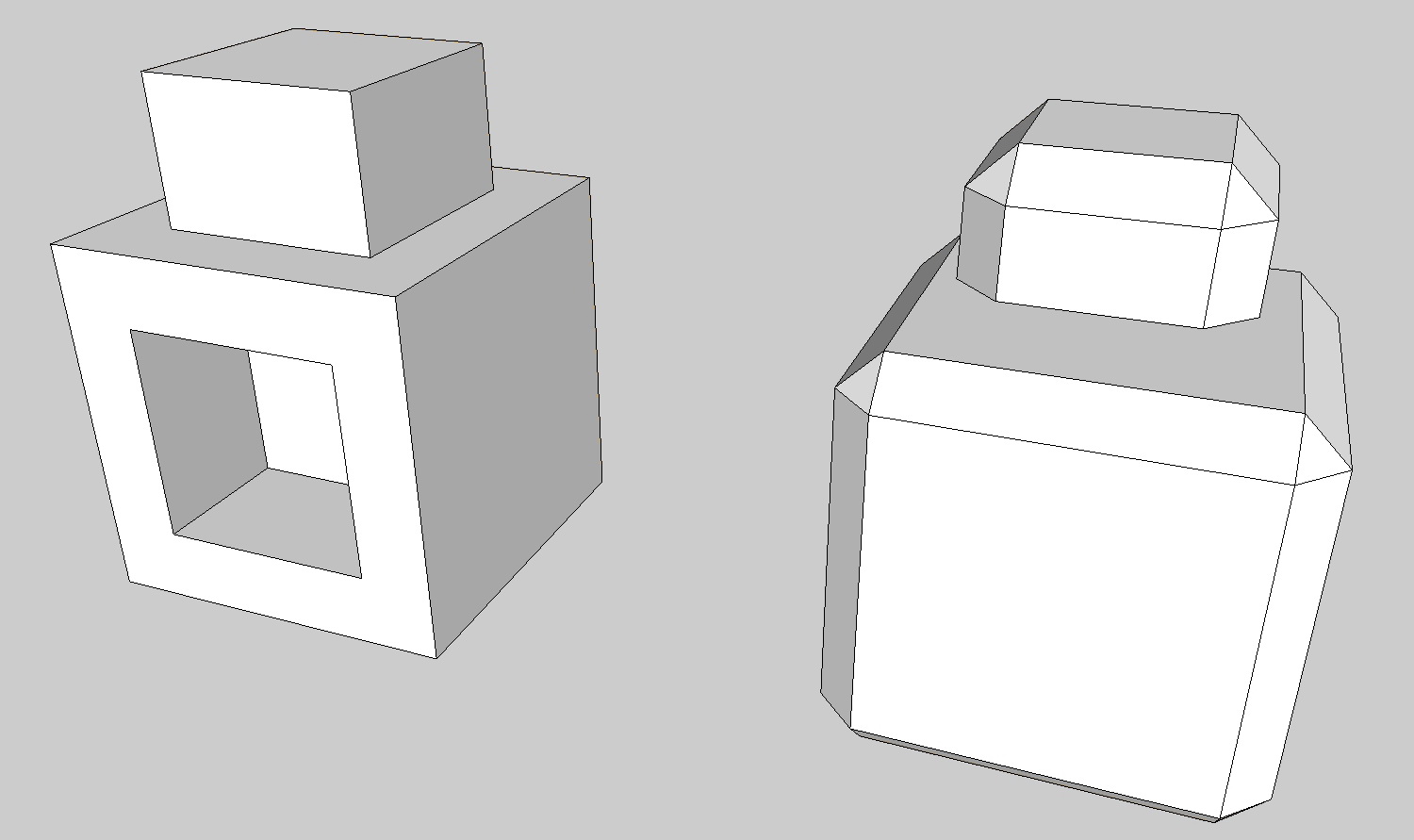
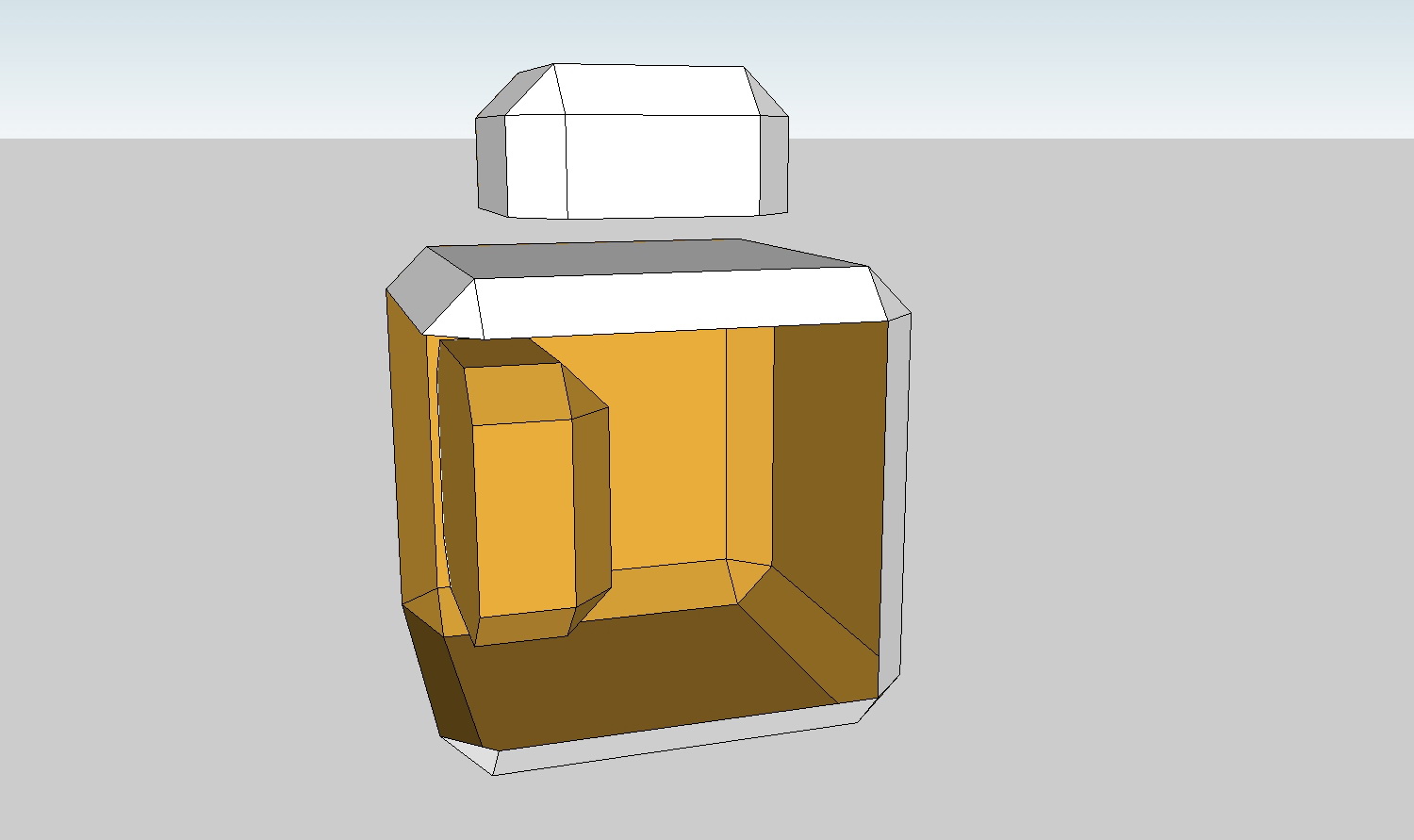
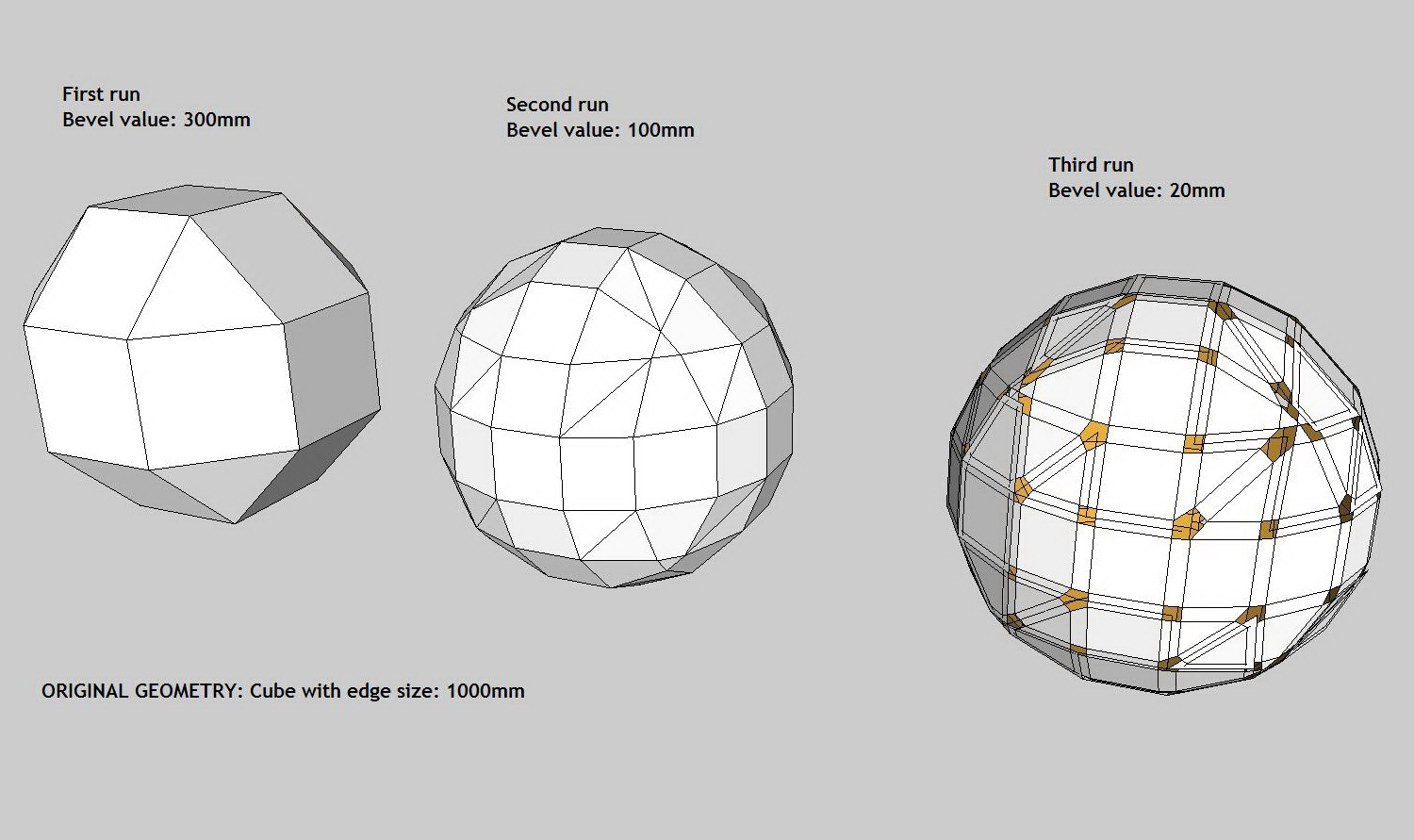
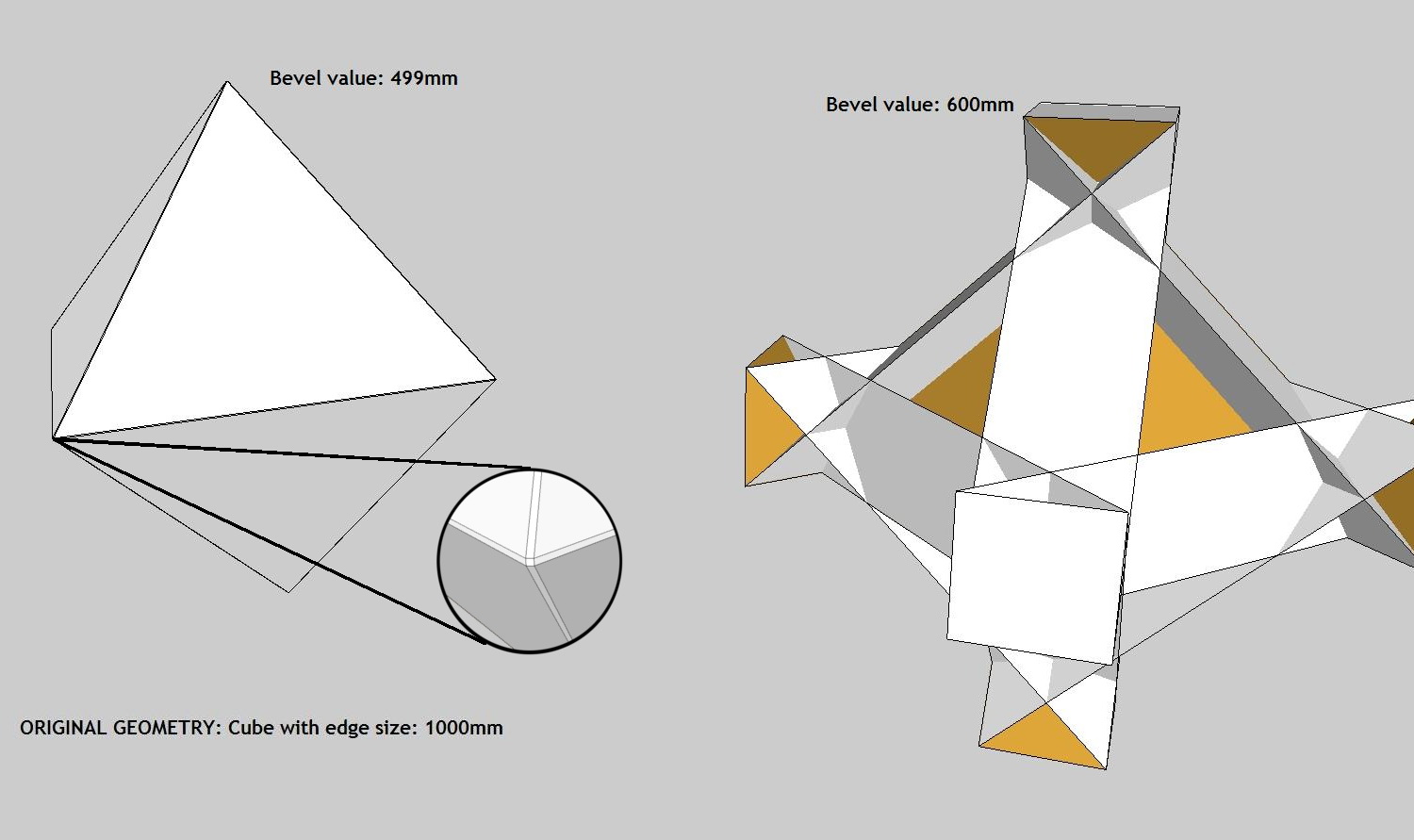
      Hy CPhillips very nice script!! Really usefull (sorry, dropped my pen)

      But in some cases I encounter some strange behaviours with this script.
      See the attached images.
      What exactly does "Cap Holes" ?
      Images 1 - 3 are self-explanatory. For img 4 i might have some simple ideas to avoid happening that: What if the script can find the smallest distance between two paralel edges from the selected geometry and don't use a greater value for bevel than is supported on that object.
      One more thing: for rounding edges the script could run twice calculating 1/3 from first bevel value, then make edges soften. I don't understand why third run gives me all the times that result with missing faces and rezidual geometry.

      I'm not criticing your work, I'm amazed and using it enthusiasticly. Just trying to help with ideeas.
      Thank again.


      1.jpg


      2.jpg


      3.jpg


      4.jpg

      posted in Plugins
      N
      NewOne
    • RE: How to snap?

      @jim said:

      Hi NewOne,

      Use an InputPoint if you need inferencing; and see the linetool.rb in the Plugins/Examples folder for an example.

      Hopefully someone who knows the tricks for using InputPoints can fill in more about using one.

      That's where I started, but everything is confusing... That example tries to explain something, but in the end i'm even more confused.
      Why are used three InputPoints when, for drawing a line two points are needed? -here is a part of code

      def activate
          @ip1 = Sketchup;;InputPoint.new
          @ip2 = Sketchup;;InputPoint.new
          @ip = Sketchup;;InputPoint.new
          @drawn = false
      
          Sketchup;;set_status_text $exStrings.GetString("Length"), SB_VCB_LABEL
          
          self.reset(nil)
      end
      

      Ok, this is not about my principal question, but one of dizzy things in that script.
      And I could not figure out where is the inferencing at point, just the constrain modifier key inference... that's why I thought the inferencing at point is an automatic behaviour and appears just when the tool makes a drawing.

      posted in Developers' Forum
      N
      NewOne
    • RE: How to snap?

      @chrisglasier said:

      @newone said:

      I want to click on screen and get the 3d coordinates of that position. I made a small script which returns me the coordinates ...

      Would you be kind enough to share the script? It would be really useful to help make my namesets bilateral.

      Thanks

      Chris

      It's no big thing yet. I've just used InputPoint on click.
      Something like this:

      
      def onLButtonDown(flags, x, y, view)
              @ip.pick view, x, y
              if( @ip.valid? )
      		position = @ip.position
              end
      end
      
      
      posted in Developers' Forum
      N
      NewOne
    • How to snap?

      Hy!

      When working in SketchUP,drawing a line or something, the cursor snaps on edges, faces or axes origin and there appears a coloured dot. Is this an automatic behaviour of drawing action or is something what can be controlled?
      I want to click on screen and get the 3d coordinates of that position. I made a small script which returns me the coordinates, but I can't be sure if I'm on a face, or edge... I'd like to force the cursor to snap on near objects and see that coloured dot.
      Thank you.

      posted in Developers' Forum
      N
      NewOne
    • RE: SketchUp RUBY API Wishlist [way of coding wishes, please]

      Sorry if off-topic.
      But... did you guys heard something about Sketchup 7 ruby documentation? What's really new here? Will it appear? When?

      Thank you. πŸ˜„

      posted in Developers' Forum
      N
      NewOne
    • Make group from component?

      Hy!
      before trying to code some plugin, I have decided to ask if is already any for my purpose.
      What I want is to convert some components into groups. Similar to context menu -> Make Component, but to convert all selected components in individual groups.
      If anyone did this before, please let me know. Thanks.

      posted in Developers' Forum
      N
      NewOne
    • RE: Bird?

      Oh this is amazing! Would you put a short tutorial about how did you modeled that bird? It might be usefull for all of us.
      Thanks.

      posted in SketchUp Components
      N
      NewOne
    • A candle

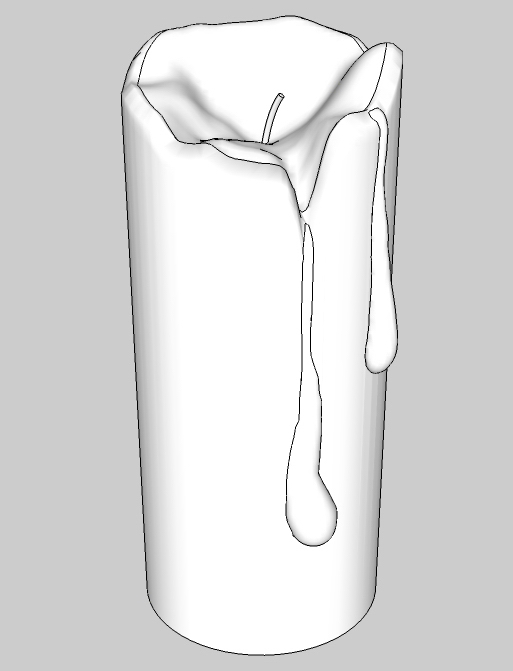
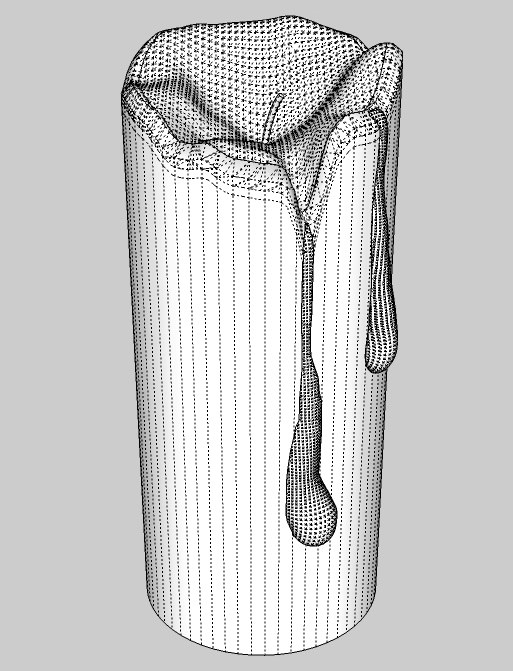
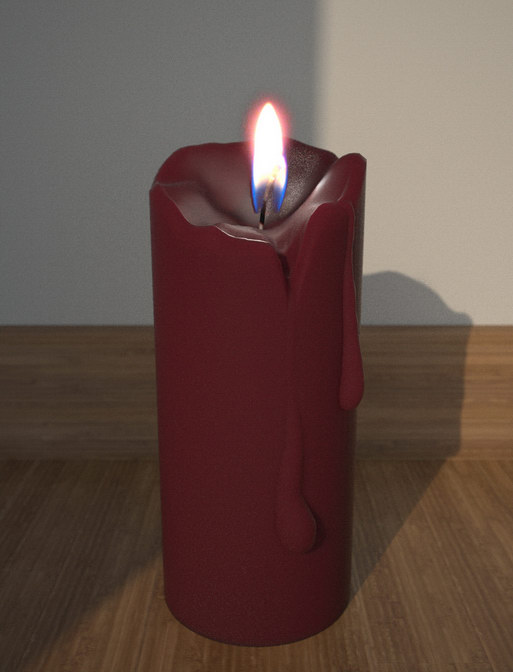
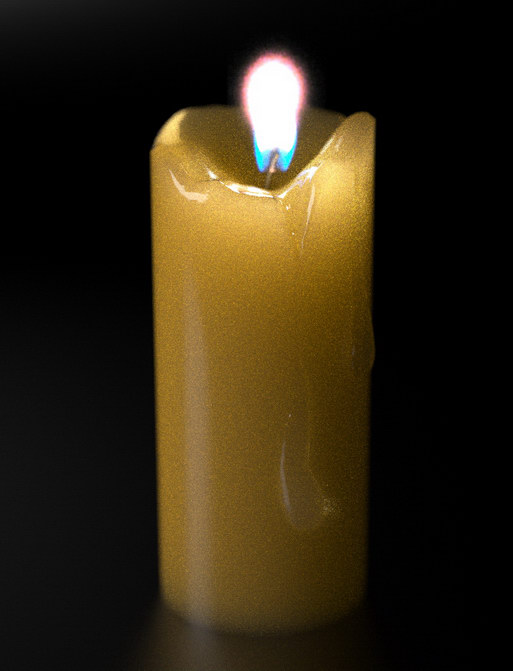
      Hello, as I learn how to squeeze Sketchup to get the best from it I've decided to try something different than regulated shapes. So I modeled a candle.
      There is a long way for me until I will be able to make cartoon characters like the specialists around here... but i dare to post my work for your judgment.
      Some critics, advices, opinions will be welcomed as well as suggestions about what should I try next to improve myself.
      As sketchup is not designed to ease the organic shapes modeling is often required to find the appropriate way/trick for best results. But that's why it challenges me.
      Rendered with maxwellrender.


      candle_model1.jpg


      candle_model2.jpg


      candle1.jpg


      candle2.jpg

      posted in Gallery
      N
      NewOne
    • RE: How to make low-poly model in sketchup?

      @daniel s said:

      Polyreducer πŸ˜‰

      Daniel S

      Thanks Daniel! This is what I was asking for

      posted in SketchUp Discussions
      N
      NewOne
    • RE: How to make low-poly model in sketchup?

      @thomthom said:

      I think the render application would have to support proxy objects for it to work.
      Doesn't maxwell support proxies? ...or maybe that was Fry render...

      Yes, maxwell supports _proxy , but the proxy is a high-poly model, placed in a specific folder. When exporting from SU to MXS (maxwell scene), if there are corresponding proxy files, will be replaced. For this, i need the low-poly object which is in sketchup scene and the high-poly object which will be used in rendering.
      Now, the only option I have is to model twice the same object. My question was if is (or can be made) a script to reduce the amount of polygons (by reducing vertexes, i think), so the user can "save as" a low-poly version of the same model.

      posted in SketchUp Discussions
      N
      NewOne
    • How to make low-poly model in sketchup?

      Happy new Year to everybody!
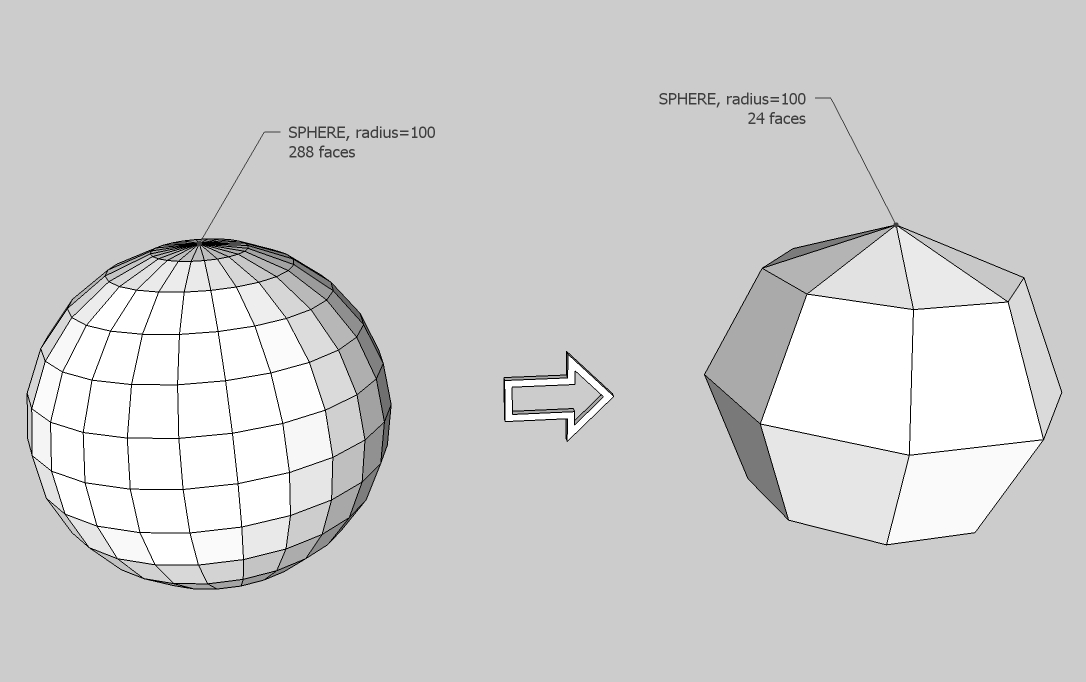
      I'm wondering... if I have a hihg-poly model in Sketchup, is there a way to make it low-poly, but not remodel the object? I want this to can have low-poly representations for my models, to not overload the scene. And the high-poly ones to be used as _proxy objects for rendering (with maxwellrender).
      Below is an example with a sphere.
      Thank you!high_to_low.jpg

      posted in SketchUp Discussions sketchup
      N
      NewOne
    • RE: [Plugin] Boolean--OSCoolean (Dec 2013) for SU 8 up free ver

      Hy! I get an error when trying to load the script. Is possible because of a vista-like patch that I have installed and changed some fonts.

      Error; #<SyntaxError; C;\Program Files\Google\Google SketchUp 6\Plugins\OSCoolean.rbs;1; no .<digit> floating literal anymore; put 0 before dot
      RBS1.0
           ^
      C;\Program Files\Google\Google SketchUp 6\Plugins\OSCoolean.rbs;1; syntax error
      RBS1.0
            ^
      

      Maybe is something that can be done to make the script working in this conditions?I don't know what is the last symbol in the error message.
      Below is what I see in npp.
      Thanks.


      this is what I see in notepad++

      posted in Plugins
      N
      NewOne
    • 1
    • 2
    • 12
    • 13
    • 14
    • 15
    • 16
    • 15 / 16