sketchucation logo sketchucation
    • Login
    1. Home
    2. mpowell1234567890
    3. Posts
    Oops, your profile's looking a bit empty! To help us tailor your experience, please fill in key details like your SketchUp version, skill level, operating system, and more. Update and save your info on your profile page today!
    πŸ”Œ Smart Spline | Fluid way to handle splines for furniture design and complex structures. Download
    M
    Offline
    • Profile
    • Following 0
    • Followers 0
    • Topics 7
    • Posts 108
    • Groups 1

    Posts

    Recent Best Controversial
    • RE: Search Results in 3D Warhouse limited to 2500?

      Yes, after that. I added 1 more modle to the keyword 3D "Making it 2501", but only 2500 shows when I cycle through the results to the end.

      @aerilius said:

      Have you ever browsed through 2500 results?

      It could have technical reasons. A google search with reasonable criteria can also give some statistics.

      posted in SketchUp Discussions
      M
      mpowell1234567890
    • Search Results in 3D Warhouse limited to 2500?

      When I search for models, I get lot's of results,"Searching for 3D for example".. but - the Search results is limited to 2500 in the 3d warehouse when there is more then 2500 result? Is there a way to fix it?

      posted in SketchUp Discussions sketchup
      M
      mpowell1234567890
    • RE: SU 9 Wishlist

      I have a few wishes for Sketchup 9 "free":

      1. The follow-me tool that can go over crossed lines.
      2. Push-pull on curved objects.
        πŸ˜„
      posted in SketchUp Feature Requests
      M
      mpowell1234567890
    • RE: Distace from Camera to object in drawing.

      Cool, thanks. Love it when I can know how far away something is in a model. πŸ˜„

      @al hart said:

      I took the utilitiestools.rb script in SketchUp, which displays an X,Y location as you move the mouse and changed it to display the distance from the camera instead.

      [attachment=1:2q0r3qa8]<!-- ia1 -->get_focal_length.jpg<!-- ia1 -->[/attachment:2q0r3qa8]

      The heart of the change is this routine to display the camera distance:

      
      > 	# get camera distance from the eye to a point at (x,y,0)
      > 	def get_distance(target)
      > 		model = Sketchup.active_model
      > 		eye = model.active_view.camera.eye
      > 		distance = eye.distance(target)
      > 		# display in drawing units and inches
      > 		slength = Sketchup.format_length(distance) + sprintf(" (%g\")", distance)
      > 		return slength
      > 	end#def
      > 
      

      Try the attached script: get_camera_distance.rb

      [Edit: I uploaded a new version of get_camera_distance.rb]

      posted in Developers' Forum
      M
      mpowell1234567890
    • RE: [Plugin] !AdditionalPluginFolders - v5.4a - 27 Sep 20

      I keep trying to download it but when I try to click on the download link, it logs me out . I get the following error "You are not authorised to download this attachment". It even happens when I'm already logged in. Is there a way to fix it?

      @unknownuser said:

      http://forums.sketchucation.com/download/file.php?id=49290

      000RedirectPlugins is a small standalone script providing the capability to define an additional user-defined directory to load plugins in Sketchup.

      This can be useful in some situations, such as:

      1. Restricted access to System folder (C:\program files...) without administrator rights
      1. Sharing plugins across different versions of Sketchup
      2. Sharing plugins amongst users on a network
        The plugin adds a menu in Sketchup Windows > Plugin Additional Directory. This command pops up a dialog box where you can enter the path of an additional directory where Sketchup should load the plugin from, in addition to the default directories used by Sketchup.

      [attachment=1:c9l41n07]<!-- ia1 -->000RedirectPlugins - Dialog.jpg<!-- ia1 -->[/attachment:c9l41n07]
      The additional directory is stored across SU Sessions. So you will do it once for all

      **IMPORTANT:

      1. Plugins will be loaded first from the additional directory and then from the SU standard plugin folders(/Plugins and /Tools). So you don’t need that all plugins reside in the additional directory.

      2. Some plugins do NOT work when loaded from a directory which is not the standard SU plugins directory. However, most new plugins should normally be OK. You can leave these plugins in the Sketchup…/Plugins folder, and they will be loaded.

      3. 000RedirectPlugins.rb is totally independent from LibFredo6. You don’t need to have LibFredo6 installed and it applies to any plugin.

      4. 000Redirect.rb does not make any particular assumption on the plugins structure or installation. Just make sure that you have the same footprint in the additional directory as you would have in the standard SU plugins folder.

      5. 000RedirectPlugins.rb allows defining several additional directories (paths must be separated by a semicolumn) but you should try to limit this number for performance reasons.

      6. It is indeed advised that plugins resides in either the additional directory or in the standard Plugins folder of Sketchup, but not in both.**

      http://forums.sketchucation.com/download/file.php?id=49286

      No user manual (see section Quick Startbelow)

      • Language: English and French
      • Menus: by default, it is installed in Windows > Plugins Additional Directory
      • Icon toolbar: No icon provided
      • The plugin is free, for private and commercial usage.

      http://forums.sketchucation.com/download/file.php?id=49287

      Download and drop the attached 000RedirectPlugins.rb file into the SU Plugins directory (it MUST be in the SU Plugins directory)

      On Mac the SU plugin directory should be:
      Macintosh HD/Library/Application Support/Google SketchUp 7/SketchUp/plugins

      http://forums.sketchucation.com/download/file.php?id=49285

      000RedirectPlugins.rb – 30 Jul 11 - 08:45 CET
      [attachment=0:c9l41n07]<!-- ia0 -->000_RedirectPlugins.rb<!-- ia0 -->[/attachment:c9l41n07]
      IMPORTANT: this plugin does NOT require to install LibFredo6.

      http://forums.sketchucation.com/download/file.php?id=49284

      No video

      http://forums.sketchucation.com/download/file.php?id=49288

      To Set or Unset an Additional Directory

      1. Select menu Windows > Plugin Additional Directory
      1. A dialog box appear
        [attachment=1:c9l41n07]<!-- ia1 -->000RedirectPlugins - Dialog.jpg<!-- ia1 -->[/attachment:c9l41n07]
      2. Type the full path of the directory. Both / and \ are accepted, on Windows or Mac
      3. To remove additional directories, just make the field empty
      4. You will need to close and start Sketchup again to use the additional directory
        Notes:
      • You can enter several directories by typing their path separated by a semi-colon (;)
      • The validity and the existence of the directory are checked when you enter the path in the dialog box. You will get a message in case of problem.
      • The existence of the directory is also checked when starting Sketchup

      http://forums.sketchucation.com/download/file.php?id=49289

      000RedirectPlugins.rb 1.1a - 30 Jul 11: Initial public release

      posted in Plugins
      M
      mpowell1234567890
    • RE: Show Me Your SketchUp

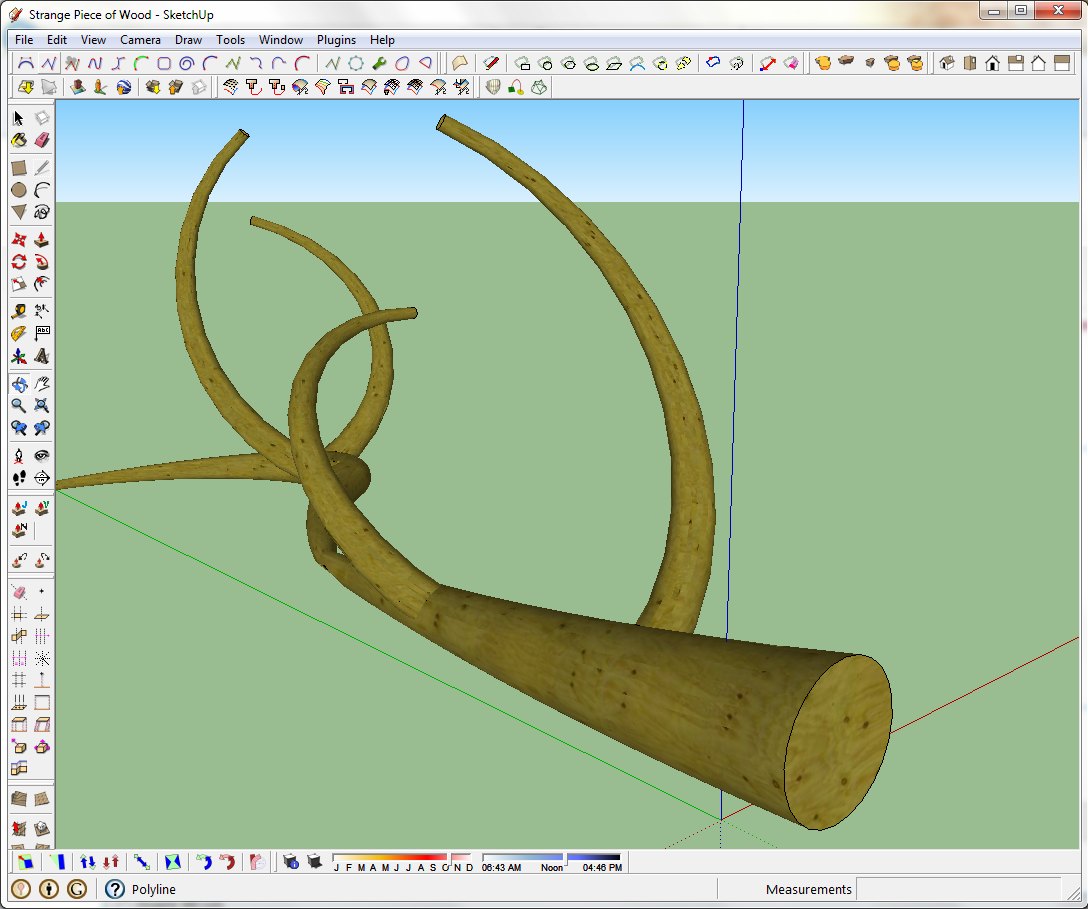
      Cool, Here's mine. Been having fun with it. β˜€


      I created the woodpiece using the curviloft tool.

      posted in SketchUp Discussions
      M
      mpowell1234567890
    • RE: [Plugin] [CityGen] - Core [WIP] (0.1.3a) β€” 19 September 2009

      Hi, I tried installing this plugin like what the instruction said in the readme file

      Plugins\city_gen.rb <- Core CityGen file
      Plugins\Gity_Gen\street_gen.rb <- Core Street Generator module file - loaded by city_gen.rb
      Plugins\City_Gen\Street_Gen\ <- Street Generator's support folder

      But, I still get the File cannot load error "Even the file is in the correct folder".. Is there a way to fix it?

      @thomthom said:

      This plugin is a work in progress. It's made public because it is a collaboration project.
      This is in it's very early beginning, so lots of things will change, and lots of bugs are to be expected. Feel free to share your ideas or join in on this project. See this thread for the discussion of the overall project. This thread is an overview of the related modules and the development thread for the core files.

      CityGen - Core
      Core and Installation Check
      This is the main file that centralise information and load the other modules.
      Modules are located in Plugins\CityGen\modules\.

      Please remove any old CityGen installations prior to installing.

      Menu entry is located under the Tools menu. Should this be under Plugins you think?

      Modules

      • Street Generator

      For Module Developers
      Core and Installation Check
      You can add this code to your module to check if the core is installed and that the module is installed in the correct location.

      
      > ### CORE & INSTALLATION CHECK ### ------------------------------------------------------------------
      > # Core check
      > if not file_loaded?('city_gen.rb')
      > 	if Sketchup.find_support_file('city_gen.rb', 'Plugins') == nil
      > 		UI.messagebox('The CityGen\'s core files is missing. Install the required core files.')
      > 	else
      > 		UI.messagebox('The CityGen\'s core files is not loaded. Ensure you installed this plugin correctly.')
      > 	end
      > 	raise 'CityGen Core error.'
      > end 
      > # Correct installation check
      > if Sketchup.find_support_file('City_Gen/' + File.basename(__FILE__), 'Plugins') == nil
      > 	UI.messagebox("This module (#{File.basename(__FILE__)}) has not been installed properly. It should be installed under Plugins\\City_Gen\\")
      > 	raise 'CityGen Module path error.'
      > end
      > 
      > module City_Gen
      > 	module Some_Module
      > 		# stuff
      > 	end
      > end
      > 
      
      
      > # CHANGELOG
      > # 0.1.0a - 31.05.2009 (Thom)
      > #		 * Initial build.
      > #
      > # 0.1.1a - 31.05.2009 (Thom)
      > #		 * Change in the module error checking routine.
      > #
      > # 0.1.2a - 31.05.2009 (Thom)
      > #		 * Added version constant.
      > #
      > # 0.1.3a - 31.05.2009 (Thom)
      > #		 * Updated to the new file structure for use with Tortoise.
      > 
      
      posted in City Generator
      M
      mpowell1234567890
    • Gmax &quot;Import &amp; Export&quot;.

      Was wondering if there's a ruby script that can Import & Export .gmax "Autodesk - from Turbosquid" file formats?

      posted in Plugins
      M
      mpowell1234567890
    • RE: SU 9 Wishlist

      @tfdesign said:

      :shock:

      Coming soon I guess.. Not sure when though..

      What? Where?? v9?? 😲

      posted in SketchUp Feature Requests
      M
      mpowell1234567890
    • RE: SU 9 Wishlist

      I like the Sphere tool and other cubical shapes added to Sketchup 9 free version.

      posted in SketchUp Feature Requests
      M
      mpowell1234567890
    • RE: SU 9 Wishlist

      Adding sound effects "Sound Files" to a specific model In Sketchup 9 free version.

      posted in SketchUp Feature Requests
      M
      mpowell1234567890
    • RE: SU 9 Wishlist

      @unknownuser said:

      [attachment=0:36qy0cg2]<!-- ia0 -->screen 1.jpg<!-- ia0 -->[/attachment:36qy0cg2]
      πŸ˜’ πŸ˜†

      Cool, I like that with the free version of Sketchup.

      posted in SketchUp Feature Requests
      M
      mpowell1234567890
    • RE: SU 9 Wishlist

      Cool, Sketchup 9 is coming? I'm ready.

      My wish list:

      1. Built-in 3D Game creator "Creating 3d games with Sketchup free".
      2. More new Function "Joint Push-Pull on a curved surface ETC..".
      posted in SketchUp Feature Requests
      M
      mpowell1234567890
    • RE: SU8 - WISHLIST

      @remus said:

      If youve got shadows on it's already possible, just go to the shadows dialog->expand it->twiddle the light and dark sliders.

      Cool, thanks.

      posted in SketchUp Feature Requests
      M
      mpowell1234567890
    • RE: SU8 - WISHLIST

      For Sketchup 8 "Free", I like to have the ability to lighten or darken shading of models especially ones that have curves.

      posted in SketchUp Feature Requests
      M
      mpowell1234567890
    • RE: SU8 - WISHLIST

      The ability it import 3D Game levels for the free version of Sketchup 8.

      posted in SketchUp Feature Requests
      M
      mpowell1234567890
    • RE: SketchUp 7.1?

      @edson said:

      perhaps not all problems we face are sketchup's fault. sometimes there are other culprits for them. a general check in one's setup could be a good idea.

      i have upgraded to 7.1 and am not facing any of the problems described above.

      Cool, that means they fixed it. No matter how much geometry is in the model it will still be fast. Awesome!
      β˜€

      posted in SketchUp Discussions
      M
      mpowell1234567890
    • RE: SketchUp 7.1?

      @mike lucey said:

      Only 4,900! Damn useless application. I must write a strong letter to Google 😞

      I agree, I could of imagine 4,900 3D tree's instead of 2D. I was hoping they can increase it to 10,000,000 tree's or more.. That's how many most forest's have..

      I do believe they have an address..
      Google Inc.
      1600 Amphitheatre Parkway
      Mountain View, CA 94043
      Phone: +1 650-253-0000
      Fax: +1 650-253-0001

      I don't know their email address though..

      posted in SketchUp Discussions
      M
      mpowell1234567890
    • RE: SU8 - WISHLIST

      @remus said:

      Nope, its been as quiet as ever.

      Cool, must be a surprise awaiting to come. I like surprises.

      posted in SketchUp Feature Requests
      M
      mpowell1234567890
    • RE: SU8 - WISHLIST

      Any more news about Sketchup 8? Haven't been seeing new post's lately..

      posted in SketchUp Feature Requests
      M
      mpowell1234567890
    • 1 / 1