sketchucation logo sketchucation
    • Login
    1. Home
    2. michaliszissiou
    3. Posts
    Oops, your profile's looking a bit empty! To help us tailor your experience, please fill in key details like your SketchUp version, skill level, operating system, and more. Update and save your info on your profile page today!
    ⚠️ Important | Libfredo 15.6b introduces important bugfixes for Fredo's Extensions Update
    Offline
    • Profile
    • Following 0
    • Followers 0
    • Topics 63
    • Posts 1,323
    • Groups 1

    Posts

    Recent Best Controversial
    • RE: Subdivision Modeling Furniture

      @unknownuser said:

      the laws of physics

      There are the laws of polymeshes. The laws of topology. Of UVs.
      There aren't any laws of physics in a 3d environment.
      I had the same issues when started learning blender.
      There isn't much of a difference than working in modo.
      SUp is great, if we keep things in groups, keep normals in tact.
      I would say, build the basics in SU, export it and feel it with furniture models, textures etc in blender. Cycles is a great render engine, it's free. More optional render engines, like thea, vray, octane etc are there. Let's not forget the wonderful and very slow Luxrender. (maybe the best renderer for jewelry presentations. (caustics at their best)
      posted in Corner Bar
      michaliszissiouM
      michaliszissiou
    • RE: Subdivision Modeling Furniture

      @unknownuser said:

      Do the textures get fragmented again if you export to obj from Blender?

      What do you mean fragmented?
      I don't remember such issues, I use obj all the time, exchanging with 3dcoat, zbrush, modo and other apps.

      posted in Corner Bar
      michaliszissiouM
      michaliszissiou
    • RE: Raytrace Online kinda cool

      Cool, thanks.

      posted in Corner Bar
      michaliszissiouM
      michaliszissiou
    • RE: Subdivision Modeling Furniture

      Thanks Rich.
      I just tried the collada exporter today. (SU)
      And the new collada importers in blender.
      No triangulation, in fact even n-gons are preserved.
      Of course, I'm not sure if everyone will appreciate n-gons.

      posted in Corner Bar
      michaliszissiouM
      michaliszissiou
    • RE: Subdivision Modeling Furniture

      @unknownuser said:

      I now use Blender extensively and where i deal SU models I use the unreleased SU2Blender obj exporter that removes tris from SU mesh and delivers to blender quad only mesh.

      Some more informations Rich?

      posted in Corner Bar
      michaliszissiouM
      michaliszissiou
    • RE: Subdivision Modeling Furniture

      Thanks pilou, too kind of you. 48 pages, but I posted a synopsis in the second post of the most important tricks and post around these pages.
      @Rich, we're talking about the opposite.

      Exporting from SUp to blender or to other apps can be a PITA.
      We suggest TIG's free obj exporter, I guess so. Excellent to export a rather huge SUp scene and render in cycles.

      1. triangulation.
      2. not welded vertices. Edit mode (blender) selelct all [W] menu, delete doubles
      3. Select all, [ctrl+F] menu in blender, tris to quads, cross your fingers.
      4. UVs in SUp: Every face is a UV not connected island. -10 for SUp. LOL
        (Most SUp users fear to get involved into a decent UV editor. If they knew all about the SUp UV editor... well nevermind). UV editor ha ha. Just use blender, select [U] menu, reset/ ctrl+P to pack these separated faces on UV texture map and have something similar to the SU UV editor. Ask for follow active quad and have something much more interesting. If it is a house something walls, select cubic and have something better. Or, like me, start thinking how great is to have an advanced UV editor for free. Learn how to use it. For archi vis use, it is one of the most important tools anyway.
      posted in Corner Bar
      michaliszissiouM
      michaliszissiou
    • RE: Subdivision Modeling Furniture

      @unknownuser said:

      The hardest part in my opinion is the creases of the fabric. There are a few methods to make creases like sculpting or using displacement maps. I'm still not sure what the best method is. Still a long way to go but I hope I'm on the right track. Love some comments on the model and render.

      Your modeling is impressive.
      Fabric creases isn't that hard. Your best option is the excellent sculpt mode (multiresolution modifier) of blender.
      Then you can have UVs (blender is one of the most advanced on this matter) and bake displacements or bumps or normal maps (from multires). This is important for exporting these models as low poly base with displ or bumps.
      Staying in blender/cycles render, you don't need it. Because you can have the low poly in preview scene, sending the hi subd data to the render engine.
      The hardest part, IMO, is the UV mapping. Especially on geometrical patterns like fabrics tartans etc. You may need to have the unwrapped faces (in UV editor) aligned to these patterns. Manually this is quite a PITA.
      In blender there's a wonderful method of unwrapping. "Follow active quad". Not the right place to explain it further but you may visit my small tutorial on such methods http://blenderartists.org/forum/showthread.php?273033-Sculpting-with-UVs-and-displacements&p=2245866&viewfull=1#post2245866
      Though this method deals with something different, the way I use the UV editor may interests you.

      You mentioned the term "crease". But it was about sculpting.
      However, in subdivision modeling there is an important hidden trick.
      You can select loops, edges, and apply a crease value. When subd (catmul clark smoothing) takes place, these edges will remain sharp-er according to the value of crease.
      Great !! But, exporting as obj there may be an issue. Will crease data will exported as well? Obj supports it. Blender? You have to try the most recent betas from official http://builder.blender.org/download/
      I'm sure, C4D already supports it.
      If you export low poly assets + displ maps in SUp, you just apply the subsurf modifiers, so, no issues on this.
      In recent blender builds, collada works just fine. This is how you export in SUp.

      posted in Corner Bar
      michaliszissiouM
      michaliszissiou
    • RE: Subdivision Modeling Furniture

      thanks Twan
      Though real displacements can be activated, what you see in render is only a new bumps algorithm of cycles.Plus the use of a pre baked AO map.
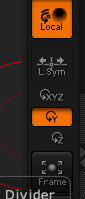
      Problems with the zbrush navigation? There's a whole documentation located in zb folder.
      However, because you obviously prefer the SUp style, instead of the default xyz, select the y. (the buttons column on the right)


      Screen Shot 2013-07-03 at 3.28.52 PM.png

      posted in Corner Bar
      michaliszissiouM
      michaliszissiou
    • RE: Ancient Greek Geometry

      Thank you for the link.
      I was always good on this.
      BTW, extremely boring.
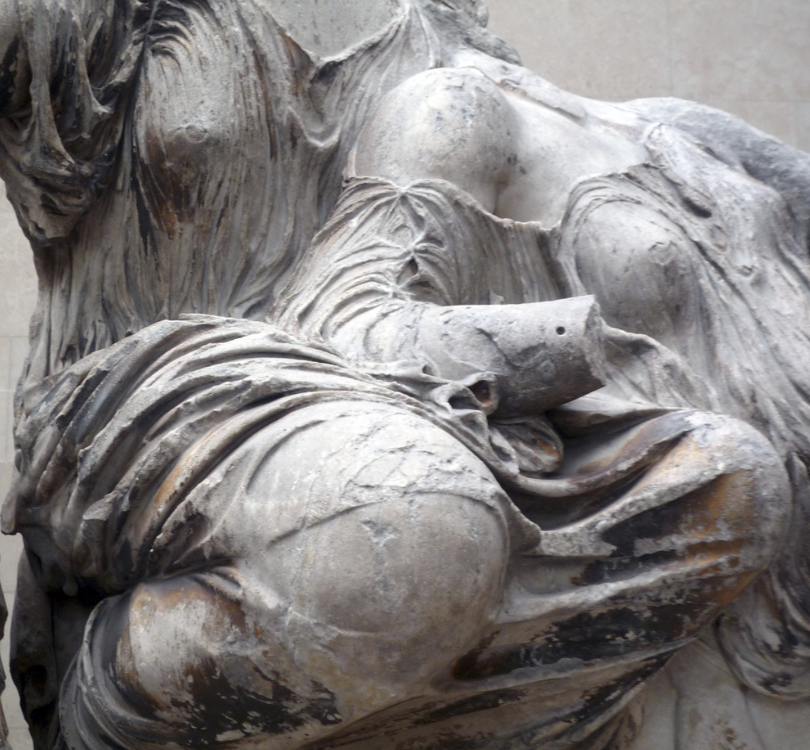
      Ancient greek geometry is here, have a look, but what kind of geometry? One that follows the marble? A fractal geometry then?
      If you measure parthenon you'll find lot of holder section there. OK, lot have been published. But you'll also find another section, a god knows where did it came from (again, lot of literature here)
      You may find some more, and more.
      In the end you may think that these all are simply nonsenses.
      An artist always search for a way to measure his thoughts, his feels, his ideas, his senses...
      This is all about art.


      Screen Shot 2013-07-02 at 10.14.35 PM.png

      posted in Corner Bar
      michaliszissiouM
      michaliszissiou
    • RE: Subdivision Modeling Furniture

      Should I add this? Here?
      Recently, zbrush 4 r6 is out. What's new?
      A great new z remesher, meaning a new auto retopology tool. Amazing, after my first tests.
      Just sculpt the basics, under dynamesh mode, ask for retopology then.
      Here an example.

      After auto retopology (ZBrush imported to blender)
      Screen Shot 2013-06-30 at 2.48.03 AM.jpg

      After UV ing (blender is one of the best UV editors around) applying displacements (bumps) and AO maps.
      A ~24 k faces model.
      LahSpZBtopo700.jpg

      posted in Corner Bar
      michaliszissiouM
      michaliszissiou
    • RE: Re: Some Funny Pics.

      @unknownuser said:

      Jus' sayin'.

      Indeed so.
      I was always expecting to see it. About time. 😆

      posted in Corner Bar
      michaliszissiouM
      michaliszissiou
    • RE: Re: Some Funny Pics.

      @ely862me said:

      @gaieus said:

      http://fbcdn-sphotos-h-a.akamaihd.net/hphotos-ak-prn1/935239_456961461002766_612997633_n.jpg

      8 pack ABS 😆

      I'll repost it to all 3d sculptors who believe that the secret of success is anatomy.
      Oh yeah.
      😆

      posted in Corner Bar
      michaliszissiouM
      michaliszissiou
    • RE: Re: Some Funny Pics.

      he he

      posted in Corner Bar
      michaliszissiouM
      michaliszissiou
    • RE: PRISM?

      @notareal
      do you call it "forward"?

      posted in Corner Bar
      michaliszissiouM
      michaliszissiou
    • RE: Sculpt using UVs and displacement maps

      I couldn't resist
      Same technique,
      this time the new NPR Toon shader by cycles.


      prodeOutLine2LL.jpg

      posted in Corner Bar
      michaliszissiouM
      michaliszissiou
    • RE: How many forum members does it take to change a light bulb?

      @box
      What you posted insults me. It's against my believes, my religion.
      It also violates the rules of this forum, or any other forum.
      I'll report it to moderators. Right now.

      posted in Corner Bar
      michaliszissiouM
      michaliszissiou
    • RE: Big dive!

      Amazing. I love it. Thank you Pilou, always excellent posts!
      Under "Le fantôme de la liberté" (Bunuel's 1974 film) everything is possible.

      posted in Corner Bar
      michaliszissiouM
      michaliszissiou
    • RE: Beautiful places

      Thank you Pete for pointing my beautiful country.
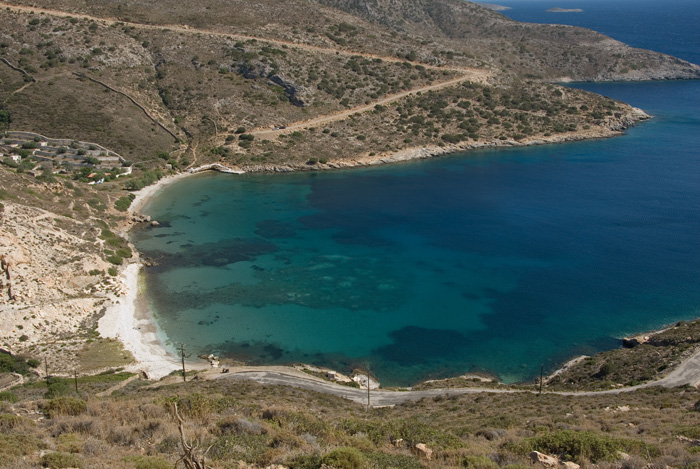
      Unfortunately, photos sometimes lie. I mean, the waters there aren't as you may think.
      Clarity, visibility. OK good enough as you can expect in mediterranean sea.
      Not like this one. This is the winner IMO.
      Fournoi island
      All these bays... all these are wonderful beaches. Can't count them.

      http://farm2.staticflickr.com/1272/857602005_d6a79de5aa.jpg

      Here... my favorite.


      _DSC0897.jpg

      posted in Corner Bar
      michaliszissiouM
      michaliszissiou
    • RE: Adobe ditches Creative Suite

      PhotoLine is a fine application.
      BTW.
      It supports 32bit exrs and CMYK conversions based on ICC profiles as well.
      Most importantly it has a nice UI (close enough to Ps) and a good tutorial.
      I hope we'll see more apps like this, it's about time.

      posted in Corner Bar
      michaliszissiouM
      michaliszissiou
    • RE: How much SU costs?

      TIGs OBJ exporter works perfectly, checked and re checked.
      I can export complicated scenes into blender/cycles for rendering.
      Blender now supports collada (the new fixed version I mean). So, I can import export in SU without issues.
      3ds importer is also workable though the limitations (64k faces for single mesh, 8digit names for textures)
      This last is broken on all OSX free SU 8, works well in SU7 free.

      But, as long SU keeps exporting ridiculous geometry, giving no control to the user on this matter, who really cares?
      I started using blender as an assist app to SU. UV editor, organic modeling.
      Then, after cycles render engine implementation and the new blender UI, I started using SU as an assist to blender, importing there.
      Meanwhile, I learned blender, new great tools similar to SU and much more advanced came. So, you see my point 😆

      posted in Corner Bar
      michaliszissiouM
      michaliszissiou
    • 1 / 1