sketchucation logo sketchucation
    • Login
    1. Home
    2. medeek
    3. Posts
    Oops, your profile's looking a bit empty! To help us tailor your experience, please fill in key details like your SketchUp version, skill level, operating system, and more. Update and save your info on your profile page today!
    โš ๏ธ Important | Libfredo 15.6b introduces important bugfixes for Fredo's Extensions Update
    Offline
    • Profile
    • Following 0
    • Followers 3
    • Topics 63
    • Posts 3,308
    • Groups 2

    Posts

    Recent Best Controversial
    • RE: 3D Truss Models

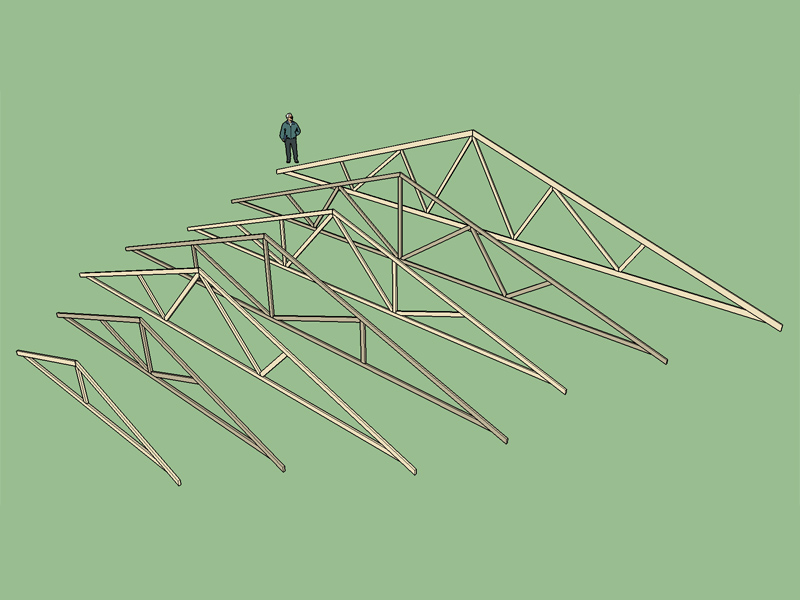
      Version 1.1.8 - 12.07.2015

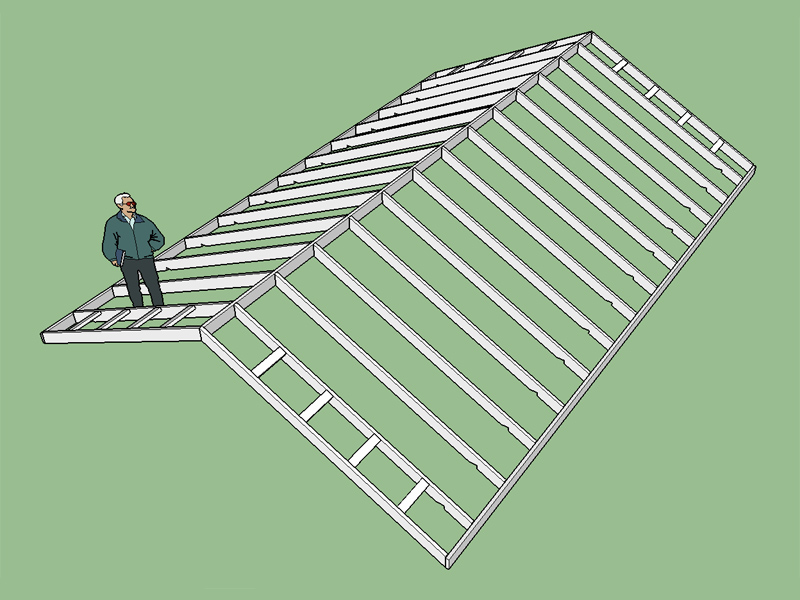
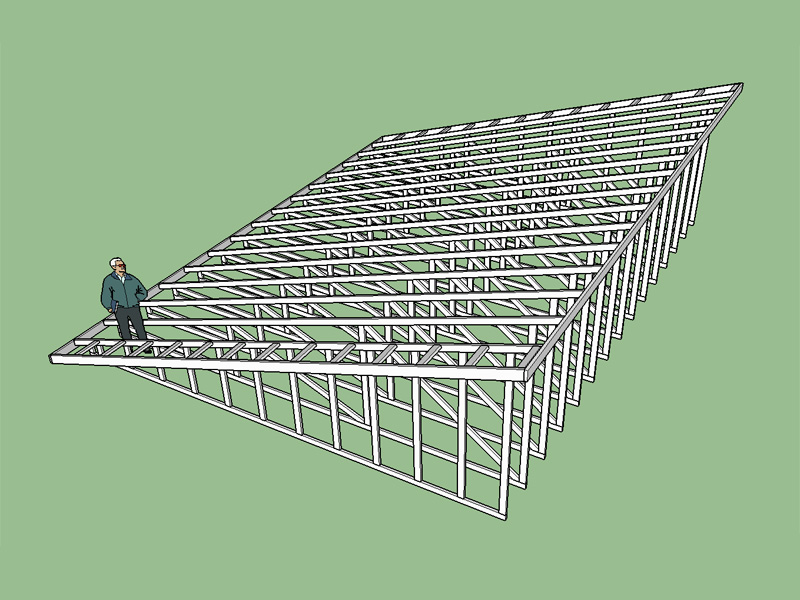
      • Added Gable Rafter Roof.
      • Advanced options enabled for gable rafter roofs (sub-fascia, outlookers, sheathing, and rakeboards).
      • New submenu item and toolbar icon added for rafter roof type.
      • Plugin divided into multiple files for ease of management.

      http://design.medeek.com/resources/images/truss_su29_800.jpg

      Structural outlookers for this type of a roof are still somewhat of a question. If they are horizontal it makes sense to notch the gable rafter but what if they are vertical?

      posted in Plugins
      medeekM
      medeek
    • RE: 3D Truss Models

      Up until now I have maintained all of the code in one large file. However I keep adding more features so I need to split it out into multiple files to keep things manageable. My new load .rb file is attempting to use a method I found on another board but I'm getting a situation where the first click on the icon loads the plugin as it should however subsequent clicks on the menu or icon do nothing.

      The problem is that after the menu item runs once it will not fire again.
      Here is a snippet of the Medeek_Load.rb file :

      module Medeek_Engineering_Inc_Extensions
      
      	module MedeekTrussPluginModuleLoader
      
      	# Show the Ruby Console at startup so we can
      	# see any programming errors we may make.
      	# SKETCHUP_CONSOLE.show
      
      
      	this_dir=File.dirname(__FILE__)
      	# Fix for ruby 2.0
      	if this_dir.respond_to?(:force_encoding)
      		this_dir=this_dir.dup.force_encoding("UTF-8")
      	end
      	PATH=this_dir
      	entries=Dir.entries(this_dir)
      	ext=".rbs"
      
      
      	# Add a toolbar item to launch our plugin.
      
      	toolbar = UI::Toolbar.new "Medeek Truss"
      
      cmd = UI::Command.new("Draw Roof Truss") {
      
      		Sketchup.load(File.join(this_dir,"MEDEEK_ROOF_TRUSS.rbs"))
      }
      	cmd.small_icon = "images/mdkplg_tool_icon16_2.png"
      	cmd.large_icon = "images/mdkplg_tool_icon24_2.png"
      	cmd.tooltip = "Medeek Truss"
      	cmd.status_bar_text = "Draw Roof Truss"
      	cmd.menu_text = "Roof Truss"
      	toolbar = toolbar.add_item cmd
      	# toolbar.show
      
      	cmd2 = UI::Command.new("Draw Floor Truss") {
      
      	Sketchup.load(File.join(this_dir,"MEDEEK_FLOOR_TRUSS.rbs"))
      }
      	cmd2.small_icon = "images/mdkplg_tool_icon16_3.png"
      	cmd2.large_icon = "images/mdkplg_tool_icon24_3.png"
      	cmd2.tooltip = "Medeek Truss"
      	cmd2.status_bar_text = "Draw Floor Truss"
      	cmd2.menu_text = "Floor Truss"
      	toolbar = toolbar.add_item cmd2
      	# toolbar.show
      
      	cmd3 = UI::Command.new("Draw Truss Set") {
      
      	Sketchup.load(File.join(this_dir,"MEDEEK_TRUSS_SET.rbs"))
      }
      	cmd3.small_icon = "images/mdkplg_tool_icon16_4.png"
      	cmd3.large_icon = "images/mdkplg_tool_icon24_4.png"
      	cmd3.tooltip = "Medeek Truss"
      	cmd3.status_bar_text = "Draw Truss Set"
      	cmd3.menu_text = "Truss Set"
      	toolbar = toolbar.add_item cmd3
      	toolbar.show
      
      	cmd4 = UI::Command.new("Draw Roof Rafters") {
      
      	Sketchup.load(File.join(this_dir,"MEDEEK_ROOF_RAFTERS.rbs"))
      }
      	cmd4.small_icon = "images/mdkplg_tool_icon16_5.png"
      	cmd4.large_icon = "images/mdkplg_tool_icon24_5.png"
      	cmd4.tooltip = "Medeek Truss"
      	cmd4.status_bar_text = "Draw Roof Rafters"
      	cmd4.menu_text = "Roof Rafters"
      	toolbar = toolbar.add_item cmd4
      	toolbar.show
      
      
      	# Add a menu item to launch our plugin.
      
      	submenu = UI.menu("Plugins").add_submenu("Medeek Truss")
      	submenu.add_item("Roof Truss") { Sketchup.load(File.join(this_dir,"MEDEEK_ROOF_TRUSS.rbs")) }
      	submenu.add_item("Floor Truss") { Sketchup.load(File.join(this_dir,"MEDEEK_FLOOR_TRUSS.rbs")) }
      	submenu.add_item("Truss Set") { Sketchup.load(File.join(this_dir,"MEDEEK_TRUSS_SET.rbs")) }
      	submenu.add_item("Roof Rafters") { Sketchup.load(File.join(this_dir,"MEDEEK_ROOF_RAFTERS.rbs")) }


      	end
      end
      
      posted in Plugins
      medeekM
      medeek
    • RE: 3D Truss Models

      Now the largest file is only about 12,000 lines, a bit more manageable. If I spend some time cleaning it up and compressing redundant sections I can probably get it to half that amount.

      posted in Plugins
      medeekM
      medeek
    • RE: 3D Truss Models

      This revised code seems to work:

      
      module Medeek_Engineering_Inc_Extensions
      
      	module MedeekTrussPluginModuleLoader
      
      
      	require 'sketchup.rb'
      	require 'extensions.rb'
      	require 'langhandler.rb'
      
      	# Show the Ruby Console at startup so we can
      	# see any programming errors we may make.
      	# SKETCHUP_CONSOLE.show


      	this_dir=File.dirname(__FILE__)
      	# Fix for ruby 2.0
      	if this_dir.respond_to?(;force_encoding)
      		this_dir=this_dir.dup.force_encoding("UTF-8")
      	end
      	PATH=this_dir
      	entries=Dir.entries(this_dir)
      	ext=".rbs"
      
      
      	# Add a toolbar item to launch our plugin.
      
      	toolbar = UI;;Toolbar.new "Medeek Truss"
           	
           	cmd = UI;;Command.new("Draw Roof Truss") {
      
      		Sketchup.load(File.join(this_dir,"MEDEEK_ROOF_TRUSS.rbs"))
      		Medeek_Engineering_Inc_Extensions;;MedeekTrussPlugin;;MedeekMethods.roof_truss_family_menu
           	}
          		cmd.small_icon = "images/mdkplg_tool_icon16_2.png"
           		cmd.large_icon = "images/mdkplg_tool_icon24_2.png"
           		cmd.tooltip = "Medeek Truss"
          		cmd.status_bar_text = "Draw Roof Truss"
          		cmd.menu_text = "Roof Truss"
           		toolbar = toolbar.add_item cmd
           		# toolbar.show
      
      	cmd2 = UI;;Command.new("Draw Floor Truss") {
      
             		Sketchup.load(File.join(this_dir,"MEDEEK_FLOOR_TRUSS.rbs"))
      		Medeek_Engineering_Inc_Extensions;;MedeekTrussPlugin;;FloorTruss;;MedeekMethods.floor_truss_family_menu
           	}
          		cmd2.small_icon = "images/mdkplg_tool_icon16_3.png"
           		cmd2.large_icon = "images/mdkplg_tool_icon24_3.png"
           		cmd2.tooltip = "Medeek Truss"
          		cmd2.status_bar_text = "Draw Floor Truss"
          		cmd2.menu_text = "Floor Truss"
           		toolbar = toolbar.add_item cmd2
           		# toolbar.show
      
      	cmd3 = UI;;Command.new("Draw Truss Set") {
      
             		Sketchup.load(File.join(this_dir,"MEDEEK_TRUSS_SET.rbs"))
      		Medeek_Engineering_Inc_Extensions;;MedeekTrussPlugin;;TrussSet;;MedeekMethods.truss_set_family_menu
           	}
          		cmd3.small_icon = "images/mdkplg_tool_icon16_4.png"
           		cmd3.large_icon = "images/mdkplg_tool_icon24_4.png"
           		cmd3.tooltip = "Medeek Truss"
          		cmd3.status_bar_text = "Draw Truss Set"
          		cmd3.menu_text = "Truss Set"
           		toolbar = toolbar.add_item cmd3
           		# toolbar.show
      
      	cmd4 = UI;;Command.new("Draw Roof Rafters") {
      
             		Sketchup.load(File.join(this_dir,"MEDEEK_ROOF_RAFTERS.rbs"))
      		Medeek_Engineering_Inc_Extensions;;MedeekTrussPlugin;;RoofRafters;;MedeekMethods.roof_rafters_family_menu
           	}
          		cmd4.small_icon = "images/mdkplg_tool_icon16_5.png"
           		cmd4.large_icon = "images/mdkplg_tool_icon24_5.png"
           		cmd4.tooltip = "Medeek Truss"
          		cmd4.status_bar_text = "Draw Roof Rafters"
          		cmd4.menu_text = "Roof Rafters"
           		toolbar = toolbar.add_item cmd4
           		toolbar.show
      
      
      	# Add a menu item to launch our plugin.
      
      	submenu = UI.menu("Plugins").add_submenu("Medeek Truss")
      	submenu.add_item(cmd)
      	submenu.add_item(cmd2)
      	submenu.add_item(cmd3)
      	submenu.add_item(cmd4)


      	end
      end
      
      posted in Plugins
      medeekM
      medeek
    • RE: 3D Truss Models

      I think I'll create in MS Word and then save it into PDF.

      posted in Plugins
      medeekM
      medeek
    • RE: 3D Truss Models

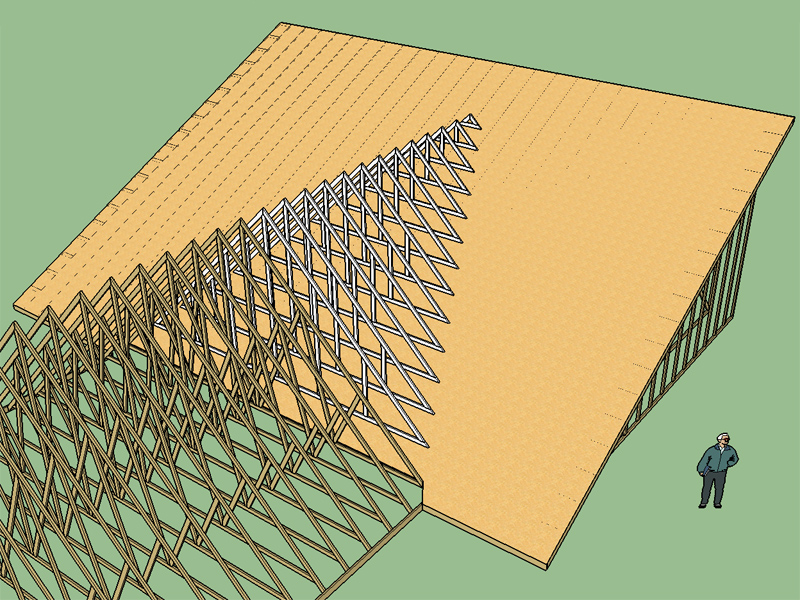
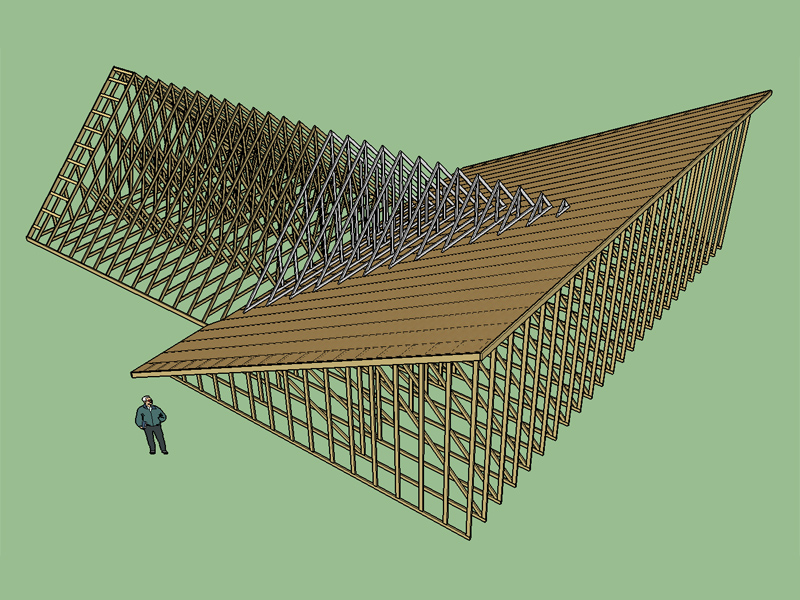
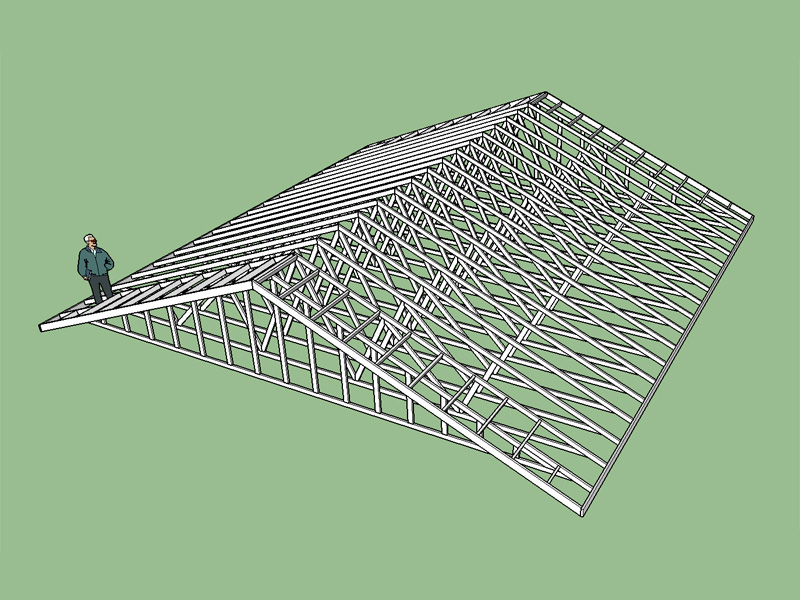
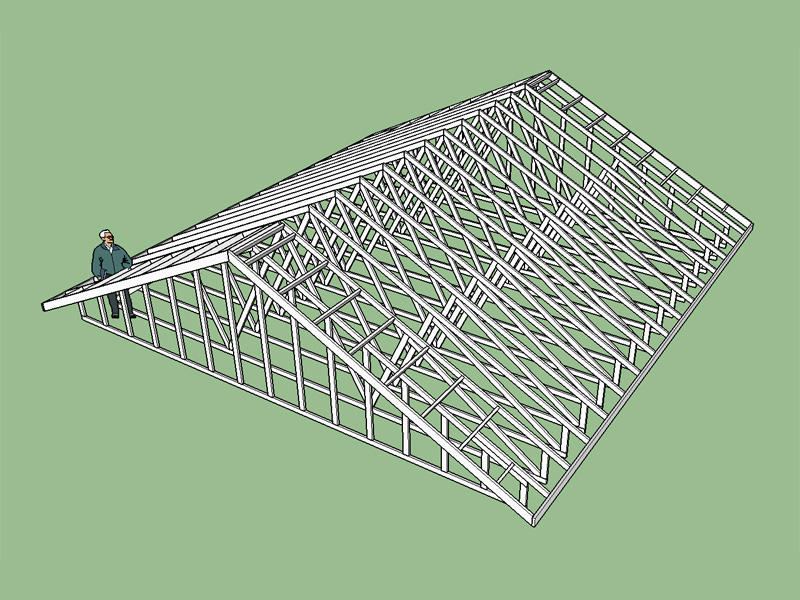
      With the main roof sheathing:

      http://design.medeek.com/resources/images/truss_su27_800.jpg

      http://design.medeek.com/resources/images/truss_su28_800.jpg

      posted in Plugins
      medeekM
      medeek
    • RE: 3D Truss Models

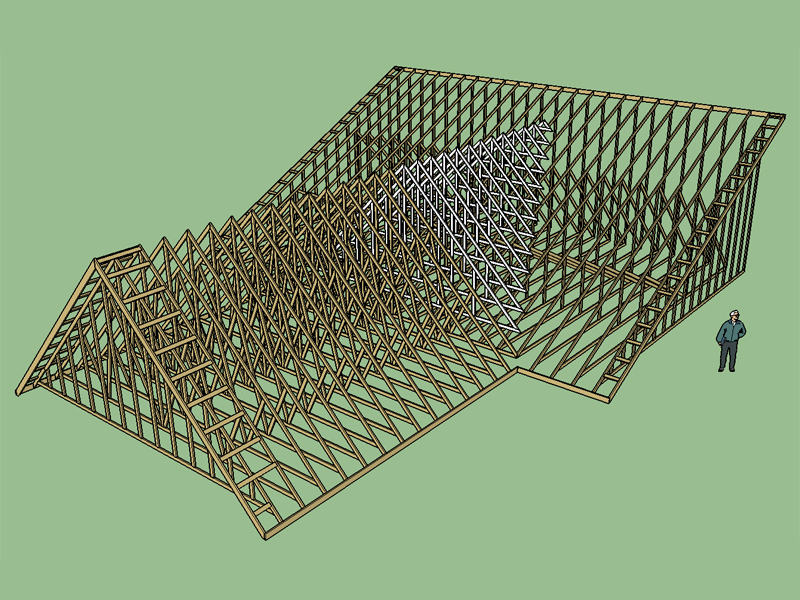
      Here is an example of a large valley set with a Monopitch Primary Roof and a Common Secondary Roof. Notice the pitch of the monopitch roof is 6:12 while the secondary roof is 12:12.

      http://design.medeek.com/resources/images/truss_su26_800.jpg

      Rather than calculate the overhang for the secondary roof it is just as easy to to trim the truss tails back and adjust the fascia so that it lines up with the fascia of the main roof after the fact.

      Even with all the automation of certain tasks there is still a good bit of manual editing required when complex roof lines are involved however I find that SketchUp has a very intuitive interface for trimming solids and once the basic geometry is there the rest is usually not too much trouble.

      posted in Plugins
      medeekM
      medeek
    • RE: 3D Truss Models

      I've addressed a few bugs with the valley set algorithm and tested it in as many configurations and orientations as possible. It it more solid now. I suggest downloading the latest version of 1.1.7 that I just uploaded to the server.

      Note that the plane of the main roof that is selected needs to be a rectangular shape at the moment to properly register (1st point selected). I usually just select the top face of one of the top chords of the trusses. The second point should be at the centerline of the last truss of the secondary roof line and at the ridge (peak) of this truss, the third point is also at the ridge (peak) but at a point towards the main roof. I really need to put the manual together to document this feature and how to use it, or at least a video.

      I also updated the geometry algorithm slightly so that it adds additional verts a 48" o/c when the valley trusses get too large. This is keeping in line with standard practice on these types of valley sets. I can also make this an input if someone requests that it be such.

      This update was not that complicated (valley sets) other than trying to figure out how to place the set based only on a plane and two points. Obtaining this information and then figuring out the math and code to compute the vertical distance between the bottom of the first valley truss where it rests on the main roof plane and the peak of the secondary roof line was the slightly painful part. The actual geometry of the valley set was surprisingly easy to code.

      The real challenge will begin when I try to add some hip sets, I may push that out for awhile.

      posted in Plugins
      medeekM
      medeek
    • RE: 3D Truss Models

      @pilou said:

      You must also think for Multi-languages of your UI ! ๐Ÿ˜‰

      I've been thinking about adding some global settings so one can set language, defaults and other misc. items.

      posted in Plugins
      medeekM
      medeek
    • RE: 3D Truss Models

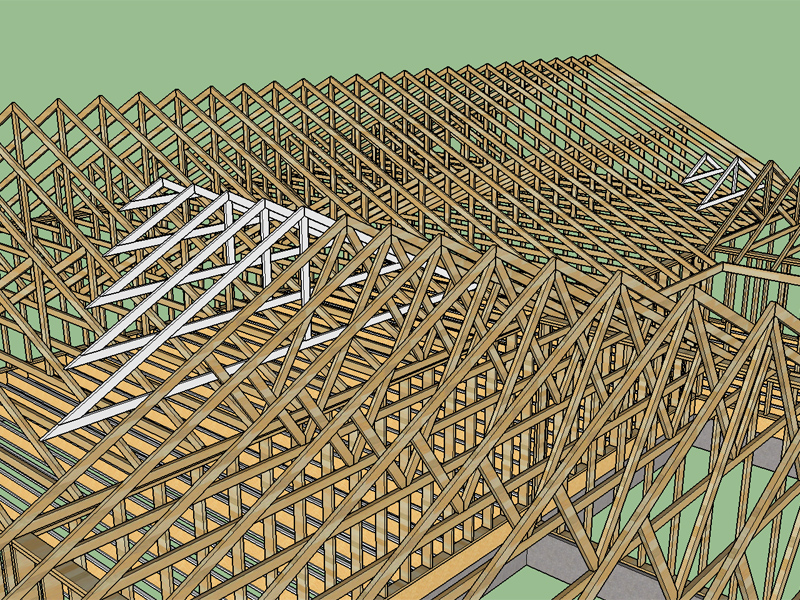
      Valley Sets are here:

      http://design.medeek.com/resources/images/truss_su25_800.jpg

      Proceed with caution though I just put it together so it is still a bit rough around the edges. Further testing and refinement is necessary but it seems to be working fairly decently.

      Currently the main roof plane and two points need to be selected rather carefully I'm not sure I can do much about that, if not I will need to document in some detail how to use this function.

      posted in Plugins
      medeekM
      medeek
    • RE: 3D Truss Models

      What format would be the best for the manual? I am kind of thinking along the lines of HTML documentation similar to the way SketchUp help files are organized but I'm still thinking about this.

      The biggest problem right now is the plugin has been rapidly progressing and evolving so its a bit hard to set out a manual that won't need major revisions/rewrite in the very near future.

      I'm thinking though in another month or two I should have something together.

      posted in Plugins
      medeekM
      medeek
    • RE: 3D Truss Models

      Version 1.1.6 - 11.26.2015

      • Added Fan and Mod Queen common truss types.
      • Structural outlookers (vert. & horz.) enabled under advanced roof options for Common (Fan & Mod Queen) truss types.

      http://design.medeek.com/resources/images/truss_su24_800.jpg

      Four more common truss types still need to be added:

      • Double Howe (6/6)
      • Mod Fan (8/4)
      • Triple Fink (8/7)
      • Triple Howe (8/8)

      For very large buildings one could also consider:

      • Quad Fan (10/5)
      • Quad Fink (10/9)
      • Quad Howe (10/10)
      • Quin Fan (12/6) ...

      A quad fink truss (10/9) with a raised heel (slider):

      http://www.selecttrusses.com/wp-content/uploads/Ag1.jpg

      posted in Plugins
      medeekM
      medeek
    • RE: 3D Truss Models

      Version 1.1.5 - 11.25.2015

      • Added Double Fink common truss type.
      • Structural outlookers (vert. & horz.) enabled under advanced roof options for Common (Double Fink) truss type.

      http://design.medeek.com/resources/images/truss_su23_800.jpg

      posted in Plugins
      medeekM
      medeek
    • RE: 3D Truss Models

      Thank-you for the vote of confidence. Sometimes I feel like I am digging a bit deep when it comes to all of these options it certainly adds to the amount of code required and the complexity. Some options are also dependent on others so it becomes a tangled web that requires careful analysis to mare sure that certain options can still work when others are not enabled. The good news is that I've probably got most of the options added to the fink truss that I will ever add so further complexity should not be too much of a problem. Now it is just a matter of adding different truss types, and other related items, more breadth and less depth.

      If it can be mathematically modeled then it can be programmed into the plugin. What you are seeing on your screen or in SketchUp is a visual representation of a mathematical model of the truss group and associated framing.

      posted in Plugins
      medeekM
      medeek
    • RE: 3D Truss Models

      Version 1.1.4 - 11.25.2015
      Structural outlookers (vert. & horz.) enabled under advanced roof options for Common (Fink) truss type.
      Structural outlookers (vert. & horz.) enabled under advanced roof options for Common (Fink) truss type with raised heel (vertical w/ strut).

      http://design.medeek.com/resources/images/truss_su22_800.jpg

      Notice that when structural outlookers are selected the top chord of the gable end truss is dropped accordingly. This may look simple now that I've got it working (at least for one type of common truss) but the amount of logic required to make sure everything comes out right is somewhat mind boggling.

      posted in Plugins
      medeekM
      medeek
    • RE: 3D Truss Models

      Does anyone have any good resources for working with dynamic components within the API? I really would like to make the top chords dynamic so that the overhang can be adjusted after the fact if necessary.

      posted in Plugins
      medeekM
      medeek
    • RE: 3D Truss Models

      Outlookers enabled under advanced roof options for Monopitch truss types.

      http://design.medeek.com/resources/images/truss_su21_800.jpg

      Also fixed all truss types so that the outlookers are measured from the bottom. I also added the option to include outlookers at the peak.

      posted in Plugins
      medeekM
      medeek
    • RE: 3D Truss Models

      @juju said:

      steam rolling ahead!

      Note, I have not coded the dropped top chord variants into the plugin yet I'm just verifying the correct way to frame out these different options with feedback from others before I commit to a specific method.

      I've spent some time chatting with some of my contractor friends and the consensus seems to be that measuring the outlookers from the bottom is fairly standard practice. There does seem to be disagreement on how best to deal with outlookers at the peak though. I like the idea of two outlookers each side of the ridge. Some say one vertical, others say none provided the last two adjacent outlookers are relatively close to the peak (I wish they would quantify what close means).

      I would like to get this as close to realistic as possible regardless of the logic and complexity otherwise what is the point. I'm not into modeling cartoons, I want it as you would build it.

      posted in Plugins
      medeekM
      medeek
    • RE: 3D Truss Models

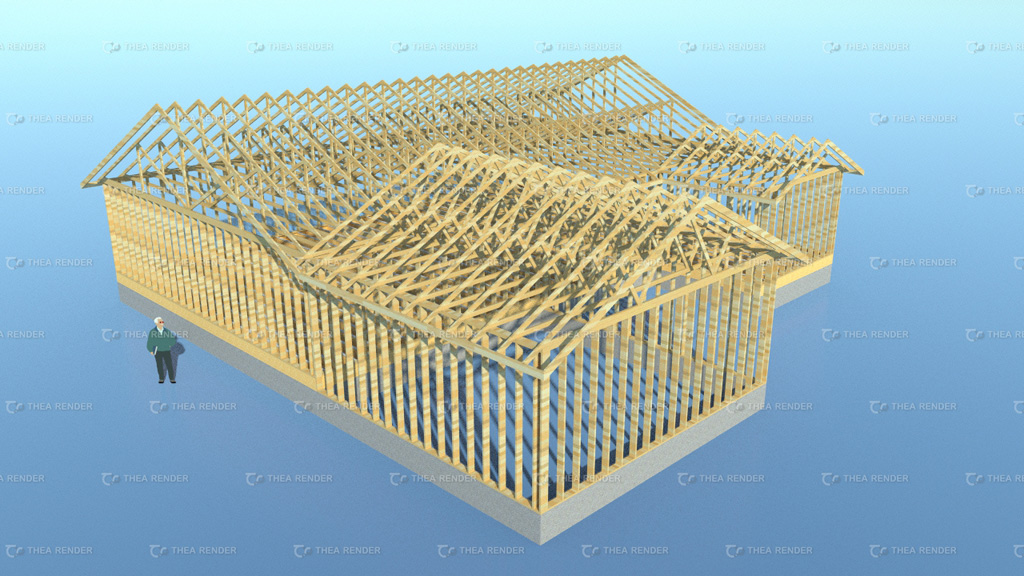
      Just for fun I was playing with Thea a bit this afternoon. I might have to purchase this render software its really quite nice:

      http://design.medeek.com/images/misc/testhouse3_1024.jpg

      Does anyone have a better wood grain or color to use when rendering lumber? As you can see the striations don't really line up with the direction of the lumber.

      posted in Plugins
      medeekM
      medeek
    • RE: 3D Truss Models

      Vertical structural outlookers with 12" overhang and 16" gable overhang:

      http://design.medeek.com/resources/truss/DOCUMENTS/SAMPLES/Dropped_Top_Chord_5.jpg

      posted in Plugins
      medeekM
      medeek
    • 1
    • 2
    • 159
    • 160
    • 161
    • 162
    • 163
    • 164
    • 165
    • 166
    • 161 / 166