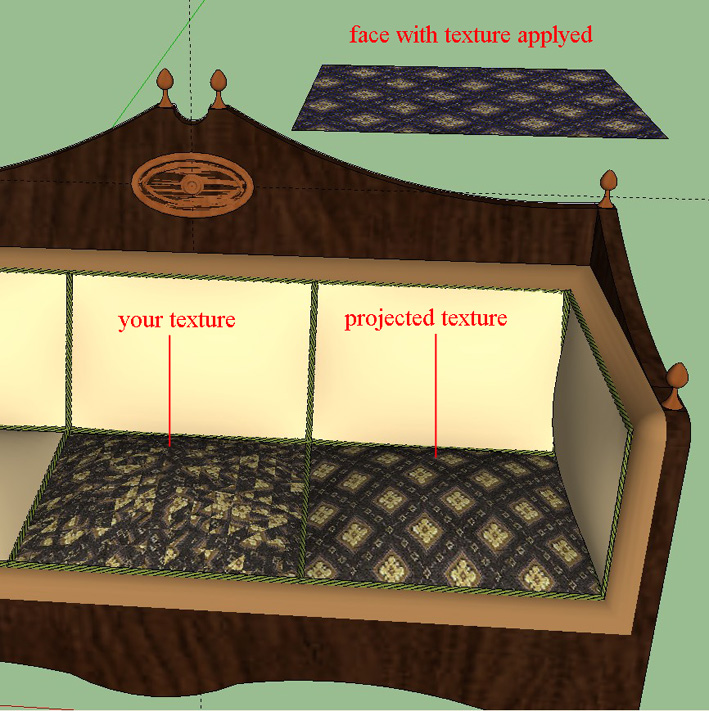
You simply have to apply the texture on the rectangle, right click on the texture and choose "texture>projected". Then pick the texture on the rectangle with the eyedropper and use the paint bucket on the curved surface.
Oops, your profile's looking a bit empty! To help us tailor your experience, please fill in key details like your SketchUp version, skill level, operating system, and more. Update and save your info on your profile page today!
Check out Febhouse | New extensions for Shadow Analysis in SketchUp Download
 M
Offline
M
Offline
Posts
-
RE: Strange color thing
-
RE: Strange color thing
An important thing you have to know about textures is the notion of "projected texture". So your pillows become definitely better

Take a look at this video and keep posting!:
http://forums.sketchucation.com/viewtopic.php?p=119231#p119231
-
RE: Appearing holes when using small models
As i said "very small surfaces", not very large.
-
RE: Appearing holes when using small models
Hi dennis013, that happens due to the fact that SU can't handle very small surfaces. Enlarge your model x10 or x100 and then resize it at the end.
-
RE: Section view
After Dave suggestions maybe this could be what you're looking for:
http://forums.sketchucation.com/viewtopic.php?p=172583#p172583 -
RE: Hidden geometry help?
Hi tald311, select your component then right click and select "soften/smooth edges". Then drag the cursor totally to left. Hope i undestood well your question.
-
RE: Strange color thing
Hi, you have two surfaces that share the same plane so SU doesn't know which one has to be showed. Simply shift a bit on the green ax the oval (0,5 mm must be enough). After all in real life your oval must have a tickness.
-
RE: Sketchup+VrayMax
Great images indeed. Only a little question, did you model the wood planks in last two images or is just a texture?
-
RE: [Plugin] Create 3d mesh from construction points... ver 1.0
Thanks Kirill, really a good plugin and it works fine!
-
RE: Hello all complete newb here needing help creating a 2d arch
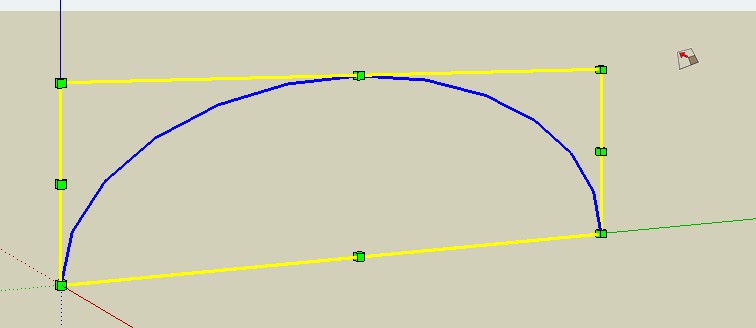
Hi Fastmerc, if you want to make something like this, draw the arc and then use the scale tool.
-
RE: Hall - conceptual
Great, great image.
 It reminds me some of John Soane drawings.
 -
RE: Issue trying to push/pull a rectangle
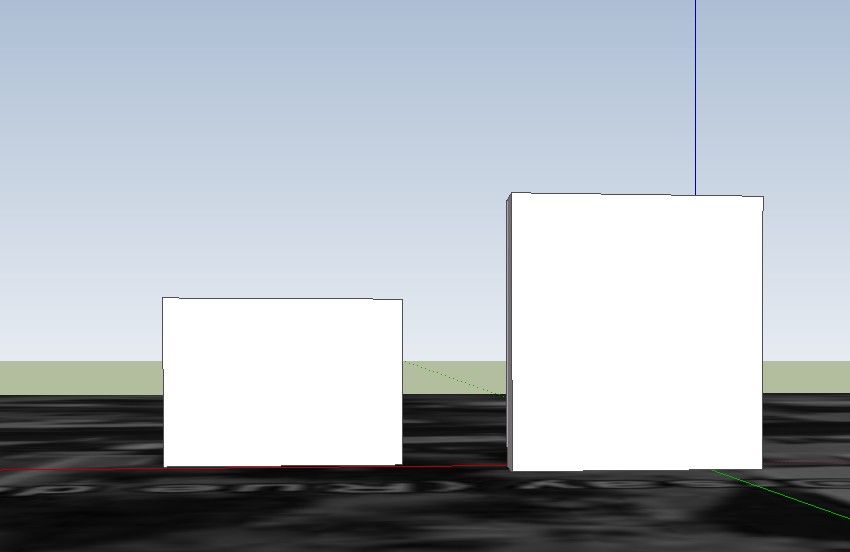
With or without unclick, you have to orbit a bit the model towards the sky. Like the picture i've posted. Otherwise your pushpull is made to the ground.
-
RE: Issue trying to push/pull a rectangle
Now i'm lost. It works well here.
-
RE: Issue trying to push/pull a rectangle
No problem at all in pushpulling both your objects. You simply have to orbit your model so your pushpull is not on the ground. Select pushpull, left click on a face, press the mouse wheel and orbit. Then release the mouse.
-
RE: Nubs on end of lines and intersections
Window>styles>edit and uncheck endpoints.
-
RE: WIP: European Back Alley
Very nice model so far. But comparing your model with the real photo i can say:
- The proportion between the width of the alley and the height of the buildings is wrong and very improbable in a medieval city. The right side building has to be higher and the alley tighter;
- You have a strange, and quite impossible, floor join in the right side building: the backline of the door-window of the first floor is under the top edge of the door on the ground floor;
- The left side building has, in the reference photo, a crooked front that ideally converge towards the arch. The same for the building of the right side: his front is aligned with the arch;
- The real alley has no sidewalks.
I understand that your model in not intended to be “real”, but when you design a street or a square, proportions and relationships between the open spaces and buildings are really important to represent a place, even an imaginary one.
Sorry, i know, i’m a boring european architect
-
RE: "Villa for Two" v-ray renderings
Nice and clean work. I especially like the "grain" you put in the images like they were old photos. What about the "floating Barcelona"?