@unknownuser said:
Seems you have resolved the problem

Sorry, that was the wrong file!!! Sorry! Two seconds! ....
 Offline
@unknownuser said:
Seems you have resolved the problem
Sorry, that was the wrong file!!! Sorry! Two seconds! ....
Just wondering if anyone can help with a quick question.
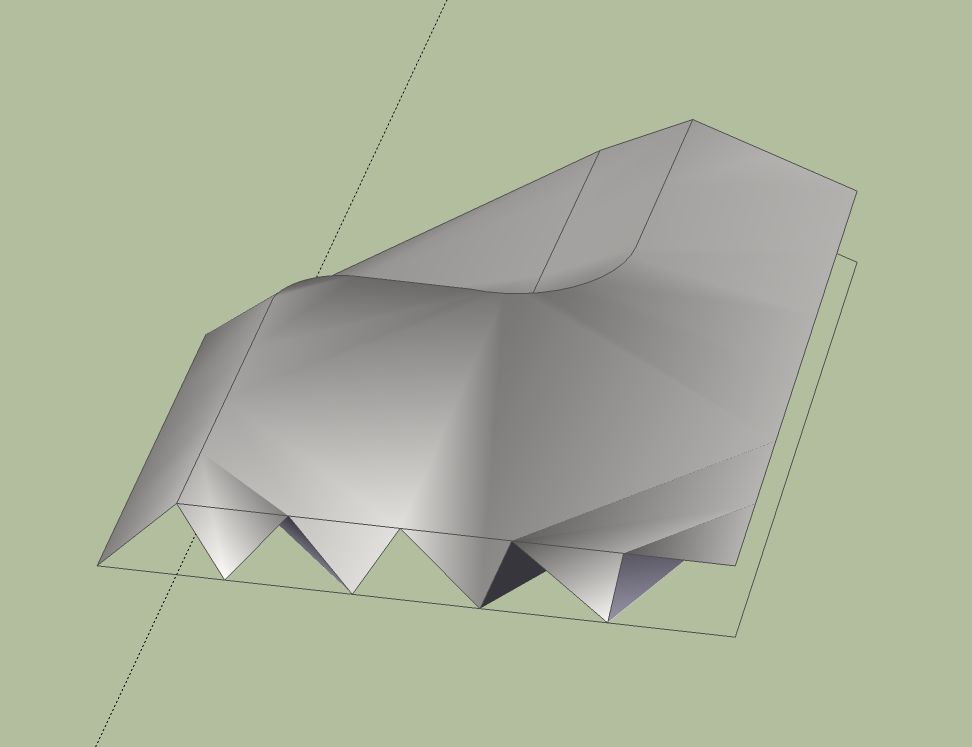
I'm trying to create a simple bit of landscape, with 2 contours, one on "0" the other 1.5m higher. I draw the two contours, then move the higher contour to the appropriate height. I then simply select the two countours, go to sandbox and activate the "from contours" function.
I however, get this result....
This can be rectified by manually amending but it takes a while - just wondering if I'm doing anything wrong in the first place?!
Thanks ....
Hi all,
I've created a terrain from the 'from scratch' sandbox facility and used a a colour GE image to add a bit of colour to it. Then trying to add a bridge to the terrain as part of a project with work.
However, the bridge then causes a weird 'grey' area that definitely isn't a shadow! Can anyone help?!
I've attached an image to show my problem ...

Yes, I totally see what you're saying Gaeius, makes perfect sense. I was just a bit worried by having 5 or 6 of exactly the same (and they are EXACTLY the same!) buildings in my 3dwarehouse but id that is the way to go, then that's fine by me!
Thanks again for the input!
@gaieus said:
Hi Lee,
With the latest SU 7.1, if you make components of your buildings inside the same model, you can just right click and upload a component. So practically you can still have them all (correctly positioned) in the same file but upload them individually.
Hi,
Didn't realise this! Thanks! Just had a quick test and it's easy as pie!
Cheers!
Many thanks for your reply!
So then, effectively, I am going to have 6 models exactly the same in my 3dw?!
Hiya,
Just wondering what the best course of action is ....
I have modelled a building that forms part of the University halls of residence, there are many of the buildings that are exactly the same, so I am just wondering, if I should upload each building seperately for each particular residential block, or, should I cluster the buildings together (approx 6 in total) and upload that to 3dw/GE?
Thanks!
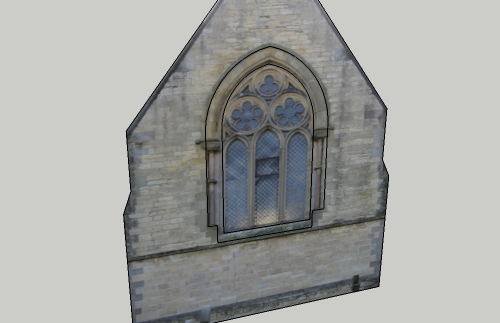
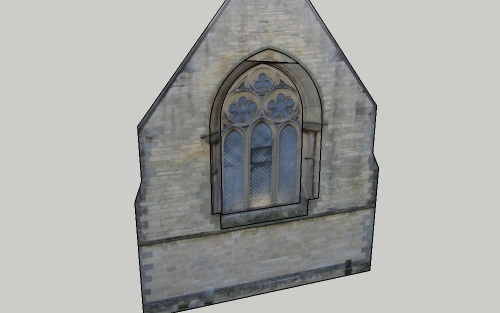
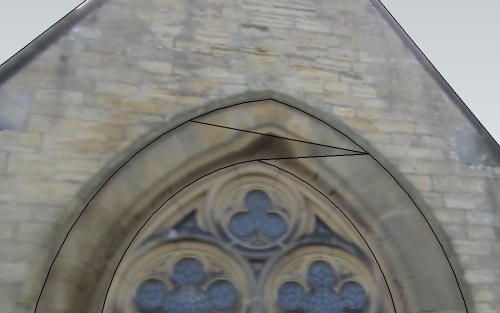
Thanks again Chris, much obliged. I was aware of being able to hide lines etc but on my original problem (which can be seen in image #2 and #3 on the 1st post) SketchUp created a new face at the top of the arch.
Anyway, don't worry about it, problem solved, thanks again!
Many thanks Chris, I think I understand what you have done! Thanks again.
NB: Do you have any idea why it wouldn't work without creating extra frame first? Just out of interest?
Ah yes, Sorry Chris, I can PUSH/PULL back he window 400mm no problems, my actual problem is I want to MOVE the inner window back, thus creating an angled bit of stone between the wall and the actual window.
Images #2 and #3 show what happen when I try to do this.
Hello,
I am having trouble with creating a recessed window. I have created the outline of the window opening, then offset the face to create the actual window itself before moving it 400mm inwards. However, something goes wrong (see pictures)and I've tried welding the lines, using different offset distances etc, but with no luck.
Can anyone help?
Thanks!
P.s. Model attached also.
Thanks ever so much Tommy, will be sure I check it out. 
Thank you guys, I am going to investigate today.
Thanks again.
@jaxcoffee said:
@leedeetee said:
@jaxcoffee said:
Do a Google Search on Andrew Carnegie. He was the Philanthropist that donated funds for all the Carnegie Library buildings to be built. Even Though today, many of the buildings are no longer libraries, they are still "Carnegie's" and worthy of being preserved as part of the historical record.
Ah right yes, I am aware of him and his works! Was more wondering about the terminology.
I have started my first model anyway, and hope to get it finished today (its 9am, Sunday here!). Thoroughly enjoyable!
Haven't seen anything yet. Stop off at one of those York pub's for a cold one? LOL! Look forward to see what you come up with.
Bit behind schedule but will get Yreka finished tonight.
Few quick questions though, I believe Yreka was built in two parts (an extension was built in 1980) and so I am modeling both at the minute - is that the correct way to procced?
Also, despite my best efforts I am unable to find any perpendicular images of the sides of the library. I have enough info from angled photographs of the front to construct something resembling the real world, which is what i will do, so hope this is OK also.
@jaxcoffee said:
Do a Google Search on Andrew Carnegie. He was the Philanthropist that donated funds for all the Carnegie Library buildings to be built. Even Though today, many of the buildings are no longer libraries, they are still "Carnegie's" and worthy of being preserved as part of the historical record.
Ah right yes, I am aware of him and his works! Was more wondering about the terminology. Makes perfect sense now.
I have started my first model anyway, and hope to get it finished today (its 9am, Sunday here!). Thoroughly enjoyable!
Hey Jax!
I'm in!
Not sure how much time I can dedicate to this but you can be sure I'll help out as and when I can!
Just one question, what's a Carnegie?! Sorry to be a bit dense but us Brits only know it as the name of the Philanthropist and as a suffix to sports teams!
Hello,
I have been trying to model one of the bridges in my city (here: http://maps.google.co.uk/maps?client=firefox-a&hl=en&ie=UTF8&hq=&hnear=York,+United+Kingdom&ll=53.956878,-1.084119&spn=0,359.98071&t=h&z=16&layer=c&cbll=53.956878,-1.084119&panoid=0rjzaX43eZYcRd2TsPCH6g&cbp=12,13.28,,0,-2.71) the actual modelling of the bridge is going OK but I am a bit unsure as to what to do for the best with regard to the GE terrain and how it interacts with the model.
The terrain is (obvioulsy) not detailed enough to give a realistic impression of the river and it's manmade banks which are a few metres higher, so I am just wondering how to proceed?
I have attached the .skp file in case it makes my question clearer.
Thanks.
I just may do that, Jax.
I'll be sure to give your thread a good read!