sketchucation logo sketchucation
    • Login
    1. Home
    2. leedeetee
    3. Posts
    Oops, your profile's looking a bit empty! To help us tailor your experience, please fill in key details like your SketchUp version, skill level, operating system, and more. Update and save your info on your profile page today!
    ⚠️ Important | Libfredo 15.8b introduces important bugfixes for Fredo's Extensions Update
    Offline
    • Profile
    • Following 0
    • Followers 0
    • Topics 149
    • Posts 794
    • Groups 1

    Posts

    Recent Best Controversial
    • RE: Modelling for GE solely from Streetview

      Hi Jax,

      A very interesting project there and some very decent results too.

      @jaxcoffee said:

      It really is fun to have to hunt for just the right amount of information to complete the model.
      I guess we will see if Google like them!

      This is the same thinking as me also, it really does sound fun, like a big jigsaw puzzle!

      Thanks for the info, fodo for thought indeed. πŸ˜„

      posted in Google Earth
      leedeeteeL
      leedeetee
    • RE: Importing .3ds files into SU

      @dedmin said:

      @leedeetee said:

      @dedmin said:

      TurboCAD - .stl - Deep Exploration - .skp

      I have no idea what that means.

      Export from TurboCAd as stl, then open with Deep Exploration and save as skp.
      The best results so far for me. Works with dwg from AutCAD also.

      Smashing, thank you, I'll give it a whirl at work on Monday. πŸ˜„

      posted in Newbie Forum
      leedeeteeL
      leedeetee
    • RE: Importing .3ds files into SU

      @kxi system said:

      @leedeetee said:

      @dedmin said:

      TurboCAD - .stl - Deep Exploration - .skp

      I have no idea what that means.

      It means we don't know much about sketchup native file format...
      But that doesn't answer the question I know...

      Hehe, no worries. πŸ˜„

      posted in Newbie Forum
      leedeeteeL
      leedeetee
    • RE: Importing .3ds files into SU

      @dedmin said:

      TurboCAD - .stl - Deep Exploration - .skp

      I have no idea what that means.

      posted in Newbie Forum
      leedeeteeL
      leedeetee
    • Importing .3ds files into SU

      I am looking at moving from TurboCAD as a design tool, onto Sketchup for the company I now work for. All of the equipment (outdoor play equipment, play areas, landscaping and furniture) is drawn to high detail in TurboCAD. I know I can export as a .dxf/.dwg file from TurboCAD but this always seems to crash the system for some reason and the files are huuuuge.

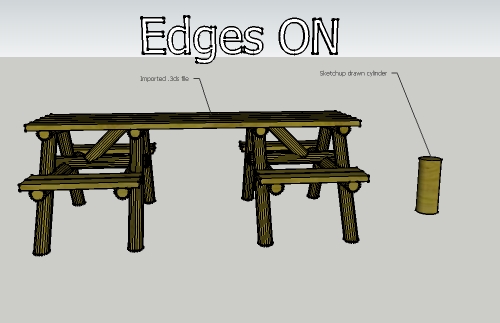
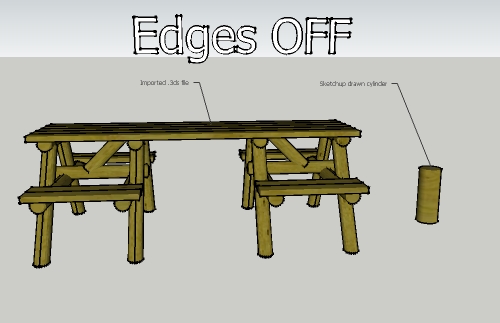
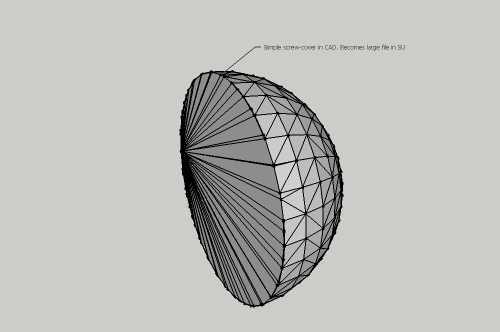
      The only alternative I have come up with is importing from Turbocad via a .3ds file. This works OK but it seems to create an edge on everything and makes what should be relatively small files huge. After a bit of investigation all of the hooks/screws have hundreds of faces of edges in SU and are huge sizes, but are small in CAD.

      Is there anyway around this? Or is it a case of re-drawing everything in SU should it be decided that SU will be taking us forward?

      Some very quick examples of what I mean are below.


      1.jpg


      2.jpg


      3.jpg

      posted in Newbie Forum sketchup
      leedeeteeL
      leedeetee
    • RE: Modelling for GE solely from Streetview

      Yeah, it's just to model for GE to have some fun, to take a break from modeling my own city. I have seen other models in GE with blank faces at the back of terraced houses for example (some houses in the famous Dursley project are like this) but as I said earlier, this doesn't look great, but are still on GE??

      So, I guess finding buildings with 360 degree streetview (or as near as possible) in cities with a lot of photographs, good GE coverage and good birds eye views, then a reasonable model for GE could be achieved???

      posted in Google Earth
      leedeeteeL
      leedeetee
    • Modelling for GE solely from Streetview

      Hiya,

      Just wondering if any of you guys have modeled for GE using just streetview images?

      I think it would be a fun thing to do, especially in towns which aren't your home town (variety is the spice of life and all that!) and obviously this can be used in conjunction with photos from the web and Bing maps birds eye view etc.

      But just wondering what would be best to do for the faces that aren't shown via photographs/SV? Leave them blank? Make a good guess? I have seen buildings on the GE layer which have blank facades, but this looks a bit rubbish to my eye!

      Thoughts appreciated!

      posted in Google Earth sketchup
      leedeeteeL
      leedeetee
    • RE: Quick question

      Ah Ok, thank very much. πŸ˜„

      posted in Newbie Forum
      leedeeteeL
      leedeetee
    • Quick question

      How long on average does it take for a model uploaded to 3dW take to be approved? πŸ˜„

      posted in Newbie Forum sketchup
      leedeeteeL
      leedeetee
    • RE: Is there a way to .... (part 2!)

      Those plugins are exactly what I was looking for, thank you both for your answers. πŸ˜„

      posted in Newbie Forum
      leedeeteeL
      leedeetee
    • Is there a way to .... (part 2!)

      Just wondering if there is an easy way to copy objects/groups along a path, similar to the 'follow me' tool?

      For example, at work I need to copy logs along a line to form a log retention wall. Just wondering if there's a plug in that can achieve this or if the only way is to do it manually?

      posted in Newbie Forum sketchup
      leedeeteeL
      leedeetee
    • RE: Is there a way to ....

      Brilliant advice, thanks.

      posted in Newbie Forum
      leedeeteeL
      leedeetee
    • Is there a way to ....

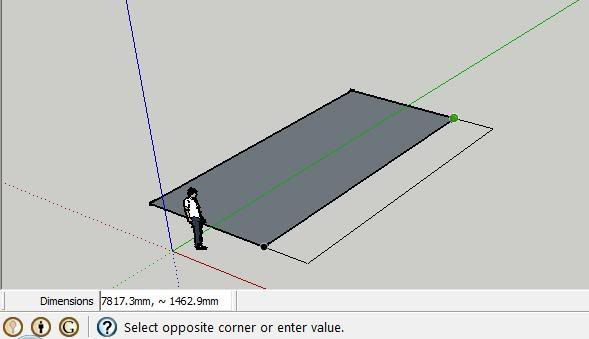
      When drawing, for example, a rectangle, lock one dimension and then type in the other manually?

      In this shoddy example:

      http://i23.photobucket.com/albums/b362/leethurston/testproblem.jpg

      Would there be any way of 'locking' 7817.3mm dimension (the one that froms the other rectangle) and then dictating the other dimension manually by typing, as it's too tricky to simply line up at 300mm exactly with the mouse.

      I know I can simply draw two 300mm lines out from the existing rectangle and do it that way, but just curious if there is a way to do it like the above?

      Thanks!

      posted in Newbie Forum sketchup
      leedeeteeL
      leedeetee
    • RE: Nice Google Street View hack

      Love it! Love the idea AND love the music. Great band.

      posted in Corner Bar
      leedeeteeL
      leedeetee
    • RE: Would Like To say Hi

      @tig said:

      there's Northumbria [Northumberland and Durham] [chez moi] - one of England's best kept secrets - with world-heritage-sites, history, fine-coasts, forests, dramatic-moors, night-life etc etc

      Totally agree, my favourite part of the UK. I am infact having my stag party in Northumberland (it's not a stag in the traditional sense - lots of walking, battlefield tours and real ale pubs etc). There is of course Holy Island too, one of the most amazing places I have ever been to.

      You could do a lot worse than visiting my home town of York too - steeped in history, from Roman, Viking, Norman, Medieval and right up to the present day. The Minster is mightily impressive and there are other hidden gems too. You;re also only an hour away from the Yorkshire Dales and Yorkshire Moors.

      posted in Corner Bar
      leedeeteeL
      leedeetee
    • RE: Please can someone help reduce my file size?

      Hi all,

      A big THANK-YOU for all your help - I have now sorted and have spent the last hour or so sorting out my model and it is now a much more manageable 1.1mb. I have taken on board everything taht has been said and I have learnt lots - future models will be a doddle now! Maybe!

      Thanks again Gaieus, I totally understand what you're saying, it makes perfect sense now, I will remember for the future, sorry for misconstruing what you suggested.

      Thank you everyone.

      All the best,

      posted in Newbie Forum
      leedeeteeL
      leedeetee
    • RE: Please can someone help reduce my file size?

      Well I've got it down to 3.3MB now. Think I'll have to start again with some of these textures ....

      posted in Newbie Forum
      leedeeteeL
      leedeetee
    • RE: Please can someone help reduce my file size?

      @jim said:

      @leedeetee said:

      making all faces 'unique texture'

      Hehe, this is the opposite of what you want to do in order to reduce file size.

      Noooooooooo! πŸ‘Š

      posted in Newbie Forum
      leedeeteeL
      leedeetee
    • RE: Please can someone help reduce my file size?

      File uploaded now - I THINK it should be a fairly simple model in itself, perhaps the problem does indeed come from the photo textures? ....

      posted in Newbie Forum
      leedeeteeL
      leedeetee
    • RE: Please can someone help reduce my file size?

      Sorry, the file is here: http://www.sendspace.com/file/gcu67j

      Any help much appreciated.

      posted in Newbie Forum
      leedeeteeL
      leedeetee
    • 1 / 1