Oops, your profile's looking a bit empty! To help us tailor your experience, please fill in key details like your SketchUp version, skill level, operating system, and more. Update and save your info on your profile page today!
Urasik Extensions | Lots of new extensions to check out Learn More
 Offline
Posts
-
RE: See Bing augmented reality
@gaieus said:
Ah well, for those Americans couple of years is already history. Remember the "History Layer" in GE (just a bit older satellite imagery - that's all)

History layer?!?!?
-
RE: Interesting Competition
Many thanks for the link .... I love things like this.
Is there a place on SCF where all design competitions like this can be located? Would be a good asset I think.
-
RE: See Bing augmented reality
Amazing!
I am especially interested to see if historic photos can be integrated into these maps. That would be brilliant.
-
RE: Problem with material
Many thanks for the thorough answers guys, I will be sure to try them out.
-
Problem with material
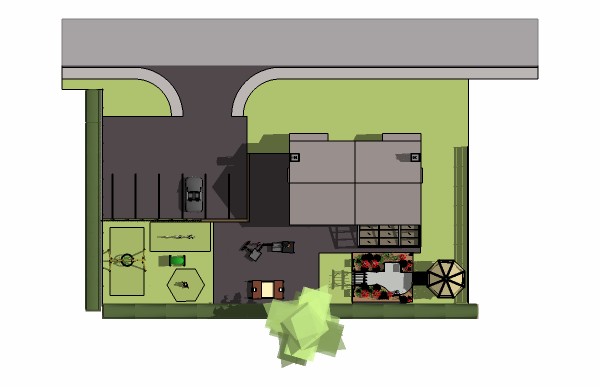
Can anyone shed any light (maybe literally!) on why my asphalt material at the top of my the model is half grey?
I have exhausted my trouble fixing knowledge - playing with shadows setting - deleting the face and re-drawing - using a new material but nothing is working!
Can you help? Ta!
-
RE: Need Modelers for Project - Modeling California First!
@jaxcoffee said:
@leedeetee said:
Today twitter, tomorrow the world!
So does that mean a lot more modeling is in store?

Certainly does! Just need those 40 hour days to start happening!
-
RE: Using Google Earth - Permission?
@gaieus said:
If you go to File > Save > Save image in GE, you can save the image - in screen resolution with the free version and high resolution (only wherever available of course) in GE Pro. Then just reload the imported B&W image in SU and you have a colour version.
It's about 5 seconds altogether.Indeed that's what we do. If modeling large green areas or terrain, you can sometimes get a nice effect (nicer than some materials/textures anyway).
I'll forget I asked this question anyway and just carry on as before!
-
RE: Using Google Earth - Permission?
Indeed, Gai, It's a tricky one:
I have come across the following sentences:
@unknownuser said:
All uses of Google Maps and Google Earth and Content MUST provide attribution to Google and our suppliers.
Especially interesting/confusing is the fair use policy ...
@unknownuser said:
Fair use: Fair use is a concept under copyright law in the United States that, generally speaking, permits you to use a copyrighted work in certain ways without obtaining a license from the copyright holder. There are a variety of factors that affect whether or not your use of Content would be considered a fair use, including the purpose and character of your use, the nature of the copyrighted work, the amount of the copyrighted material used, and the effect of your use upon the potential market for the copyrighted work. For example, there are differences between use in a for-fee service and use in a work of scholarship, or the use of a single map screenshot and the use of detailed map images for an entire country. ...

-
Using Google Earth - Permission?
Can a company utilise Google Earth imagery? Just wondering if anyone can shed any light on if it is OK to use google earth images (Not SV? It is, in 90% of cases, simply painting the satellite image onto terrain to give a more realistic effect. Is this a no go? Or is it acceptable if you provide attribution to Google?
Advice will be much appreciated.
Thanks.
-
RE: Problems with > Get Photo Texture
Thanks mate,
How bizzare, it works now! I have honestly turned it on and off a few times! I have however had a dodgy internet connection today so I wonder if it is something to do with not having web access or something?!
Thanks for your reply.
-
Problems with > Get Photo Texture
Hiya,
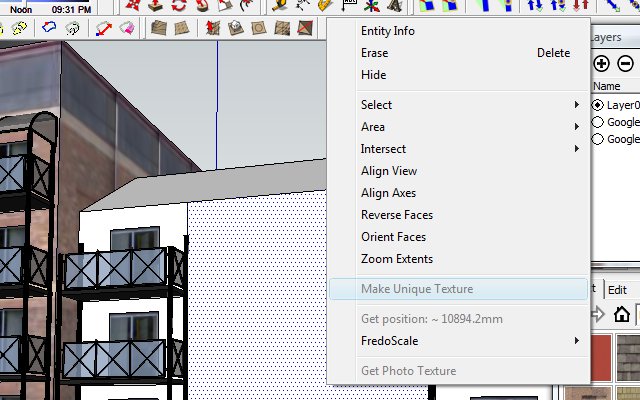
Just wondering if a kind soul can tell me whats up with my set-up .... I can't seem to get a phototexture anymore, nor can I combine textures etc. Any help much appreciated.
-
RE: Need Modelers for Project - Modeling California First!
Today twitter, tomorrow the world!
-
Easy way to join lines?
Just wondering if there is an easy way to join lots of lines, a small minority of which are almost connected, but not quite, in order to create a face?
I know I could do the laborious task of going over every line again but with a complex model or lots of arcs etc, this is not really practical. So, am I missing a script or an easier way? Weld doesn't seem to work for me??
Cheers!
-
RE: 'Snapping' to a face above a terrain?
Many thanks! So effective, so simple!
-
RE: 'Snapping' to a face above a terrain?
Attached is an example of what I am trying to do ....
I use top view in Paralel projection and then draw my road/path, ready to be draped, but it always snaps to the terrain thus making it impossible to do!
Thanks!
-
'Snapping' to a face above a terrain?
Just wondering the best way that I can draw on a face positioned directly 'above' a terrain model so that I can then drape the lines/faces onto the terrain below (using sandbox > terain.
Every time I try drawing above, it always snaps to the terrain below!
Can anyone help?!
-
RE: Question regarding "from contours" Sandbox tool
That's absolutely fantastic, thanks very much chaps.
-
RE: Question regarding "from contours" Sandbox tool
Sorry, CORRECT model is now attached!
Just needs "from contours" applying to see the problem!
Thanks!