sketchucation logo sketchucation
    • Login
    1. Home
    2. jgb
    3. Posts
    Oops, your profile's looking a bit empty! To help us tailor your experience, please fill in key details like your SketchUp version, skill level, operating system, and more. Update and save your info on your profile page today!
    🚨 Skimp | 25% Off until March 30 Buy Now
    Offline
    • Profile
    • Following 0
    • Followers 0
    • Topics 73
    • Posts 803
    • Groups 1

    Posts

    Recent Best Controversial
    • RE: A MACRO RUBY (Someone please!!!)

      Now you got my attention 😲

      I wouldn't mind knowing how to make threads with minimal line count. In my current model of the cargo floor in my big air freighter, I needed to see bolts and holes to make sure I had proper attachment, clearances and adequate access. I'm up to 350 bolts so far, and only 15% of the floor drawn. Mind you, the floor is sectional, needing 43 sets of beams, braces and floor panels, plus a complex set of stuff at each end to hold the ramps. My lines count is around 557,000.

      I also will have a few big components where I will have to show threads.

      posted in SketchUp Discussions
      jgbJ
      jgb
    • RE: A MACRO RUBY (Someone please!!!)

      Dave, yes, without reservation. If you want, I can even supply you some examples of how I reduced the line count yet maintained the look of detail. If glue lines were a problem, a long while back I wanted to add weld ripples and bolts with real spiral threads, till SU gagged. Now I just use a different colour or texture to differentiate strictly visual detail. ie: dark gray for threaded bolts, and a different metal texture for weld lines.

      I keep a ruler nearby with the words "You're NOT making shop drawings" printed on it to rap my knuckles when necessary. 🀣

      Pbacot, Good idea, but with one major snag, besides grouping each one. Selection tools will only work on copies of a group, not on separate, even if identical, groups.

      posted in SketchUp Discussions
      jgbJ
      jgb
    • RE: Hide dimensions text

      This would be ideal to hide copyright notices within the model.

      See topic.....

      http://forums.sketchucation.com/viewtopic.php?f=15&t=42399&p=379799#p379799

      posted in SketchUp Discussions
      jgbJ
      jgb
    • RE: Weird triangulation of faces

      I played a bit with using the scale tool (not Fredo's) to correct a distorted surface.

      The reason this will not work as expected is the lack of precision inherent in the scale tool. Had no time to try Fredo's scale tool, but I suspect it suffers the same as well.

      If you scale anything, you will notice that the % scale is good only to +-X.01 (reported in the VCB) but you can scale to finer precision by manually entering a value. Here you want to the 2 center handles to merge. But if the distance to move is less than that .01 tolerance, then the selected handle will snap to just in front or just in back of the target handle. You can't nail it. Yes, you can interpolate the distance and enter it in the VCB, but how exact is your estimate? You would have to be within SU's tolerance limit to flatten the face, and that tolerance is way less than the scales tolerance.

      Whenever I get a flat surface mangled by an intersect, and that happens a lot (to me), and seems to happen more-so in big models where I can suddenly get literally dozens of hidden lines appearing out of nowhere, I use TT's Selection tools to select only the hidden lines and delete them all. Invariably that blows away the surface. Either I reconstruct the surface or undo to just prior the intersect, and manually intersect the entities.

      It seems to me that when you move a line on a surface, or intersect a surface, SU will draw temporary hidden lines connecting all the potential verticies on that surface, to form the "bend" lines. But the cleanup routine to remove the unneeded lines seems to quit before the job is done, like I said more-so in big models.

      Part of the problem with intersecting is again related to SU's internal tolerances. If the line fragments generated by the intersect is near or less than the tolerance, SU may not even draw the line, resulting in an open piece of the surfaces, or it may snap the endpoints of the fragment at the tolerance point, which will throw off the "flatness" of the surface resulting in stray hidden or soft or even hard lines.

      The only solution here is for Google to rationalize SU's internal tolerances and make them more consistent, and at the same time loosen up the tolerance (a bit) for a surface to remain "flat". SU also needs to be a lot more adept at handling small line fragments. People are using SU more-so as a poor mans engineering 3D CAD (especially me) therefore needing finer tolerances, than as its' original intent as an architectural sketching tool that is OK with its current larger tolerances.

      posted in SketchUp Discussions
      jgbJ
      jgb
    • RE: Hide dimensions text

      I started to play with this, however limited that is.

      One partial solution (sort of!) is to make the text 1 point or .001 in high. That effectively makes the text almost invisible (looks like a small line) πŸ‘ but, and a big but... the arrowheads also disappear. πŸ‘Ž πŸ˜’

      posted in SketchUp Discussions
      jgbJ
      jgb
    • RE: Hide dimensions text

      @dave r said:

      @jgb said:

      Simpler yet, just put all your text/dimension objects on a separate Documentation layer. That way you can turn them on or off at will.

      How do you separate the dimension text from the arrows?

      Good point; I thought he meant all of the dim.

      I will slink off now.... 😳

      posted in SketchUp Discussions
      jgbJ
      jgb
    • RE: Hide dimensions text

      Simpler yet, just put all your text/dimension objects on a separate Documentation layer. That way you can turn them on or off at will.

      posted in SketchUp Discussions
      jgbJ
      jgb
    • RE: Closer to object.

      Clipping as you get close is a perennial problem. I suffered it in spades when I started with SU years ago. I asked several times on the old SU BBS, and got no solutions.

      Then I discovered SketchUcation, so I asked here, and Catamountain (whatever happened to her??) solved it.

      As you start zooming in and get clipping, select some face, as a reference to where you are going.
      Turn OFF Perspective.

      The view will zoom out considerably.

      Then zoom in to the selection, and keep going till you get close enough to whatever.

      I have gotten close enough that a line fragment only .001 inch filled the screen. Note the cursor or tool will start getting jerky as you get in real close, and sometimes selecting an entity becomes a bit dicey.

      When done with the closeup, zoom out before you turn back on the perspective.

      posted in SketchUp Discussions
      jgbJ
      jgb
    • RE: Have you had a model stolen?

      I guess the rule of thumb here is
      Don't post anything you would not give away for free. β˜€

      There are a few ways to prove a model is yours in case it ever gets to the stage where somebody is selling your model and/or claiming ownership.

      Put an ownership text block in a corner, defining how it can be used.
      See my models in the warehouse, lower right corner. Not foolproof, especially if the slimer knows SU.

      Hide your name inside the model, as a group, not a comp that can easily be found. There are many ways to make that invisible, but only you will know exactly where to find it. πŸ€“

      But if there are people out there willing to buy a copy of your model for a few hundred $$$, you be the first to sell it. I could not believe some of the prices I saw on TurboSquid. 😲

      posted in SketchUp Discussions
      jgbJ
      jgb
    • RE: The "Duh!" thread (aka the Doh! thread)

      I've had several cases where I had to modify a component which I could not see clearly because of the external surrounding structure. Layering and hiding was not a good solution, as I needed some externals as reference to the edits, and then all that relayering and hiding had to be reversed out.

      Select the component and any reference externals and simply Move/Copy them well into free space.

      Do the edits, using temporary layers and hides only on the copies as needed.

      When done, delete the copies and any temp layers.

      posted in SketchUp Discussions
      jgbJ
      jgb
    • RE: Weird triangulation of faces

      In effect you are flattening the surface that went very slightly off during the intersect. And that is a very good suggestion.

      But that will only work on surfaces that were (before the intersect) exactly planar to any 2 model axis, that is; the surface is aligned in 2 axis directions. If the surface is at any angle, flattening using the SU scale tool will clobber the surface, as Scale works strictly along axis directions.

      For non-axis planar surfaces use Fredo's Scale tools, where you can define the scaling box's orientation.

      posted in SketchUp Discussions
      jgbJ
      jgb
    • A MACRO RUBY (Someone please!!!)

      I know there was a request for a MACRO function in the Wishlist topic, but I'm raising this as a separate topic.

      Is there a MACRO function plugin (I suspect not), or can some wizard please write one? πŸŽ‰

      I have to do a multi-step operation to correct an error, and I have several hundred of them to do, all the same set of operations.

      My present problem is bolt holes in my parts, drawn as open through-holes with ringed "threading" on the hole surface. Yes, I do get carried away with detail sometimes. That shot my lines count to way over 700,000 😲 and SU now crawls along. So, as I only have 6 bolt type components, I modified the bolts to a single surface instead of the ringed "threaded" surface, and that alone dropped my line count to under 600,000.

      There are 162 bolts in the model (so far), and each bolt goes through 2 or 3 other parts, with an entity count of between 48 and 186 for each hole in each part, depending on whether it is just a hole, or is a "threaded" hole. I want to convert all these "holes" to just black circles on the surface, resulting in only 26 entities per hole (12 sided circles).

      The operation for each hole, or in the case where several holes are close to each other, is to select the hole and all its bits, deselect the 2 faces of the parts surface, delete the hole bits, join 2 vertices on each opening to form a face (face does not work here), delete the those 2 lines, and finally paint the 2 (hole) faces black.
      I've done about a dozen and I am freaking out. 🀒

      Now if I had a Macro that could "learn" those steps, I'd be done sooner than typing this topic. β˜€

      A cupola parameters to the Macro.

      It has to "learn" the steps, by recording the operations. I'm not talking writing a set of macro instructions, as that get real hairy real fast.

      There has to be a "do once" and "Repeat X times" function.

      Forget about SU Undo. SU Undo is only 100 steps (I counted) and a multi-step Macro done a bunch will overrun the undo stack anyway. Well maybe keep the SU Undo for "do once" operations only. Instead, do an implicit filesave before the Macro steps execute, so if it blows up, the model is safe.

      And if you want to get really functional, have an external Macro saved library that can be called up later and in other models doing the same thing.

      And now back to my mods in progress... 🀒 🀒 🀒

      posted in SketchUp Discussions sketchup
      jgbJ
      jgb
    • RE: Deleting materials from Entity Info

      @dave r said:

      I don't think you can.

      I suppose you could rearrange them by editing their names.

      That only works in the materials list, not in Entity Info.

      Entity Info seems strictly sorted (and remains static) in order of initial application from Materials into the model. If you import a component or model from some other library, their colors are added to the list unless they have exactly the same name and color/shade (RGB) and that is why a lot of duplications exist. In one model that used a lot of imported components I ended up with 7 "blacks", all RGB=0,0,0 but the names were slightly different; ie: "00black, black-2, <black>" etc.

      I haven't played much with textures/colors to see if I have any control over that.

      posted in SketchUp Discussions
      jgbJ
      jgb
    • RE: Deleting materials from Entity Info

      Good idea... Good thing I thought of it. 🀣

      Anything on sorting/moving colors around in the Entity Info??

      posted in SketchUp Discussions
      jgbJ
      jgb
    • Deleting materials from Entity Info

      I wanted to redefine the base materials/colors of my master default template, as the old one has too many useless (to me) mats and duplicates.

      I used the Materials Ruby to clear all mats from the scale reference 2D Bryce that contained all the colors. It went white as expected, but all the colors remain in Entity Info and in the "In Model" materials list. Not what I expected. Saving as a new default template and reloading did nothing.

      So, how do I clear the model of all mats/colors so I can start fresh with the colors I want in the order (on entity info) I want for all my new creations?

      And while we're on the subject, is there any way to sort/rearrange the Entity Info and/or In Model mats to place the "most popular" ones at the top?

      posted in SketchUp Discussions sketchup
      jgbJ
      jgb
    • RE: [Plugin][$] Curviloft 2.0a - 31 Mar 24 (Loft & Skinning)

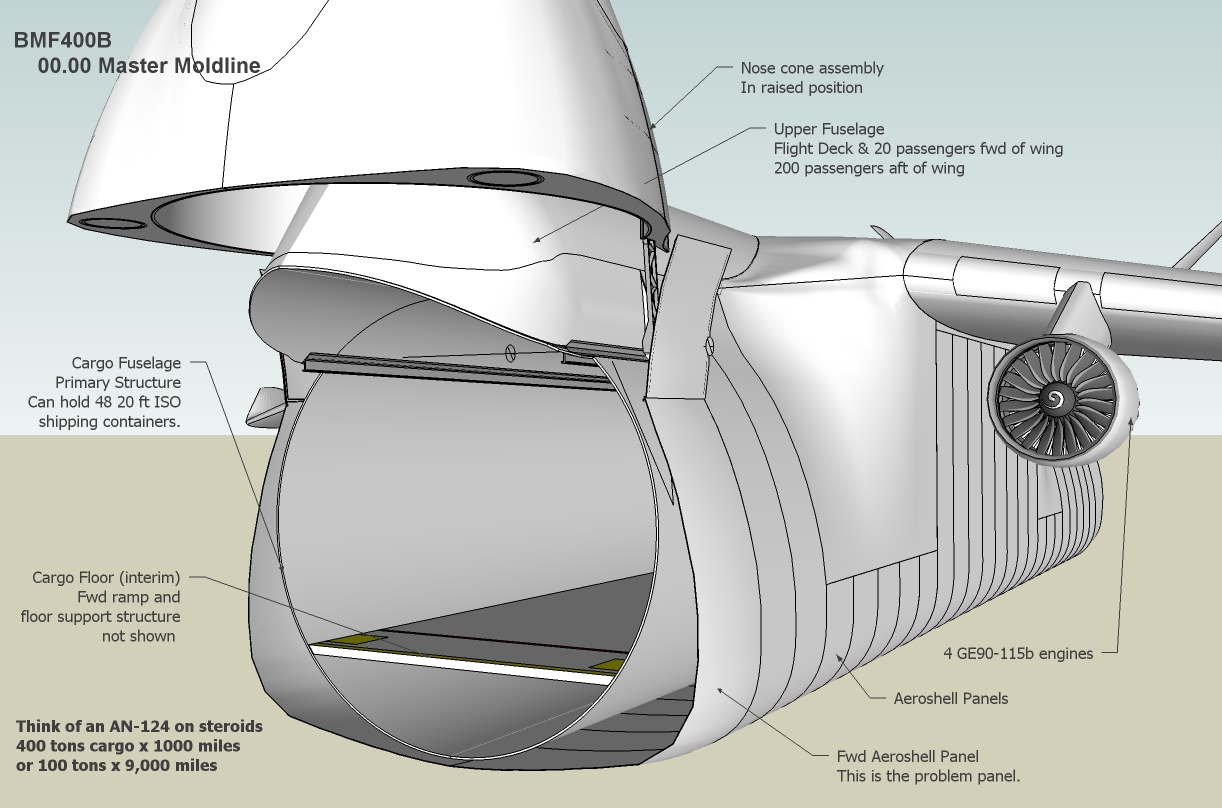
      Mac1; that was an interesting note regarding aeroshells RCS and landing radar. Would you not have jettisoned the aeroshell high enough up so it would not be a consideration on landing?

      And my term "aeroshell" applies to the outer fuselage of my big freighter, for lack of a better term.
      It completely surrounds the main fuselage primary structure and is subject to aerodynamic loads only. It forms a shell or fairing around various systems such as landing gear, aux power, etc. from nose to tail.

      I've posted a picture of it to explain a bit of what it is about. I will not get into details for proprietary reasons. There is a lot not shown in the pic, as most details such as landing gear, support structure, systems etc are detailed on other drawings. This pic is of the master moldline and covers the main structure and secondary structures, aeroshell, fairings, etc. Otherwise the SU model gets too large to handle. I have about 20 such sub system drawings.

      Think of this airplane as an Antonov AN124 on steroids. It follows that planes general configuration, but is much larger. MGTOW is about 1,700,000 lbs. Max payload is 400 tons plus fuel for 1,000 miles.
      Cargo handling is optimized for standard shipping containers, stacked on the cargo deck 3 wide by 2 high by 8 along deck for 20ft ctrs or 4 x 40ft ctrs. There are 4 x 15 ton hoists on 2 overhead gantries to load/unload. And the cargo floor is completely removable for supersized loads. In fact it can swallow a complete Airbus A380 fuselage or a Space Shuttle fuel tank with room to spare.

      Construction is primarily carbon fibre for about 95% of the airframe. The fabrication methodology is proprietary and novel. The main fuselage tube is fabricated in one piece about 40 feet diameter and 280 feet long. The nose cone and aft cargo doors are simply cut out and finished to be mated back. The upper fuselage is fabricated the same way, cut in 2 longitudinally and serves 2 airplanes. Each half is then cut in 2 again forming the fwd and aft upper fuselages, which are mated on top of the cargo fuselage.

      The aeroshell is more or less conventional panel layup. Carbon fibre skins with a honeycomb or foam core.

      Anyway, this forum is not the place to discuss my design so here I quit.BMF400b

      posted in Plugins
      jgbJ
      jgb
    • RE: [Plugin][$] Curviloft 2.0a - 31 Mar 24 (Loft & Skinning)

      @unknownuser said:

      PS: do not forget that Skin works on coons, that is 3 or 4 profiles in loop

      ❓ ❓ ❓ ❓ ❓ In Canada a coon is a smart thieving mammal. 🀣 (Racoon)

      posted in Plugins
      jgbJ
      jgb
    • RE: [Plugin][$] Curviloft 2.0a - 31 Mar 24 (Loft & Skinning)

      Mac1; You are very close to the actual panel, except for a curve that you could not know of.

      Please note; I am not looking for a solution. I have it. The original post was for Fredo to investigate why I get a black face but an empty group.

      I've attached copies of the actual problem panel and the adjacent panel with notes. A 2nd copy has the problem face deleted and a C-Loft empty group attached.

      FYI, these panels are carbon fiber composite honeycomb sandwich, 1/2 in thick. At this point in the design development, the stiffeners and structural attachments are not yet incorporated. To all you aero engineers, these panels are NOT primary structure, and are subject only to aerodynamic loads. Even so, they are stronger than they have to be, considering the planned stiffeners/internal structure that attaches them to the primary a/c structure. As such, they are considered fairings.


      Copies of the full panels.

      posted in Plugins
      jgbJ
      jgb
    • RE: [Plugin][$] Curviloft 2.0a - 31 Mar 24 (Loft & Skinning)

      @mac1 said:

      My work flow is double click to get in context of the curve, select the skin tool, left click and select the total curve, select the green check and once the black is formed you need to click in space to complete the surface. Use outliner to see that a group is formed within your group and explode unless you want to keep as a nested group.

      Mac1; To keep the perspective, I'm replying separately to your 2 parts.

      I do exactly that, and get a correct black face. BUT when I click to finish, I get an empty group. I've said this several times. In a previous post I highlighted this to Fredo, and he replied by acknowledging then fixing the problem. Like I said before, this seems most likely to happen when facing a very nearly flat surface.

      And using SU8 Free, I don't use Outliner. To get at the empty group (to delete it) I use TT's Selection Tools. πŸ‘ πŸ‘

      posted in Plugins
      jgbJ
      jgb
    • RE: [Plugin][$] Curviloft 2.0a - 31 Mar 24 (Loft & Skinning)

      @mac1 said:

      I get the two lines also and is the reason I used the skinning option and get the same result as Fredo. BTW I measure 0.5 in apart and looks like by design ???

      The 2 lines you refer to are the inner and outer edges of a very large 1/2 inch thick panel which is part of a fairing made of several adjoining panels. The 1st master panel itself (outer skin) was originally formed by C-Loft, then thickened with JPP to 1/2 inch. It formed all 4 edges. All the panels are rectangular (4 distinct corners) with that similar pronounced curve.

      Then I selected 1 edge to become the curve control for this adjacent panel, which had a different overall shape at the top, but shared an edge. I formed that panel the same way, but had to modify it for the design. In doing so, I lost the 2 side edge faces and 1 top edge face (expected). I then closed the top 2 corners. One edge immediately skinned, but this edge and the top did not. I expected the top not to skin as it had a slightly irregular profile, but this edge should have auto skinned because it was skinned prior to the mod, and the top end was redrawn. I used C-Loft to re-skin the top edge (worked 1st time) but this edge persistently refused. I have since manually skinned it in the model.

      If you want I can post the complete panel here, in its present state, but I doubt it will contribute anything to this discussion.

      posted in Plugins
      jgbJ
      jgb
    • 1 / 1