sketchucation logo sketchucation
    • Login
    1. Home
    2. jgb
    3. Posts
    Oops, your profile's looking a bit empty! To help us tailor your experience, please fill in key details like your SketchUp version, skill level, operating system, and more. Update and save your info on your profile page today!
    ๐Ÿšจ Skimp | 25% Off until March 30 Buy Now
    Offline
    • Profile
    • Following 0
    • Followers 0
    • Topics 73
    • Posts 803
    • Groups 1

    Posts

    Recent Best Controversial
    • RE: Most impressive SketchUp modelling

      @hussel hann said:

      Hi all...
      Just wondering...are there any amazing designs that created just by using pure google sketchup (without additional plugins).

      I am a newbie here, so my question might look stupid. ๐Ÿค“

      There is no such thing as a stupid question, especially when from a novice.

      The object behind nearly all pluggins is either to correct a deficiency or to enhance a feature, or most usually, make a tedious task easier, faster or more accurately.

      The rendering you see in preceding posts are all after the fact of drawing the model. There is very little "rendering" capability in SU, so 3rd party apps or pluggins are needed to "put the lipstick and eye shadow" on. You still need the skills in SU to make a realistic model before you dress it up.

      So, yes, you can make a model in SU without any pluggins, but it will take a lot more effort.

      As an example, I design airplanes, and not just the exterior views, I put in components and assemblies, such as structure, mechanics, etc. It used to take me a week to make a fairing (the curved skin where 2 parts of the structure meet, such as wing to fuselage) in native SU.

      Then Curviloft came along and that reduced to about 2 days. I need to draw both the outer skin or moldline and the inner surface of composite panels that were usually 1/2 to 1 inch thick. I could not simply copy the outer skin 1/2 inch away, then join the edges, as the inner curve changes with the thickness.

      Then Joint-Push-Pull came along and the construction time for a fairing is now a few hours.

      posted in Gallery
      jgbJ
      jgb
    • RE: [Plugin][$] Curviloft 2.0a - 31 Mar 24 (Loft & Skinning)

      @curlaloosh said:

      Hi, but where to download?

      If you mean the Curviloft pluggin, you can always find the latest version of any pluggin thread in SketchUcation in the very first post by the author. It's a convention in this forum to avoid downloading old versions.

      posted in Plugins
      jgbJ
      jgb
    • RE: Check out this extremely talented modeler

      @jmjohio said:

      @hellnbak said:

      Not gonna comment until I hear it running

      Rrrrr....Rrrrr...Rap.Rap.Kurchunk.Kurchunk.Kurchunk.Rap.Rap.Rap.(silence) ๐Ÿ˜

      Of course it died..... No fuel and no coolant. It only ran that little bit from fuel in the carbs. ๐Ÿ˜’

      posted in Gallery
      jgbJ
      jgb
    • RE: Check out this extremely talented modeler

      Nice model. ๐Ÿ˜

      Just out of curiosity, how may lines and faces are there in this model? (model info)
      And what sort of performance/smoothness does your system give you?

      Mine starts to get jerky around 500,000 lines, and then I have to start turning off layers to move/pan.

      posted in Gallery
      jgbJ
      jgb
    • RE: Most impressive SketchUp modelling

      OK, this isn't SU modeling. ๐ŸŽ‰

      I was on the net researching Planetary Gear Drives and computing their ratios, when I found this link.

      It gave me the calcs I needed, but then later I started to explore some of the links on the page, and a few hours later, I'm here.

      Go to this page, go 1/2 way down and click on "Planetary Gear Drive" or any of the links on page bottom, go watch some videos and be amazed. ๐Ÿ˜ฎ

      http://woodgears.ca/gear/planetary.html

      ===================================================================
      And my SU model in part....... (resulting from that research)

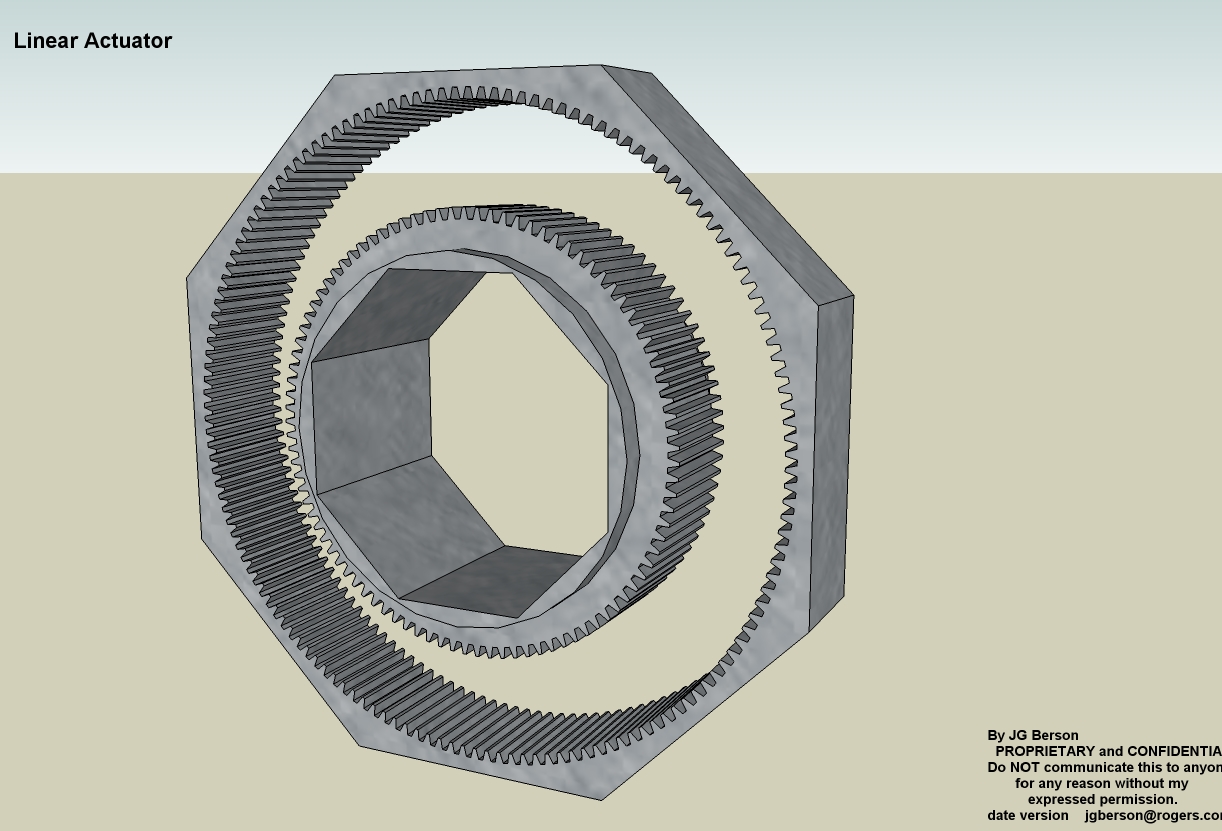
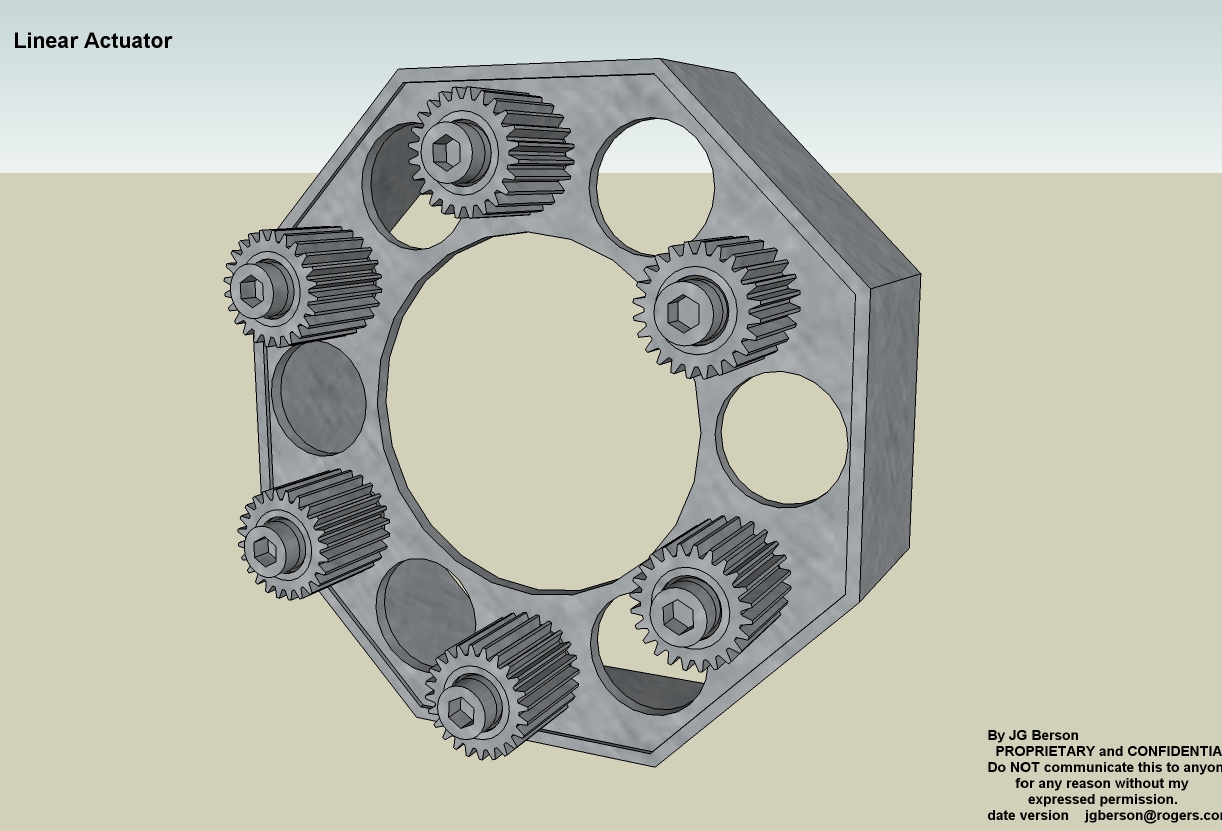
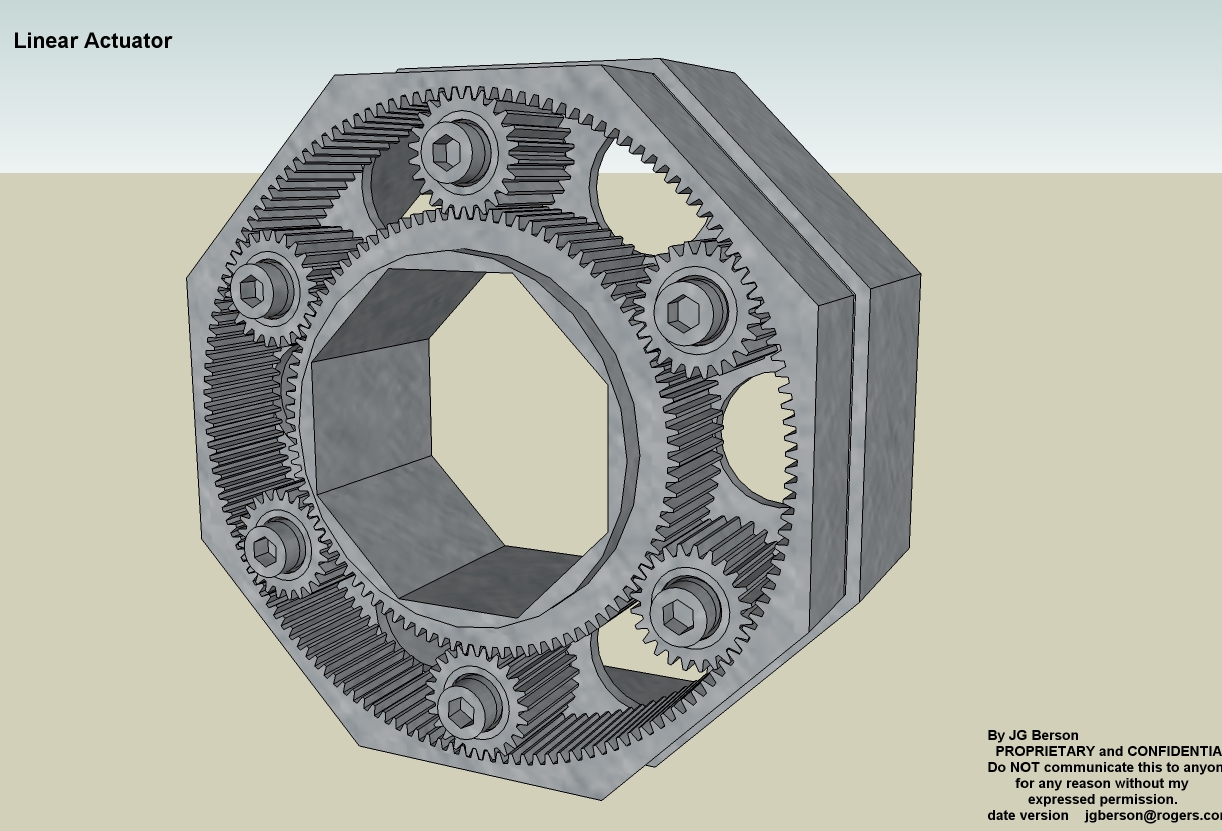
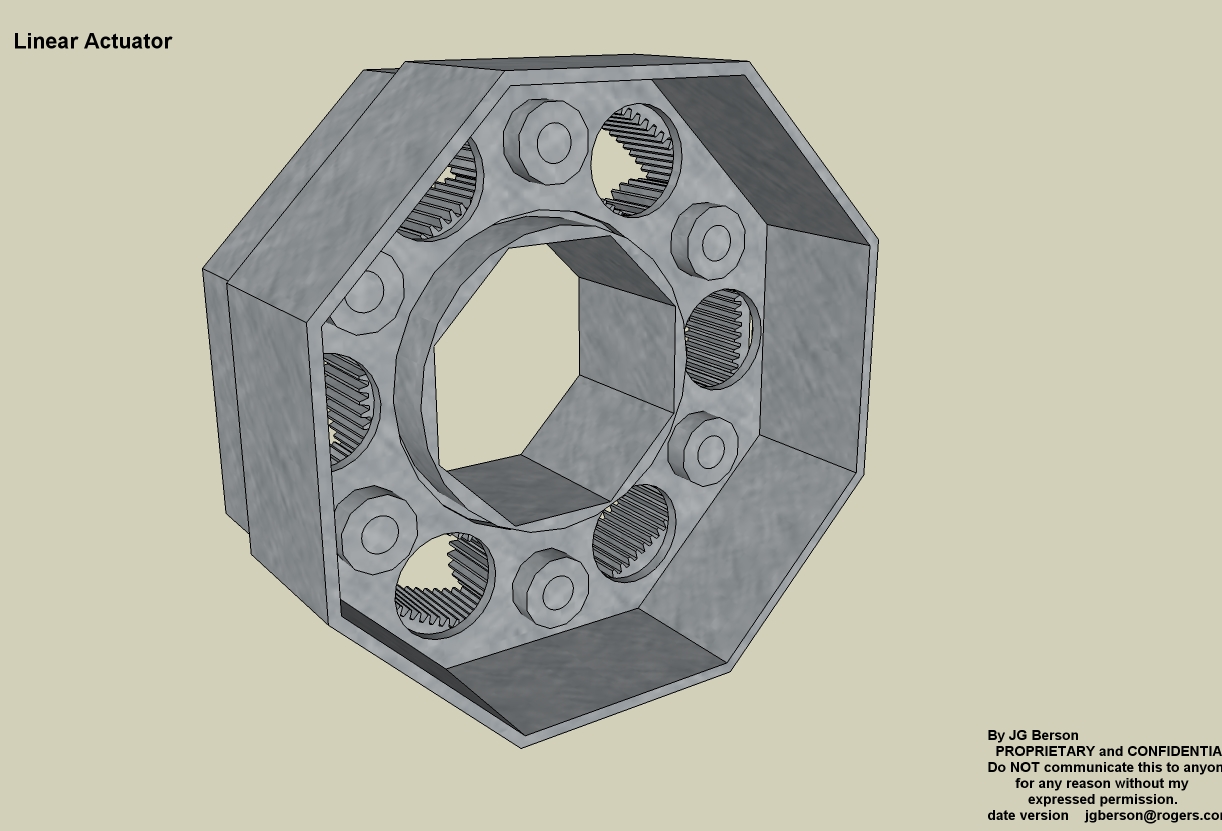
      Attached are 4 pics of the gearbox for an actuator I'm working on on my big airplane project.
      (Straight from SU, no post rendering)

      Sun & Ring Gears - Sun is stationary, the Ring is Input.

      Planet Gears & Spider.  The Spider is Output.

      Assembled gearbox.  Total ratio in this config is .6:1

      Backside view.  The Octagonal ring overlaps the Ring gears octagonal outer edge to drive a cascade of 2 or more gearboxes.

      posted in Gallery
      jgbJ
      jgb
    • RE: Most impressive SketchUp modelling

      I'm not into post-process rendering, but that was impressive. I watched about 50% (fast fwd through repetitive stuff) and that was an education in itself. I'm a big fan of layers in SU, but using layers like he did in post was an eye opener, and for what little of that I do in my photoeditor, I will be using layers to edit. ๐Ÿ‘ ๐Ÿ‘ ๐Ÿ‘ ๐Ÿ‘

      posted in Gallery
      jgbJ
      jgb
    • RE: [Plugin][$] Curviloft 2.0a - 31 Mar 24 (Loft & Skinning)

      @nickgenerator said:

      Because I am really missing the feature I just cannot resist to ask here, too.

      If you are planning new features for Curviloft it would be great when selecting of curves that are part of different components could become possible. (I mean like the right one where two curves can be one contour.)

      [attachment=0:vrc6ns2r]<!-- ia0 -->comp.png<!-- ia0 -->[/attachment:vrc6ns2r]

      Of course I know, that exploding is possible but it is really unconvenient. Especially, because right now you cannot have one instance of the component connected to the path you want to loft with while having the parent somewhere else where it is easier to edit. (You can but if you make the child unique for lofting the connection is gone...)

      I've done something very much like this easily, several times successfully. I've done it with curves from as many as 5 different comps building fairings for my airplane designs.

      Open to edit one of the comps and select only the lines you want the curve to edge on.
      Copy to the clipboard and close the comp.
      Paste in Place the copy and immediately make the copy a comp or group.
      Open the next comp and clipboard its lines as before, then close it.
      Open the lines copy comp/group and Paste in Place, building up the curve control lines.
      Repeat as needed.
      When done, apply Curviloft to the copied lines, and you have a surface that conforms to the lines from several separate comps. Remember you now have 2 groups containing the surface, so delete one of them.

      Also, bear in mind you may also need to do some tweaking of the endpoints common to disparate source comps to close loops, etc, before Curviloft can do a successful surface.

      posted in Plugins
      jgbJ
      jgb
    • RE: How to place object on spiral path?

      Thanks, but for my specific problem that would only be a partial solution.

      It would do the spiral portion OK, but my bearings do a loop back through a specific path, that your solution could not handle. It would require a secondary operation to place bearings on that loopback path, and while not a difficult job, the "String Comps" Ruby did it all in a single step, not counting the path definition step I would need to do for both, if only partially for your solution.

      posted in SketchUp Discussions
      jgbJ
      jgb
    • RE: How to place object on spiral path?

      Thankyou Thankyou. Box and especially Chris.

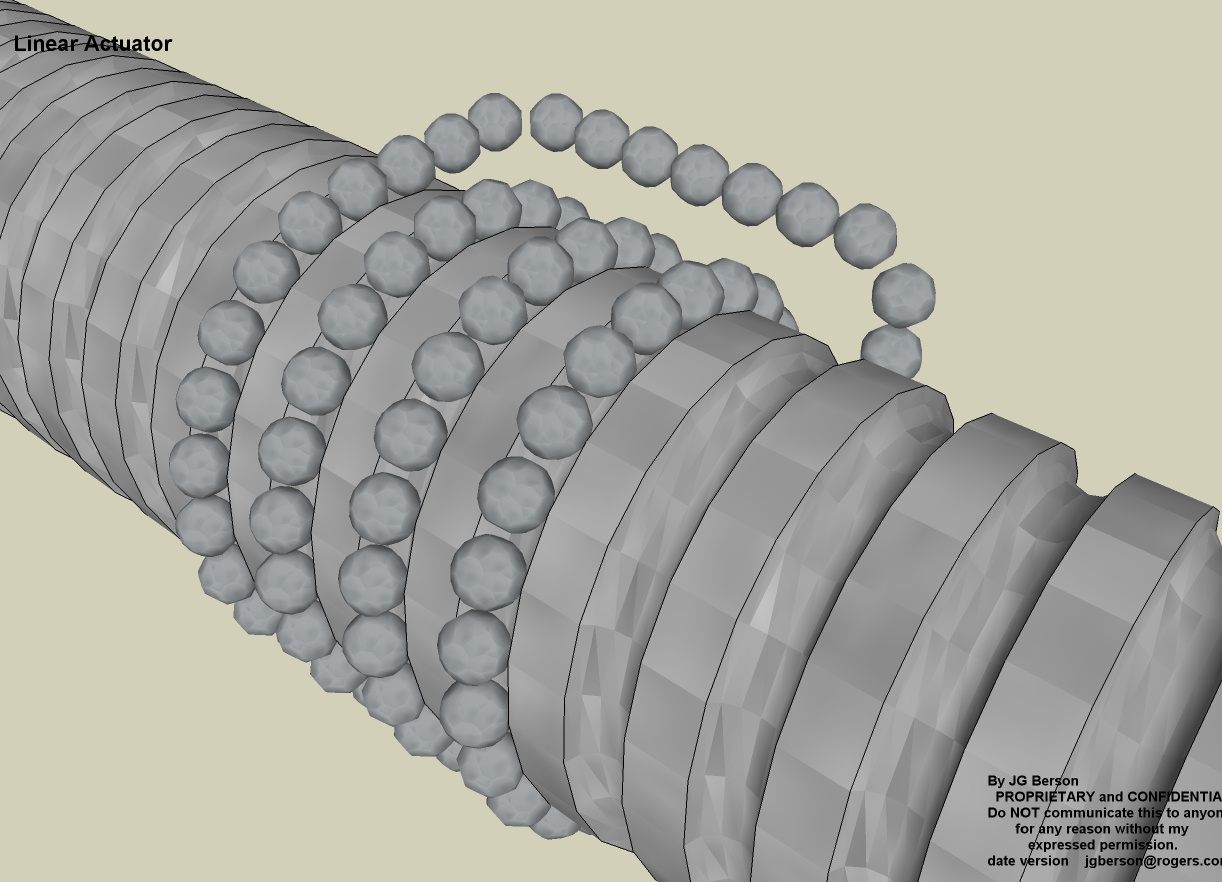
      Took me less than 30 minutes to do this. About 10 minutes to make the path, about 20 minutes to make the ball and tweak it, and 30 seconds to make the bearing group.

      I remember about 2 years ago I did this same construct the hard way. Took almost 2 days to get it right.
      This is an updated total redraw of the machine.


      Recirculating Ball bearing string made with Component Stringer

      posted in SketchUp Discussions
      jgbJ
      jgb
    • How to place object on spiral path?

      I need to place about 100 small balls (1/4 in Diam) on a spiral path. I can define that path with a spiral line that loops back to join itself, like a string of pearls wrapped around a wrist.

      Anybody got any idea how to do that? ๐Ÿค“

      posted in SketchUp Discussions sketchup
      jgbJ
      jgb
    • RE: Solid has an Open Face

      I was really more curious about why than getting a fix. ๐ŸŽ‰

      I edited the "solid" version with the open face, by deleting 1 line of the round hole and redrawing that 1 line. The face re-formed and the object is now a proper solid. ๐Ÿ˜

      posted in SketchUp Discussions
      jgbJ
      jgb
    • RE: Solid has an Open Face

      Thanks, but I really did not understand your explanation. Deleting the red face leaves a hole. Unless the co-planar face is invisible (not just hidden) it should be a non-solid.

      And so, how to fix it, other than redrawing completely that section???

      Also as far as reversed faces go, I know. This object is nowhere near complete. I check for solidity on a regular basis to avoid a huge cleanup when done.

      As an aside, there is a near identical flipped mate to this which is now about a 95% copy, after I made changes to both. The problem geometry was part of that 100% copy before it was made unique and it does NOT suffer the same "open face" problem. I don't know when the problem occurred, but I did make a minor change in that area (at the top of the hole) but not directly affecting the "open face".

      This model is also being plagued with useless hidden lines after almost every intersect I do, and even after extrusions onto planar opposite faces. ๐Ÿคข

      posted in SketchUp Discussions
      jgbJ
      jgb
    • Solid has an Open Face

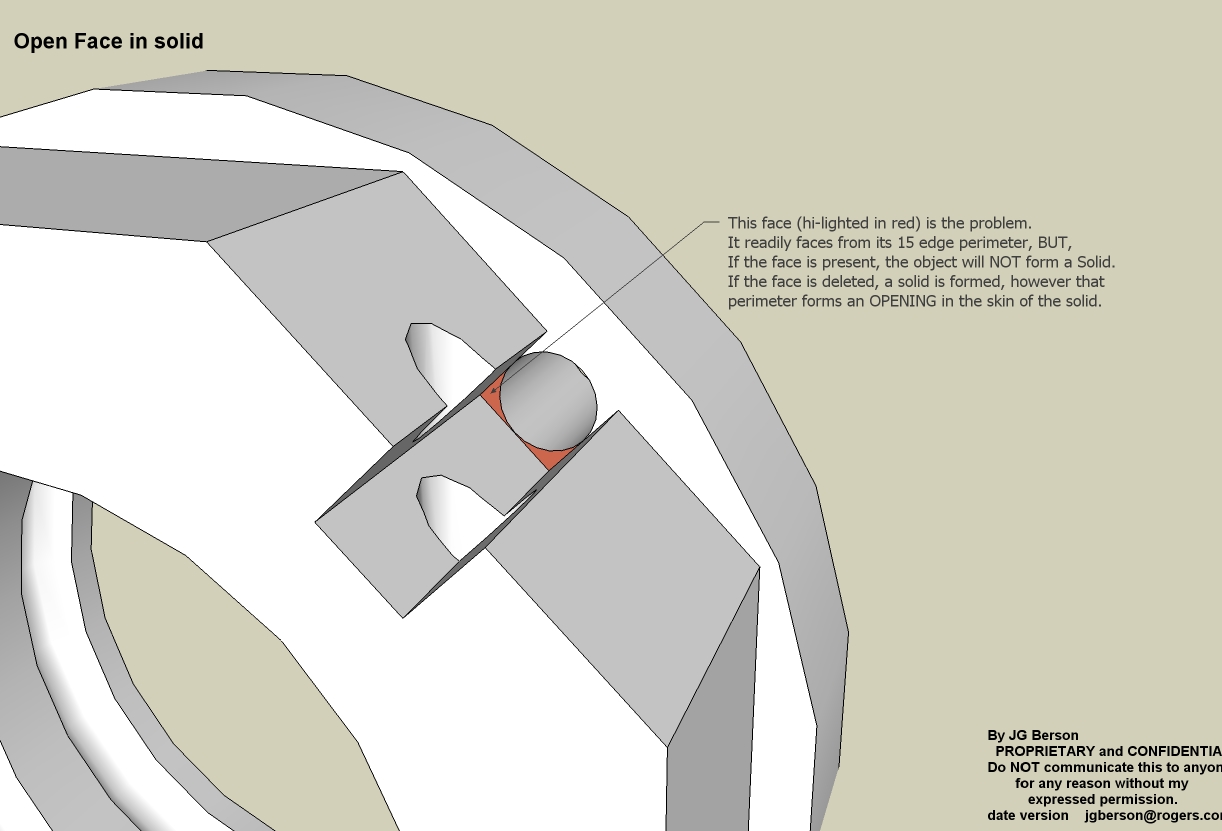
      This is a strange one. This model of a recirculating Ball Bearing ball guide (1/2 of it) has a single face (highlighted in red) on the exterior skin, that if that face is present, indicated by Solid Inspector, the solid will not form. ๐Ÿ‘Ž

      But if the face is deleted, forming a hole in the skin, SI says OK, and the object forms a solid. ๐Ÿ˜ฎ

      The face forms easily from its 15 bounding edges.

      What am I missing here? โ“

      -

      If you delete the red face, a solid is formed.

      posted in SketchUp Discussions sketchup
      jgbJ
      jgb
    • RE: Weird triangulation of faces

      @xiombarg said:

      Another problem that seems to be associated with those micro gaps is that when fixed, often it creates a dual face, especially so when dealing with very small areas.

      I think one aspect that the Sketchup development team needs to recognize is that Sketchup is positioned to be the most widely used and recognized program associated with 3D printing, but this means that Sketchup has to be able to deal with very small geometry, as most of 3D printing currently deals with smaller more ornamental forms.

      I think I know why SU will draw a 2nd or even 3rd face between 3 planar and endpoint joined lines. The endpoints of each line are actually not connected, but within the tolerance to form a face. SU draws a face for each line. Other than using Solid Inspector, or seeing the subtle difference in a smooth face, there's no way to find them.

      You are dead right about SU becoming a standard for 3D printing. A few months ago I attended a seminar for SolidWorks CAD and they had a "gee-whiz" 3D printer there that could lay down a solid model in multiple materials from soft rubber to aluminum in 1 go using inkjet technology. One simple demo part was created in SU and the drawing ported to the printer using an in-development s/w conversion. The presenter aid SU was becoming the poor-mans 3D printer app. ๐Ÿค“

      posted in SketchUp Discussions
      jgbJ
      jgb
    • RE: A MACRO RUBY (Someone please!!!)

      Dave, the way you do detailed threads is pretty much how I do them. You probably use Dynamic Comps, but I only use SU-Free so mine are a far less flexible.

      However filesize is not my concern. Entity count is. I hate the way SU slows down when my total model lines count gets near a million. I use judicious layer visibility but even that sometimes does not help much. Small bolt holes are drawn 12 sided, large holes are standard 24 sides.

      In an airplane structure, sections of parts that are low stressed, like "I" beam webs, typically have large holes in them simply to reduce the weight of material. Hole size, placement and spacing is calculated not to impair strength or stiffness. In my models they are there more-so for a realistic look, as I do not calculate their existence. Like I said, I am not making shop drawings.

      I've attached an extract of my big airplanes cargo floor support structure to demo how I can reduce the entity count of (2) components that are used repeatedly in the model. Normally I do not show most bolts in my structural drawings, but here I had too, as I needed to present a higher level of realism for this model.

      For the majority of holes, large or small, I do not push through the hole to the opposite face. For a 24 sided hole that creates 96 entities per hole, 24 faces and 72 lines. I just draw 2 circles, and paint the "hole" with transparent white, for a total of 50 entities, 48 lines and 2 faces. 1/2 the detailed way. And it maintains solidity, although I have to calculate for the "extra volume" of the fake hole. I also paint both side of any face the same, so looking in a hole doesn't look weird. That also eliminates backside shine through at the edges.

      For holes that are threaded, I used to draw extra circles down the hole to look like threads, and that alone kicked the entity count way way up. So now, instead of transparent color, I use a dark gray. No extra entities. Same for bolts.How to reduce entity count, yet look the same.

      posted in SketchUp Discussions
      jgbJ
      jgb
    • RE: Weird triangulation of faces

      These micro-gaps are pernicious and extremely difficult to find. You can have multiple triangles that seem to endpoint on 1 vertex, but in fact are separate and have their own vertex extremely close to each other. As you said, the only way to fix them is to delete all but 1 line and rejoin the triangles.

      However, the cause of many of these micro-gaps are micro-fragments of lines joining those separated verticies. They are so small, SU cannot make a face using them as 1/3 of the triangle, and leaves the face open. Finding micro-fragments is easy. Just do a very small Left2Right Select on the vertex, then just erase them. Then fix the triangles/faces.

      They are caused by many ways, intersects, most common, but not adhering to endpoints when drawing lines is next most common. Be very careful when joining endpoints that SU does not say "Constrained by ...." which means it wants to put the end of the line you want to draw coincident with an axis line, or snapping to an endpoint just near where you want to go. That for sure will generate gaps and fragments, and faces that simply will not form.

      If you do get that dreaded "Constrained by ..." going from point A to B, then Escape and simply draw the line from point B to A (reverse). For some weird reason that always works. ๐Ÿ‘ฟ

      posted in SketchUp Discussions
      jgbJ
      jgb
    • RE: Have you had a model stolen?

      Some time back I d/l'd from the warehouse a Lockheed C5 Galaxy model I needed for my big airplane project (size comparison only). I spent almost a whole day cleaning it up and correcting some technical errors, affecting about 60% of the model. (I'm not an accuracy nut, but some stuff ya gotta fix! ๐Ÿ˜’ )

      I then reposted the update, BUT I gave full credit to the originator in my notes. That's only the right thing to do.

      posted in SketchUp Discussions
      jgbJ
      jgb
    • RE: Weird triangulation of faces

      I watched the vid. Interesting. While I've stated above why using the scale tool is not ideal, a tip on doing it that way is....

      ๐Ÿ’ญ When you need to get very close to the subject (center handles) before you zoom in, turn OFF perspective. That will allow you the get very close without nearfield clipping.

      After that doesn't work ๐Ÿคข if you examine the model and the affected faces you will notice most of the hidden lines emanate from midway along an edge and some from corners. The Hlines from corners are what you would expect when an intersect happens, as SU draws these potential fold lines before the actual intersect is actioned. SU is supposed to clean up these lines after the intersect, except where the face becomes non-planar. SU does not do a good job of that cleanup.

      But you can rebuild the face with a bit of sleuthing and some line regeneration. Using the erase tool, start deleting Hlines in small bunches. When a bunch defaces, undo and delete the Hlines 1 by 1, leaving the very few lines that deface intact. You will get most of them that way, and if there are any left you can just leave it alone, but we can't do that, now, can we? ๐Ÿ˜’

      You will notice the bulk of the remaining Hlines almost always emanate from somewhere along a line at 1 or both ends. Very rare in my experience they emanate between 2 corners. That means the line has been segmented for some reason, and 1 or more new endpoints have shifted out of "flatness" tolerance from SU's point of view. Delete that line, and its minute segments. The 2 faces it formed will disappear.

      IMPORTANT; do a small left2right select at each corner, to make sure no micro fragments remain, just delete if they appear in Entity Info. That may also delete some other faces, leaving 1 or more lonesome lines, attached at 1 end.

      Replace the lines endpoint to endpoint, and faces should reform.

      Yes, you can end up redrawing much of the perimeter of some really bad cases, but that will cleanup a face and reduce the line count as well.

      posted in SketchUp Discussions
      jgbJ
      jgb
    • RE: Have you had a model stolen?

      TIG just posted an "Invisible Font" which would be ideal to hide copyright notices inside your models.

      Only you would know where they are.

      See the topic......

      http://forums.sketchucation.com/viewtopic.php?f=15&t=42569&p=379946#p379946

      posted in SketchUp Discussions
      jgbJ
      jgb
    • RE: Closer to object.

      Or to put it another way, the wheel zoom rate is proportional to the apparent distance from you (camera) to the object directly under the cursor (even if not selected). So the closer you are the "slower" the zoom. And that also accounts for the so-called "Hyper-Pan" or "Hyper-Zoom" when your cursor lands on empty space during repeated zooms or pans.

      The best recourse after a very slow zoom or when in deep space is to "View Extents" which will ballpark you to your object. "Previous View" is only good for the last 3 or 4 positions before cycling back.

      Another trick is to create a temporary scene before zooming in if you are going to be in close for multiple operations, and need to get back out to a common viewpoint multiple times.

      posted in SketchUp Discussions
      jgbJ
      jgb
    • 1 / 1