Oops, your profile's looking a bit empty! To help us tailor your experience, please fill in key details like your SketchUp version, skill level, operating system, and more. Update and save your info on your profile page today!
🔌 Smart Spline | Fluid way to handle splines for furniture design and complex structures. Download
1- Does it ping the user's PC to see what they have installed?
or
2- Build a data base on a SketchUcation server for each user based upon what they have downloaded via SketchUcation?
======================
At any rate, it seems to work seamlessly. My thanks to the SketchUcation team for its foresight in developing the Tools Plugin.
I suppose if this could be adapted to be non-destructive to the original geometry (it wouldn't do any slicing), then user could draw quick section planes.
Another solution would be for LayOut to be able to import common vector graph formats such as pdf, svg, ai.,etc, and then save it to their internal format.
At times I wish LO had something like a wireframe view where you could select an edge of an object (or group) to select the entire object, then move the object to another layer or bump it up in the current stacking order.
Is there a way to punch a hole in a LayOut shape? For example, you draw large rectangle and then draw a smaller circle inside and over the top of the rectangle; can you subtract the circle from the rectangle.
If not, has anyone suggested to SketchUp folks the ability to apply some basic boolean functions to a selection of objects?
If I wanted to add info to the taskbar below such as:
= Subtract, [
] = Multiply, [/] = Divide, [%] return remainder, [**] = exponent, [ ( ) ] = group functions"*
what would be the proper ruby format and where should it be inserted?
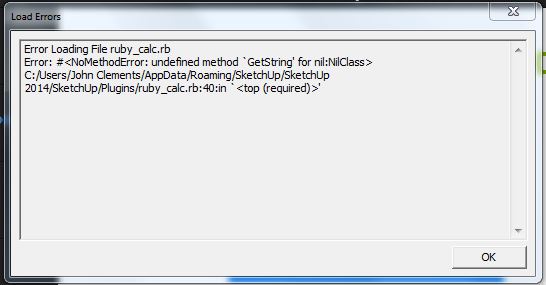
*# Ruby Calc
by Gruff
Oct 29th 2009
Many thanks to a4chitect for the win32ole section
Ruby Calc is a simple SketchUp for Windows calculator.
Feel free to hack and wack it.
Since it is run as a loose procedure rather than a class
it does not kick SU out of the currently running tool
#Try to activate the Sketchup window:
if wsh.AppActivate(' - SketchUp Pro') || wsh.AppActivate(' - SketchUp')
wsh.SendKeys(sanswer)
else
puts "Impossible"
end
end
#---
if( not file_loaded?("ruby_calc.rb") )
add_separator_to_menu("Tools")
[highlight=#ff0000:rs61bj0c]UI.menu("Tools").add_item("Ruby Calc")[/highlight:rs61bj0c] { rubycalc }
end
I had a chance to visit with the Skalp developers at the SU conference in Vail this year. They have been working extremely hard to create a 1st class plugin to deal with sections. They have looked at just about every aspect of sectioning and exploited every opportunity available in Ruby; PLUS a lot of ingenuity has gone into into the design of their UI to present a full-featured sectioning tool. They have not left too many stones unturned. Skalp's documentation is good also. I expect their support and continued development will be of the same caliber.
When disabling a script, it is moved to the right pane and is displayed in red text. Should it also be removed from its respective SU Submenu? It is not happened for me (SU has to be closed and reloaded).