I think ThomThom's Selection Tools and Smustard/Rick Wilson's Instances may be able to do this.
Oops, your profile's looking a bit empty! To help us tailor your experience, please fill in key details like your SketchUp version, skill level, operating system, and more. Update and save your info on your profile page today!
Urasik Extensions | Lots of new extensions to check out Learn More
 Offline
Posts
-
RE: Select Instances/Replace Selected?
-
RE: [Plugin] Dimension management tools
My first impulse is to manage the dimensions just via layer manager that way if you export the component or cut and paste, the layer goes with it.
Placing the dimension outside of their context could result in all sort of unwanted issues.
-
RE: [Plugin] Dimension management tools
Sometimes, workflow could involve modeling different parts as separate models then inserting them or copying-and-pasting them into a new file. In this situation if the separate models have dimensions then the dimensions would become nested. I would think this not to be an uncommon practice, particularly when more than one person is contributing geometry to a project.
I think a checkbox option to act on all nested dimensions inside a component or group or, if not in a nested element, the entire model would be a good thing.
-
[REQUEST] Hide All Selected Layers for All Scenes
I have a site model with several scenes.
I need to import a model of a new facility (call it Option D) which applies to only two scenes of the site model.
It would be far quicker after importing the Option D model, to hide ALL of its unique layers for all site model scenes and then unhide Option D's layers for the two application site model scenes.
If it doesn't already exist, can a script be created to "hide all selected layers for all scenes" ?.
-
Create your own Calculator for Your Website
Hi All:
Perhaps this resource might be useful for any of you that have your own woodworking website.
The site automatically generates the Html code to display and do unit calculations.
Choose the units of measure you want the calculator to use and size of the calculator graphic, then cut-and-paste the resulting html code into your webpage publishing application. -
Suggestions for best plugins for drawing pump profile ?
To Administrator: If this posting is not the appropriate forum, please feel free to move it.
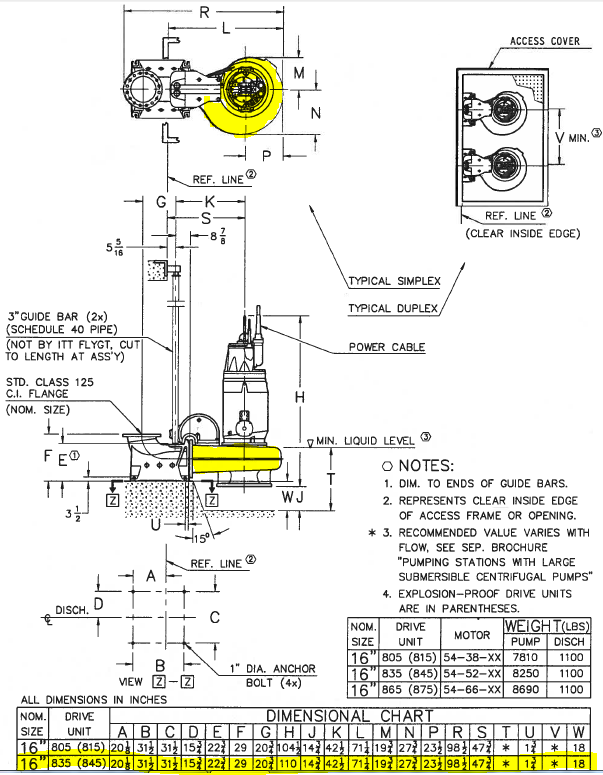
I have drawn pumps before by hand and with using plugins, but I haven't been satisfied because it either took too long or the geometry didn't come out right or it had too many faces.
I've attached an SU2015 model of the top and side profiles of the portion of a pump needing to be replicated. The plan view was drawn with 4 arcs (each with 9 segments) and 2 line segments.
The shape is basically a round(ed) tube.
I would be interested in recommendations for the best plugin (or plugins) to create the 3D shape. If you want, please feel free to the list the steps used to accomplish the shape.
Thanks, John
-
RE: [Plugin] TIG-LayerWatcher
"But at least this fixes the exploding Group/Component issue where its Geometry inherits the container's Layer !"
That is the 5-star attribute of this plugin. Thank you TIG!
-
RE: [Plugin] Hide Overlapping Geometry (Updated 20150511)
I noticed that if the normals of the two overlapping faces are the same (both are "pointing" in the same direction), then the script fails.
-
RE: [Plugin] 3D Text Editor
Hi Thomas:
1.
If a fraction (ie., 1/2) or decimal (.5) is entered for the text size, then the UI gets broken.
Would it be possible to allow size values less than an inch? If not, then can you error-trap for this?2.
When zoomed in, the screen display of the characters while you enter text in the UI may not be seen. Could there be an option to have the text centered in the SU window OR allow the user to click at a location in the SU window where the text is to be displayed? -
RE: [Plugin] FredoTools - v4.5c - 24 Jun 24
Looks to be operating properly now. Thank you.
-
RE: [Plugin] FredoTools - v4.5c - 24 Jun 24
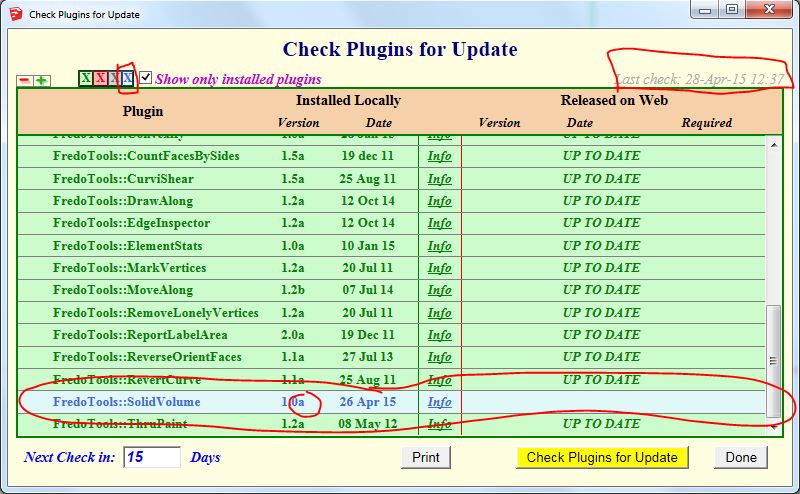
Should this appear in your update log?
-
A way to save Toolbar info?
Is there someway ruby can store your Toolbar info (how they are docked and what is active) and then be used to restore that configuration or be used for other SU installations?
I may be doing some training and this would be help setting up the PCs prior to instruction (some may be student's private laptops).
-
RE: [Plugin][$] Profile Builder 2
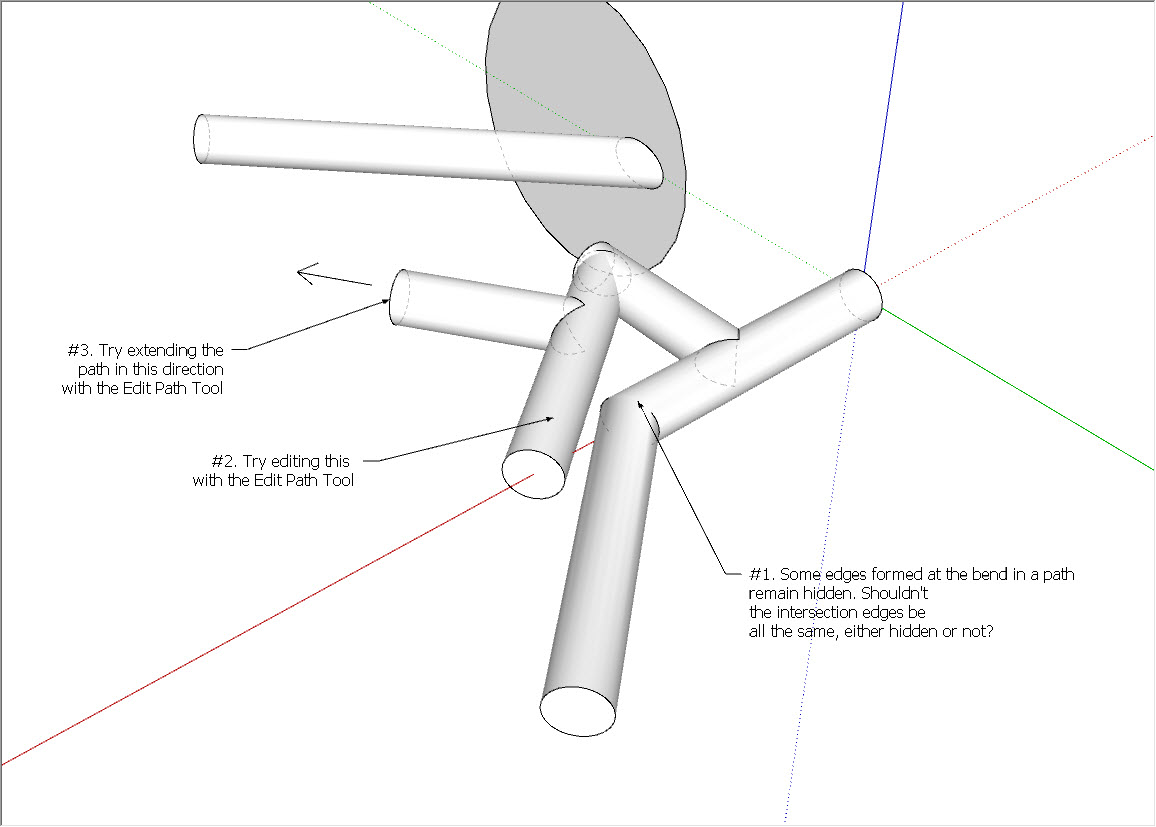
A few quirks.
I kind of expected issues 2 and 3 to happen, but issue 1 is a surprise (I think it is fixable).
-
RE: Outliner: Is there a way to extract data from the Outliner
Thanks, everyone. Learned something new.
I did check the Learning Center for Outliner before posting here, but I didn't see any mention of the report feature.
-
RE: Outliner: Is there a way to extract data from the Outliner
Really? Can you explain how that is done?
-
Outliner: Is there a way to extract data from the Outliner
I have a large model. It contains many components (over 2,000) that originated from DWG sources.
The Component Editor window simply chokes when attempting to display the Model components.
The Outliner, however, is extremely fast responding to searches. Is there a way to export search results from the Outliner to a spreadsheet format?

-
RE: Face Reverse plugins - which is the best
Yes, Fredo, I think it would be very worthwhile to release it as standalone plugin.