sketchucation logo sketchucation
    • Login
    1. Home
    2. jason_maranto
    3. Posts
    Oops, your profile's looking a bit empty! To help us tailor your experience, please fill in key details like your SketchUp version, skill level, operating system, and more. Update and save your info on your profile page today!
    ⚠️ Important | Libfredo 15.6b introduces important bugfixes for Fredo's Extensions Update
    Offline
    • Profile
    • Following 0
    • Followers 0
    • Topics 21
    • Posts 1,011
    • Groups 1

    Posts

    Recent Best Controversial
    • RE: Questions about emitters in free Maxwell Render

      I would say this is a really bad idea with the free version due to the FIRE/draft engine limitations -- and more importantly it's generally a bad idea for realism.

      The reason why is because the sun is super intense compared to any emitters, and being an exterior shot you have to base your camera exposure on the sun -- which would normally be somewhere between EV 14-15 (lower for dawn/dusk)... conversely, the EV values for normal interior lighting is somewhere between 5-8 (generally).

      The only way to get the emitter in such a scene to be seen as "bright" (in relationship to sunlit objects) is to make them completely unrealistically powerful.

      For more information perhaps you will find this helpful: http://en.wikipedia.org/wiki/Exposure_value

      And yes, you can make an image an emitter, but it would need to be an HDR/EXR to do so... however the same physics of light apply (as I outlined above).

      Best,
      Jason.

      posted in Extensions & Applications Discussions
      jason_marantoJ
      jason_maranto
    • RE: Material color change don't work

      If you are changing a simple colored material it will work in "real-time", however if you are attempting to colorize a texture then you will have to manually refresh the scene in FIRE or the changes will not be shown.

      The reason why is a colorized texture has be be re-exported to the engine (as a new texture), whereas a simple "color" does not.

      Any time you make any changes that have to do with changing textures you will have to manually refresh.

      Best,
      Jason.

      posted in Extensions & Applications Discussions
      jason_marantoJ
      jason_maranto
    • RE: Sketchup 9 - a long wait.

      @thomthom said:

      I terms of marketing Google did very good for SketchUp - I agree. But in terms of developing the core application - they did badly.

      How true... I came along right after Google bought SketchUp and was enthusiastic about having such a well moneyed and powerful company behind the product... won't make that mistake again πŸ˜‰

      Best,
      Jason.

      posted in SketchUp Discussions
      jason_marantoJ
      jason_maranto
    • RE: Trimble & Sketchup 64 bit

      @thomthom said:

      Still talking about 64bit? What would you have to be re-inventing?

      Yes. A system for transferring data between 32-bit and 64-bit processes -- it's completely not necessary for a plugin author to do this, and SketchUp is one of the only (supposedly professional) programs I know that would even suggest such a thing be created by a plugin author. And, as I already said, this labor would be rendered redundant once SketchUp moves to 64-bit.

      Whether 64-bit is needful for SketchUp processes is almost irrelevant -- it is needful for nearly every other software one might use in conjunction with SketchUp... and is already supported as such.This is a roadblock for developers to do their best work, and one of the things that makes SketchUp less powerful than the competition. SketchUp is behind, and only getting further behind by the day.

      But even that is irrelevant -- somebody at Trimble will force the dev team to embrace 64-bit and when that happens won't the "32-bit forever" apologist backtracking be fun to watch. πŸ˜„

      Best,
      Jason.

      posted in SketchUp Discussions
      jason_marantoJ
      jason_maranto
    • RE: Trimble & Sketchup 64 bit

      OK -- I resisted the temptation to post about these issues for quite some time but I'm going to throw an alternate viewpoint out there for those who do develop render engine plugins (which I am doing, but not for SketchUp).

      It is not the responsibility of the plugin maker to re-invent the wheel just to have the program perform competitively with comparable software packages. It is in Trimbles best interest (and their responsibility) to make sure Sketchup IS competitive with comparative software packages (and here I'm talking about the Pro version).

      For too long the SketchUp dev team have "passed the buck" to the plugin developers to keep the software even remotely usable at the level of other packages. This is a poor model for several reasons, but the most important is because at any point in time Trimble can change its mind and make hundreds/thousands of man-hours of plugin developers time moot by virtue of making changes in the host app.

      As a developer I would say that it is unreasonable to expect developers to invest time in creating proprietary solutions that will very likely be made obsolete within a version or two. Whether they like it or not Sketchup will be 64-bit soon or it will be a dinosaur(extinct)... it's as simple as that.

      Best,
      Jason.

      posted in SketchUp Discussions
      jason_marantoJ
      jason_maranto
    • RE: Sketchup 9 - a long wait.

      I suppose maybe we misunderstood each other, but I think it may be a difference of opinions about how exactly to interpret that comment.

      You see SketchUp staying the same as a desirable outcome -- I do not. Furthermore, since the bulk of Trimbles interests will be represented as separate "extensions" the bulk of the development time and energy will be expended on those extension instead of on making Sketchup itself better.

      The SketchUp I see is already many years behind, looking like and working very much as a pre-2006 era tool... I blamed this on Google, and had hopes new ownership would rectify the problem.

      Best,
      Jason.

      posted in SketchUp Discussions
      jason_marantoJ
      jason_maranto
    • RE: Sketchup 9 - a long wait.

      @thomthom said:

      And the integration Trimble will do with SketchUp will be in the form of Extensions (plugins). So expect SketchUp's core nature to remain.

      Ugh, this is what I was afraid of... 🀒

      posted in SketchUp Discussions
      jason_marantoJ
      jason_maranto
    • RE: Imported textures not visible in free Maxwell Render

      Open up the entity info window -- when you click on the image it will either say "Image" or "Face"... if it says "Image" then it needs to be converted to geometry (ie Face) by using the explode command.

      Best,
      Jason.

      posted in Extensions & Applications Discussions
      jason_marantoJ
      jason_maranto
    • RE: Soften/Smooth problems with free Maxwell

      I'm not sure what to tell you on this -- smoothing renders as it should on my machine.

      Best,
      Jason.

      posted in Extensions & Applications Discussions
      jason_marantoJ
      jason_maranto
    • RE: Imported textures not visible in free Maxwell Render

      Context click on the imported image and choose explode -- this will make it a real object with a proper SKM material.

      Best,
      Jason.

      posted in Extensions & Applications Discussions
      jason_marantoJ
      jason_maranto
    • RE: Imported textures not visible in free Maxwell Render

      When you say import an image how exactly are you importing the image? The plugin requires textures to be made into SketchUp materials (SKM) and applied to geometry... it then interprets those SketchUp materials either automatically or by your custom settings in the Maxwell scene manager.

      Best,
      Jason.

      posted in Extensions & Applications Discussions
      jason_marantoJ
      jason_maranto
    • RE: Small white dots with free Maxwell Render?

      The white dots are reflected caustics -- they will clear but will take longer in the free versions "draft" mode for FIRE. Here are a few comparison renders (all to SL 12).
      !["Production" mode for FIRE](/uploads/imported_attachments/BaHX_chair_SL12.png ""Production" mode for FIRE")!["Draft" mode for FIRE](/uploads/imported_attachments/IzHc_chair_SL12_draft.png ""Draft" mode for FIRE")

      and as a slightly counter-intuitive work around I would reduce the roughness to 0 -- which causes the caustics to be less of an issue... as you see in this render (which will be the file I PM back to you).!["Draft" mode for FIRE with 0 roughness plastic](/uploads/imported_attachments/jY51_chair_SL12_draft2.png ""Draft" mode for FIRE with 0 roughness plastic")
      Best,
      Jason.

      posted in Extensions & Applications Discussions
      jason_marantoJ
      jason_maranto
    • RE: Small white dots with free Maxwell Render?

      If you care to share the SketchUp file with me (by PM) I can take a look and see what I can do -- otherwise I'm just guessing.

      Best,
      Jason.

      posted in Extensions & Applications Discussions
      jason_marantoJ
      jason_maranto
    • RE: Small white dots with free Maxwell Render?

      This could be alot of things -- a few of the more likely:

      • materials with colors too intense -- for instance "white" is really 225 RGB (the white of a sheet of paper) rather than 255 RGB... which will definitely cause noise. I tend to keep saturation below 225 as well for colors.

      • Using dielectrics (Glass, Water and SSS) will not only cause the render to slow down alot but the caustics will be difficult to resolve (or even practically impossible depending on the lighting situation). Typically for SSS I expect to render to at least SL 20-25... glass/water can be much higher. Best advice is to use AGS instead of Glass.

      • Using emitters with the physical sun/sky can cause power disparity -- Maxwell is optimized to resolve the noise of most powerful emitters first... and the sun is much more powerful than any other emitter. But you should be avoiding emitters with the free plugin anyway.
        Best,
        Jason.

      posted in Extensions & Applications Discussions
      jason_marantoJ
      jason_maranto
    • RE: Free Maxwell Render UV mapping problem

      Well, it does appear darker to me in the SketchUp viewport as well -- I think somehow the texture/UVs have been scaled down by the ThruPaint plugin in that area.

      Best,
      Jason.

      posted in Extensions & Applications Discussions
      jason_marantoJ
      jason_maranto
    • RE: Free Maxwell Render UV mapping problem

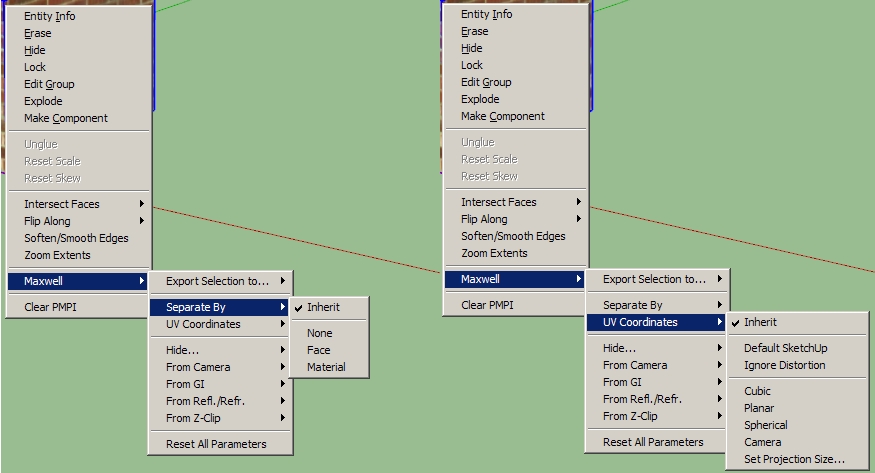
      I'm not sure if the stand-alone plugin has any of these options, but if it does trying some of them may be a good idea (the geometry needs to be grouped to access the context menu).

      MaxwellUVoptions.jpg

      My gut tells me Separate By>Face may be what you need here, but I think it may be something you have access to only with the full render suite version of the plugin.

      Best,
      Jason.

      posted in Extensions & Applications Discussions
      jason_marantoJ
      jason_maranto
    • RE: Free Maxwell Render UV mapping problem

      I have not used that plugin, so I can't say for sure -- however the first thing I would try is explode the groups... I've seen alot of SketchUp/Maxwell weirdness due to material scaling issues with re-sized groups and components.

      As a result I tend to explode as much as possible before rendering any complex project... particularly if I didn't model/texture it myself.

      Best,
      Jason.

      posted in Extensions & Applications Discussions
      jason_marantoJ
      jason_maranto
    • RE: Grass!

      Cool β˜€ I'm glad to help -- after all what else would I do with my SketchUp/Maxwell nerdyness πŸ€“

      Best,
      Jason.

      posted in Extensions & Applications Discussions
      jason_marantoJ
      jason_maranto
    • RE: Grass!

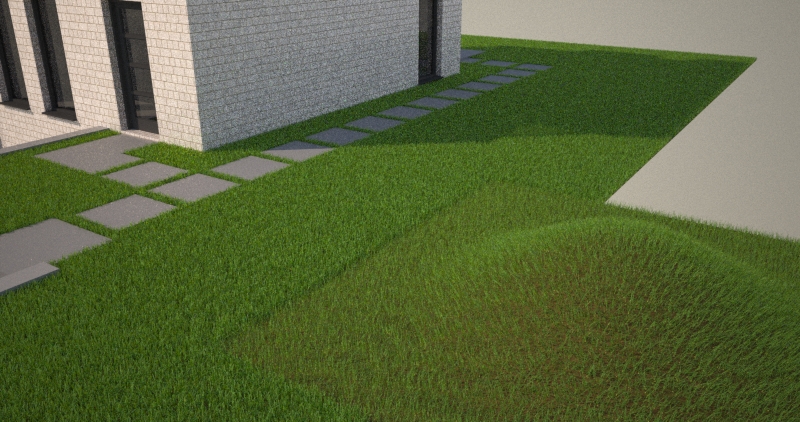
      simpel-huis-3d-002.jpg
      OK, so this was pretty easy to fix -- some of the issue was the way materials were used and (potentially) some of it was geometry.

      Basically the main issue was the use of the grass MXM material -- that MXM should only be applied to the grass modifier itself -- the base geometry needs a completely different material... I used a simple solid brown "dirt" material here, but you can get as fancy with that as you want.

      The next thing is you do not want the grass geometry to go beneath other objects (like the walkway slabs) or the grass may grow "through" them as well... Here I just went into your grass group and deleted any geometry below the slabs.

      I also made some modifications to the main grass modifier but that was only for my aesthetics πŸ€“

      I'll PM you the edited file so you can look it over.

      Best,
      Jason.

      posted in Extensions & Applications Discussions
      jason_marantoJ
      jason_maranto
    • RE: Grass!

      I've never seen anything like this before -- can you post a sample file for me to look at?

      Best,
      Jason.

      posted in Extensions & Applications Discussions
      jason_marantoJ
      jason_maranto
    • 1
    • 2
    • 11
    • 12
    • 13
    • 14
    • 15
    • 50
    • 51
    • 13 / 51