sketchucation logo sketchucation
    • Login
    1. Home
    2. jason_maranto
    3. Posts
    Oops, your profile's looking a bit empty! To help us tailor your experience, please fill in key details like your SketchUp version, skill level, operating system, and more. Update and save your info on your profile page today!
    ⚠️ Important | Libfredo 15.6b introduces important bugfixes for Fredo's Extensions Update
    Offline
    • Profile
    • Following 0
    • Followers 0
    • Topics 21
    • Posts 1,011
    • Groups 1

    Posts

    Recent Best Controversial
    • RE: Render package options?

      Certainly true, but working in a large company having access to all of the Maxwell plugins can be useful -- with just one license you can have several people working in several different applications at the same time (via the plugins)... some doing scene setup (SketchUp, 3DSMax, etc.), others doing postwork (Photoshop, Nuke, After Effects). And with the 5 render nodes you could have as many as 6 scenes rendering at a time... as far as I can see the only thing the license is tied to is the computer(s) doing the actual rendering.

      My point wasn't so much that Thea was a bad value, just that "value" is a subjective idea.

      But yes, testing and research is the only way to know what might be your best fit. 👍 👍

      Best,
      Jason.

      posted in Gallery
      jason_marantoJ
      jason_maranto
    • RE: Render package options?

      @solo said:

      Then there is the price, by far the best value for money based on what you get.

      I think this can be a bit misleading -- it is a good value, but if you take Maxwell for comparison you can see that Thea is not the best value. The full Render Suite of Maxwell comes with all plugins for free (and offers many that Thea does not like Photoshop, Nuke, and After Effects... 17 in all) -- it also offers 5 free render nodes.

      If you add up all the price of all plugins Thea offers, and the render node difference, Thea comes out to be more expensive -- and you could easily make the argument that you get less for your money (depending on your needs).

      Each engine has it's strengths and weaknesses (which can be listed on and on) but "value" is definitely in the eye of the beholder, and depends entirely on your needs.

      Best,
      Jason.

      posted in Gallery
      jason_marantoJ
      jason_maranto
    • RE: Render package options?

      Maxwell Render could be a really nice fit for your needs -- it handles exterior shots excellently and setup time is minimal. You can opt to work inside Sketchup exclusively if you like (via the Standalone plugin), however I would recommend you go with the full Render Suite... the reason being the plugin is the same in the sense you can work exclusively within Sketchup still, but if you determine you need more power you can always go outside SketchUp to do what you need.

      There are plenty of tutorials starting with these: http://www.youtube.com/playlist?list=PLC6E0E0B6921A94E5

      I have also made a huge library of free ready-made Sketchup materials that auto-convert to Maxwell materials at rendertime, including the entire line of Arroway textures (you need to own the textures for these to work).

      Best,
      Jason.

      posted in Gallery
      jason_marantoJ
      jason_maranto
    • RE: Maxwell Render v2.7.20 Release

      Use Maxwell Z-Clipping instead of SketchUp section planes for the type of scene you have shown -- this works, always has.

      Best,
      Jason.

      posted in Extensions & Applications Discussions
      jason_marantoJ
      jason_maranto
    • RE: Maxwell Render v2.7.20 Release

      Both of those images could be easily done using the Z-Clipping features of Maxwell...

      Best,
      Jason.

      posted in Extensions & Applications Discussions
      jason_marantoJ
      jason_maranto
    • RE: Maxwell Render v2.7.20 Release

      I know this is a major new feature of the new plugin for Indigo -- which is made by Whaat, who also makes Zorro, so it is a natural fit... but AFAIK there has never been any official direct support in the Maxwell plugin for SketchUp clipping planes (that doesn't mean it wasn't in there at some point in time as an undocumented alpha feature).

      Best,
      Jason.

      posted in Extensions & Applications Discussions
      jason_marantoJ
      jason_maranto
    • RE: Maxwell Render v2.7.20 Release

      I've got a copy of the Maxwell 2.7.10 patch installs (but not the full version) -- PM me if you want to get them from me.

      As far as I know sections planes are still not supported in Maxwell outside of the "Z-Clipping" plane. However you can use a section plane to actually cut away the geometry in Sketchup... what I would do is to set the "cut-away" geometry to a group assigned "Hidden from Camera".

      Best,
      Jason.

      posted in Extensions & Applications Discussions
      jason_marantoJ
      jason_maranto
    • RE: Maxwell Render v2.7.20 Release

      Are you talking about the draft engine? I've not noticed anything specific with the production engine, but I do not do interiors very often, and they tend to be the hardest to clear.

      Best,
      Jason.

      posted in Extensions & Applications Discussions
      jason_marantoJ
      jason_maranto
    • RE: Scaling MXM materials in Maxwell Studio

      If you are trying to apply the material in Maxwell Studio then you have 2 possible approaches:

      1. You can manually set the tiling (in relative units or meters)for all the textures in the MXM to get what you want

      -or- (and this is the easier option)

      1. You can enter UV editing mode with the (object selected) and use the move/scale/rotate widgets to alter the UV's to suit what you are looking for.

      I used to do most of my texturing in Maxwell Studio with the old version of the plugin -- but since the newer versions addressed many of my concerns with this I just do it in SketchUp more often than not.

      Studio still has several advantages for the SketchUp user:

      • You can compile a scene made from many different modelers/assets -- which can be hard with SketchUp due to it's poor import capabilities and low performance with high poly counts.
      • Creating/editing MXM materials is a seamless process in Studio.
      • You can stack multiple Grass modifiers easily for more complex Grass effects.
      • I use HDR Light Studio with Maxwell Studio (via the plugin) and can't do without it (although it's utility is limited in Arch Viz)

      That said, if you are only working with SketchUp models, and don't feel limited by SketchUp poly counts, then you will likely find the plugin (and MXED) to be all you need most of the time. I work mostly in Studio, but that is because I utilize everything I listed above on a regular basis... I use SketchUp to get things built and mostly textured and then go to studio to fine-tune everything and add in other assets that SketchUp cannot handle.

      When I say "mostly textured" I am mostly using my RAL and Arroway sets of materials which all have a SketchUp (skm) material which is very easy to apply (like any SketchUp material) -- if I need to built a new MXM I tend to do that in Studio... I just find the flow of creating/editing materials to be faster in Studio.

      Best,
      Jason.

      posted in Extensions & Applications Discussions
      jason_marantoJ
      jason_maranto
    • RE: Scaling MXM materials in Maxwell Studio

      What does the material look like in the SketchUp viewport?

      Best,
      Jason.

      posted in Extensions & Applications Discussions
      jason_marantoJ
      jason_maranto
    • RE: [WIP] villa Skanör, Sweden

      These are great! You really know how to get the best out of the free version of the Maxwell plugin 👍 👍

      Since you are using the clay render for the details inside are you using real glass for the windows? If you are currently using AGS, you may find real glass could give better results after the compositing (but slower rendering)... sometimes the AGS can give odd results (to my eyes) when used in double thickness. I've attached the "clear" formula of AGS to this, which is unavailable in the plugin and IMO gives better results than regular AGS.

      Also, in this case you might use a white "clay" to match the color of the walls inside... my RAL lines have a "diffuse" color range that could be useful for a technique like this. Actually, now that I think of it, using SketchUp Layers (auto MXM) override to do a "multi-color clay render" might be even more useful... but after looking it up in the manual it says that feature is not available in the "stand-alone" plugin.

      Best,
      Jason.


      AGS Clear.zip

      posted in WIP
      jason_marantoJ
      jason_maranto
    • RE: Trimble & Sketchup 64 bit

      No doubt, but that just costs me more money since those features won't be built into SketchUp and most of the things I want/need are paid plugins...

      That's not to knock the plugin/3rd party people -- those people (including you) are the only thing which make SketchUp usable to me... so anything that makes your life easier I'm all for 😄

      However, it would be nice to be thrown a bone or two by SketchUp proper for a change.

      Best,
      Jason.

      posted in SketchUp Discussions
      jason_marantoJ
      jason_maranto
    • RE: Trimble & Sketchup 64 bit

      Oh, I was more or less content to "wait and see" -- however John has already announced via his posts (in this thread) that there will be no 64-bit SketchUp (Pro or otherwise). So there's no point in waiting to gripe, might as well express my displeasure now, so I'll be happy again by the time SketchUp 2013 (ugh) is released. 😉

      At this point, aside from some talk about Layout getting some much needed love, I've got nothing to look forward to -- since AEC specific tools mean squat to me.

      Best,
      Jason.

      posted in SketchUp Discussions
      jason_marantoJ
      jason_maranto
    • RE: Trimble & Sketchup 64 bit

      @thomthom said:

      Google Product Forums

      favicon

      (productforums.google.com)

      That thread is interesting to me because it shows how much my opinions have changed in the 2+ years since I posted there. At that time I was very much in line with the 32-bit apologists, but if you read carefully you will see why:

      1. I recognized there was a limited amount of development that the SketchUp team was capable of and I would rather they put their energy into other tools (UV unwrap tools to be specific).

      2. At that time there was no rendering within SketchUps process by Maxwell, so everything that got rendered was outside of the SketchUp 32-bit limited process.

      So why the complete change of attitude on my part in just 2 years?

      1. The supposed excuse of "limited resources" for development imposed by Google has theoretically been eliminated -- if that is so then why not wish/ask for more.

      2. It has become clear to me that my pet toolset (proper UV unwrap tools) will never be embraced by John -- If I have to live with such a limited modeling /texturing toolset inside SketchUp then I want it to be the most robust platform it can be.

      3. The technology around SketchUp has changed dynamically in the meantime and SketchUp seems to be stuck in a rut -- at first I was prone to believe it was a limitation imposed on the team by Google, but with John's recent comments here it has become clear to me that it is actually him that is the roadblock.

      How much have things changed for me in that time-frame? At that time none of my software (except Maxwell) took advantage of 64-bit -- now all of them do... and I see better performance from all of them because of it. Not only that but not a single one offered excuses as to why they wouldn't do it, they just did it, because it was the obvious way forward.

      So I can only come to one of three conclusions, either:

      1. SketchUp was made in such a way that the core is impossible to update to 64-bit, and all of this is simply a distraction from that fact (which seems to be the most likely possibility).

      2. Trimble is not serious about SketchUp itself being a competitive "Pro" product, and they have handed down directives to focus the dev teams attentions elsewhere (like Google did, but with a different focus).

      3. John Bacus is going to be the death of SketchUp, because he stubbornly refuses to get with the times (I doubt this, because he would be fired before long if this were true).

      Best,
      Jason.

      posted in SketchUp Discussions
      jason_marantoJ
      jason_maranto
    • RE: Maxwell Render - Hidden Emitter Problem

      @unknownuser said:

      And Mr Maranto swoops in to save the day yet again!! 😄 Jason, any chance you'd fancy being my roomie??!! The rent will be non-existent for as long as you are my Sketchup/Maxwell Render slave!!! 😉

      😄 I'm good with that, but I'm sure my wife might have a issue with me being another woman's slave (even if it is only for Sketchup/Maxwell).

      Best,
      Jason.

      posted in Extensions & Applications Discussions
      jason_marantoJ
      jason_maranto
    • RE: How to render a carpet and lights (Maxwell plugin for SU)

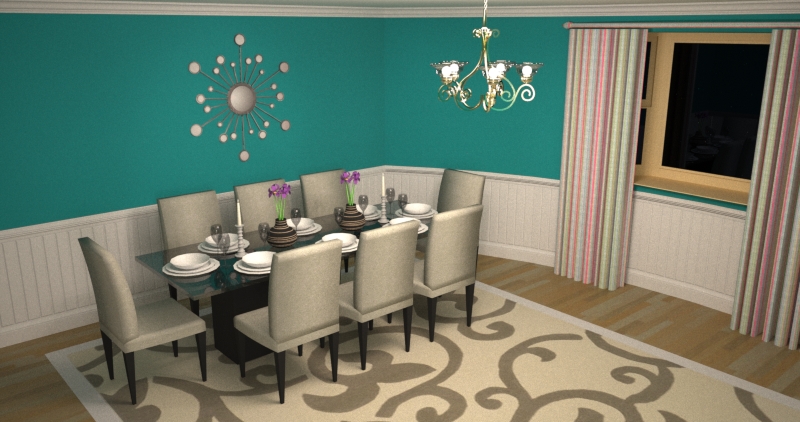
      I'm sorry to say that I just don't think the “Draft” engine is up to the task of a scene like this – I tried a bunch of things, and there were some issues, but fixing them had little impact of the draft engines output... at the end of the day the draft engine still can't clear the noise within a reasonable time/SL.
      Draft engine SL18
      If this is the type of scene you need to render often I think it really is going to be needful to use the production engine – which can do it no problem (see attached example).
      Production engine SL14
      On the off chance you want to know what I tried here is a description of what I changed (and the updated file):
      ChandellierWithNoGlass_jmods.zip
      After taking a look at the file I started to make some edits – the first thing I did was remove any geometry that wasn't needed for the render. Partially because this helps me get my bearings and find flaws but also because this makes the SketchUp file more compact. I made quite a few geometry changes and you can look at those and decide for yourself... most notably the chandelier and the rug.

      Then I started looking at the Maxwell settings – in particular the camera settings were very unrealistic. You had it set for an EV of 1 – for interiors a EV of 5-7 is more normal.

      Once I set the EV to 5 to get the camera exposure more natural I adjusted the materials – I added 2 materials: “jason emitter” and “jason emitter plane”. I used the first for the “bulbs” of the chandelier and the the second was used on a plane I set behind the camera to be used as a “fill light”.

      Other than that I made some tweaks to the various materials looking for too bright colors or materials using textures which were too bright. I was careful to use the entity info palette and remove any conflicting materials – meaning if the group level had one material assigned but the subgroup level had another (the table set was an example of this).

      I changed the wall and ceiling into my “painted wall” material, which you can download here:
      http://www.maxwellrender.com/forum/viewtopic.php?p=349725#p349725

      Sorry I can't give you better news.

      Best,
      Jason.

      posted in Extensions & Applications Discussions
      jason_marantoJ
      jason_maranto
    • RE: Maxwell Render - Hidden Emitter Problem

      The sphere should be set to hide from GI as well as hide from camera.

      Best,
      Jason.

      posted in Extensions & Applications Discussions
      jason_marantoJ
      jason_maranto
    • RE: How to render a carpet and lights (Maxwell plugin for SU)

      Here are some answers:

      1. Add a bump/normal map (normal map preferred) to the material... without MXED there's not much else you can do here.

      2. AGS does not refract light (like glass/water/etc.) so it acts more like a reflective screen than a glass object... I don't think you will ever get a realistic results from AGS in this instance. Its designed purpose is for glazing (windows).

      Also it looks like you have an emitter material assigned to the actual chandelier geometry, but I can't be sure since I don't have the file to look at.

      1. White paneling at 230 is probably too high, white paper is 225 and paint is almost always less "white" than paper. However that is not likely the issue -- but again I couldn't get to root of the issue without seeing the file. That said, I would not have high expectations of the draft engine in these scenarios, it will clear (eventually) but take much longer (read: higher SL) than the production engine for the same interiors.

      I show many examples of this fact here:http://sketchucation.com/forums/viewtopic.php?p=372974#p372974

      My best advice is to find a way to share the file with me so I can take a look -- anything else is just me guessing.

      Best,
      Jason.

      posted in Extensions & Applications Discussions
      jason_marantoJ
      jason_maranto
    • RE: Trimble & Sketchup 64 bit

      I though we all established long ago that SketchUp isn't really so much a complete package but rather a platform... if that's true than it would be a pretty sorry platform that doesn't support 64-bit. SketchUp was pretty cool 5 years ago -- but alot of time with no significant developments has allowed its competitors to pass it by.

      I'm not asking SketchUp to be anything more than it really is, a platform for better software and plugins that use Sketchup as a host shell.

      However, I think it's pretty clear that it won't happen, there's no way one of the dev team (and such a prominent one) would stick their neck out publicly so soon after the transition without a clear idea of will happen on the subject. They would simply be setting themselves up for public embarrassment later when they have to hype the 64-bit feature as a good thing.

      Best,
      Jason.

      posted in SketchUp Discussions
      jason_marantoJ
      jason_maranto
    • RE: Render transparent png imgage files in free Maxwell Render?

      Unfortunately I do not -- You can get sample size free textures from Arroway, but they are often too low-rez to be suitable for anything besides far backgrounds.

      Perhaps somebody else can help in this regard.

      Best,
      Jason.

      posted in Extensions & Applications Discussions
      jason_marantoJ
      jason_maranto
    • 1
    • 2
    • 9
    • 10
    • 11
    • 12
    • 13
    • 50
    • 51
    • 11 / 51