sketchucation logo sketchucation
    • Login
    1. Home
    2. jason_maranto
    3. Posts
    Oops, your profile's looking a bit empty! To help us tailor your experience, please fill in key details like your SketchUp version, skill level, operating system, and more. Update and save your info on your profile page today!
    ⚠️ Important | Libfredo 15.6b introduces important bugfixes for Fredo's Extensions Update
    Offline
    • Profile
    • Following 0
    • Followers 0
    • Topics 21
    • Posts 1,011
    • Groups 1

    Posts

    Recent Best Controversial
    • RE: Sample Model for Rendering

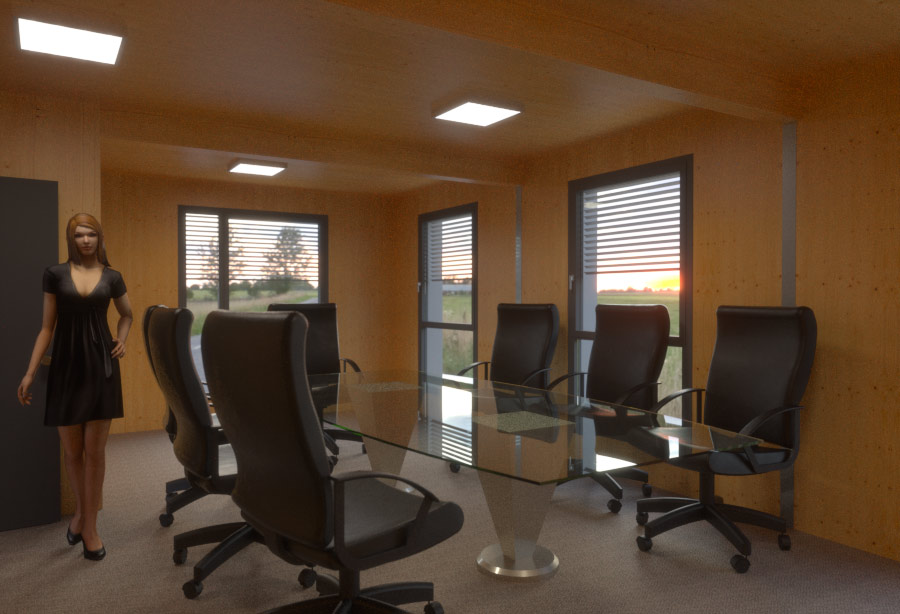
      Here's another shot with Maxwell using some of my Arroway and RAL materials -- I also added more lights and re-arranged the existing ones slightly. I'm not sold on the floor I used, I may do another version at some point.

      meeting_room_sample2_simulens.jpg
      Also I really think this model needs more details, like baseboard/trim and electrical sockets to be a bit more interesting/realistic.

      Best,
      Jason.

      posted in Gallery
      jason_marantoJ
      jason_maranto
    • RE: Maxwell Emitters not working...Please Help

      Thank-you -- as I say I don't show much because it is just "a means to an end" for me. For instance I may be in the middle of a painting and I hit a difficult spot (to figure how to light), so I whip up a render to see what Maxwell thinks about it... it's very similar to how a person might use a calculator to check their answer to a hard math problem.

      I'm really enjoying seeing your work as well πŸ˜„

      You can create a sun animation from your exported MXS file using Python scripting with the render suite version of Maxwell, but since that's completely outside of SketchUp so I tend not mention those things here.

      There's plenty I don't know -- but it's part of my job to stay on top of the software's I teach, so I don't mind answering questions whenever possible. I'm sure there will come a day very soon when you will be able to help someone else in much the same way β˜€

      Best,
      Jason.

      posted in Extensions & Applications Discussions
      jason_marantoJ
      jason_maranto
    • RE: Maxwell Emitters not working...Please Help

      The % has to do with the final destination SL you have set -- if you have it set for a high SL (20 or above) then it will not show a high % until you get to roughly SL 15 and above.

      Multi-light is definitely one of the reasons I prefer the render Suite version rather than the stand-alone but there are others as well... however you cannot animate the sun from SketchUp since SketchUp does not really have any real animation tools to speak of (other software that Maxwell supports can do such things, so it's not a Maxwell limitation)

      My renders float arround a bit, since I don't do final renders as a commercial project I tend not to show much, but occasionally I'll post something in these forums. Probably the only thing I have handy right now is here: https://picasaweb.google.com/115419104654687676842/Solaris

      Best,
      Jason.

      posted in Extensions & Applications Discussions
      jason_marantoJ
      jason_maranto
    • RE: Maxwell Emitters not working...Please Help

      Maxwell is much maligned for its long render times -- and certainly compared to a biased renderer (like Vray) it will take much longer. This is particularly true of interior shots, which would likely be your primary use for the software.

      Typically I leave my final renders cooking overnight, so they usually get about 12-16 hours to get to what I would call done (typically SL 20) for a good sized render.

      From my POV it really all comes down to what you need the software for -- it you are going to be doing just a few high quality renders a week then Maxwell is an excellent choice. If on the other hand you expect to be doing several per day then you should probably look at a biased solution. That's not to say there aren't studios using Maxwell for animations, where you would need alot of frames per day... they just have the computing power to throw at the problem (the full version of the render suite allows you to network computers together to speed up the process). With Maxwell the end result is the only real way to speed things up (at a certain point) is to use a stronger computer (or many of them together).

      For the record I do own a few biased render engines, and while they are cool to play with, what I need for my work is what Maxwell gives... and I don't mind waiting for it.

      SketchUp Pro has a few advantages with Maxwell but probably not enough to justify the expense on that alone... currently the best argument for SketchUp Pro is Advanced Camera, Layout and Dynamic Components.

      Best,
      Jason.

      posted in Extensions & Applications Discussions
      jason_marantoJ
      jason_maranto
    • RE: Sample Model for Rendering

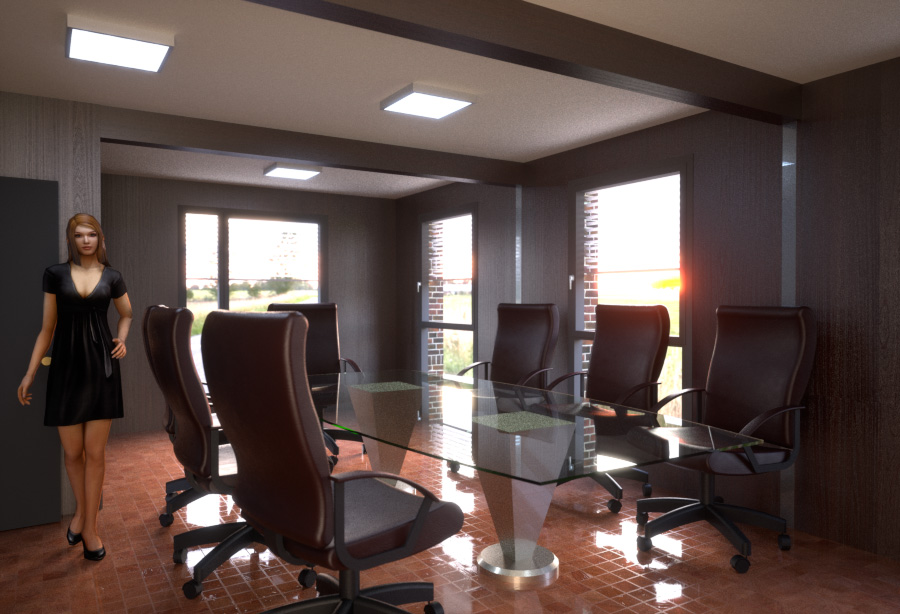
      Here's a whack at it with Maxwell -- I tried to make the least amount of changes possible, but I did opt to use a free sample HDR for the background from http://www.hdri-locations.com/ for a more subdued tone. I used the Maxwell "Simulens" effects at the end for a bit of bloom and whatnot.

      meeting_room_sample.jpg
      I'll probably take another whack at it with more custom materials and add some lights.

      Best,
      Jason.

      posted in Gallery
      jason_marantoJ
      jason_maranto
    • RE: Maxwell Emitters not working...Please Help

      The paid plugin contains the real "production" Maxwell Render engine -- whereas the free version contains only the FIRE "real-time" preview engine. IMO the FIRE engine is really only suitable for product rendering shots or outdoor scenes since it is meant for quick calculation of simple lighting. Whereas the "production" engine is going to give much better results for complex lighting (like you would typically find with indoor scenes).

      That said, at this point you may find it is a better value for you to go this path instead of the "pro/paid" version of the stand-alone plugin): http://www.maxwellrender.com/education/learning_edition

      Best,
      Jason.

      posted in Extensions & Applications Discussions
      jason_marantoJ
      jason_maranto
    • RE: Maxwell Emitters not working...Please Help

      I'm glad you got it sorted πŸ˜„

      I also talk about this stuff to my friends, and I get the glazed look too... but I don't let it get to me.

      I'm a bit of an odd case... I use 3D primarily as a tool for generating reference images for my artwork -- similar to the way that I take reference photos with a camera. I tend to work in a realistic style and light is very important to me... so Maxwell is a natural fit for what I do. The thing I like most about working in 3D is the fact that I can setup scenes that would be prohibitively expensive and/or impossible to do with a camera in the real world.

      Best,
      Jason.

      posted in Extensions & Applications Discussions
      jason_marantoJ
      jason_maranto
    • RE: Maxwell Emitters not working...Please Help

      When I created the SketchUp material I named it the same name as the IES file (to keep things straight for myself).

      It's worth checking my camera settings against yours and also trying to modify my simple scene with your desired IES files to make sure everything is working right before you try to go back to your current scene... or at least I always find it helpful to try to work with new things in a simplistic setting first.

      Best,
      Jason.

      posted in Extensions & Applications Discussions
      jason_marantoJ
      jason_maranto
    • RE: Maxwell Emitters not working...Please Help

      Here's a sample scene with 3 IES lights in a blank room so you can see the correct setup.

      Best,
      Jason.


      IES Tester.skp

      posted in Extensions & Applications Discussions
      jason_marantoJ
      jason_maranto
    • RE: Maxwell Emitters not working...Please Help

      Well first off there are two separate components relevant to MXM-based IES materials -- which is to say there is a Maxwell material (called an MXM) and also an IES data file, which is used by the Maxwell material to generate the light pattern.

      That said, I would not bother with MXM-based IES material these days since the newer versions of the Maxwell plugin all allow for an "embeded-type" IES emitter material. To do this you should select the Materials tab (of the Maxwell Scene Manager dialog) choose the SketchUp material you wish to make an IES emitter (from the dropdown) and choose a Character>Type of "IES File".

      From there you can link to any IES data file you want to use, as well as customize the intensity and Kelvin temperature.

      The only other important thing to know about IES files in Maxwell is that they need to be applied to small Spheres -- to direct the light you simply move and/or rotate the sphere geometry.

      I have always seen a subtle loss of detail when saving to jpeg from Maxwell because the internal Maxwell render is always a high bit-depth image, but a jpeg tends to be 8-bit so it does not support some of the refined details. My solution has always been to output to high-bit depth for post processing, after which I will reduce to 8-bit... obviously this workflow is not possible with the stand-alone plugin.

      Best,
      Jason.

      posted in Extensions & Applications Discussions
      jason_marantoJ
      jason_maranto
    • RE: Renders so slow?

      You can easily get that quality level from several "real-time" render engines (I'm partial to http://lumion3d.com/ for this type of work) -- however most of them use GPU processing so if you don't have a recent/powerful video card you would need to purchase that in addition to the program.

      Alternately you might look at http://www.artlantis.com/ or http://www.light-up.co.uk/ which can also hit that target very quickly and have different relative strengths.

      Best,
      Jason.

      posted in Extensions & Applications Discussions
      jason_marantoJ
      jason_maranto
    • RE: Grass!

      That looks really nice!

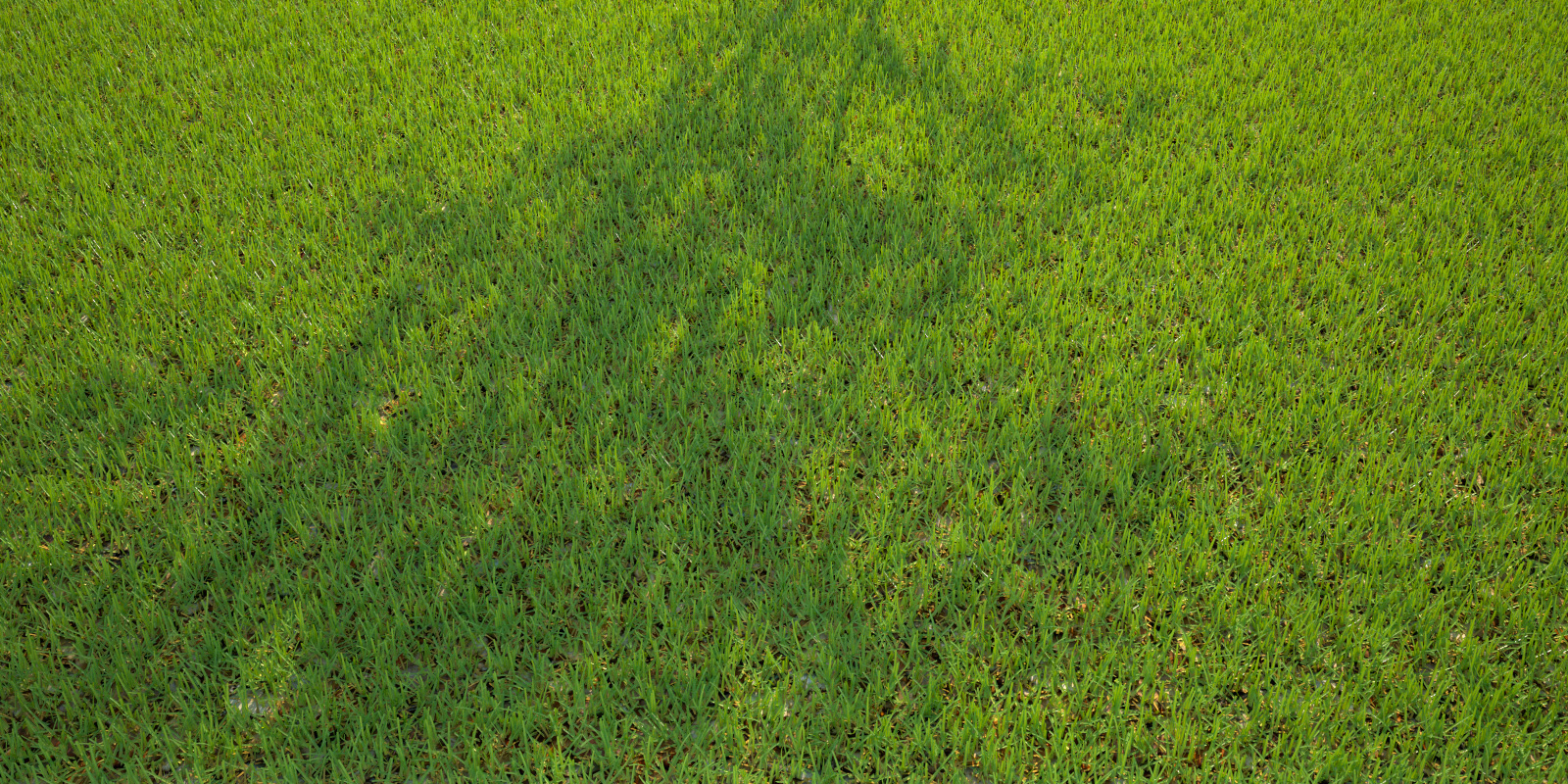
      I've done some tests that I've been pleased with as well. Here's one that incorporates a leaf litter MXM for the ground (textures originally free from http://www.photosculpt.net/) -- in this case I used 2 grass modifiers stacked(with different seed values), one for green grass and one for "dried" yellow grass, using a density map for both:grasstest2.jpg
      The yellow grass is down low to the ground, with altered geometry settings to help integrate the grass better into the "leaf litter" base. The green grass is just the MXM I linked in the first post.

      Best,
      Jason.

      posted in Extensions & Applications Discussions
      jason_marantoJ
      jason_maranto
    • RE: Maxwell Render 50% off

      Maxwell Render is at 50% off again thanks to Spain's goals against Italy -- sale discount is valid until July 8th.

      Best,
      Jason.

      posted in Extensions & Applications Discussions
      jason_marantoJ
      jason_maranto
    • RE: Grass!

      When you say you have Maxwell 2.6 are you talking about the full "Maxwell Render Suite" or the "Stand Alone Plugin"?

      Both can be updated to 2.7 for free (assuming you have the previous version) but each has different installers and you would need to download the proper installer to successfully update.

      If you want to, you can just download the full 2.7 installer (as opposed to the update installer) to have a clean install -- your license will work since it is valid for all 2.x releases of whichever type of Maxwell you purchased ("Stand Alone Plugin" or full "Render Suite").

      If you persists in having issues it is best to ask the devs directly on the Maxwell forum.

      Best,
      Jason.

      posted in Extensions & Applications Discussions
      jason_marantoJ
      jason_maranto
    • RE: Grass!

      Yes, I agree -- I've been hopeful for tools like these ever since Maxwell started supporting hair/fur.

      Make sure to read the docs here: http://support.nextlimit.com/display/maxwelldocs/Grass#

      Particularly the "Level of Detail" parameters -- they can really help with keeping resource usage manageable when working inside SketchUp (although my preference is to work with Grass inside Maxwell Studio, so I can use all of my RAM).

      Best,
      Jason.

      posted in Extensions & Applications Discussions
      jason_marantoJ
      jason_maranto
    • RE: Grass!

      Once you select a group to assign the grass modifier to you should be able to select it from a dropdown list -- click where it says "none" and a dropdown list should appear of all the materials you have already loaded into the scene.

      Best,
      Jason.

      posted in Extensions & Applications Discussions
      jason_marantoJ
      jason_maranto
    • RE: Grass!

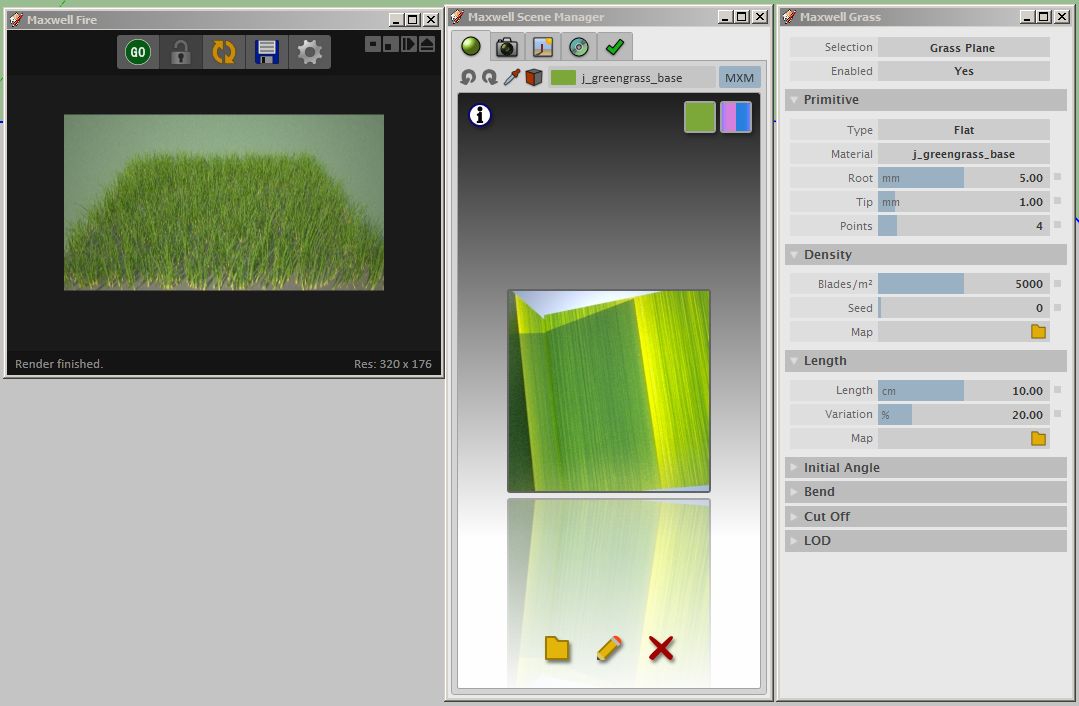
      You apply the grass in the modifier menu under Primitive>Material (see image for example).grass_matsetup.jpg

      Best,
      Jason.

      posted in Extensions & Applications Discussions
      jason_marantoJ
      jason_maranto
    • RE: A new home for SketchUp

      I already went through all 7 stages -- what now? πŸ˜• πŸ˜•

      Best,
      Jason.

      posted in SketchUp Discussions
      jason_marantoJ
      jason_maranto
    • RE: City streets

      It looks really nice so far, but maybe overlaying some "sketchy edges" output would pop some of the detail in the shadow side of the building?

      Best,
      Jason.

      posted in Gallery
      jason_marantoJ
      jason_maranto
    • RE: WIP render with free software

      It's looking great so far πŸ‘

      Best,
      Jason.

      posted in WIP
      jason_marantoJ
      jason_maranto
    • 1
    • 2
    • 13
    • 14
    • 15
    • 16
    • 17
    • 50
    • 51
    • 15 / 51