My apologies for taking so long to reply, Mike. Been incredibly busy.
Looking good. Looking forward to seeing this project progress.
 Offline
My apologies for taking so long to reply, Mike. Been incredibly busy.
Looking good. Looking forward to seeing this project progress.
Very nice work, Mike. Would love to see some more photos. Color makes it difficult to see details. 
Really good to see more of your amazing work. Simply incredible! I'd give anything to be able to create such models.
Jim, always a pleasure seeing more of your incredible work. Seems like all the good words have already been taken here, so I'll just combine them into one to create a whole new adjective that might come close to describing your amazing creations --
BRILLIANTOUTSTANDINGSTUNNINGWONDERFULBEAUTIFULGREATFANTASTICAWESOMWOW!!!!!
Nah, still inadequate, but I can't find my thesaurus so I guess it will have to do.
Please keep your work coming!
Nice concept Bryan.
It needs to incorporate a couple of hidden security cameras, to provide a visual history of whoever vandalizes/destroys it first. In today's world I just can't see it surviving very long 
Nice work! I like the stormy sky, whenever I use a sky in my models it's usually stormy. Fits my mood.
Well I finally got around to trying this fix
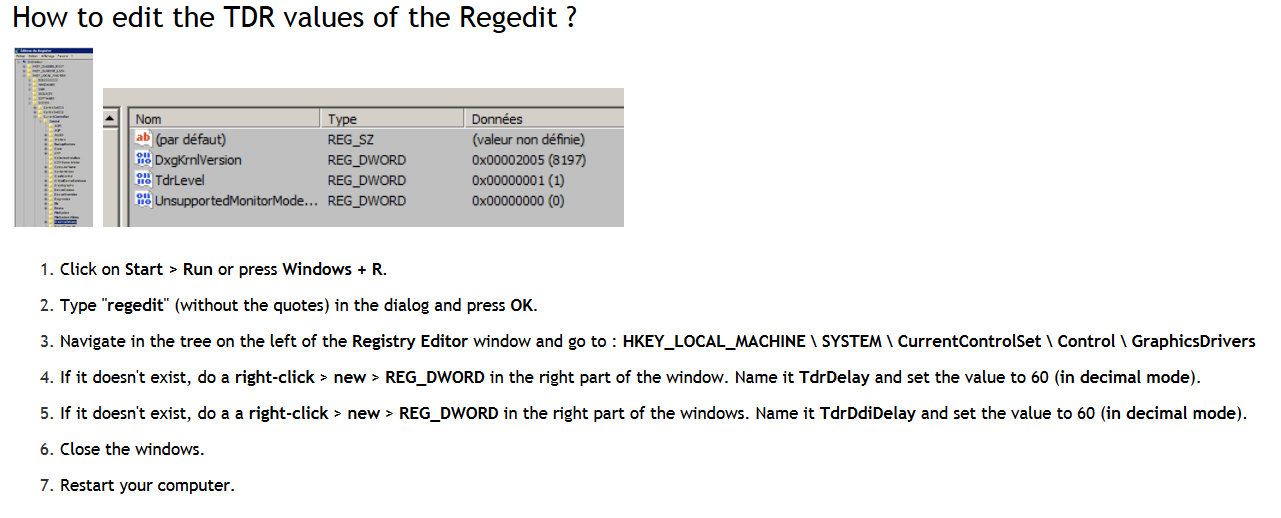
and it worked!
Set my values at 60 and now even my largest model can be worked with no problems.
Unfortunately I had already reset the laptop back to the original factory settings in anticipation of selling it, which meant that I had to do all the updates again (a real pain in the butt), and copy almost 700GB worth of data over to it (including my 369GB Sketchup Stuff folder). Now I get to do all the fine-tuning (again). Fun time.
See what trouble you caused me, Rich? 
@rich o brien said:
Thought so. I suffered this also with projected textures in SU 2015.
Not sure what the cause is. Try fiddling with the Graphics settings.
I also get this in SU2017.
Only thing to trap for is duplicate faces.
Well, since this is only an intermittent problem, and only with this particular model, I'll probably just live with it. Not worth fiddling with my graphics settings when everything else is working fine.
I was just curious about why this was happening, you know, trying to fill my pretty-much empty head with some pretty-much useless knowledge 
@rich o brien said:
There's a setting you can change in the Registry that sets when the GPU times out.
I experienced something the same with Substance Painter and this is their suggestion.
Thanks Rich, I'll give it a try. Out of curiousity, did you try this to fix your mentioned problem? Did it work?
@pbacot said:
Looks like more too good modeling, but that wouldn't be the cause.
haha. Trust me, if too-good modeling was causing the problem, I wouldn't have the problem
A while back I decided that I hadn't bought anything dumb for a while so I bought a new laptop (even tho my old laptop was performing perfectly well). Even dumber when you consider that I only use a laptop when I go out for coffee, maybe a couple of time a week.
Anyhow, I got a great deal on a brand new MSI GT80 Titan SLI-094.
Here are the pertinent specs --
Windows 8.1, Intel i7 4720HQ 2.6/3.6GHz, 16GB DDR3L SDRAM 1600 MHz, two NVIDIA Geforce GTX 965M - 4GB GDDR5 SDRAM (SLI).
Well, I figured that with two graphics cards it would handle even my largest models with ease. But for some reason when I try to work on a large model, when I try to move it around I get the following error msg
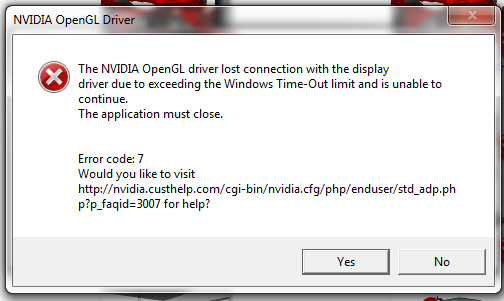
and then SU closes. These are models that my old laptop handles just fine, with a bit of lag when moving around the model but never crashing.
Thought maybe someone out there might have the same or similar laptop, and might know what's causing this.
I stopped using it several months ago because of this problem, but I would really like to keep it if I can find a solution (gonna double the RAM if do keep it). I love the 18.4 inch display, the full-size mechanical keyboard, the way you can remove a panel on top of the 10lb beast and have full access to the RAM and hard drives, just so much I really like about it - if only I could use it for my SU work.
Any suggestions?
If not, would anybody like to buy a laptop (works great with SU
For some reason on this model some of my textures are behaving strangely. For no particular reason they will start to look funky
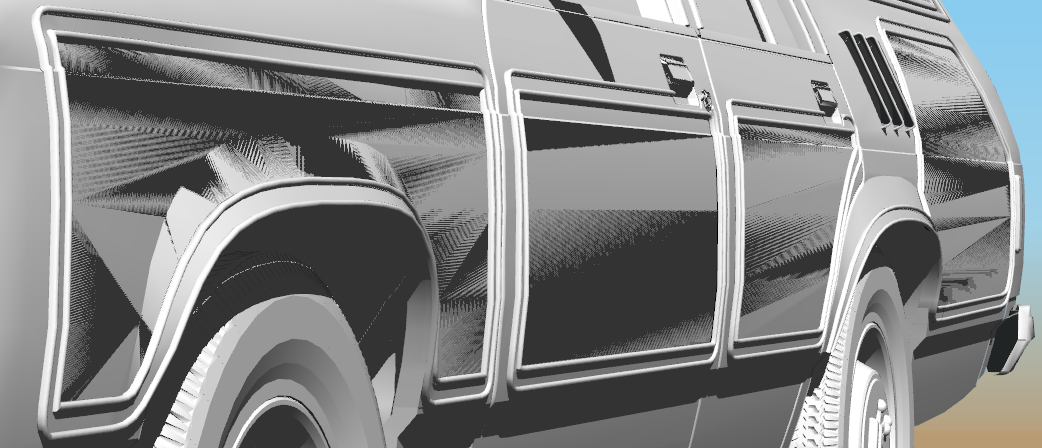
but if I click on them they become normal
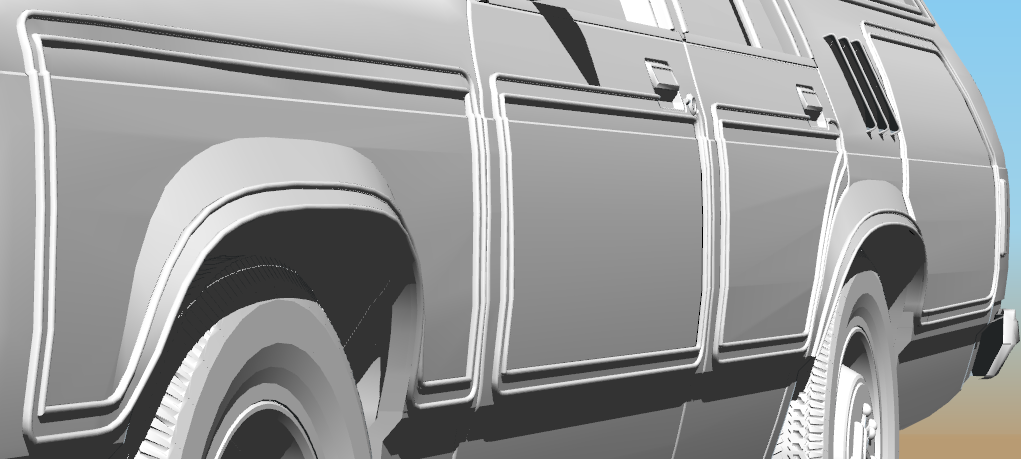
and will remain ok for some time, until once again the funky factor kicks in.
They are just normal projected textures, PNG.
Not a huge deal, just annoying, and was wondering if anybody has any ideas why they are doing this.
Michael,
Very impressive work, well done
I have fond memories of watching Space 1999 (had a huge crush on Barbara Bain)
Looking forward to seeing more of your work
Steve
@hornoxx said:
[ Next to the 5 spot lights, there is an emitter material on a rectangle face, which is also a lightsource.
yeah, every now and then I like to do something to remind myself how dumb I actually are.
I know less than nothing about rendering, but I like the photos of your ambitious project. Now just add a bunch of tire marks, some trash and litter, maybe some graffiti and oil puddles, and it will be perfect
In No. 7, aren't there just five lights per fixture, or am I missing something? Yeah, I probably am, but I had to ask.
Hey John,
How 'bout you send me copies of all the textures you have amassed for your masterpieces? Heck, if I had those I might even try some of that there architectural-type stuff (ok, probably not, I just love collecting textures )
Steve
Very impressive work.
I do have one question tho - how do you keep your desktop so neat?? When I do clean mine (rarely), 10 minutes later it once again looks like a toxic waste landfill site 
@tadema said:
You start posting and I'll write you a book
John
Yeah, haven't been doing much new stuff with SU lately. Been meaning to getting around to posting a batch of my one-off models, but obviously that hasn't worked out. Inertia sucks
John,
Really good to see more of your mind-blowing creations. I gave up long ago trying to find some little thing to criticize in your work (to make me feel better). Just ain't there.
You, sir, are the Master!
Steve
You should really make a book of your masterpieces. I know I would buy it.
