@juju said:
Try re-doing the file association, take a look a this post of mine.
I'd love to take a look at it, but for some reason it says that I'm not authorized...
 Offline
@juju said:
Try re-doing the file association, take a look a this post of mine.
I'd love to take a look at it, but for some reason it says that I'm not authorized...
I've been using SU 2015 for a long time, but recently (for reasons that I won't go into) I also installed SU 2013. Only used it for an hour or so, then uninstalled it. I used Iobit Uninstaller, which did a deep scan to remove all traces of the program.
Unfortunately, my supposedly super-smart computer doesn't seem to realize that the program is no longer there. Whenever I open a project folder now, instead of thumbnails I see this....
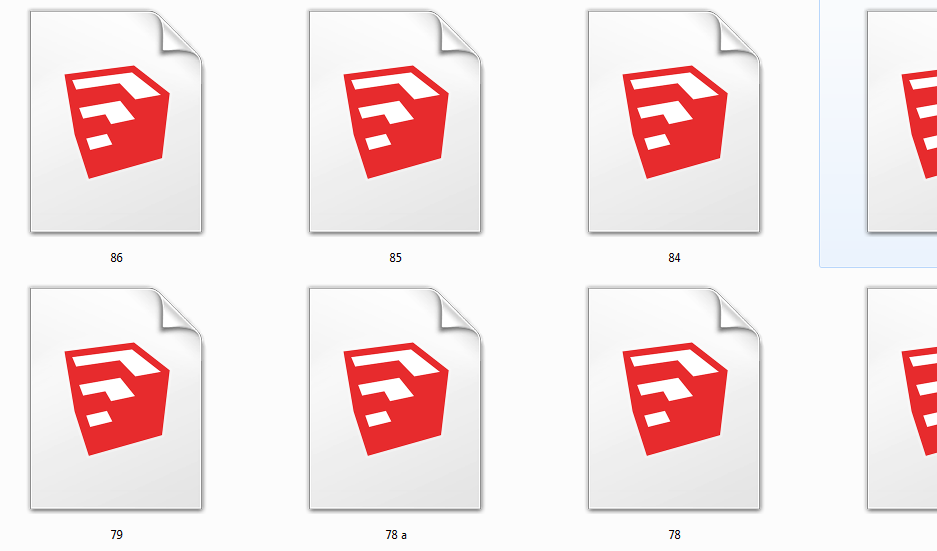
I can click on one and it does open with 2015 ok, but when I save it still shows only the emblem, not the thumbnail.
And when I right click on one it gives me option of opening it in either 2013 or 2015....
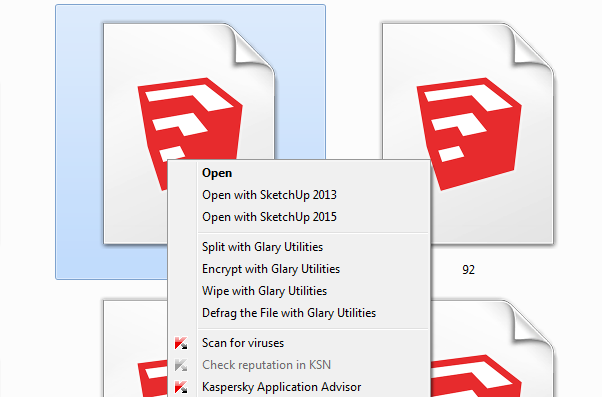
I have done a thorough search of my C drive to see if some remnant might remain of 2013, but found nothing. Any ideas or suggestions????
Yay, something with wheels!
Looking good, Mike. I'm curious as to why you say you might have gone too small (assuming the driver can fit comfortably in it).
Also curious about the object protruding from the front. A laser maybe? 
Keep at it!
Steve
TIG,
I bow to your expertise, and will reinstall SU at some point. For now it is working well, no more SKB's, no problems.
I still do not understand why, of the many times and many computers I have installed SU on over the years, without using "run as administrator", it did not cause problems with these installs. I am not questioning the wisdom or correctness of your advice and recommendations, I'm certainly not qualified to do that. I just like to understand the whys and wherefores of things when I can. I guess I could just chalk it up to being lucky, but that's just not the way things go for me 
Again, thanks
Steve
TIG,
Well I gave your suggestion a try, but......
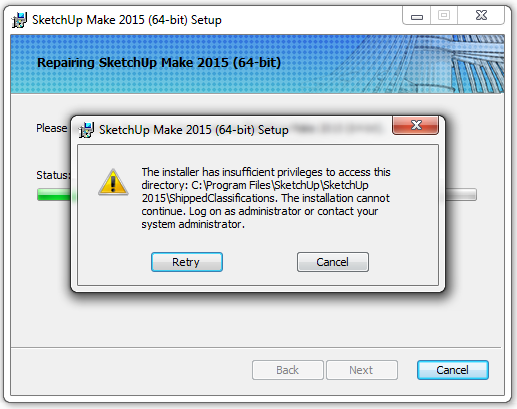
I AM logged in as Administrator, and I DID click on "run as administrator" when starting the repair.
I think I will just let things go for now, and if it does start to give me problems I will do a reinstall of SU.
thanks again,
Steve
@dave r said:
I asked what version of WINDOWS?
oops...Windows 7 Pro, all I ever use (except my main laptop does have Win 8 on it, kept it just out of curiosity and haven't been bothered by it enuf to go to the trouble of switching it to Win 7)
@dave r said:
The correct way to install SketchUp is to right click on the installer and choose run as administrator.
Yes, I will do that for any future installs. Thanks.
Steve
@tig said:
Making numerical SKB backup files, is not normal behavior.
What happens when you have your Preferences set to make SKB backups, is that when you save your model the previous version of its SKP is renamed briefly as a numerical SKB, the model is saved as an updated SKP: if there is a preexisting named-SKB its deleted and the latest numerical SKB is then renamed with the correct name, so you have an up to date SKP and a a SKB one saved-version behind...
Not sure I understand all this (my knowledge of SU is only a tiny fraction of pretty much everyone here on the forums), but my preferences are not set to make SKB backups, in fact I see no option to do so....
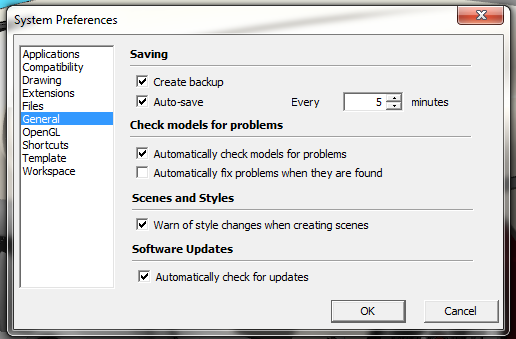
...maybe this is an option in Pro, I only have Make, but regardless I can't understand why anybody would want to save their backups as SKB's
@tig said:
If you have not installed SketchUp properly it can cause all sorts of weirdness.
Perhaps SketchUp has insufficient rights to do this process...
To install it correctly, close SketchUp.
Now find the SketchUp installer exe file [probably i your Downloads folder].
Select its icon and right-click > context-menu > "Run as administrator".
When prompted choose "Repair".
Restart SketchUp and see if it's improved.
All I can say is that I installed and set up SU just the same as I have always done it. Install the program, select a template, install the extensions, arrange the toolbars, set up all the shortcuts, etc. It works fine, no problems at all except for the SKB thing. And that only started after I had been working on the model for quite a while. Keep in mind that my setup of SU is probably much simpler than most people here, very few extensions, nothing fancy, very basic. It's all I need.
As far as "repairing" my SU install, would that affect anything that I have set up (shortcuts, toolbar setup, etc)?
And as I have mentioned, I have never used "Run as administrator" when installing SU. I have never seen anything about that in the forums, nor has it ever caused a problem for me. Not saying that it shouldn't be done that way, I'm just saying it has never caused a problem for me.
@tig said:
Another cause of these numerical SKB files not getting renamed properly is that you might be working on a model file located on a remote server etc, so the process gets timed out.
You should always work on local files wherever possible.
Also check that the folder containing the model's SKP and the SKB files has its Permissions set to not limit access to 'others' etc...
No remote server, just local files, as always. And my Permissions are not limited, just the same as always.
The recurring theme here is "just the same as always". I'm not unfamiliar with installing a new C drive, over the years I have done it regularly, and I have a well-defined system for doing it with minimum fuss and hassles. Has always worked for me.
As a final note, I have continued to work on this model since I started this tread, and no more SKB's have been produced. Not saying it won't occur again, but even if it does it is no big deal for me as long as my regular saves and autosaves continue to work ok, unless other problems start to show up. Depending on the severity of those problems I may have to uninstall SU and start from scratch. Would rather not have to do that but not the end of the world (as we know it) 
Your advice and suggestions are much appreciated TIG.
Happy holidays
Steve
@dave r said:
Do these SKB files have different names?
Hi Dave,
They are numbered 0 to 12
@dave r said:
What version of Windows?
2015 Make
@dave r said:
When you say you, "replaced the SSD on my main computer, and finally succeeded in getting everything set up just right again." what exactly did you do with SketchUp? Did you install it fresh? Did you right click on the installer and choose Run as administrator?
I installed SU just as I normally do, no problems, no, did not install as administrator, I never have but that has never been a problem.
@dave r said:
Did you install any extensions that might be creating back up files automatically?
As usual I just installed all the extensions from a copy I had made of the previous installations.
I mentioned the replacement of my C drive only to be thorough in providing any possibly relevant information, but I really don't think it was a factor due to the fact that I had been working on a model off and on all day, and the mass production of skbs only appeared in the last few hours. I made no changes to the computer during that time but logic tells me that something must have changed/happened just prior to the skb thing.
I wasn't very hopeful of finding a solution, but hey, you never know 'till you ask, right? And like I said it's not a huge problem, just delete the pesky things.
And maybe it will turn out to be a one-time thing. We'll see
Have a nice holiday,
Steve
A few days ago I replaced the SSD on my main computer, and finally succeeded in getting everything set up just right again. I spent a lot of time today working on a model, no problems....until a few hours ago. Suddenly it is creating way too many skbs, 13 in a couple hours. In the past it has occasionally made a skb, but not very often.
I changed nothing on the computer today, so I'm at a loss as to why this would suddenly start to happen. Not a huge problem of course, just delete them, but I thought I would throw this out there in case someone knows why this is happening.
@boofredlay said:
This is a quick shape I placed in my backyard just now to test.
[attachment=0:2t2iectc]<!-- ia0 -->GE Pro.JPG<!-- ia0 -->[/attachment:2t2iectc]
So when you look out your back window you see that shape, right?
AH HA! Just figured out the problem with my photos. I forgot to disable my ad blockers!
So they were there all along, in all their glory.
I hate old age
@pbacot said:
Are they "shining"? What color is the back material? That could be bleeding through. It can look better with different outputs, even if it looks bad in SU. I get that sometimes with dark materials, and the back material is lighter--but usually NOT at such a close up view.
It's really difficult to describe, that's why I needed to show the photos. As far as the back material, it's black...but the problem shows up as white.
@mike lucey said:
I assume that you are kidding and you can't really see the photos. I don't know what the problem is, I used the normal procedure....
Oh wonderful, it's not showing the attached photos. Tops off a perfect day
Probably not gonna get a miracle solution to this, but it never hurts to ask.
Where two faces join at a right angle, the line where they join looks funky when it's in shadows.
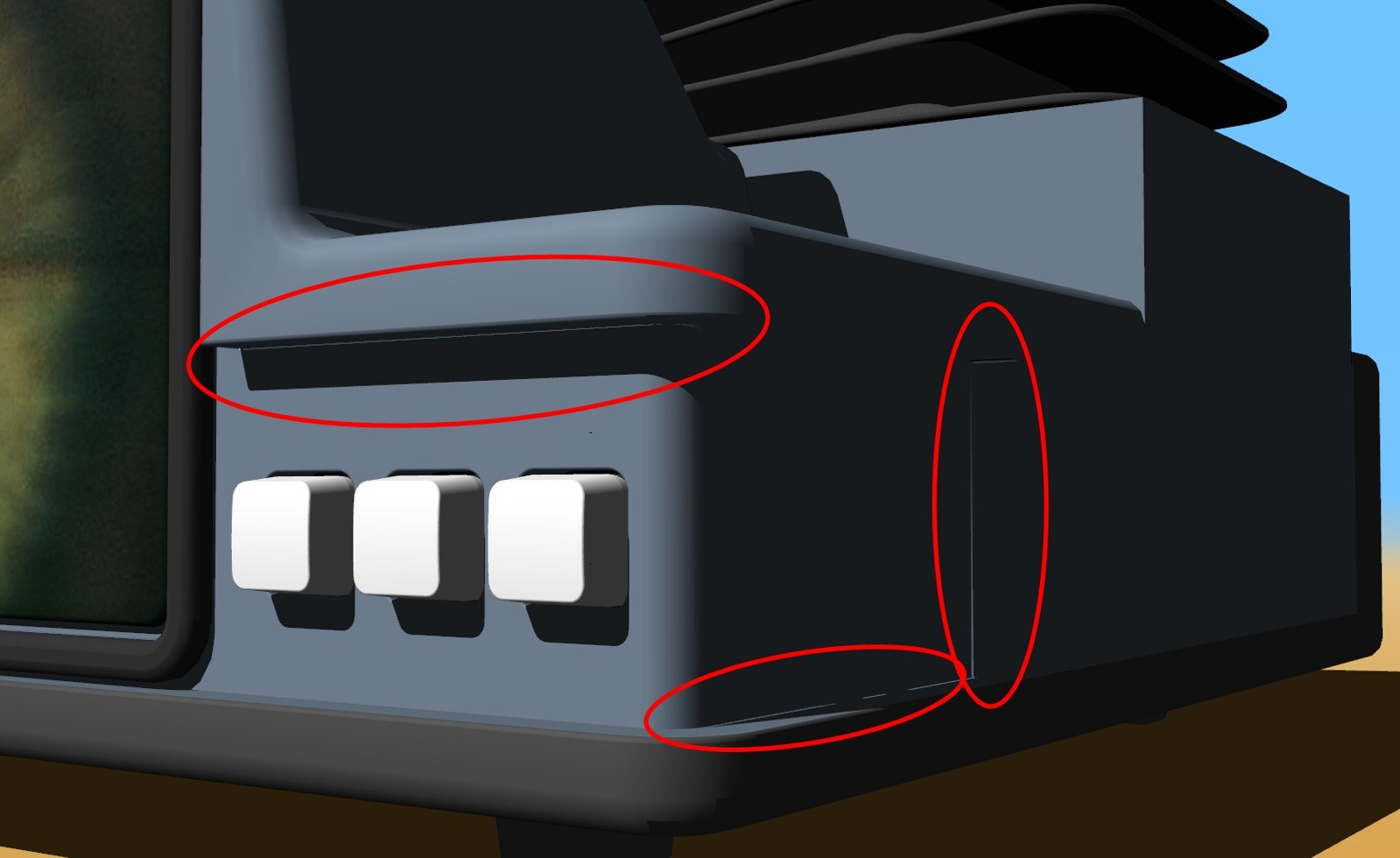
Even when the corner is rounded it's funky.
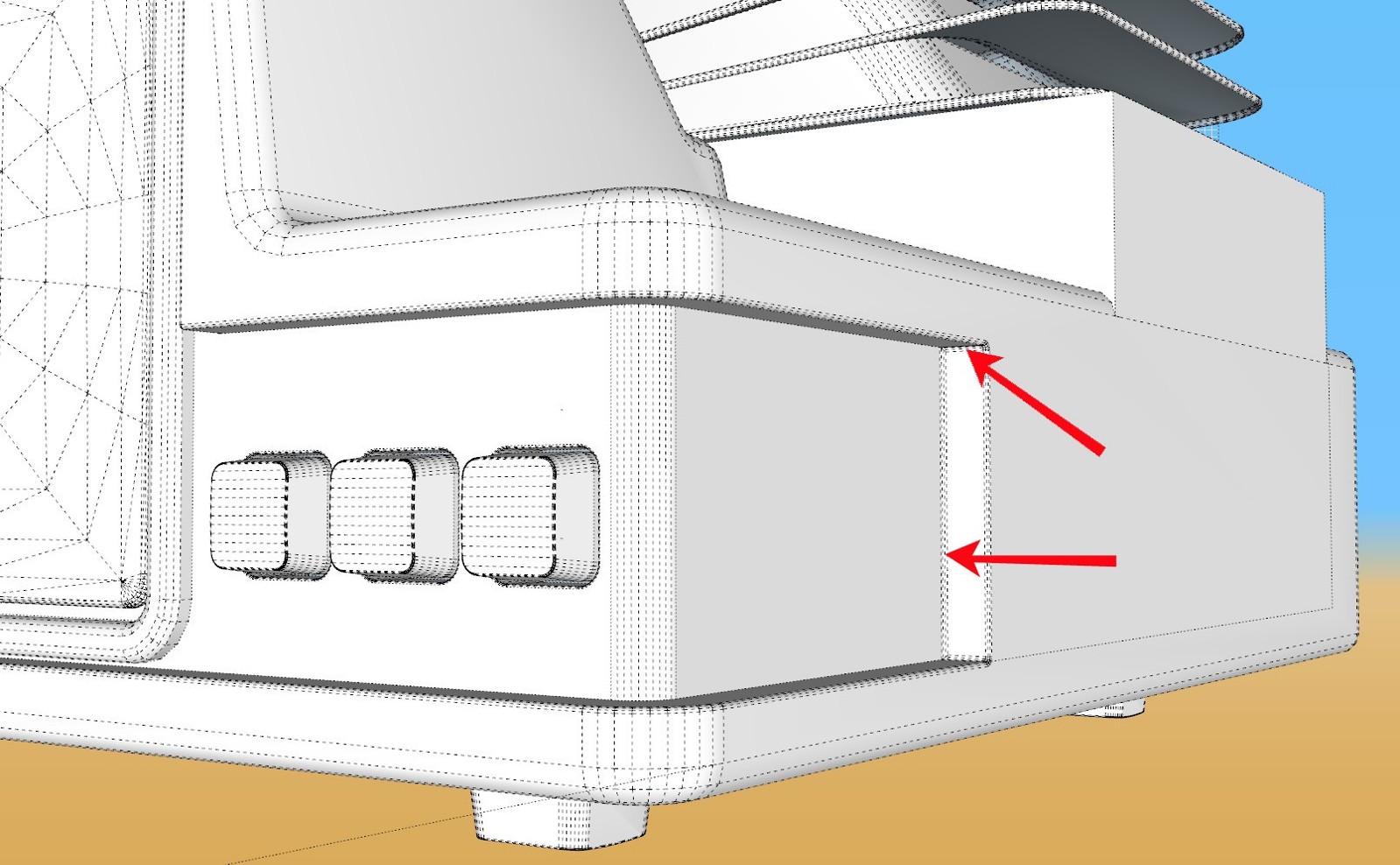
Any suggestions?
I'm not sure I understand this, but I really only have one concern -- Will I be able to continue use of SU2015 in the future? Or will it have a cutoff date of some sort? Or what?
It's moody. I like moody. Very nice work 
@numerobis said:
(if there is someone who could code an extension to bring back the old functionality... i would pay for it)
And I would pitch in too
Well, I appreciate the input. Actually, I only installed 2017 because I had received an email informing me that there was a maintenance update for Artisan. Well, even tho I have never figured out to use the dang thing, for some reason I installed the update, and THEN it informed me that it will only work on 2016 or newer. Like I said, I have never figured out how to use it, and I seriously doubt I ever will, but I guess it just became a thing where I paid for the dang thing so I want to have it available. So I might keep 2017 but only use it in the unlikely event that I decide to give Artisan another try someday.
Against my better judgement I just installed 2017. One thing I noticed was that the "trays" as they call them are a bit of a pain in the butt compared to 2015. I have been putting the trays I use most along the top of my display, and only need to click on them to expand them, and click on them again to close them up.

The trays in 2017 are larger, and you have to physically pull them down to use them and then push them up to close them. A stupid, no reason change IMHO.

I doubt that there is a way to get them to open and close with just a click but I figured I would ask.
Also, when I open a model in 2017 I get this message
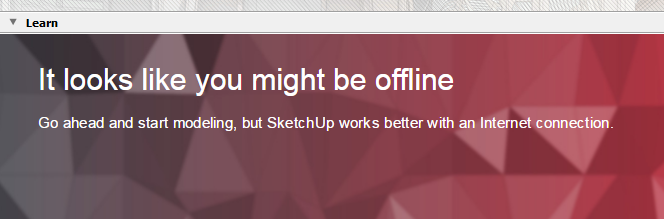
In what ways does it 'work better' online? I only connect to the internet when I need to, and disconnect when I no longer need to be online. It just makes sense nowadays, too many crazies out there just lurking.
Anyhow, not sure I will actually be using 2017, but thought I would ask a few questions about it.