sketchucation logo sketchucation
    • Login
    1. Home
    2. glro
    3. Posts
    Oops, your profile's looking a bit empty! To help us tailor your experience, please fill in key details like your SketchUp version, skill level, operating system, and more. Update and save your info on your profile page today!
    🚨 Skimp | 25% Off until March 30 Buy Now
    G
    Offline
    • Profile
    • Following 0
    • Followers 0
    • Topics 29
    • Posts 403
    • Groups 1

    Posts

    Recent Best Controversial
    • RE: [Plugin] Layers Panel 1.2.1

      @jiminy-billy-bob said:

      Thanks,

      Could you explain in detail how you got the error?

      i was trying to make a group of different layers
      i selected them as shown in the video, and i couldn't drop them

      but...

      i tried again and this time it worked
      false alarm, sorry

      seems to be working on my computer too

      posted in Plugins
      G
      glro
    • RE: [Plugin] Layers Panel 1.2.1

      @jiminy-billy-bob said:

      Sorry, I was away and didn't see your post.

      Could you translate the error message?
      I can't reproduce it, could you explain in detail how you got the error?

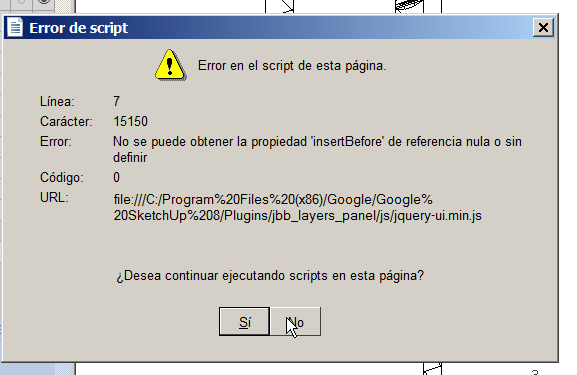
      "not possible to get the property "inserbefore', reference null or not defined...
      do you want to continue script of the page?"

      more or less...

      posted in Plugins
      G
      glro
    • RE: [Plugin] Get centroid and area properties for any face

      @alexschreyer said:

      I ran into a problem a while ago where I needed area centroids of irregular planar shapes. Since I couldn't find an appropriate SketchUp plugin, I used Rhino that time. The attached plugin adds this functionality to SketchUp.

      Contrary to some plugins that I found, which use the centroid of the bounding box (and then add a construction point there), this one calculates the actual centroid accurately for any polygon (hence any shape in SketchUp). It also provides the area (more for reference since SketchUp spits this out anyways) and the area moments Ix, Iy, Ixy.

      Please give this a try and let me know if you run into any usability, calculation or proper plugin programming issues.

      Some limitations: Shapes must be drawn on the ground (x-y plane) and calculation accuracy is limited by polygon accuracy.

      Plugin webpage (available soon): http://www.alexschreyer.net/projects/centroid-and-area-properties-plugin-for-sketchup/

      plastic characteristics of cross sections are sometimes needed too...

      is it something that could be added to the plugin? because [anchor= goto=:1n1fsrz0]http://www.skpengineering.com[/anchor:1n1fsrz0] is not avalaible anymore

      posted in Plugins
      G
      glro
    • RE: Can we select by layer?

      @jiminy-billy-bob said:

      @glro said:

      I came to the conclusion i needed such a plugin too
      i didn't find anything simple already made

      Layers Panel does that :
      http://sketchucation.com/plugin/751-layers_panel

      yes, i tried
      but it doesn't work on my computer

      bug related to IE v11, it seems...

      posted in SketchUp Discussions
      G
      glro
    • RE: Can we select by layer?

      @troyhome said:

      I hope this is a doh! moment, but is there a way to simply select everything on a given layer?

      I came to the conclusion i needed such a plugin too

      i didn't find anything simple already made

      so i made it (in a simple way)

      the plugin writes the answer of the prompt in a text file to recall it for the following prompt (some people might not like it)

      and it would be much better to have a popup window to choose among the layer you want to select instead of having to type it (but it is complicated and i don't know how to do that)

      but, here is the simple plugin


      select by layer

      posted in SketchUp Discussions
      G
      glro
    • RE: [Plugin] Layers Panel 1.2.1

      internet explorer 11.0.9600.17239

      @tig said:

      @giro

      What version of Internet Explorer do you have ?

      posted in Plugins
      G
      glro
    • RE: [Plugin] Layers Panel 1.2.1

      I tried

      I got an error message while i was trying to move some layers to a group

      too bad

      the appearance is well finished, and it fits a need


      error message

      posted in Plugins
      G
      glro
    • RE: [Plugin] Tube cutting optimisation

      @jclements said:

      I could not get the latest version to accurately work at all.
      Try the attached file.

      [attachment=0:q94of7rb]<!-- ia0 -->test 2 for counting component.skp<!-- ia0 -->[/attachment:q94of7rb]

      downloaded the file
      plugin didn't work
      switched units to millimeters
      the plugin worked...

      concersion issues...?

      posted in Plugins
      G
      glro
    • RE: [Plugin] Tube cutting optimisation

      @inteloide said:

      Hello !

      Just post new version that solve some of your issue. Main improvement is in vector auto-detection.
      It try to find which dimension was change between component original definition and the component instance you selected. If within change (you didn't scaled selected component), the plugin try to find the biggest dimension axis in the component. If it's a cube (grrr...) then the plugin doesn't not define a vector, so user must define it. In any case user can change the vector afterward.

      I take into consideration, for next update, your requests :

      • add cutting width parameter (should not be so complicated)
      • Try to develop model structure to look component included in sub-components.
      • I'll try to implement a option to list only components in selected entities of the model (to avoid listing all "tubes" of the model).

      See you after some hours of coding ;o)

      Inteloide

      thank you, you repaired everything

      posted in Plugins
      G
      glro
    • RE: [Plugin] Tube cutting optimisation

      Thank you

      I tried:

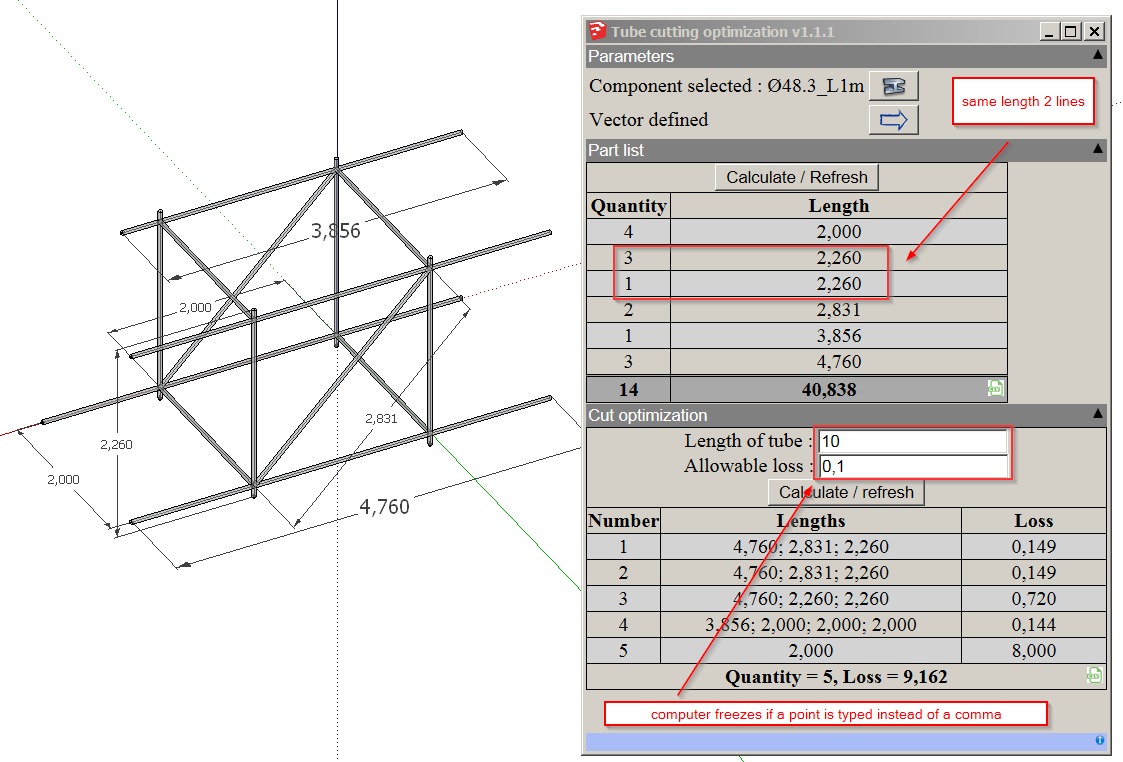
      the plugin windows opens automatically when sketchup is launched: possible to avoid that? because you don't always need to use the plugin
      calculate/refresh now works
      2 lines for tubes same length; possible one line only?
      in cut optimization, if french is the system language, you have to enter the number with a comma, not a decimal point; otherwise your computer freezes; possible to avoid freezing?

      i understand the difficulty to retrieve the length when the component doesn't follow main axis; would it be possible to store the tube component axis directly in the sketchup model, so that when you open it again, you don't have to clic again (same component, same axis)

      also, if the point is to cut the tubes, would it be possible/useful to parameter the cut width?


      tube cut opt bugs

      posted in Plugins
      G
      glro
    • RE: [Plugin] Tube cutting optimisation

      @inteloide said:

      Just post the new version !

      Thank you for your plugins; it sounds magical for the user, but i know there is a lot of work behind

      I tried the new version; now it works in SU8; i got the expected result from the model i uploaded previously

      Then i selected one tube and i made it longer; clicked on "calculate/refresh" but the list didn't change

      I realized maybe i had to select the component again by clicking on the button in the up right corner

      i did ... and yes; this time it changed the list, but the result doesn't seem correct

      Besides, by definition, a tube is a structural element that have one dimension much longer than the 2 others; so, would it be possible for the plugin to recognize automatically which dimension is much bigger, without having to define the vector by mouse?

      This program might be useful for scaffolders who use tubes and fittings
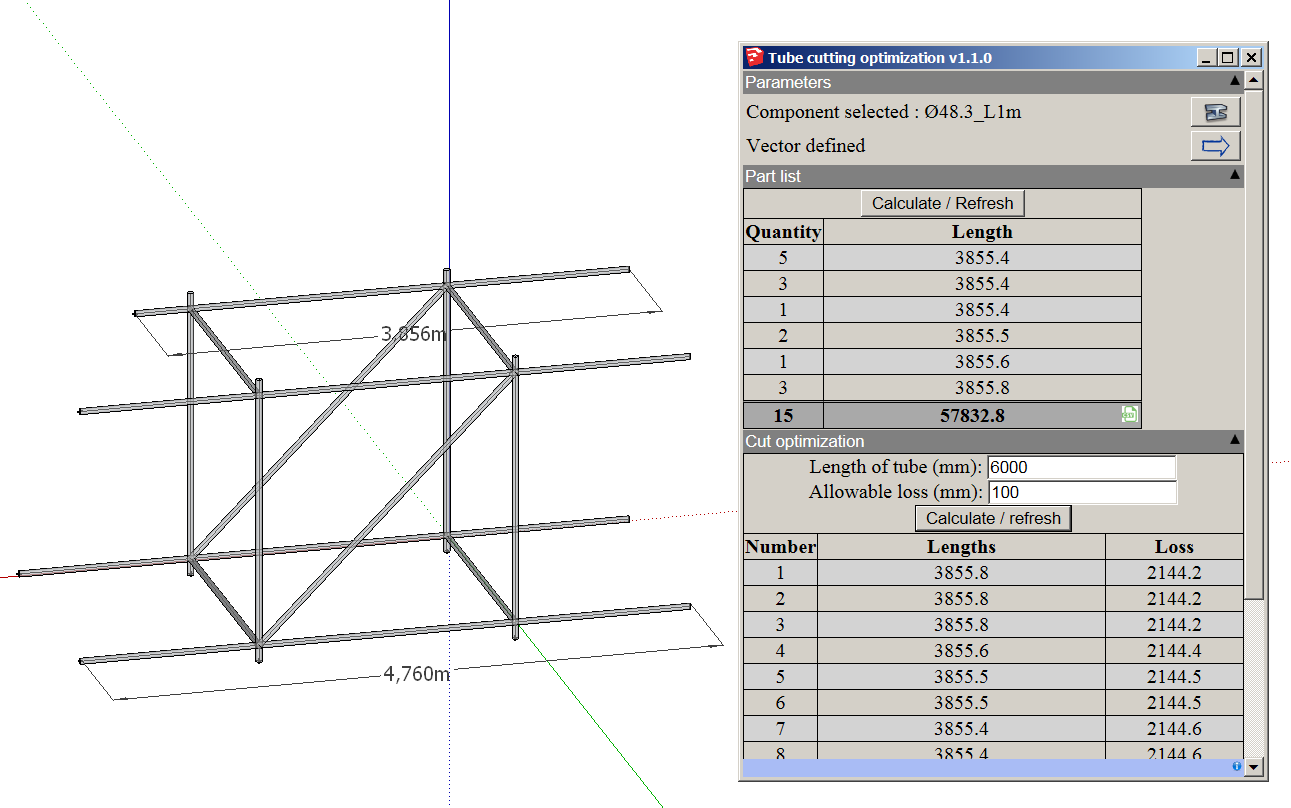

      tube cut opt screen shot


      tube cut opt example

      posted in Plugins
      G
      glro
    • RE: [Plugin] Tube cutting optimisation

      i tried
      made this file
      get the following error message

      "optimisation
      14
      Error: #<ArgumentError: wrong number of arguments (1 for 0)>
      C:/Program Files (x86)/Google/Google SketchUp 8/Plugins/BGSketchup/Tube_cutting_optimisation/Rb/Main.rb:118:in round' C:/Program Files (x86)/Google/Google SketchUp 8/Plugins/BGSketchup/Tube_cutting_optimisation/Rb/Main.rb:118:in add_optimisation_in_html'
      C:/Program Files (x86)/Google/Google SketchUp 8/Plugins/BGSketchup/Tube_cutting_optimisation/Rb/Main.rb:117:in each' C:/Program Files (x86)/Google/Google SketchUp 8/Plugins/BGSketchup/Tube_cutting_optimisation/Rb/Main.rb:117:in add_optimisation_in_html'
      C:/Program Files (x86)/Google/Google SketchUp 8/Plugins/BGSketchup/Tube_cutting_optimisation/Rb/Main.rb:109:in each' C:/Program Files (x86)/Google/Google SketchUp 8/Plugins/BGSketchup/Tube_cutting_optimisation/Rb/Main.rb:109:in add_optimisation_in_html'
      C:/Program Files (x86)/Google/Google SketchUp 8/Plugins/BGSketchup/Tube_cutting_optimisation/Rb/Main.rb:53:in optimisation' C:/Program Files (x86)/Google/Google SketchUp 8/Plugins/BGSketchup/Tube_cutting_optimisation/Rb/Main.rb:35:in show_hide_window'
      C:/Program Files (x86)/Google/Google SketchUp 8/Plugins/BGSketchup/Tube_cutting_optimisation/Rb/Main.rb:118:in `call'
      C:/Program Files (x86)/Google/Google SketchUp 8/Plugins/BGSketchup/Tube_cutting_optimisation/Rb/Main.rb:118"tube cut opt

      posted in Plugins
      G
      glro
    • RE: [Concept]PDF Viewer

      @dan rathbun said:

      @glro said:

      ... a model could contain a textual description, for example

      We can already do that. Every model has a "description" attribute that can be entered via the File tab of the Model Info dialog.

      It is what is listed in the templates picklist.

      yes
      i never noticed that feature
      might be useful

      but very few informations

      what i meant is adding a calculation note to a scaffolding model, for example; this is typically what i do all the time

      instead of sending 2 documents, i would send one, te SU model, and the calculation note would be embedded

      posted in Plugins
      G
      glro
    • RE: [Concept]PDF Viewer

      @dan rathbun said:

      I and others just used UI.openpanel("*.pdf")
      and opened a valid return path in the WebDialog.
      Most users already have AdobeReader installed, so it opens within the WebDialog (unless perhaps the user has the AR properties set to always open outside the browser?)

      So what would we gain ?
      The file open UI handling via Js FileSystemObject, instead of SketchUp's Ruby ?

      if the pdf could be embedded into the skp file, the gain wold be big: a model could contain a textual description, for example

      posted in Plugins
      G
      glro
    • RE: [Plugin] ToolbarEditor (1.1.2) – updated 08.06.2014

      @aerilius said:

      Plugins can not influence the position of the toolbar (they can only tell SketchUp to show/hide a toolbar, and Sketchup remembers the position). Since these toolbars are created with a timeout (after all other plugins have been loaded), there was initially a problem wher the toolbar didn't remember its position. After report it was improved in SU2013 so that SketchUp should remember the position even after timeout. In which SketchUp version does it happen to you?
      I have reduced the timeout, maybe that caused the problem?

      i use sketchup 8

      i shall try version 13 or 14, to check

      thank you

      posted in Plugins
      G
      glro
    • RE: [Plugin] ToolbarEditor (1.1.2) – updated 08.06.2014

      another detail: the toolbar position is not stored when you close sketchup

      so you have to move it everytime you open

      not really important, but would it be possible to dck the created toolbars as the other native toolbars?

      posted in Plugins
      G
      glro
    • RE: Searching a plugin to deeply explode nesting groups

      @mythos said:

      Thank you very much for all your answers. It seems that there is no existing script that does exactly what I need. Thus I started to have a deeper look into the Ruby documentation of SketchUp. Actually it was pretty easy to implement the needed behaviour for my own.

      You can find a first version of my "Flatten Hierarchy" script as attachment to this posting (just copying it to your plugins folder). Any comments or improvements are highly appreciated since even if I am a software developer I have never been working with Ruby before.

      Here is a short description explaining what the script does:

      Traverses through the selected entities and deeply explodes all nested groups and components that only have groups and components (but no actual geometry like edges or faces) as direct children. In other words this script flattens the hierarchy of the selected entities by bringing all nested groups and components up to the current level of selection without interfering any geometry.

      does exactly what is written; so:

      if a component contains groups
      it is exploded and disappears as a component in the component list

      this might be a problem

      it is not a default, but one should be aware of that

      possible to choose? explode ONLY groups or ONLY components?

      posted in Plugins
      G
      glro
    • RE: Searching a plugin to deeply explode nesting groups

      @mythos said:

      Thank you very much for all your answers. It seems that there is no existing script that does exactly what I need. Thus I started to have a deeper look into the Ruby documentation of SketchUp. Actually it was pretty easy to implement the needed behaviour for my own.

      You can find a first version of my "Flatten Hierarchy" script as attachment to this posting (just copying it to your plugins folder). Any comments or improvements are highly appreciated since even if I am a software developer I have never been working with Ruby before.

      Here is a short description explaining what the script does:

      Traverses through the selected entities and deeply explodes all nested groups and components that only have groups and components (but no actual geometry like edges or faces) as direct children. In other words this script flattens the hierarchy of the selected entities by bringing all nested groups and components up to the current level of selection without interfering any geometry.

      does exactly what is written; so:

      if a component contains groups
      it is exploded and disappears as a component in the component list

      this might be a problem

      it is not a default, but one should be aware of that

      possible to choose? explode ONLY groups or ONLY components?

      posted in Plugins
      G
      glro
    • RE: Sketchup 8 faster than sketchup 13?

      @deaneau said:

      @adamb said:

      SU8 and SU2013 were much of a muchness on speed. SU2014 is much faster.

      But Aerilius is correct that you need to compare apples to apples; check you have identical Observers attached in both versions before testing.

      however some plugins will crash SU2014 in SU2013 all be good.

      can you give an example?

      this might help to find an explanation

      posted in Developers' Forum
      G
      glro
    • RE: Sketchup 8 faster than sketchup 13?

      @adamb said:

      glro: you seem very quick to judge things you perhaps do not understand.

      The purpose of having 2 locations, is that one is a global, shared repository, another is a per-user repository.

      i don't want to offend anybody

      and i am conscient of the limits of my programming skills

      i know the problem i have is not linked to ruby versions, and i have at least one example of trimble limiting on purpose the possibilities of sketchup plugins

      so i have a doubt

      that's it, no big deal

      posted in Developers' Forum
      G
      glro
    • 1
    • 2
    • 6
    • 7
    • 8
    • 9
    • 10
    • 20
    • 21
    • 8 / 21