sketchucation logo sketchucation
    • Login
    1. Home
    2. glro
    3. Posts
    Oops, your profile's looking a bit empty! To help us tailor your experience, please fill in key details like your SketchUp version, skill level, operating system, and more. Update and save your info on your profile page today!
    ๐Ÿšจ Skimp | 25% Off until March 30 Buy Now
    G
    Offline
    • Profile
    • Following 0
    • Followers 0
    • Topics 29
    • Posts 403
    • Groups 1

    Posts

    Recent Best Controversial
    • RE: [Plugin] Add comments to your file

      @inteloide said:

      okay, version 1.5.2 should solve javascript issue.
      About your tab-scene issue, I tried from an empty file : it works.

      Could you please open the ruby consol window (Window/Ruby Consol) to see if error appear Inside, when setting the link and changing the scene in SU ?

      Thank you.
      Inteloide

      no error message in the ruby console ... because it works perfectly!

      i clic on the scene tab and the comment window shows the corresponding tab, as said

      after installation, i had to close sketchup and open it again, though; just after the installation, it didn't work

      thank you, seems operational; i am not sure about the use of a backward link between the comment window and the scenes...
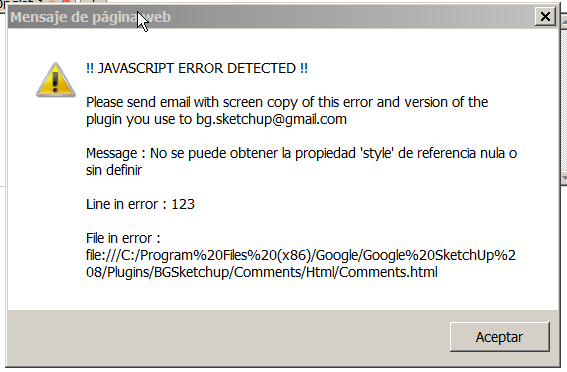
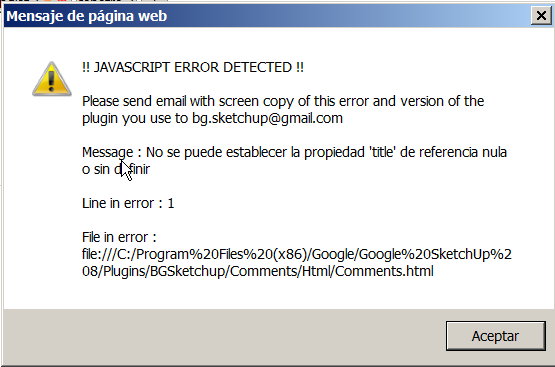
      posted in Plugins
      G
      glro
    • RE: [Plugin] Add comments to your file

      @inteloide said:

      Hello Glro,

      Actually, the plugin should works like this : when selecting a scene in Sketchup, the linked (if defined) tab in plugin is shown.

      The opposite (when clicking on a tab in plugin, show the scene in Sketchup) is not implemented yet. I could, if you need it.

      About the javascript error you have, could you please tell me more : when do you have this error, what did you do before ?

      Inteloide

      when i clic on a scene tab in sketchup, it doesn't change anything in the comment window, even if i previously set a link between a comment tab and a scene tab

      the error message i sent, i don't remember how it popped up

      here is a new one: it appeared when i clicked on the comment button to show again the comment window, after closing it using the cross in the upper left corner


      2014-04-06 19_07_21-Commentaires v1.5.1.png

      posted in Plugins
      G
      glro
    • RE: [Plugin] Add comments to your file

      error
      @inteloide said:

      @box said:

      Sorry, I just noticed that it has a second error, thought it was a repeat but it is a different line.

      There were a lot of bugs actually... Thanks for raising the error you had.
      Version 1.5.1, just posted, corrects the tab deletion issue.

      Inteloide

      posted in Plugins
      G
      glro
    • RE: [Plugin] Add comments to your file

      just downloaded the 1.5.1 version

      found out you have to press on "TAB" to link a tab to a scene

      but actually no link seems to be made on my computer, because when i clic on the tab in comment window, it doesn't show the linked scene in sketchup, and when i clic on the scene tab in sketchup, it does'nt show the linked tab comment

      i am probably missing something...

      posted in Plugins
      G
      glro
    • RE: [Plugin] Components manager plugin

      it seems to me that the #1 component issue is related to your component manager plugin; for example:

      i built a model from components in the component folder in june
      in july, i modify some of the components
      in september, i come back to the model and try to add some of the components that have been modified in july: they come with a #1 at the end

      the real solution would be to use your plugin BEFORE i begin to modify the model; i just realize that while i am writing it

      So, if all the components in the model are updated, when i add a new one, it will come without any #

      i am going to try that...

      thank you for trying to find a solution

      posted in Plugins
      G
      glro
    • RE: [Plugin] Components manager plugin

      @tig said:

      @giro
      try a folder rename?
      MTX_bibliotheque_(non_classee) ๐Ÿ’ญ
      Stick to ye-olde ASCII A-Za-z etc

      thank you for taking the time to answer

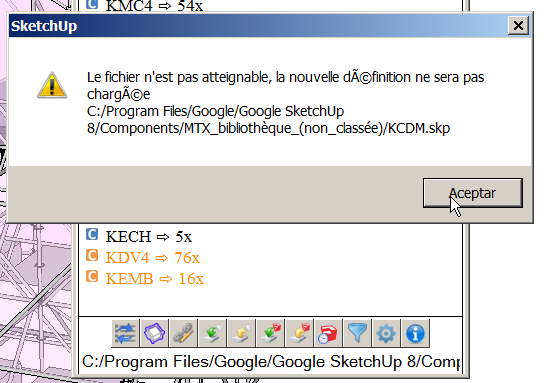
      yes, i already have been faced to this accent problem, but the tricky thing is that sometimes it is the source of the problem, and sometimes not

      for example, the first screenshot, the problem is due to the fact that i buit the model on a computer using windows XP, and today i use windows 7; so the link is not "... program files... " anymore but "program files (x86)"

      anyway, i should change the folder name...

      my concern is how to remove the "#1" at the end of the component name

      what i do now is:

      i replace all the "#1" components by another one which is not already used in the model
      i purge the unused components
      i replace the component "not already used in the model by the one without the #1

      it takes some time...

      posted in Plugins
      G
      glro
    • RE: [Plugin] Components manager plugin

      i had stopped using this plugin because of compatibility problems, but this new version is better

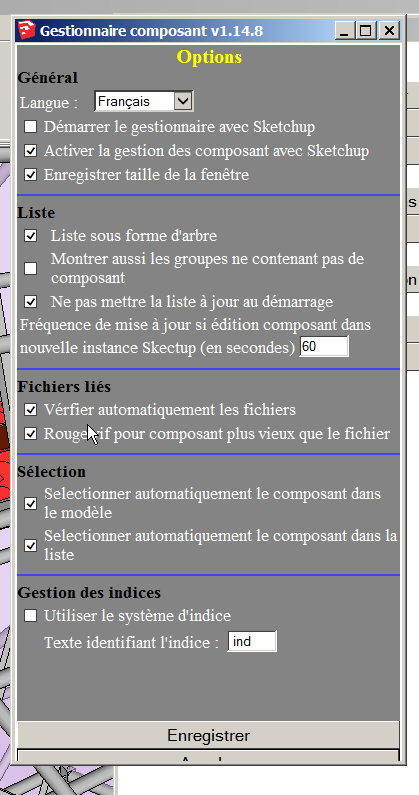
      some minors observations:accentswindow size
      window size again

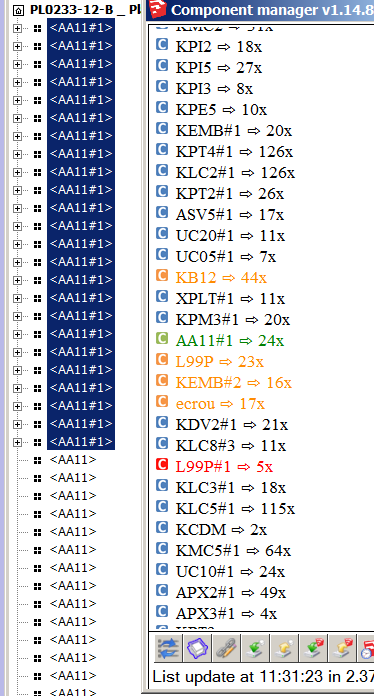
      for the 3rd screen copy, no matter what size i give to the window, it is still truncated at the bottom

      i was looking for such a plugin to update a model made of components, when individual components have been updated after the model has been created.

      Now, there is still a problem i can't solve using the native components window nor this plugin:

      when a component is introduced in a model, if there is already one with the same name in it, sketchup automatically adds #1 at the end of the component definition name of the newly introduced component

      how to replace the ...#1 component by the one that was first in the model, the name of which is ...?

      I tried "reload selected components", AA11# is then written is creen, but the #1 is still at the end of the name...


      #1

      posted in Plugins
      G
      glro
    • RE: [Plugin] Add comments to your file

      @inteloide said:

      Hello

      Rename function added :
      [attachment=0:no9akdmn]<!-- ia0 -->Comment v1_3_0.rbz<!-- ia0 -->[/attachment:no9akdmn]

      Place your mouse on tab name, and a new button appear.
      ...

      Inteloide

      yes, it works; very nice plugin; i have been trying a few to comment easily and clearly a sketchup model scene by scene; this is the best so far

      thank you

      posted in Plugins
      G
      glro
    • RE: [Plugin] Add comments to your file

      @inteloide said:

      Well done ! Thanks for that !

      Here is the correction :
      [attachment=0:1thx4yvb]<!-- ia0 -->Comment v1_2_1.rbz<!-- ia0 -->[/attachment:1thx4yvb]

      Version history:
      1.2.1: Corrected : Avoid error when deleting tab placed before current tab

      1.2.0: Added : Added possibility to have different tabs
      Optimzed : Change toolbar name to "Comments (BGSketchup)"
      Optimzed : Avoid filling "undo" stack with comments saving operation.

      very efficient

      would be nice to be able to rename the title of the tabs

      "espanol" doesn't include "h"

      maybe i type rather fast, but the comment get written in the window very slowly; maybe it is my computer

      an internet link would be useful for me, because it would enable to attach a cloud hosted document to the model but a link to a scene would not; you can already switch scene using the native scene tabs

      the button (icon) doesn't show up the first time after installing the plugin; but it pops up the second time you launch sketcup after installing the plugin

      posted in Plugins
      G
      glro
    • RE: [Plugin] Add comments to your file

      @inteloide said:

      @box said:

      An excellent addition to an already useful plugin.

      But you know people are going to start asking for things like, can you link a comment to a specific layer/scene/component etc etc

      Then I would say : why not ! ๐Ÿ˜‰
      Let's me finish tabs feature, then I will have a look at other additional features.
      But any idea is welcomed !
      Inteloide

      the tabbed version will be a big enhancement; one tab per scene, for example...

      would it be possible to put an active internet link in the comments window?

      posted in Plugins
      G
      glro
    • RE: [Plugin] Update Links Manager

      It works as described, it is light and efficient

      but

      you have to press the control key while you click to execute the link
      and
      only click to set the link

      would it be possible to do it the other way?

      just click to execute the link and ctrl+click to set the ling

      to make it more simple for the final user, who is more likely to simply click on an object in the model

      pressing the control key suits better to the one who is setting the link, because it is more complicated and he is the one who is supposed to know

      posted in Plugins
      G
      glro
    • RE: Exporting Animations With Moving Objects

      @acordey said:

      I've created an animation using the Proper Animation plugin to show some moving elements,but can't find anything to help me export it as a video file that I could send out, rather than just viewing it in sketchUp. The Smooth Animation plugin enables me to export frames, but I was wondering if anyone knows of any other techniques to enable animations like this to be exported directly?

      i use camstudio
      http://camstudio.org/

      posted in Plugins
      G
      glro
    • RE: [Plugin] Add comments to your file

      @inteloide said:

      Just simple as this ! ๐Ÿ˜‰

      Inteloide

      simple... sounds magical to me...
      and it fits perfectly my need

      thank you again

      posted in Plugins
      G
      glro
    • RE: [Plugin] Add comments to your file

      where is the comment stored ?

      since i don't see a file, i suppose it is somewhere in the data base of the computer

      if so, it implies that the comment is available only on the computer that issued it, no?

      i would like the comment to be available on another computer, to transmit both the comments linked to the model, and the model itself

      for example, a text file with the same name as the sketchup model; if found in the directory, it would be showed in sketchup

      would you consider it as additional option to your plugin?

      posted in Plugins
      G
      glro
    • RE: [Plugin] Add comments to your file

      @inteloide said:

      Hello,

      Glro, please try with this version to see if all your bug are gone.

      e

      yes, it works perfectly now

      thank you

      posted in Plugins
      G
      glro
    • RE: Dimension Tricks

      @fhj said:

      Hi everyone

      I wonder if there is a way or a plugin ( for SU 2013 )can take multiple dimensions for selected lines or something like that , and if there is a way to make the dimensions look like Autocad dimensions when you zoom out and zoom in. ๐Ÿ˜„

      i wrote this
      http://sketchucation.com/forums/viewtopic.php?f=323%26amp;t=56055

      only for vertical lines

      posted in Plugins
      G
      glro
    • RE: [Plugin] Add comments to your file

      nice plugin

      no buttons for me though

      and the info window is truncated

      and the comment window doesn't pop up automatically, even when it is checked so in options


      window truncated

      posted in Plugins
      G
      glro
    • RE: Are there any known &quot;bad plugin combinations&quot;

      @jonorman said:

      Hi..

      My problem is that when i work in SU it often "bug splats" using SU native tools, like "move" ...

      plugins might not be responsible

      i experienced the same thing, when the model is big, and SU working at the limit of the computer memory possibilities

      in this situation, i don't use native move tool, but others like mover2

      posted in Plugins
      G
      glro
    • RE: Flatten surface without hidden geometry

      @tranman100 said:

      Hi guys,
      Is there a plugin to flatten

      Thanks!

      TIG's flatten to plan
      http://forums.sketchucation.com/viewtopic.php?t=31908

      you need workplane
      http://forums.sketchucation.com/viewtopic.php?t=31204

      posted in Plugins
      G
      glro
    • RE: Flatten surface without hidden geometry

      @tranman100 said:

      Hi guys,
      Is there a plugin to flatten all the terrain without showing the triangle hidden geometry?

      Thanks!

      maybe D BUR's projections plugin
      http://sketchucation.com/forums/viewtopic.php?t=20140

      one of the options enable to project on a plane

      posted in Plugins
      G
      glro
    • 1 / 1