sketchucation logo sketchucation
    • Login
    1. Home
    2. glro
    3. Posts
    Oops, your profile's looking a bit empty! To help us tailor your experience, please fill in key details like your SketchUp version, skill level, operating system, and more. Update and save your info on your profile page today!
    🚨 Skimp | 25% Off until March 30 Buy Now
    G
    Offline
    • Profile
    • Following 0
    • Followers 0
    • Topics 29
    • Posts 403
    • Groups 1

    Posts

    Recent Best Controversial
    • RE: Sketchup 8 faster than sketchup 13?

      @aerilius said:

      It's not inefficient (rather the opposite). It's a change that developers have wanted to happen already years ago. User data (like plugins) belong into the user folder, it's on all operating systems like that and even Microsoft strongly recommends it. The previous location needed administrator permissions (to manipulate system files) every time a user wanted to install a plugin.

      As it seems, under Trimble the SketchUp team has finally the courtesy and resources to realize bigger improvements (to achieve more than adding a Google Earth button). But still changes take time.

      i agree with you about the benefits of installing plugins outside the program files folder

      but why put them in such a remote directory, repeating the same word in the path? and why enable the plugins to be installed in 2 different folders?

      i have reasons to think that trimble is reducing the possibilities of plugins in sketchup; hope i am wrong, or that it is temporary

      posted in Developers' Forum
      G
      glro
    • RE: Sketchup 8 faster than sketchup 13?

      @dan rathbun said:

      For a true test, you need to turn off ALL other plugins.

      i removed all plugins in SU14, but the one i wanted to test; and it is still 5 times slower than running in SU8 with many other plugins in the folder

      besides, i discovered that plugins can be installed in 2 different folders with SU14

      C:\ProgramData\SketchUp\SketchUp 2014\SketchUp\Plugins

      and

      C:\Users[name]\AppData\Roaming\SketchUp\SketchUp 2014\SketchUp\Plugins

      very complicated, and apparently inefficient

      it seems to me that Trimble has not improved sketchup, to say the least

      i shall wait for an update...

      posted in Developers' Forum
      G
      glro
    • RE: Sketchup 8 faster than sketchup 13?

      @aerilius said:

      … to reduce side effects and factors that you don't know.
      A comparison with all things replicated (same model, same plugins, same observers) is more complicated and less meaningful than a comparison with all things reduced to the minimum.

      yes, i understand; change only one parameter at a time to be sure it is this one which is responsible of the change

      i shall make 3 identical plugins folders and test

      but i have the same issue on 2 different computers, both with SU13, and when i launch the plugin, SU13 and SU14 freeze (no answer written in the upper colored strip)

      SU8 doesn't freeze...

      So i suspect it is a sketchup 13 and 14 issue

      posted in Developers' Forum
      G
      glro
    • RE: Sketchup 8 faster than sketchup 13?

      @adamb said:

      SU8 and SU2013 were much of a muchness on speed. SU2014 is much faster.

      But Aerilius is correct that you need to compare apples to apples; check you have identical Observers attached in both versions before testing.

      i tried SU14: for the same parameters, takes as much time as SU13, that is about 5 times more than SU8

      the plugin mainly adds components to the model and move them

      i suspect "observers" (whatever this may be) are different from one version to sketchup to another

      the ruby version might not be relevant

      thank you for answering

      posted in Developers' Forum
      G
      glro
    • RE: Sketchup 8 faster than sketchup 13?

      @aerilius said:

      What does the code do?
      ...

      i am not sure about what are observers, but i tried SU profiler to see where the time is spent

      I don't understand either the details on the report, but i see the 3 first lines represent almost half of the time

      mainly what the plugin does is insert components and move them

      i shall try SU 14

      thank you for taking the time to answer


      SU profiler result

      posted in Developers' Forum
      G
      glro
    • Sketchup 8 faster than sketchup 13?

      i wrote a plugin that gives a result 3 times faster when running in SU 8 than in SU 13...

      I know my ruby code could be optimized, but that doesn't explain the difference; it should be as slow in SU 8 and 13...

      and ruby version is the same: 1.8.6 for both SU versions..

      Anyboby experienced something similar?

      posted in Developers' Forum
      G
      glro
    • RE: Error when closing sketchup

      @solo said:

      C:/ProgramData/Google Sketchup 7

      Delete that folder and reinstall.

      found a solution: update my graphic card driver directly from the ATI website (ATI Mobility Radeon HD 4650)

      the update from windows control panel, did'nt work

      posted in SketchUp Bug Reporting
      G
      glro
    • RE: Error when closing sketchup

      @solo said:

      C:/ProgramData/Google Sketchup 7

      Delete that folder and reinstall.

      i did that (same problem with sketchup 😎

      it didn't work

      i uninstalled and rinstalled sketchup

      it didn't work

      i emptied my temp directory

      it didn't work ...

      any idea?

      posted in SketchUp Bug Reporting
      G
      glro
    • RE: [Plugin] Extended Views v1.2 UPDATE May 23, 2013

      @wodur said:

      works perfect and really improves sketchup possibilities to draw 2D while everything is represented 3D but working with several axes views I realize that it could be interesting to have a way to save the axes position.

      Didier BUR made UCS manager plugin to do exactly that, but i don't find it anymore on the web

      posted in Plugins
      G
      glro
    • RE: [Plugin] ToolbarEditor (1.1.2) – updated 08.06.2014

      @aerilius said:

      I cannot reproduce this. For me the webdialog accepts input in all input fields in SU 2014, SU 2013, SU8, WinXP, Win7.

      β€’ What version of Internet Explorer do you have installed?
      β€’ Does the text area for Ruby code never accept input or only after you selected an icon?
      β€’ Can you see that it is a text area (or is it possible that it just has a zero size)?

      internet explorer 11
      never accepts input
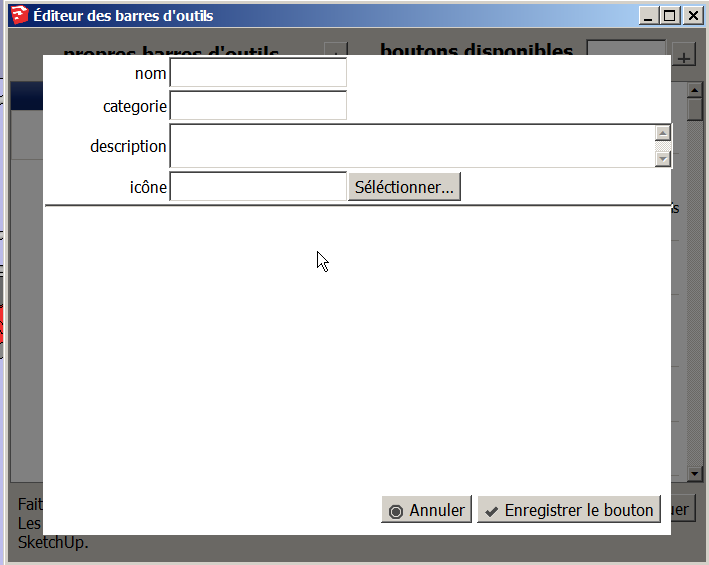
      cannot see that it is a text area (screen copy added)add a button window

      hope it helps

      posted in Plugins
      G
      glro
    • RE: [Plugin] ToolbarEditor (1.1.2) – updated 08.06.2014

      @aerilius said:

      What happens when you can't enter snippets? What do you do and what does not happen?

      nothing happens...

      after i fill in the form (name, category, ...), and i choose a file for the icon, it is then impossible for me to type anything in the area below the icon file address

      posted in Plugins
      G
      glro
    • RE: [Plugin] ToolbarEditor (1.1.2) – updated 08.06.2014

      @lewisee said:

      I can't enter code for custom (new) buttons using SketchUp Make 2014. Other wise this is a great extension. Thanks

      i can't enter snippets either

      su8, win7

      posted in Plugins
      G
      glro
    • RE: Searching a plugin to deeply explode nesting groups

      @mythos said:

      I often need to deeply explode a group that consists of other groups (and so on). For example to use the solid tools you need to bring all solids to the same level (by ungrouping/exploding all parent groups).

      Does anybody know an extension that can deeply explode a selected group by bringing the deepest children (groups) to the top? In other words I want to bring all deeply nested solids on one level by a one-click operation.

      Background:

      Most times I create a lot of groups of nested solid objects to ease the organization when creating complex models for 3D printing. Obviously his manually exploding operation of many nested groups took a lot of time. 😐

      Expressed more formally:

      The "deep explode" operation should automatically explode all groups and subgroups (of the currently selected element) that only consist of other groups but does not contain actual (ungrouped) faces/edges.

      PS: Any help is highy appreciated because this has been really time consuming for me! 😞

      i asked a similar question in this forum a while ago
      i wanted to explode down to the eepest level of embedded component, and stop

      http://sketchucation.com/forums/viewtopic.php?f=180%26amp;t=51438

      it works well with component
      maybe you could adapt TIG's code to do the same with groups instead of components

      posted in Plugins
      G
      glro
    • RE: [Plugin] Add comments to your file

      @inteloide said:

      Hello glro !

      Please try the new version (2.2.0), the hyperlink follow function is now implemented.
      Checked the options : you may change the way to follow a link : by double click or simple click, by pressing 'ctrl' in parallel or not... It's you who decide !

      Note also that, if you run plugin before to update, you should have a prompt that told you to update the plugin, with a link to this forum. I hope it works !

      Let me know if everything works ok for you !

      Inteloide

      yes, i got a message when i launched the old version, telling me there is a new one
      i downloaded and installed it

      i tried the feature to add a web link in a comment: it works !
      not at the first time: it took me a few seconds to understand you have to press CTRL while you clic on the link to make it work; i should have red the help window at first... double click seems more natural to me though

      but this feature widens a lot the possibilities; for example, you can upload a document to dropbox, and link the model to this document to give textual information about the model

      you have reached the perfection; congratulation!

      posted in Plugins
      G
      glro
    • RE: [Plugin] Add comments to your file

      @inteloide said:

      Hello !

      Not a lot of answers... 😞 Only 6 downloads... 😞

      Just post the new version, that introduce the follow updates:
      Added : Update checking ! To be sure to have the latest version of the plugin !Added : Change button icon to a menu.

      PS : Note that plugin try to load an external javascript code from http://bgsketchup.esy.es. This code allow the plugin to check the latest version. No information is transfered to the website. The script only send to Sketchup the latest version.

      Inteloide

      just installed version 2.1.0
      i was eager to try the possibility to insert a link in a comment
      but for me it doesn't work... at least, as i thought it would

      i was expecting the possibility to link to a webpage; but when i click on it, nothing happens; parameters can be set for the link, but they are not documented in the help file (yet)

      i suppose i am missing something

      After many atempts, i understood i had to keep the finger pressed on the mouse and drag from the button just below the cross; the bar with additionnal buttons would appear and disappear just after i move the mouse, otherwise

      i haven't used this plugin in a real situation, yet, but i shall if i manage to get an active link to a webpage

      posted in Plugins
      G
      glro
    • RE: [Request/Idea] Component replacer in right click menu

      @numerobis said:

      To replace a component with another you now have to open the component browser and search for the component in the list. Depending on the scene size this can be a very long list with hundreds or thousands of objects which takes several seconds to open even in list view and then you have to find your component...

      Now the request for a plugin: πŸ’š
      I think it could be useful to have a limited list of often used components in the right click menu with the ability to replace selected components or simply place a new one in the scene. The included components could either be build of maybe the last 10, 20 or 30 used components or predefined objetcs that stay in the list (or both).

      yes, the component window opening is slow when there are many many components to show
      you could create a special folder in the sketchup components folder, with the few components you need: it will open quicker

      posted in Plugins
      G
      glro
    • RE: [Plugin] LaunchUp – A Quick Launcher for SketchUp

      @aerilius said:

      Thank you!

      I didn't find any further hint what could cause slowdowns, but if CLibraries creates menu items for components (for all components?) it could be related.

      LaunchUp uses an index of all menu items. I would expect a larger index could eventually slow down the startup and the search inside LaunchUp but shouln't affect SketchUp when LaunchUp is not used.
      More components could also slowdown the components browser. But as long as components are not added into the model, they shouldn't affect SketchUp's general performance when the components browser is not used.
      Could you check how many plugin-created menu items there are?
      c=0; ObjectSpace.each_object(UI::Command){ c+=1 }; c

      i typed
      c=0; ObjectSpace.each_object(UI::Command){ c+=1 }; c
      i got
      70

      posted in Plugins
      G
      glro
    • RE: [Plugin] LaunchUp – A Quick Launcher for SketchUp

      @aerilius said:

      I will look into it. Though I don't know what could cause this (the plugin does not use observers, and should not be triggered when you change a layer etc.). Can you tell me how many plugins you have and how components and layers in the model?

      Maybe launchup is not responsible for the slowdown

      i have increased a lot the size of my components folder, recently; one folder is 129 MB and another 102

      And i use launchup together with "CLibrairies_loader.rb", to call components as well as plugins

      I understand now that "CLibrairies_loader.rb" must be the one slowing down sketchup, because it has so many components to load.

      posted in Plugins
      G
      glro
    • RE: [Plugin] LaunchUp – A Quick Launcher for SketchUp

      @vicxp0518 said:

      I've figured out that this plugin will cause a major slow down with selecting, component editing, layer visibility switching, and something else.

      I hope I was wrong but when I suffer with the annoying problem, there seems no way out, but when I disable this plugin, everything gets back to fine normal. I don't know why this would happen, but it really occurs on my larger models.

      i am experiencing slowdown of sketchup also, with the last version

      Have to desinstal it because i cannot use anymore my other plugins...

      posted in Plugins
      G
      glro
    • RE: [Plugin] Add comments to your file

      @inteloide said:

      No big problem, I think.

      Inteloide

      i agree; you just have to know it

      the plugin seems to be ready for use; adding an active link to a web page would be nice, but the link can be added and copied/pasted in an internet browser also, so it is not very important

      posted in Plugins
      G
      glro
    • 1 / 1