sketchucation logo sketchucation
    • Login
    1. Home
    2. frv
    3. Posts
    Oops, your profile's looking a bit empty! To help us tailor your experience, please fill in key details like your SketchUp version, skill level, operating system, and more. Update and save your info on your profile page today!
    โš ๏ธ Important | Libfredo 15.6b introduces important bugfixes for Fredo's Extensions Update
    F
    Offline
    • Profile
    • Following 0
    • Followers 0
    • Topics 48
    • Posts 263
    • Groups 1

    Posts

    Recent Best Controversial
    • RE: Timber types

      Incredible woodtextures can be found at Arroway textures
      http://www.arroway-textures.com/en/products/wood-1/contents

      I use these myself and I would not like anything larger for a texture really. Have a look at the other wood textures as well and the user gallery. I think this is the best and worth it.

      yesterday I made this table with it
      http://homepage.mac.com/fillieverhoeven/leaves/large-3.html

      I am not advertising I hope, I am just a customer who loves to share his joy about something great,
      Francois

      posted in Woodworking
      F
      frv
    • Photorealistic rendering wood

      Hi, I am new here in this group. I worked for 20 years on a big wooden boat and I also have an architectural firm. I love to work with wood and Sketchup. At our office we design a lot using wood and we most often use Sketchup and lately Modo to model our designs.

      We also render our work to show our clients and of course wood must have the typical feeling of wood also in our renders. Then wood is not all that easy, especially to render the typical warm sense untreated wood has as opposed to stained or lackered wood.

      I have started to work on my materials using Aroway Textures and Maxwell to render my SU models.
      I will show some more later on, this is the beginning, the third image is modelled in Skechup. The other 2 are not but rendered in Maxwell as well.
      http://homepage.mac.com/fillieverhoeven/leaves/index.html

      Hope my work will contribute to this forum,
      Francois
      Fillie Verhoeven

      posted in Woodworking
      F
      frv
    • RE: Many problems

      well, different topic but speed is not Maxwell's problem. For exterior rendering, that is to say using direct light (physical sun) speed is not an issue. Only when interior lighting and thus lots of indirect light situation need to be solved speed becomes a problem. But as I found out Vray suffers from it to. And in Vray it takes a long while before you get a good impression of the final image where Maxwell even for very complex scenes provides for good feedback in less than 5 or 10 minutes.

      I just rendered a wooden table, texture maps 6000x4000, and a chromium and aluminium light. I made the model in Sketchup and Maxwell showed the result in less than 1 minute. Then ofcourse kept rendering for hours to reach SL 10. But actually SL 2 was done in a few minutes which was really good enough to see what it was going to be. I find Vray not as easy on my patience.

      But again, I will explore Vray a little more. It makes me think of Modo a lot in terms of render quality and we almost always render our Modo work in Maxwell.

      Francois

      posted in V-Ray
      F
      frv
    • RE: Many problems

      I could not work with it on my Macbook pro laptop, 2Gb Ram and a duocore 2,4 Gh processor. It crashed non stop even on small models.

      But at the office it works a lot better, 4Gb ram and 8core processor. Its buggy alright but I do render images. But the huge speed gain I was expecting compared to Maxwell remains to be seen. I find Vray actually a bit slow to render, especially previewing a scene at rendering. Maxwell always gives me a good preview right from the start of the render. Well, I am not at all experienced with Vray yet so I can't really comment on how well Vray can be. But the first impression is that its capable of very high quality images right out of SU.
      Francois

      posted in V-Ray
      F
      frv
    • RE: Maxwell trees with Sketchup

      No, you can just update by reimporting parts of the SU model. Even texturemapping and assignments are kept while importing. Its actually very simple and fast. I just came to work like this since the current SU plugin for Maxwell was not functional anymore with the new v2 of Maxwell. So I had to work with Studio which so far I had avoided as much as possible. But forced to work from Studio I slowly came to the conclusion that Studiois a very powerful app to use in combination with Sketchup. Sketchup is bad with big models which is something Studio is very good at.
      Francois

      posted in Extensions & Applications Discussions
      F
      frv
    • RE: Maxwell trees with Sketchup

      No, I place the trees in Studio, the standalone app by NL for Maxwell.
      I can however import one tree in SU and then proxy these for export to Maxwell but its much easier to just import the trees seperatly along with the model of the building in Studio. Studio is very fast with even high polycount geometry. So if your just placing a dozen trees or so its easy enough.

      posted in Extensions & Applications Discussions
      F
      frv
    • RE: Maxwell trees with Sketchup

      If you like them for import in SU you have to deal with over 200.000 triangles for the higher green ones (95Mb mxs file per tree). I don't think Evermotion trees are effectively made with either components or instances for the leaves.

      That's why we don't bother to import and assemble our work in Studio. There we use these trees with subsurfacescattering textures to make them look real. Studio does instancing so you don't explode your model copying these beasts around. Our SU buildings are about 10% of the rest of the file with cars and trees. Actually, very detailled cars are usually no more than 5Mb.

      I don't hink you can ever do this with VfSU. But I am still experimenting with VfSU. I might be tempted to sell my license though since I somehow feel I am already to much into Maxwell to get properly going with Vray. Vray does seem to be a good renderer though for SU, especially rendering directly out SU.
      Francois

      posted in Extensions & Applications Discussions
      F
      frv
    • Maxwell trees with Sketchup

      Hi, since I bought Vray I am actually doing more work with Maxwell.

      I am actually getting more enthousiastic lately on Maxwell and Studio and mixing techniques to get my SU models beyond what I thought was possible.

      http://homepage.mac.com/fillieverhoeven/leaves/index.html
      I have just textured these trees bought at Evermotion. I use them with my Sketchup models. The are adding incredible realism to my SU models. I added the car through Modo and into Studio/Maxwell. I did this to later place my SU model of the building.

      I will show the results combined later.
      Francois

      posted in Extensions & Applications Discussions extensions
      F
      frv
    • RE: How to import maps

      tx again and yes , I have the current version which is
      The latest version of V-Ray for SketchUp is 01.48.66.
      according to the link you posted

      posted in V-Ray
      F
      frv
    • RE: How to import maps

      well, your right, the one on the bottom does open up a window to choose a file.
      TX That was unclear to me that that is the only place to import a texture file.

      I haven't figured oout yet how to get a current version of the OSX plugin.

      posted in V-Ray
      F
      frv
    • RE: How to import maps

      ok, my version is VRayForSketchUp-1.48.52-osx-installer
      It might be an old version but I would be surprised to be set up with an old version.

      I am adding a few new questions about the rectangular lights;

      1. when I make them a component the render no longer starts.
      2. when I group several rectangular light the render no longer starts.

      Is it true that light objects should remain as original geometry never within any kind of hiarchy. I haven't tested yet materials with emitter layers.

      Tom, tx again, I wonder how you manage to be so helpfull looking at all the other threads you are replying on as well.
      Francois

      posted in V-Ray
      F
      frv
    • RE: How to import maps

      Ok, but all the "M" buttons scrolled down under bring up the same window again and some others do not work at all.
      I am sure this must be a bug. I thought they also Beta tested the OSX version. Its really very unstable. I hope I have not invested in a tryout.
      Francois

      posted in V-Ray
      F
      frv
    • RE: How to import maps

      Tx Tom,
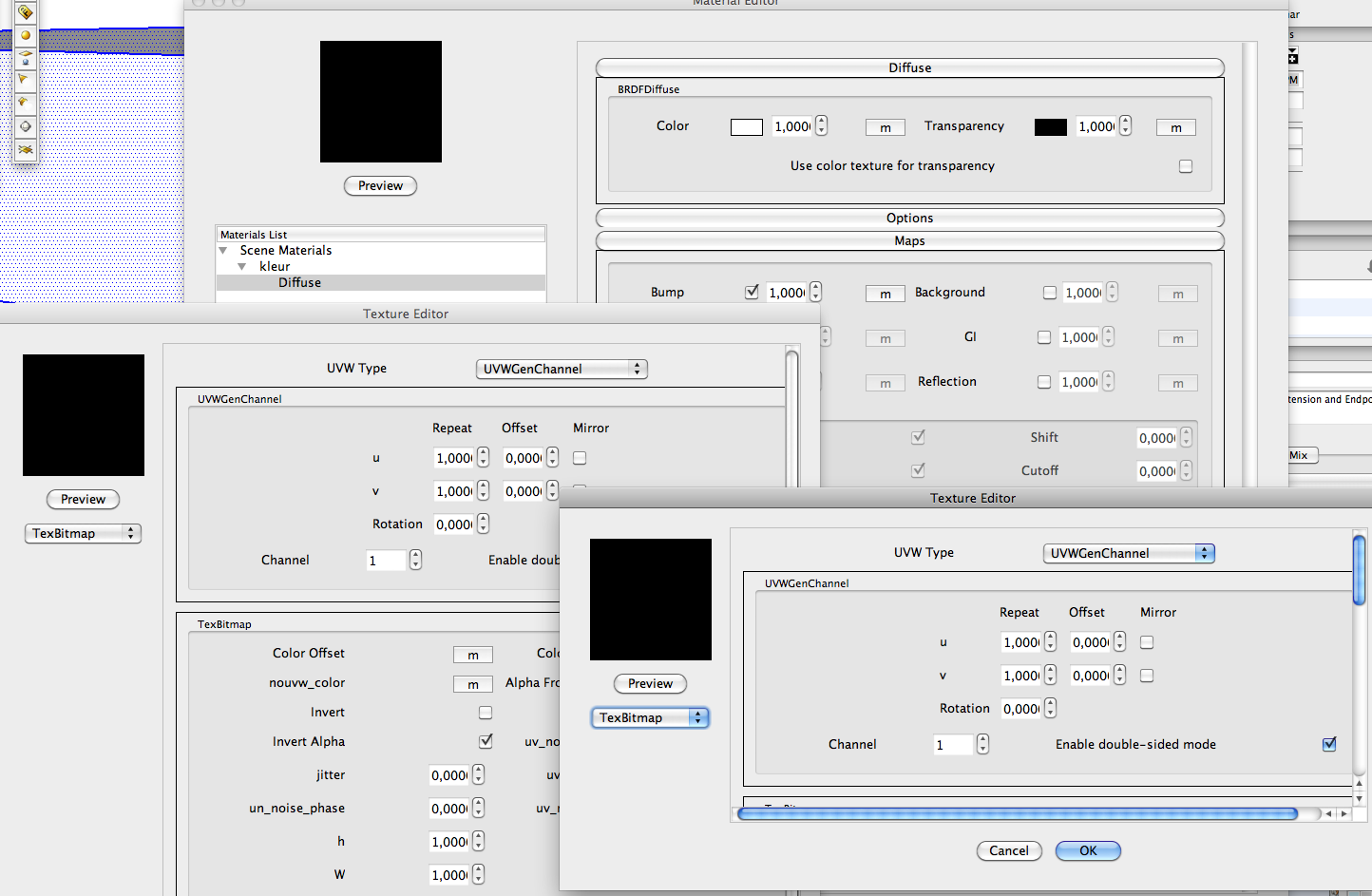
      but I am afraid the OSX version has a major bug here. If I do as you show I keep getting back at the TexBitmap window. I am just in circly without the option to choose a texture file from disk.
      I think I should report this to Vray.
      Are you using the OSX version. I wonder how I got the OSX version before Feb 10.


      screenshot

      posted in V-Ray
      F
      frv
    • RE: Does anyone knows which software is used for these images?

      I agree, with the sun shining in these images makes the interiors look small and low. He should use a light dome for those kind of renderings. But its a fact that the days of sketchy edges are over. Just have a look at the Asian Vray forums and you seen gorgeous work done by students in not all that much time and experience.
      Francois

      posted in Extensions & Applications Discussions
      F
      frv
    • New in VfSU (OSX) basic questions

      Hi, I am new in VfSU and have a few basic questions that seem to be difficult for me;
      first I find the plugin a little unstable. But I see renderings finished and i suppose thats a bit in the game of the early adopter.

      But here are some of my basic questions, any help from more experienced users is welcome. Don't hesitate to answer short and brief without much elegance...๐Ÿ˜„

      1. I can't seem to make any light to work, for instance the rectangular light can be edited but the effect is none, no light.
      2. were is the low priority setting for rendering as is mentioned in the manual
      3. there is a difference, and sometimes big in the manual and the actual OSX plugin. I assume this is due to the newer version.
      4. Is there a quick guide to good architecturel glass.
      5. is there a quick guide to speedyhigh quality archviz settings for exterior work under the phycical sky.

      This is it for now.
      Tx Francois

      posted in V-Ray render plugins extensions
      F
      frv
    • RE: How to import maps

      Hi,
      yes I mean the procedural maps. I only get those, never a window that allows me to upload a jpg or other map from disk. The bitmap or texture just brings me to a new dialog showing me the same pulldown options again.

      But as I understand from you the only way to work with textures in VfSU is by the material textures brought in by the SU material pane. That means just one for each material. You can not iow make a displacement map that differs from the diffuse map. VfSU just uses the same map for all effects...

      It seems very limited to me but I think I am mistaken.
      tx for your help btw,
      Francois

      posted in V-Ray
      F
      frv
    • RE: How to import maps

      Hi Thomthom,
      how's the plugin for the material panel getting along. Remember ..

      Well, I have just used Vray for an hour now. Rendered an Audi TT and my Maxwell knowledge came in handy. But I am trying to import jpg maps I used with Maxwell to render with Vray or is that not possible. I mean higher resolution that SU can handle. I am getting a little afraid VfSU can't import maps just like that. I can only get a list of presets when I try to pulldown the maps menu in the Vray material panel.

      Can you shed some light on this.
      Tx Francois

      posted in V-Ray
      F
      frv
    • How to import maps

      Hi, maybe very stupid question but I just bought Vray.
      I am trying to import a map from disk but I seem just to be able to choose from some presets for instance for a bump map.

      I am an OSX/SU and now Vray user.

      Any help however short is very appreciated.
      Francois

      posted in V-Ray render plugins extensions
      F
      frv
    • RE: Thoughts on Maxwell render

      Hi Jason, your right about Studio and mixing models from different modelers. Thats a big pre over other render app's. We just bought Vray though since I got tired of the grainy interior renderings. For exterior Maxwell is just great and fast too but the interiors are just a nightmare to render.

      I am interested in your library although I have little to offer back. You are not referring to the RAL library that is posted at the Maxwell forum ?
      If you like you can send me a message for sharing your library.
      Tx. Francos

      posted in Extensions & Applications Discussions
      F
      frv
    • Thoughts on Maxwell render

      Hi, I am a Maxwell user, as well as Modo and SU and Vectorworks,

      Since the current plugin for v2 is not really good yet I started to work with Studio exclusively to render my SU work.
      As a result my work has become better looking and I have saved a lot of time as well. I render now 300Mb+ models all made in parts in SU and rendered from Studio to Maxwell.

      In Studio big models are rather smooth but in Sketchup they are unworkable. I am beginning to see that Maxwell/Studio is one of the few options one has to render very large combined SU models.
      Here are the advantages to render with a renderapp. that has its own standalone modeling/rendering window.

      1. models can be made in small SU-parts and rendered assembled in the renderapp.
      2. materialising is fast and easy as compared to the slow material panel in SU.
      3. previews can be made quick without the need to export lots of geometry for each preview.

      Am I right to see that when choosing a render application you need to look into how you handle big models with trees, cars, furniture lighting etc. If you have to keep it all in one SU file your presentations will be rather limited.
      Francois
      posted in Extensions & Applications Discussions extensions
      F
      frv
    • 1
    • 2
    • 6
    • 7
    • 8
    • 9
    • 10
    • 13
    • 14
    • 8 / 14