great stuff, alan, the skippy and the box. and your site will be too, i am sure.
Oops, your profile's looking a bit empty! To help us tailor your experience, please fill in key details like your SketchUp version, skill level, operating system, and more. Update and save your info on your profile page today!
⚠️ Important | Libfredo 15.6b introduces important bugfixes for Fredo's Extensions Update
 Offline
Posts
-
RE: Jewellery box
-
RE: Layer Manager
também gostaria de saber. quando perguntei me disseram que são os mesmos do outro forum, e que lá estão explicados em algum lugar da página.
-
RE: Layer Manager
fernando,
o link estava errado, por isso não conseguiste baixar. baixa o pdf daqui.
não entendi a outra pergunta.
abraço.
-
RE: Every MIT course available online to all
none that i could identify. but i found an introductory design course that relies heavily on it. check it out here.
-
RE: Every MIT course available online to all
paul,
thanks for this tip. this is an amazing resource for people involved in architectural education!
-
RE: Please Welcome Style Builder...
yes, very nice.
it is also very nice of google to throw as a bone from time to time. this way we get evidence that your team is silently working to improve SU.
thanks, brad.
-
RE: Editing Dimensions
@joe wood said:
Type your first line, then type \n, followed by the next line. When you finish editing it you'll see two lines of text. Go in and Edit one of the lines in this skippy and you'll see what I did.
You can also put the \n in front of a line to drop the line down. I learned this on the original @Last forum. I hope alot of you didn't know this

i must be doing something wrong as it did not work for me. i typed this: 1st line \n second line but the whole thing remained on the same line.
-
A question about notebook battery usage
being new to notebooks (bought my first one in july) i wonder what should be wisest procedure in terms of extending the battery life.
in general i work with my notebook connected to the power supply, thus the battery is not really needed when at home or at the office.
question: should i leave the battery on all the time? or should i just install it when on the road?
i would like to hear from you on that.
-
RE: Couch needed
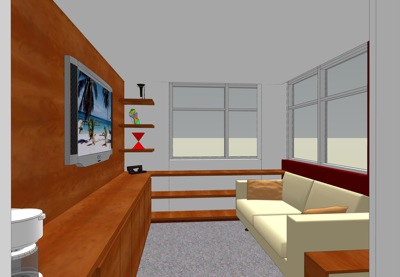
this is a view of a preliminary scheme that i developed for a lounge inside a clinic, using one of the couches obtained through this thread. thanks again.
-
RE: New here
@masta squidge said:
@engineeredcupcake said:
They were created to go along with his book, Google Sketchup for Dummies, but alone they are very helpful.
hi jasmine,
welcome to the fold.
chopra's book is excellent and very cheap too, if you buy it from amazon.com. another good source of videos is http://www.go-2-school.com; some of them are really impressive.cheers.
-
RE: Free sketchup or sketchup pro?
sorry, gai, i did not remember it. yes, i am on mac but most of my students are not so the script will be useful to them.
thanks.
-
RE: Free sketchup or sketchup pro?
@gaieus said:
Also Jim Foltz made a ruby that puts location into the free version, too.
do you where can it be downloaded from? i looked for it in our repository but could not find it.
-
RE: Free sketchup or sketchup pro?
have a look at vectorworks. i have been using it since it was called minicad. it is really good and packed with features. much cheaper than autocad, archicad and pthers like these.
it comes with a render module (renderworks) and a fine terrain modelling module (landmark).
good luck.
-
RE: Stamp tool alteration
in case it is needed i have tom's skippy and a hard copy of the main discussions.
-
RE: Stamp tool alteration
exactly. that thread was pure gold. i learned a LOT from it.
-
RE: Stamp tool alteration
@rhankc said:
I havent been able to successfully accomplish this except by starting over. maybe grouping the stamp and then carefully moving it....
i always keep a virgin version of the terrain in case i have to start over.
-
RE: Extrude but preserver original line
@jean lemire said:
For a face, extrude to full heigth. Then, select one end face and Copy/Move it to the other end. Then, immediately type /X in the VCB where X is the number of intervals that you want between the faces. For example, typing 4 will yield 4 intervals and you will end up with the two end faces and three faces equaly spread in between.
Just ideas.
this works beautifully, jean. thanks.
-
RE: Offset a polyline
@gaieus said:
No, it's not possible.
sorry to disagree, gai. as long as the lines are coplanar and connected, they do not need to configure a closed polygon for you to be able to offset them.