sketchucation logo sketchucation
    • Login
    1. Home
    2. db11
    3. Posts
    Oops, your profile's looking a bit empty! To help us tailor your experience, please fill in key details like your SketchUp version, skill level, operating system, and more. Update and save your info on your profile page today!
    🚨 Skimp | 25% Off until March 30 Buy Now
    D
    Offline
    • Profile
    • Following 0
    • Followers 0
    • Topics 28
    • Posts 395
    • Groups 1

    Posts

    Recent Best Controversial
    • How to import pattern fills into LayOut?

      Don't have time to draw patterns from scratch (on deadline) but have found couple of fills from CadHatch that are just what I'm looking for. Is there a way to directly import these .pat files into LayOut?

      If not, is there a work-around? Where are LO pattern fills stored and in what format?

      Also, does anybody have good sources for additional LO material patterns? The native offering is awfully sparse (at least in LO 2015).

      Thanks for any help.

      Doug

      posted in LayOut Discussions layout
      D
      db11
    • RE: A Wall Sconce from Italy

      Very cool lamp and nicely rendered.

      posted in Woodworking
      D
      db11
    • RE: What's the best way to learn SketchUp Shortcut Keys?

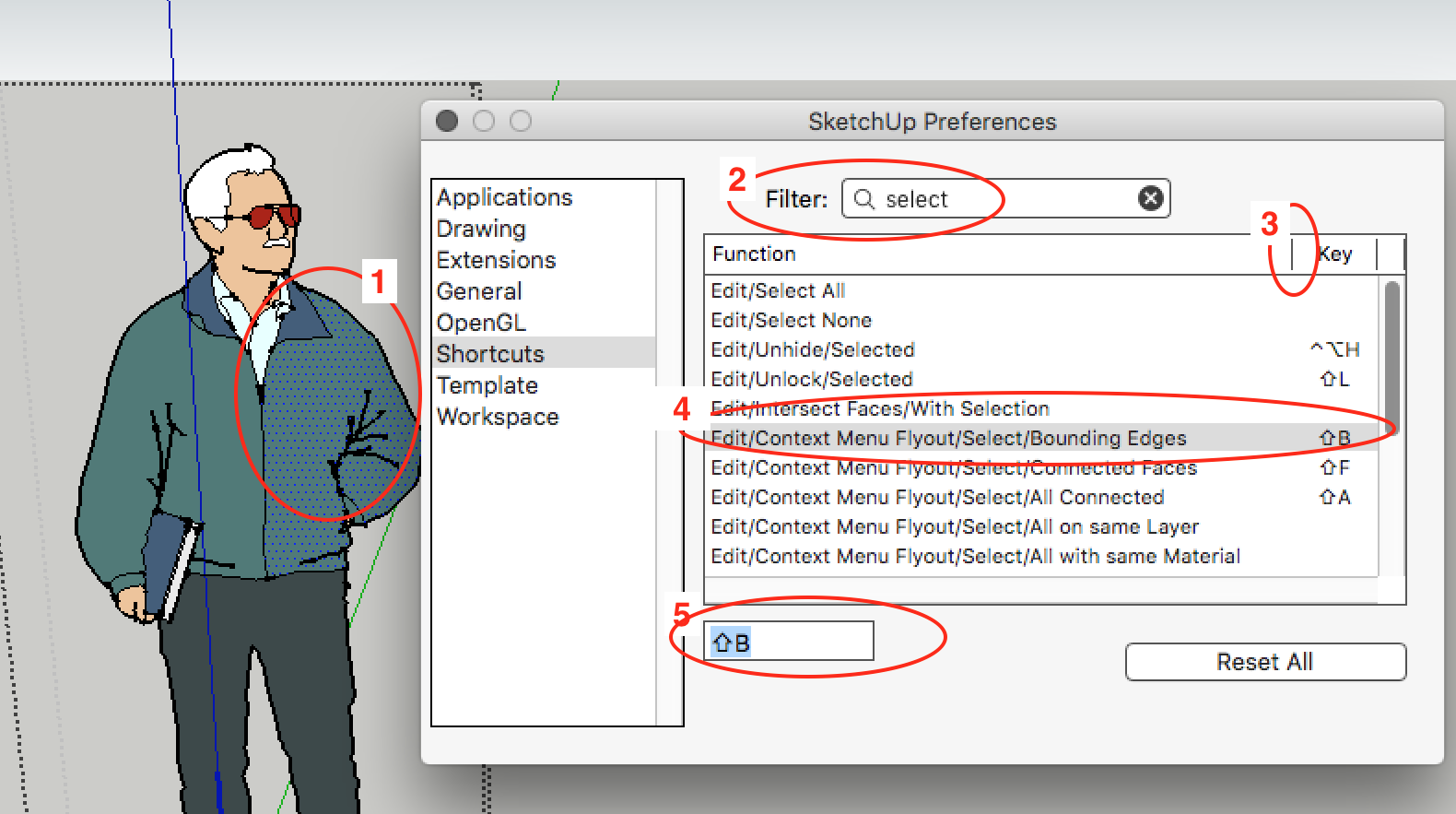
      Like this:

      Context_Menu_Shortcut.png

      1. open the group/component and select a face only
      2. go to 'Preferences/Shortcuts' and filter on 'select'.
      3. grab this bar and drag right to view the full menu item name (you can't modify the Preferences window size itself)
      4. select the 'Bounding Edges' item from the list
      5. enter your shortcut

      The main thing to remember is that to add a shortcut for a context menu item, you must be in the specific context that loads it into the context menu flyout (you can check that by right clicking and seeing if your desired item shows up in the flyout: if not, you're not yet in the proper context). Otherwise it won't show up as an option in the 'Shortcuts' list.

      It's not obvious that it works this way, but once you understand how it works it does make sense.

      Hope this helps.

      Doug

      posted in SketchUp Discussions
      D
      db11
    • RE: An ambitious project

      @leonard96 said:

      the trial period of the Keyframe animation has expired and I can't afford to buy a license for it

      Given that the license for Keyframe Animation is only $40, why not do a small Kickstarter or GoFundMe campaign? All you would need is a handful of people to throw in a nominal donation and you'd have the money to buy the license and complete your project.

      Given the enthusiasm that people have for it, I'd think it'd be a no-brainer.

      Just a thought.

      posted in WIP
      D
      db11
    • RE: Wormley Desk

      Very cool desk and nice job modelling / rendering it.

      posted in Woodworking
      D
      db11
    • RE: Automatic walls, doors & windows

      @facer said:

      Why did your use imperial dimensions to identify windows and doors?

      Canada is metric I believe, is Quebec an exception? πŸ˜„

      Not sure whether it's due to our proximity / trading relationship with US, or simply industrial inertia, but the vast majority of building materials are still made / spec'd to Imperial units.

      So to work/live here in QC, we need to be bilingual in dimensions as well as language πŸ˜‰

      posted in Plugins
      D
      db11
    • RE: Nudge stuff in LayOut el-rapido

      Thanks for the explanation. Good to know.

      posted in LayOut Discussions
      D
      db11
    • RE: Nudge stuff in LayOut el-rapido

      @dave r said:

      It's been like that from the first version of LayOut.

      Dave, is there a way to set the nudge increment? I was aware of the shift-nudge for larger jumps, but is it possible to go the other way (reduce) nudge distance? I've played with changing the unit precision and the grid size, but it's not clear to me that either effect nudge distance in any way. (I may well be mistaken)

      It would make sense to me that the more precise the drawing, the smaller the standard nudge distance should be. Or, have a control key override for a micro nudge β€” like shift-nudge but in the opposite direction.

      Any clarification would be appreciated.

      posted in LayOut Discussions
      D
      db11
    • RE: Bricsys Shape

      @glenn at home said:

      Installed and running fine for me on 2 machines:
      Core i7, GTX 645 with Win 7 Pro
      AMD Athlon II X4, GTX 650 and Windows 10 Home

      I'll have to wait on trying it since I'm on a Mac and their MacOS version isn't available yet.

      I'd be curious to hear how you find it in use. We have been considering a move away from SU (due to the continually unaddressed workflow issues between SU and LO), and BricsCad / BIM with along with Shape for conceptual modelling seems a compelling offering β€” depending on how well Shape replaces SU.

      posted in Freeware
      D
      db11
    • RE: Hardware - PC Build SU+V-Ray

      @solo said:

      At the time it cost $3600 but that same setup now is around $2800.

      Though in no way cheap, that's actually less than I would have thought. Thanks.

      posted in V-Ray
      D
      db11
    • RE: Hardware - PC Build SU+V-Ray

      @solo said:

      Everything works great with my Ryzen 1800x, Lumion loves the 1080ti (only utilizes one) where Thea uses all 16 threads and 2x 1080ti's (amazing speed) SU is smooth.

      I will suggest a good sized SSD, I went for a 1TB Samsung SSD and a 4TB WD mechanical 2nd drive, everything starts faster from Windows to SU, Photoshop, Lumion.

      [attachment=0:157a2ukd]<!-- ia0 -->Capture.JPG<!-- ia0 -->[/attachment:157a2ukd]

      Sounds like an amazing build, with performance to match. What was the final $$ damage for it?

      posted in V-Ray
      D
      db11
    • RE: Medeek Door and Window

      @pixero said:

      My 3pt windows plugin is meant to be super easy and quick to use. (Not very detailed though.)
      How do you plan to get the dimensions of a window with just 2 clicks?
      My idea was to avoid lots of settings to make the workflow fast.
      First set the window setting of your choice and then click away.

      I was going to reference your plugin as a super-simple way to quickly add windows to a model. It's fantastic and fast for early-stage modelling when you just need representative windows to flesh out conceptual designs.

      If Medeek's plugin uses a similar approach for sizing/placing windows, but with more detail in the produced components (and therefore more attributes to set), it could play a similar role for later design stages β€” especially if he implements a 2D layer as suggested... a great idea!

      If you could set attributes that are saved as plugin defaults (vs each time you use it), then then the workflow could be just as fast as 3pt Window, once you've set it up.

      My other suggestion was that casements are a must as a standard window type, and tilt-turn would also be very useful.
      posted in Plugins
      D
      db11
    • RE: Where have all the Sketchers gone?

      @paul russam said:

      We’ve basically committed ourselves to getting Lumion soon so I’ll probably be posting some β€œlook at me” stuff in the near future πŸ˜›

      I'll look forward to those posts. We're considering getting Lumion at some point (later) in 2018, so would be very interested in hearing about your experience with it.

      posted in Corner Bar
      D
      db11
    • RE: 3D Connexion

      @box said:

      It's different for Mac.

      The filepath for MacOS is shown in the screengrab below. (copy the 3DxSketchUp.rb loader file and corresponding folder from SU 2017 to the equivalent SU 2018 folder).

      Important thing to note is that the proper location is the 'Macintosh HD/Library/Application Support' folder at the root level of the boot drive, NOT the 'User/Library/Application Support' folder where other SU plugins are normally installed. (Make sure that you don't have a duplicate copy in the User Plugins folder β€” it can cause issues)

      Screen Shot 2017-11-23 at 11.44.35 PM.png

      posted in SketchUp Discussions
      D
      db11
    • RE: Edmond Spence Side Tables

      I like that design a lot too. As always, impeccable modelling / texturing / rendering. Nice job, Dave.

      posted in Woodworking
      D
      db11
    • RE: SUp Ver 3?

      From Wikipedia:
      SketchUp debuted in August 2000
      Google acquired @Last Software on March 14, 2006.
      On January 9, 2007, Google announced Google SketchUp 6

      So SU3 was still @Last and somewhere between those dates... seems the exact release date isn't easily found.

      posted in SketchUp Discussions
      D
      db11
    • RE: Asian Gazebo

      A very striking design, and beautifully executed.

      posted in Gallery
      D
      db11
    • RE: MSPhysics - Experiments &amp; Examples

      Very cool - love it!

      posted in Plugins
      D
      db11
    • RE: Kristoff Rand - Krisidious - Shot

      That's terrible news.

      I've always appreciated his thoughtful contributions, and hope to see him back here soon.
      Wishing him a full and rapid recovery from his injuries.

      posted in Corner Bar
      D
      db11
    • RE: Fredo on Mac

      @mariocha said:

      To Mac users: Sierra & High Sierra.
      Finally tracked down that occasional (sometime often) SU 'Hang on quit' problem. (beachball & force quit)
      Occurs every time one of Fredo's configuration dialog is opened during a session.

      I've had problems primarily with SUClock. It not only hangs on quit, but it then has to be disabled manually before re-launching or it splats on launch.

      The problem has been intermittent, so I haven't noticed if it's related to opening the configuration window. I will check it out though. Thanks for the info.

      (will also update to the latest LibFredo, which will hopefully obviate the need to figure it out)

      posted in Plugins
      D
      db11
    • 1 / 1
