sketchucation logo sketchucation
    • Login
    1. Home
    2. d12dozr
    3. Posts
    Oops, your profile's looking a bit empty! To help us tailor your experience, please fill in key details like your SketchUp version, skill level, operating system, and more. Update and save your info on your profile page today!
    ⚠️ Important | Libfredo 15.6b introduces important bugfixes for Fredo's Extensions Update
    D
    Offline
    • Profile
    • Following 0
    • Followers 0
    • Topics 67
    • Posts 2,179
    • Groups 1

    Posts

    Recent Best Controversial
    • RE: Solid works conversion

      @deanlegg said:

      Is it possible to import solidworks files into SU?

      Not directly. Third party software may be used to convert the file into something that Sketchup recognizes - like Frederik mentioned. Even better, if you have access to Solidworks, you can save the file as DWG (or DXF, STL, etc.), and import that file into Sketchup.

      If you don't have access to Solidworks to convert the file, feel free to PM me the files and I can help you.

      posted in SketchUp Discussions
      D
      d12dozr
    • RE: 3D printing advice on plugins

      Several plugins fit the description of what you're looking for, so here a few more to add to sdmitch's list.

      1. Thomthom's Solid Inspector 1 and 2 :http://extensions.sketchup.com/en/content/solid-inspector,
        and http://extensions.sketchup.com/en/content/solid-inspector%C2%B2

      2. Export STL's from Sketchup: http://extensions.sketchup.com/en/content/sketchup-stl

      3. FredoScale will do bending and twisting a little differently than ShapeBender linked by sdmitch above, and it's free (as in send Fredo a donation if you like the plugin) πŸ˜„ http://sketchucation.com/pluginstore?pln=FredoScale

      posted in SketchUp for 3D Printing
      D
      d12dozr
    • RE: The Bridge, the Barge and the Croc - Kindle ebook

      You have a great imagination, Stuart!

      posted in Gallery
      D
      d12dozr
    • RE: Ceramic 3D Prints

      You're a master of SDS, Oli! Fantastic results on the ceramic prints too πŸ‘

      posted in Gallery
      D
      d12dozr
    • RE: Cutting a large model for 3D printing (revisited!)

      Hi Rev, superglue and hot glue are commonly used to attach 3D printed parts together. For some novel ways including friction welding the parts together, you may check out this piece on Makezine.

      Regarding the long skinny triangles, I wouldn't worry about them unless you are experiencing trouble while printing. While they aren't ideal, I've never personally had trouble printing them. That said, increasing the polycount while exporting is likely the best way to avoid the long triangles, but then you can run into overly heavy models that take longer to process and can also make for a lower quality print.

      posted in SketchUp for 3D Printing
      D
      d12dozr
    • RE: 3d pdf files or something better?

      Stuart, would something like Sketchfab work for your needs? It's not available as a document, but it's an online application and you can embed the model in many websites like you would a YouTube video. There is a Sketchup plugin to upload a model directly to Sketchfab.

      posted in SketchUp Feature Requests
      D
      d12dozr
    • RE: Your Recommendations Please

      Cheers, please let up know what you end up getting. πŸ‘

      posted in SketchUp for 3D Printing
      D
      d12dozr
    • RE: Your Recommendations Please

      Ash, I am skeptical of the Printrbot you linked to. Maybe you could check with Printrbot directly and see if they are legit, or if there are any 'official' dealers in India.

      I would not recommend the used wood Ultimaker. None of the new printers are made of wood any more because if it's tendency to move with the changing seasons. You want a stable frame or calibration and print quality will suffer.

      The build quality of your last two links looks fine, but I can't comment any further than that. I haven't had much interaction with Prusa brands. Hope that helps!

      posted in SketchUp for 3D Printing
      D
      d12dozr
    • RE: Your Recommendations Please

      Looks like you need a W & S...if you had your printer, you could just 3D print some new ones πŸ˜›

      The first link you posted does not look good. The kit itself looks fine, but the website does not give me confidence that you will get a quality product and/or support. The product description is a bare minimum, well not even that - the printing area is not listed?? The link to the support forum is broken as well.

      The Fabx machines look good as far as I can see, as does the rest of the website. Personally I would feel much more comfortable purchasing from '3Ding', given the choices you have presented.

      posted in SketchUp for 3D Printing
      D
      d12dozr
    • RE: Watercolor palette for shapeways

      Looks great, Stuart!

      posted in SketchUp for 3D Printing
      D
      d12dozr
    • RE: Cutting up a model for 3D printing

      @revelever said:

      Should I scale it up before importing into netfabb or no difference?

      -rev

      Shouldn't make a difference, but you can scale it quickly in Netfabb if needed. Glad it helped!

      posted in SketchUp for 3D Printing
      D
      d12dozr
    • RE: Cutting up a model for 3D printing

      @cotty said:

      You can have a look at the trial of the nice plugin...

      Great solution for inside Sketchup, Carsten.

      If you're having trouble in Sketchup, you can cut up a model very easily using Netfabb Basic. It's usually much faster and you'll have less trouble with holes in the model. Here's a tutorial:

      posted in SketchUp for 3D Printing
      D
      d12dozr
    • RE: Object not solid

      @duubike said:

      For example if i draw a solid cube (attached image 1) and then draw a rectangle on it and pull it out (attached image 2) is it possible to make that into a solid? Or the only way to make it into a solid is to draw the second cube as a seperate solid and then merge them together?

      This is correct for the example you describe. The problem is that on a more complex object there may be interior faces, or some other geometry that will cause the operation to not be solid.

      Here are a few basic principles that you should know when 3D printing your Sketchup models.

      posted in Newbie Forum
      D
      d12dozr
    • RE: Watercolor palette for shapeways

      πŸ‘ good thinking to just print a small part for testing, Stuart. Please let us know how it goes!

      posted in SketchUp for 3D Printing
      D
      d12dozr
    • RE: Watercolor palette for shapeways

      The hinges you made look great! Yes, the plastic will leak unless you paint it. $60 sounds about right for commercial printing. You could get it printed cheaper on a small desktop FDM machine, but the quality won't be nearly as good and you'll still have to seal it with paint or epoxy.

      posted in SketchUp for 3D Printing
      D
      d12dozr
    • RE: Watercolor palette for shapeways

      Stuart, I'm always glad to help you, and even more pleased to you posted publicly. This way others with the same questions will benefit and you get answers faster. πŸ˜„

      I would try a sort of piano hinge, where half of the hinge parts are on the top of the box, and the other half are on the bottom half, then run a brass rod through for a pin.

      http://www.robertkarl.org/woodworkingblog/uploaded_images/PianoHinge-797236.jpg

      (not my image)

      1/16" should be thick enough, but you will have to paint or otherwise seal the plastic because it is very porous.

      You should also increase the resolution of the circles used to make the paint holding trays so that you get a smoother surface. Running fredo's Roundcorner plugin on the sharp corners is a good idea.

      posted in SketchUp for 3D Printing
      D
      d12dozr
    • RE: One Way To Fix Disappearing Model

      3D printer running in the background! πŸ˜„

      posted in SketchUp Tutorials
      D
      d12dozr
    • RE: A Useful SU to 3D printing thread.

      For architectural scale models, you almost have to start from scratch or rebuild them using the existing model as a guide for the scale you want to print at. The reason is because when you scale down an existing model, you're left with tons of features that are too small to print, so you have to start over and exaggerate the size of features that are important to show, decide what needs to be left out. It's pretty easy to repeat after you've done one, because the modeling is so much simpler. I guess an analogy would be low-poly models for faraway components in a game vs. the high detail closeup objects.

      posted in SketchUp for 3D Printing
      D
      d12dozr
    • RE: A Useful SU to 3D printing thread.

      Here are a few more tips that I wish I know when starting out.

      • Learn about the printing process, even before designing in Sketchup. Surf YouTube or go to a makerspace and get some hands on time with a machine. See what makes a print fail (despite the media hype, you can't print anything!) and how you can design around the limitations. I would say this is the #1 thing you can do to design effective prints, especially when using a commercial print service like Shapeways.

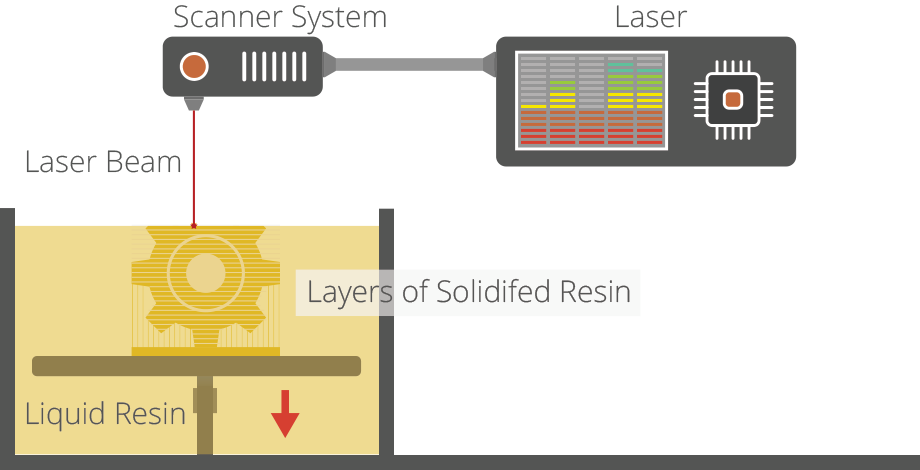
      • Understand that there are a handful of 3D printing processes, and that designing for each one has its nuances because of the particular way the machine works. Ie: hollowing models is great for some machines to help reduce material costs, but working with a solid block of a model may be easier on a common filament-based machine. Become familiar with each process, and decide which one will work best for your particular needs. This tip builds directly on #1.

      Here's a good guide on 3D Printing Industry to get you started.

      http://3dprintingindustry.com/wp-content/uploads/2014/02/stereolithography.png

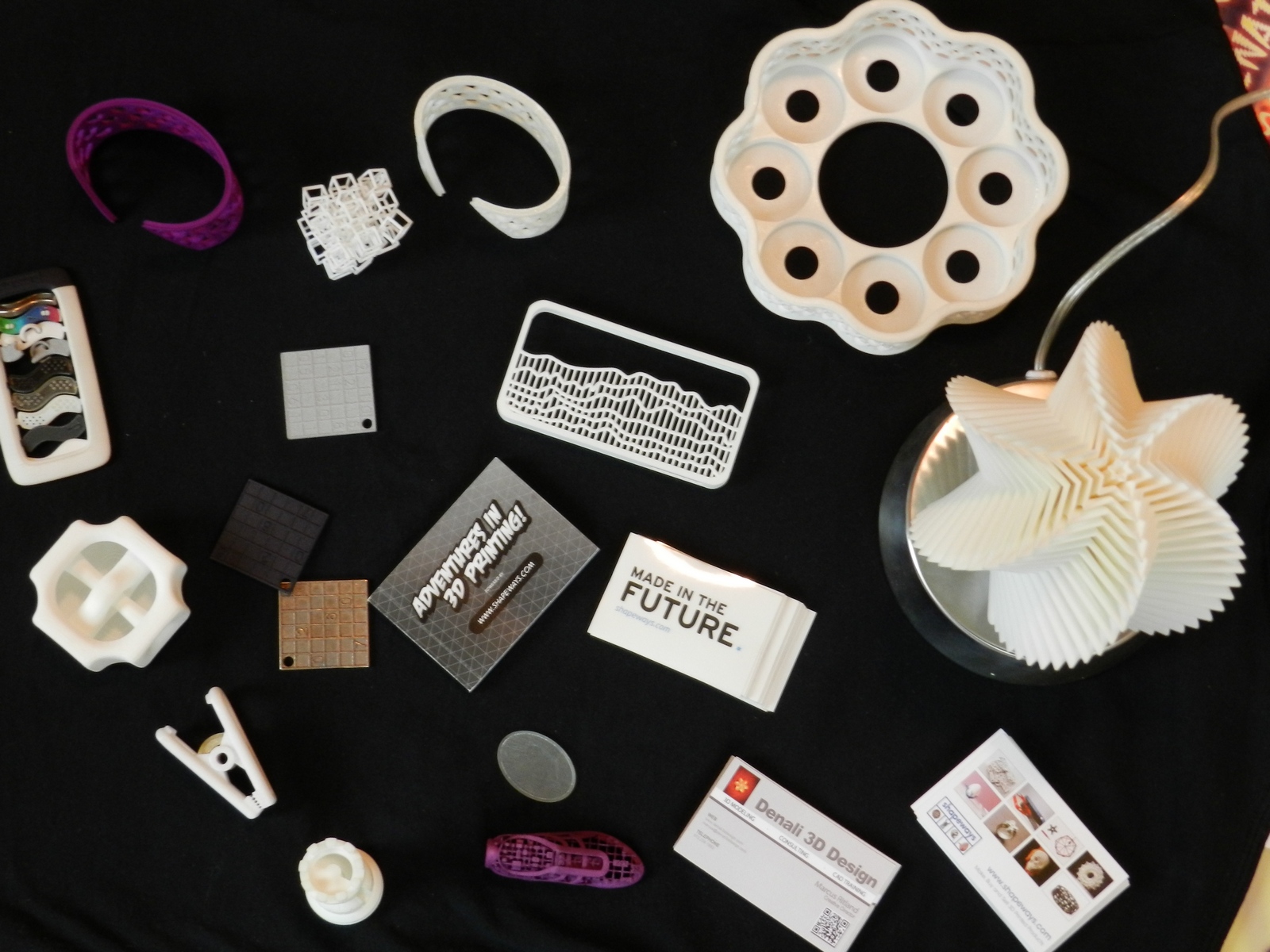
      • It helps to get your hands on 3D printed samples, so you can feel for yourself the mechanical properties of each kind of material. You can get samples from a trade show, a local makerspace, request from a manufacturer, or as a last resort buy a 3D printed part from a print service.
        A few sample prints I've collected

      • Once you know what machine you'll use, learn the "print resolution" of the printer. Similar to DPI in photos and paper printing, 3D printers have a smallest minimum feature/detail resolution that they can print at. 2mm screw threads? Probably not. 20mm screw threads? No problem! This is a very common problem when starting out because it's so easy to zoom up to 1000% on your model and everything looks gigantic, but the printer can't actually produce that detail in the real world.

      • One tip that you can use to check for minimum detail is to make a dummy cube the size you want your smallest feature to be (say 1mm x 1mm x 1mm), and then drag that cube around for size reference in your model. Importing an object to compare the overall size of your model is another good idea. Making a phone case? Import a model of the phone to get an idea of scale. BTW, did someone say 3D Warehouse? πŸ˜„

      • Now for making your model solid. I like to work in little solid bits of solid groups or components, and then use the Outer Shell command to combine them all at the end. This way you experience less of Sketchup's quirky ability to goof up some seemingly good geometry. You can also save copies of your model at important steps along the way to create a sort of model history, enabling you to go back to a previous point in the model. Not quite parametric modeling, but as close as you can get with Sketchup.

      • Use plugins to check for errors and sometimes fix them. Thomthoms Solid Inspectors and Tig's SolidSolver are great free options. For really frustrating problems, use a 3rd party program. Netfabb Basic and Netfabb's online model repair are excellent to quickly fix an exported STL before sending it to the printer. If you're uploading models to Shapeways or another 3D print service, they have an automated fixing system similar to Netfabb that will fix minor problems.

      posted in SketchUp for 3D Printing
      D
      d12dozr
    • RE: A Useful SU to 3D printing thread.

      Hey, my specialty! πŸ˜„ Do you have a particular project you're working on now Pete? Any specific questions?

      Here's where I always send folks first, my article on MasterSketchup: 8 Tips for 3D Printing with Sketchup. This article covers the best practices.

      posted in SketchUp for 3D Printing
      D
      d12dozr
    • 1 / 1