Elegant. Beautifully done wood texture.
Oops, your profile's looking a bit empty! To help us tailor your experience, please fill in key details like your SketchUp version, skill level, operating system, and more. Update and save your info on your profile page today!
⚠️ Important | Libfredo 15.6b introduces important bugfixes for Fredo's Extensions Update
 Offline
Posts
-
RE: Vectary - Ultimate 3D Tool
I logged in after figuring out that the "@" was already input and you have to type your address in using that "@" (i.e., you can't just type in your whole address) Quaint.
Anyway, it never did log in: just the spinning arrow.

-
RE: Stug 111 ausf.b
You need update your skill level to Advanced

Was Substance Painter used to texture it?
-
RE: Interior Renders
Overall hard to believe anyone could do better: beautiful (even with supersize beer
 )
)Isn't Copyright just one word?
-
RE: [Plugin]SharpComp v1.0 2015-11-29
@wikii said:
with SEC v0.02
If I make shortcuts CAS+E to "Edit Component",CAS+B to "Send Back".
What is "CAS" in CAS+E and CAS+B
-
RE: Pattern Fill
Is this what you meant by "opacity of the patterns"?
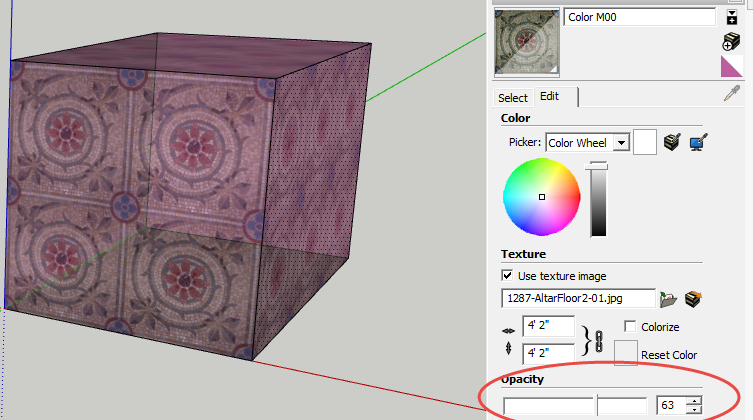
EDIT
pbacot beat me to it and assumed this is not what you meant. -
RE: [Plugin] BezierSpline - v2.2a - 22 Apr 21
@jclements said:
I guess I never knew this.
I didn't either! Saves having to make a plane to draw on

-
RE: Extending a non-axis orientated line
I wonder what happens if I press this and this??

-
RE: Animation Plugin Recommendations
I would recommend you take a look at SimLab Soft
-
RE: [Plugin] Mirror
@pbacot said:
Using this GREAT tool a lot lately in framing models. Thanks for the note James. I really never want to erase the original, it seems, and it would be easier to just delete it rather than answer that dialog.
If this is directed to me, I don't understand your reply.
What I would prefer is that the new mirrored object be the one selected so I can immediately move it. This leaves me with the original in its location and the mirrored copy in the moved location.
No big deal: super extension
-
RE: [Plugin] BezierSpline - v2.2a - 22 Apr 21
Thank you.
The phraseology of
"The doc is slightly outdated, but gives an overview of the essential features. All PDF files are also available from the menu "Draw > BezierSpline curves > Documentation..."
implied that they were "also" contained within the extension.
It's an excellent idea to have direct access to the documents for the more complex extensions that one does not use frequently: I wish all extension authors would do the same.
-
RE: [Plugin] BezierSpline - v2.2a - 22 Apr 21
@unknownuser said:
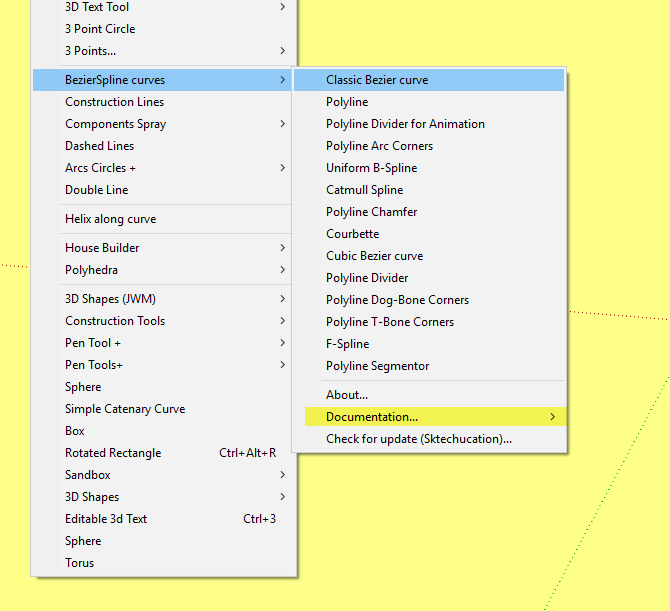
Note: All PDF files are also available from the menu "Draw > BezierSpline curves > Documentation..."
All the spline tools work fine, but the Documentation feature does not work. I've used Autoinstall with the SCF Plugin Store tool to be sure I have the latest version, but nothing happens when I click on "Documentation"
-
RE: Sneak Peek ExtensionStore
Once again the master tempter strikes!
-
RE: [Plugin] Double line
Works fine from Draw menu (except it's "Draw>Double Line" not "Draw>Double Line>Double Line", but there is no toolbar called "Paletts" (or "Double Line" as could be expected).
I note that it says "third icon down". This seems to imply that "Paletts" is a master toolbar perhaps loaded by another extension?
-
RE: Faster Autosave!
@monkers said:
I have set up a small 10GB RAM disk (Storage drive mounted on RAM) as a temporary location where I can locate my working files.
10GB RAM disk is small

I have 32GB of ram so to use one third of it for a ram drive would really not be small to me. -
RE: Rayner...in the style of
A perfect 10.
It's hard to work on my projects when I see what you have achieved.