Thanks so very much (it's good to know that I'm still somewhat vaguely sane)
Oops, your profile's looking a bit empty! To help us tailor your experience, please fill in key details like your SketchUp version, skill level, operating system, and more. Update and save your info on your profile page today!
Check out Febhouse | New extensions for Shadow Analysis in SketchUp Download
B
Offline
Posts
-
RE: Sketchucation Tools 5.0...
-
RE: Sketchucation Tools 5.0...
Here are my steps:
- Start Sketchup (in this case, my daily driver is 2023)
- Notice the ExtensionStore toolbar.
- From the extensions Menu, select Toggle toolbar ON/OFF 'off' update notification turns 'on'
- The toolbar is gone
- Exit Sketchup
- Restart. The toolbar is there again
- From the extensions Menu, select Toggle toolbar ON/OFF 'off' update notification ignored
- Acknowledge the modal popup "Toolbar button automatic Update marker may show after restart..."
- Select the same menu item again, and the toolbar is gone
- Exit Sketchup and restart
You probably wouldn't be surprised to know that the (@*!!@$/#^) toolbar is back again.
I can't be the only one who just doesn't WANT the toolbar. Really, I can start up the extension any time I want from the menu.
-
RE: Sketchucation Tools 5.0...
Because I was dropped on my head as a small baby, I am utterly unable to find a way to turn off the sketchucation tools menubar. There are two toggles that appear to be correct on the menu, but neither works permanently. I'm sure uninstalling it would work, but that does seem a bit drastic?
I'm at a bit of a loss as to why it doesn't work like every other plugin toolbar
-
RE: Elephant in the room
Yall are nuts. President Trump is a Kennedy'esque liberal, who happens to be aligned with the Republican Party (for those of you who are old enough or educated enough, much like Eisenhower).
He is
1.) Anti-Free Trade
2.) Socially Liberal (pro-gay rights, ETOP's back to the states)
3.) Anti warMay he and his successors continue driving Democrat scum crazy.
-
RE: [Plugin] SketchUcation Tools
@Rich-O-Brien said in [Plugin] SketchUcation Tools:
@B2Pi said in [Plugin] SketchUcation Tools:
....it would give me a place to start...
To start what? That has no relation to Sketchucation Tools
To start figuring out why I can't get sketchucation tools to work.
To refresh your memory, @TIG had suggested ensuring that two URL's and two IP addresses were unblocked. They are unblocked, but an additional URL associated with those IP addresses is blocked (I've no idea why).
-
RE: [Plugin] SketchUcation Tools
Any chance you're actually using edg3d.io ? That is blocked for me, and it would give me a place to start...
Cheers
-
RE: Fredo 6 Collection License
@fredo6 I'm afraid that I have the same issue. RoundCorner, JointPushPull, VisuHole, and ToolsOnSurface are all licensed on 21/12/2023, and can't be cleared.
Thank you
-
RE: [Plugin] SketchUcation Tools
@B2Pi Hmmmm... Alternatlively, is there a way to download a bundle? Could that be considered a feature request?
-
RE: [Plugin] SketchUcation Tools
@Rich-O-Brien said in [Plugin] SketchUcation Tools:
@B2Pi You could try whitelisting *.sketchucation.com if there's an issue there.
Ah, well, that was why I was hoping for a base URL. sketchucation.com and community.sketchucation.com are getting through. The plugin store is displaying and cataloguing, it just isn't downloading.
@B2Pi said in [Plugin] SketchUcation Tools:
Sketchucation plugin store had stopped working on my machine
At some point it did work and then just stopped? That suggests something on your device changed.
Well, yes. I'm not in control of the firewall. However, the latest behavior does indicate errors on both sides of the wire.
@B2Pi said in [Plugin] SketchUcation Tools:
Is there a generalized download location?
@TIG may know more?
Thanks
-
RE: [Plugin] SketchUcation Tools
Forgive the necropost, but this seems like an appropriate place.
The Sketchucation plugin store had stopped working on my machine with a message of something like 'unable to unzip file' with any attempt to install or update.
Upon updating to 4.4.0, I no longer get that message, but either updating or installing instantly reports success, with no positive result.
I suspect that a URL is blocked, but I can't request an unblock without knowing the URL. Is there any logging going on? Is there a generalized download location?
Cheers
-
RE: [Plugin][$] RoundCorner - v3.4a - 31 Mar 24
@fredo6 said:
Just click on where the hole is supposed to be. You'll see the corresponding face. Delete it.
Sigh. Thank you. I wasn't born an idiot, it's taken years of training to get here...
-
RE: [Plugin][$] RoundCorner - v3.4a - 31 Mar 24
Well, that's not right. I fear I bought the wrong extension.... I'm trying to do a round over on hole in a handle (OK, a fillet, for those who are persnickety) This shows the general 'before' situation:
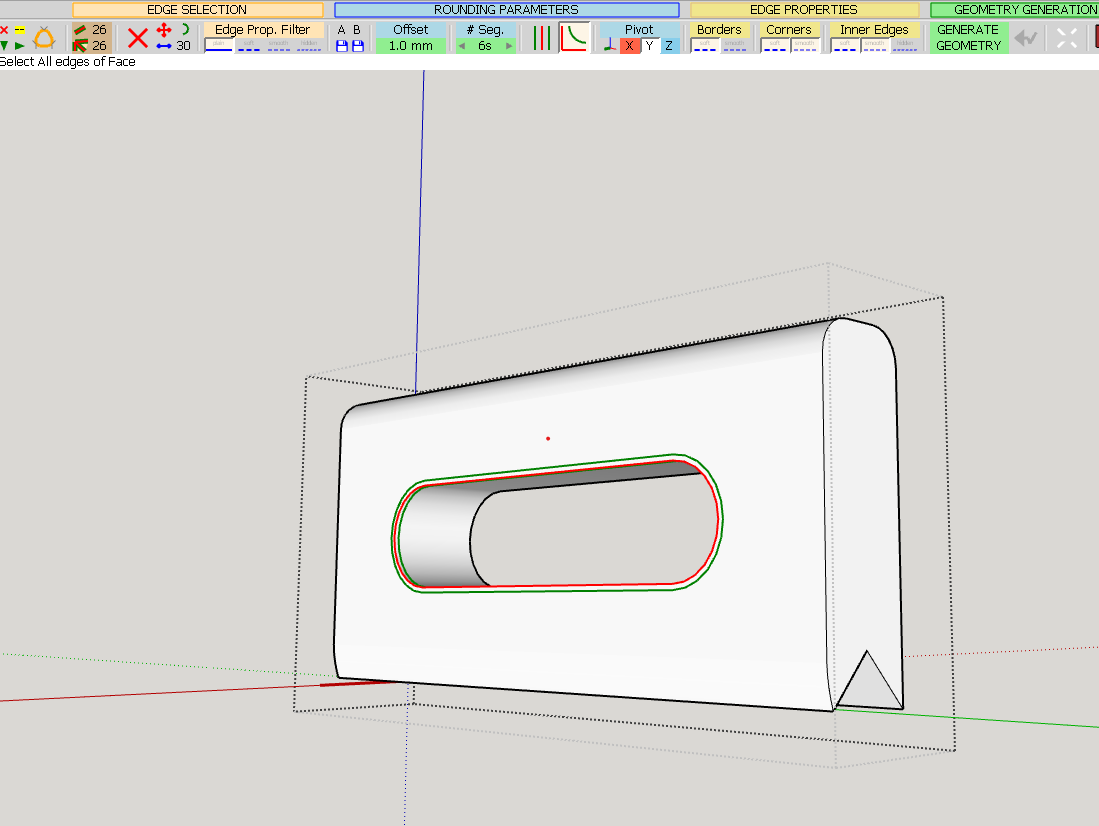
And after hitting the magic 'go' button, I get this:
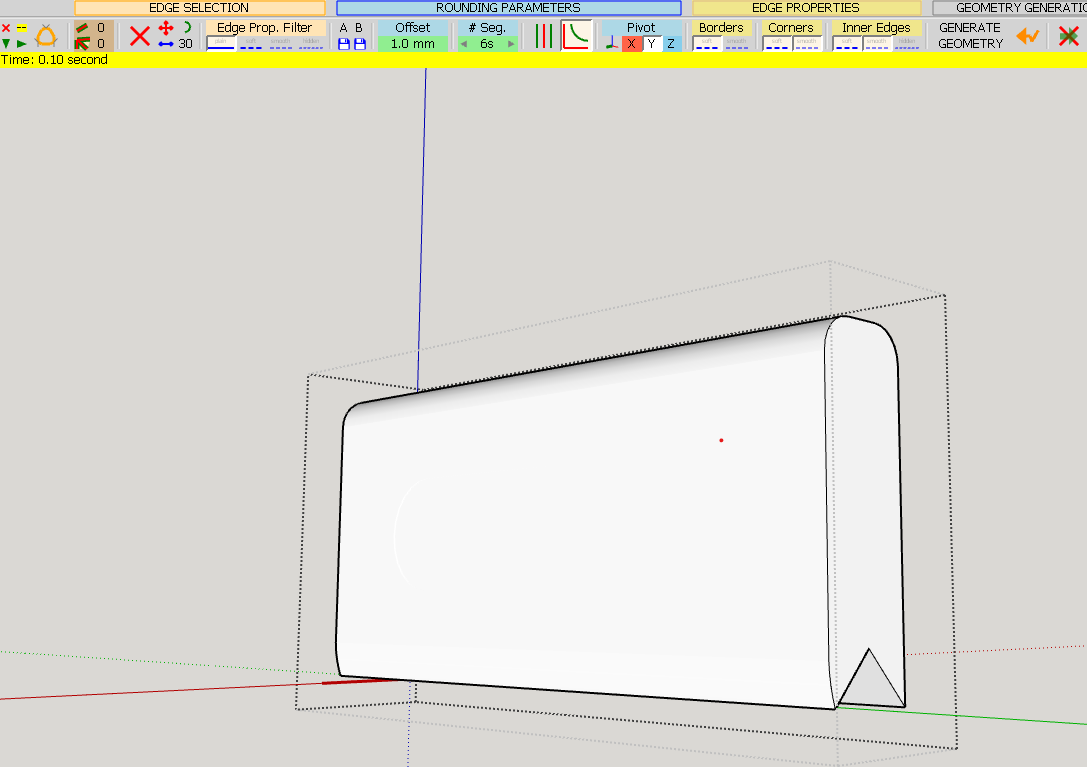
No, not quite right. Any tips and or suggestions on how to get this done?
Cheers
PS Using Sketchup 23 on Win10
-
RE: Plans to build
Revivification of a very old thread, but I happened to run across the source plans for this, I think, from 1992 (and it seemed to be common then). From archive.org for the sake of protection:
https://web.archive.org/web/20190302213624/http://troop142bsa.org/sketchbook/Camp%20Table%20.pdf
-
RE: Can't login to SketchUcation via Sketchup plugin ExtensionSt
Yup. It just doesn't work. I had similar problems a couple of years ago, and was told that 'linux users are rarer than hen's teeth' (I liked that line). Other side effects are that anything that's licensed via sketchucation is, well, not licensed.
I get around it by running SU in a windows VM, and have always meant to investigate and debug the ruby... but I've not done that yet. Perhaps someday...
Oh, there are also some extensions that are reliant on the browser that won't work. One that comes to mind is cutlist. Oh, and souvenir crashes pretty hard on certain ops.
-
Has anyone seen a diff tool for sketchup models
I often find myself in the position where I have two old models that appear to be identical, but.... are they? If they were text files, I could just run diff. Does a similar tool exist for sketchup?
-
RE: Attaching arbitrary data to a model
Please forgive me. I was convinced that I'd already replied. This is exactly what I needed (and I'm further at a loss wrt how I didn't see that in the the API reference). Thanks very much
-
Attaching arbitrary data to a model
Is there a way to attach what was once called a blob to a model? Perhaps I'm blind, but I'm just not seeing it. If not, is there some other magic method to accomplish something similar?
Cheers
-
RE: Plans to build
@humpmetwice said:
@iichiversii said:
That picnic table is a nice concept, are the plans open source?
Yes they are but for the life of me I can't find the link to share with you.
Here's the next best thing.If you ever find the original, I'd love to see it.