sketchucation logo sketchucation
    • Se connecter
    Oops, your profile's looking a bit empty! To help us tailor your experience, please fill in key details like your SketchUp version, skill level, operating system, and more. Update and save your info on your profile page today!
    🚨 Skimp | 25% Off until March 30 Buy Now

    [Plugin] Roof.rb

    Planifier Épinglé Verrouillé Déplacé Extensions & Applications Discussions
    extensions
    174 Messages 75 Publieurs 173.4k Vues 75 Abonné
    Charger plus de messages
    • Du plus ancien au plus récent
    • Du plus récent au plus ancien
    • Les plus votés
    Répondre
    • Répondre à l'aide d'un nouveau sujet
    Se connecter pour répondre
    Ce sujet a été supprimé. Seuls les utilisateurs avec les droits d'administration peuvent le voir.
    • TIGT Hors-ligne
      TIG Moderator
      dernière édition par

      This is the latest version of my 'Roof' script.

      Fixed the reversed face glitches in Hipped roof's fascias if the 'selected-face' was itself reversed.
      Listed materials' now use their 'display_name' rather than their 'name'.
      Offset_eaves code has been completely rewritten to correct inexplicable irregularities in the soffit sizes produced in v3.1 - it was eventually easier to redo the code rather than try to find the underlying cause...
      I found that v3.2 still had a glitch with some vector normalizing [cause of the original v3.1 issue I suspect] ! It's now fixed anyway.
      ...
      v3.4 Fixes a minor typo glitch which stopped A:B pitches working IF you didn't have some other scripts loading too. 😳
      v3.5 Glitch with rare soffit/fascia combos fixed with @fstype="Vertical+Horizontal",
      also issue with some distorted faces addressed so eaves are always 'out', Roof-Slope now reports to 3 d.p.
      v3.6 Errors minimized. Speed greatly improved. Roof-Slope now reported in angle, 1:B and A:12.
      v3.7 Error/Glitch in 'Gable by Width' fixed.
      v4.0 Minor tweaks and v2016/2017 full compatibility.
      v5.0 Updated, compatible with all current versions

      Feedback please.
      Latest version available from the PluginStore http://sketchucation.com/pluginstore?pln=Roof

      There were previously ~3000 downloads of v3.0... so a lot of you might need to update, as only ~200 of you updated to v3.6 😕

      I've also included the original Help docs in two formats in the zip file...

      TIG

      J 1 réponse Dernière réponse Répondre Citer 0
      • S Hors-ligne
        seasdes
        dernière édition par

        Thank you TIG and Merry Christmas to you.
        Walter

        Using Sketchup Pro 2019

        1 réponse Dernière réponse Répondre Citer 0
        • A Hors-ligne
          a4chitect
          dernière édition par

          Thanks Santa TIG!

          great work, good job...

          1 réponse Dernière réponse Répondre Citer 0
          • D Hors-ligne
            dtrarch
            dernière édition par

            TIG

            A most Merry and Blessed Christmas to you and yours.
            I am sure that the Magic Roof ruby is the best of the year 2007 and
            thank you so very much for your kind and generous offerings.

            dtr

            1 réponse Dernière réponse Répondre Citer 0
            • FrederikF Hors-ligne
              Frederik
              dernière édition par

              THANKS, TIG...!
              This ruby sure will become handy...!!

              And a very Merry Christmas and Happy New Year to you and everyone else..!!
              http://www.kerkythea.net/users/Frederik/Anim-Icons/xmas.gif

              Cheers
              Kim Frederik

              1 réponse Dernière réponse Répondre Citer 0
              • CadFatherC Hors-ligne
                CadFather
                dernière édition par

                indefa-TIG-able!

                Thanks and Merry Christmas..

                1 réponse Dernière réponse Répondre Citer 0
                • D Hors-ligne
                  Dan
                  dernière édition par

                  Thanks, TIG for this very useful script (and for all the other free scripts you shared with us)!
                  Marry Christmas and a very Happy New Year!

                  1 réponse Dernière réponse Répondre Citer 0
                  • KrisidiousK Hors-ligne
                    Krisidious
                    dernière édition par

                    awesome Tig... now that's a Christmas present.

                    By: Kristoff Rand
                    Home DesignerUnique House Plans

                    1 réponse Dernière réponse Répondre Citer 0
                    • JClementsJ Hors-ligne
                      JClements
                      dernière édition par

                      My thanks, also.

                      'tis the season for sharing.

                      All you skills and contributions are appreciated.

                      John | Illustrator | Beaverton, Oregon

                      1 réponse Dernière réponse Répondre Citer 0
                      • B Hors-ligne
                        bellwells
                        dernière édition par

                        Whew.....you are something else, TIG!! Tireless, selfless, competent, sharing....the list goes on.

                        Merrrrrry Christmas and Happy New Year to all.

                        Ron

                        1 réponse Dernière réponse Répondre Citer 0
                        • N Hors-ligne
                          Nexus009
                          dernière édition par

                          Hi TIG! an extern file to language and a toolbar of Roof??? for next release??? 😄

                          TAAAAAANKS!!!! 😉 💚 👍

                          Il mio Teschio è una Bandiera che vuol dire Libertà

                          1 réponse Dernière réponse Répondre Citer 0
                          • G Hors-ligne
                            GhossbGood
                            dernière édition par

                            HOHOHO....I'l try this
                            & Thank's a lot 👍 👍 👍

                            1 réponse Dernière réponse Répondre Citer 0
                            • J Hors-ligne
                              juanjo06
                              dernière édition par

                              muchas gracias TIGger 👍

                              1 réponse Dernière réponse Répondre Citer 0
                              • PatrickDP Hors-ligne
                                PatrickD
                                dernière édition par

                                Hi TIG
                                I am a relatively new SU user (now addicted!)
                                I have just used your roof tool for the first time and think it's brilliant. Thank you for sharing such a fabulous resource.
                                A Merry Christmas to you also.

                                Regards

                                PatrickD

                                1 réponse Dernière réponse Répondre Citer 0
                                • E Hors-ligne
                                  ELYSIUM
                                  dernière édition par

                                  Tks Tig!!

                                  1 réponse Dernière réponse Répondre Citer 0
                                  • E Hors-ligne
                                    ELYSIUM
                                    dernière édition par

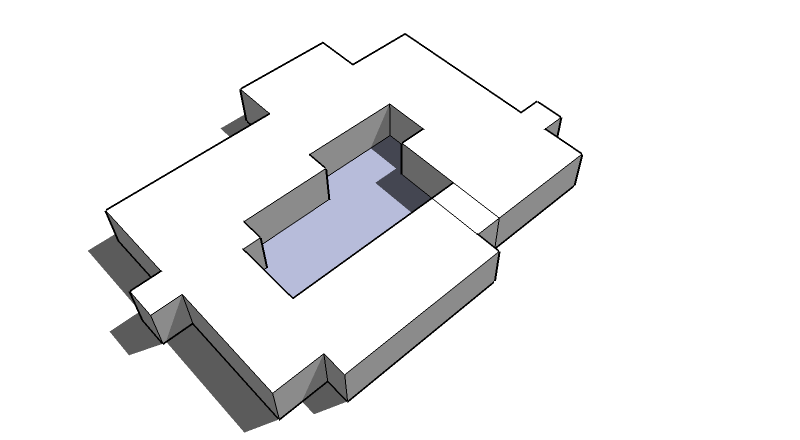
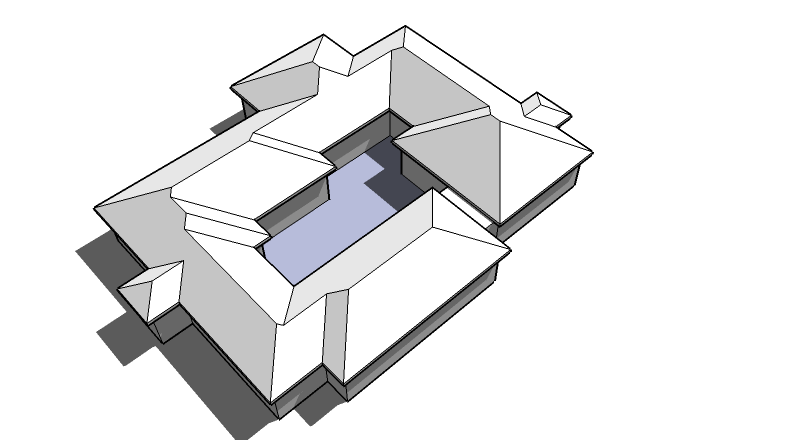
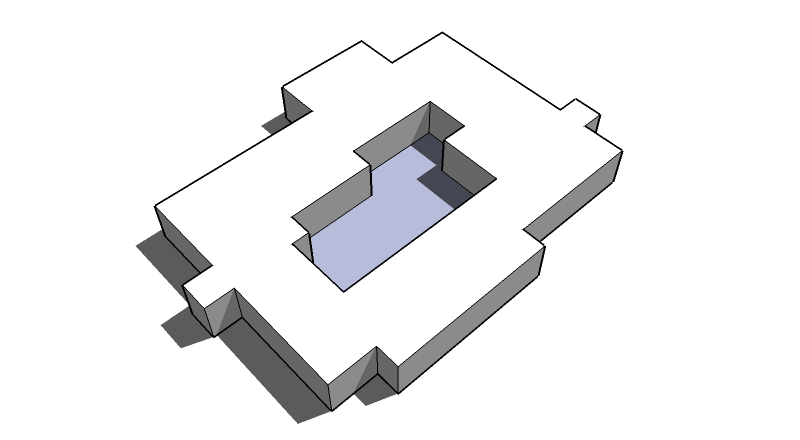
                                    I made a quick test and it worked fine, but i tried to make a roof on a volume with a courtyard, and the script didn't recognized the void. It only worked when i when i made it in to a U type plan. Is it possible to change it in a way that it recognizes holes in the geometry of the plan??

                                    tks again for this wonderful script!

                                    3.png


                                    4.png


                                    5.png


                                    6.png

                                    1 réponse Dernière réponse Répondre Citer 0
                                    • E Hors-ligne
                                      ELYSIUM
                                      dernière édition par

                                      roger! tks for the help! 😄

                                      1 réponse Dernière réponse Répondre Citer 0
                                      • TIGT Hors-ligne
                                        TIG Moderator
                                        dernière édition par

                                        @elysium said:

                                        I made a quick test and it worked fine, but i tried to make a roof on a volume with a courtyard, and the script didn't recognized the void. It only worked when i when i made it in to a U type plan. Is it possible to change it in a way that it recognizes holes in the geometry of the plan??
                                        tks again for this wonderful script!
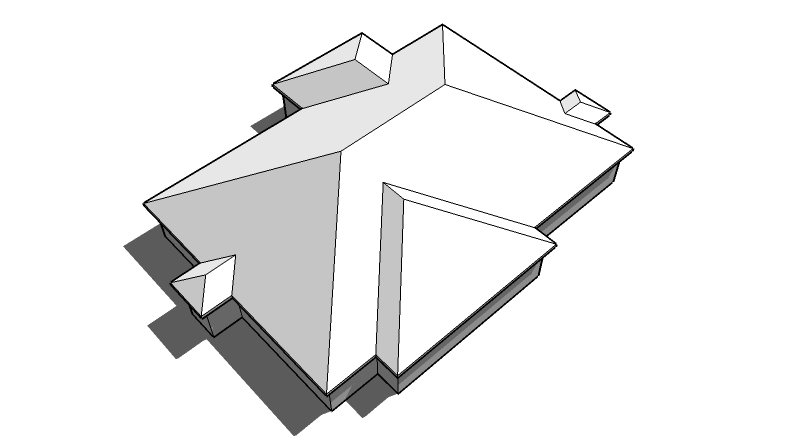
                                        Making holes in the plan makes Roof.rb just too complex (than it already is !). Your solution of splitting the 'doughnut' is the best way round it. You should split the base-face twice at a central spot (gap a little wider than twice the roof overhang) - then the resulting roof shape is easily editable to 'heal' it. Once the roof is made then open the roof's Group for editing and start to heal the two hips that are temporarily made at the 'split'.

                                        Use the Move tool - pick on one of the un-needed 'cross' fascias and move it to snap onto the other un-needed one, then pick a top vertex on one of the un-needed hips and move it across onto the other un-needed hip's equivalent vertex to heal the 2 roof faces. The vertices should snap together and leave the roof planes coplanar but with unwanted splitting lines (you erase these next).

                                        Now you need to heal the bits of soffit etc and get rid of unwanted bits of the roof inside where you have joined these two temporary 'ends' together. It's easiest to do this if you set the Component/Group edit-mode to hide everything else during editing. That way you can simple look at the roof volume from below (its 'ceiling' is left open and any other walls etc below it will be temporarily hidden): then you can add 4 extra Lines to split the unwanted bits of 'cross' soffits off, then Erase the unwanted Edges splitting the 2 healed roof plane, the 2 unwanted 'internal' fascia's horizontal edges and the 2 long-side fascias unwanted vertical splitting Edges; finally Erase the 3 Edges of the 2 unwanted 'cross' pieces of 'internal' soffit to tidy up. Exit the Group edit and it should now look as desired, with its central hole...

                                        It's actually much quicker to do all of this than it is to write it down !!!

                                        TIG

                                        1 réponse Dernière réponse Répondre Citer 0
                                        • TIGT Hors-ligne
                                          TIG Moderator
                                          dernière édition par

                                          Here's RoofHelp.doc (zipped) covering v3.0 - Unzip it and put it in the Plugins folder...

                                          The .mht and .pdf formats will have to wait until the new year - the laptop I'm having to use over the holidays can't access the big-upload server...


                                          RoofHelp.zip

                                          TIG

                                          1 réponse Dernière réponse 👍 Répondre Citer 0
                                          • thomthomT Hors-ligne
                                            thomthom
                                            dernière édition par

                                            How does your plugin work? In general concept? Intersecting planes?

                                            Thomas Thomassen — SketchUp Monkey & Coding addict
                                            List of my plugins and link to the CookieWare fund

                                            1 réponse Dernière réponse Répondre Citer 1
                                            • 1
                                            • 2
                                            • 3
                                            • 4
                                            • 5
                                            • 8
                                            • 9
                                            • 1 / 9
                                            • Premier message
                                              Dernier message
                                            Buy SketchPlus
                                            Buy SUbD
                                            Buy WrapR
                                            Buy eBook
                                            Buy Modelur
                                            Buy Vertex Tools
                                            Buy SketchCuisine
                                            Buy FormFonts

                                            Advertisement