sketchucation logo sketchucation
    • Login
    Oops, your profile's looking a bit empty! To help us tailor your experience, please fill in key details like your SketchUp version, skill level, operating system, and more. Update and save your info on your profile page today!
    ⚠️ Update | Sketchucation Tools 5.0.8 released with licensing improvements and bugfixes Download

    Is SketchUp Now Open-Source? Trimble Won't Like This

    Scheduled Pinned Locked Moved Corner Bar
    23 Posts 9 Posters 458 Views 10 Watching
    Loading More Posts
    • Oldest to Newest
    • Newest to Oldest
    • Most Votes
    Reply
    • Reply as topic
    Log in to reply
    This topic has been deleted. Only users with topic management privileges can see it.
    • TIGT
      TIG Moderator @L i am
      last edited by TIG

      @L-i-am

      Just accept the risk and install it - the installer has not been 'signed' to Microsoft's liking, BUT the software is regarded as fully legit... Hopefully they'll fix the installer glitch in the future...

      TIG

      1 Reply Last reply
      Reply Quote 1
      • Mike AmosM
        Mike Amos
        last edited by

        That and the installation being in Spanish.

        Absentia mortis praesentiam vitae probat, vita autem est argumentum constantiae.

        TIGT 1 Reply Last reply
        Reply Quote 0
        • TIGT
          TIG Moderator @Mike Amos
          last edited by

          @Mike-Amos
          Google Translate on their web pages works well enough, but the installer's instructions are pretty obvious, even when in Spanish ? It is written by an engineer in Peru - so his principal language is Spanish, the installed app itself uses Spanish, Portuguese or English [and metric or imperial dimensioning] so it's easy enough to use once it's been installed. They are working on an English version of their pages and installer dialogs. It's only a few weeks old !
          It's certainly NOT SketchUp, but shows what can happen when rewriting something from scratch, based on many features of a tried and trusted format like SketchUp... and of course it's free, multi-platform and even has dark-mode !

          TIG

          1 Reply Last reply 👍
          Reply Quote 0
          • Mike AmosM
            Mike Amos
            last edited by

            I think the result thus far is pretty amazing but tbh, during install there was only one of three options which made sense. I guessed correctly. Pretty sure all the little niggles that mean anything will be fixed before v1.0 at least. Increasing the tool buttons and menus will be handy for those of us minus 20/20 too. Potato/Banana..........

            Absentia mortis praesentiam vitae probat, vita autem est argumentum constantiae.

            1 Reply Last reply
            Reply Quote 0
            • ntxdaveN
              ntxdave @L i am
              last edited by ntxdave

              @L-i-am said:

              Very very interesting. How do get around windows defender. I get this message when I try to open the EXE file I get this " Windows protected your PC
              Microsoft Defender SmartScreen prevented an unrecognized app from starting. Running this app might put your PC at risk."

              App:
              ingetrazo-setup-v0.5.3.exe
              Publisher:
              Unknown publisher

              I have tried downloading the installer but cannot get it to show up in my downloaded folder to try to install it. I also keep getting messages that say it should not be trusted.

              Can someone give me a link to something where I can go try it? I am running Windows 11.

              Press F1...thank me later

              1 Reply Last reply
              Reply Quote 0
              • TIGT
                TIG Moderator
                last edited by

                Blocking dialog ...More Info > Run Anyway ? button ??

                TIG

                1 Reply Last reply
                Reply Quote 0
                • ntxdaveN
                  ntxdave
                  last edited by

                  OK, I finally have it installed. Now it is time to do some learning. I was thinking (from the original post) that this was an extension of Blender. I see it is a completely separate app. Now I have to do some testing/learning. It will be interesting to see if there is any response from Trimble.

                  Press F1...thank me later

                  1 Reply Last reply
                  Reply Quote 0
                  • N
                    numerobis
                    last edited by

                    If it really does have similar inference functions, geometry generation, and display capabilities, then it will be very interesting to see how it performs. And to what extent they can integrate multithreading and GPU utilization...

                    1 Reply Last reply
                    Reply Quote 0
                    • KrassK
                      Krass
                      last edited by

                      hello,
                      It would be great to have a powerful free tool—I’ve tested it—but I feel that as long as the 2017 version of SketchUp exists, there’s no point to it.
                      It’s riddled with bugs. There’s also the Hew 3D version (https://github.com/hew3d/hew); the interface and navigation are excellent, but the rest is even worse. And what about extensions?

                      Krass

                      N 1 Reply Last reply
                      Reply Quote 0
                      • N
                        numerobis @Krass
                        last edited by

                        @Krass said:

                        And what about extensions?

                        "Extensions — a plugin system: drop a Python file in the plugins folder and its tools appear in the Extensions menu."

                        Link Preview Image
                        ingetrazo/docs/plugins.md at main · ingelibre/ingetrazo

                        Modelador 3D libre estilo SketchUp para arquitectura, ingeniería y diseño 3D. Linux-first, PySide6, integración IFC con IngePresupuestos. - ingetrazo/docs/plugins.md at main · ingelibre/ingetrazo

                        favicon

                        GitHub (github.com)

                        1 Reply Last reply
                        Reply Quote 0
                        • KrassK
                          Krass
                          last edited by Krass

                          yes, but all extensions already done in ruby will be lost

                          Krass

                          TIGT 1 Reply Last reply
                          Reply Quote 0
                          • TIGT
                            TIG Moderator @Krass
                            last edited by TIG

                            @Krass
                            Its API is in a very early stage.
                            It is possible to convert RB to PY [AI etc] but, considering the likely API differences, I suspect that reusing whole scripts could be a timesome task !
                            BUT their core 'ideas' will still be valid - and reconsidering how these get realize on a newer platform might actually improve them in the long run ??
                            Let's wait and see - after all it is still only weeks old...

                            TIG

                            1 Reply Last reply
                            Reply Quote 0
                            • N
                              numerobis
                              last edited by

                              Yes, we need to see to what extent plugins can be converted and what might need to be modified or rebuilt. Maybe it will be possible to build a converter. However, let's wait and see how things develop…

                              1 Reply Last reply
                              Reply Quote 0
                              • ntxdaveN
                                ntxdave
                                last edited by TIG

                                I am trying to learn the tool but having problems. There are times (like say with the bevel tool) where I would like to be able to enter values for the tool or understand how to control the axis for something like the rotation tool. So far, it has been iffy. I wish that the panel on the right side of the screen would give you more options to enter values. But I have just started so I will keep messing around and try to learn things. If someone has suggestions about where to find more instructions, please let me know.

                                It is off to a good start but as others have said, a long way to go. One of the first things, IMO, is to provide notes about how to use various tools. As an example, if you want to rotate an object you need an option of how to select which axis you want to use for the rotation. Yes, if you hover the object you are trying to rotate, you need to be able to kit a key that specifies which axis you want to rotate on. But again, the tool is very new so there will, I assume, be many updates to help with using the software.

                                Press F1...thank me later

                                1 Reply Last reply
                                Reply Quote 0
                                • P
                                  pixelcruncher Extension Creator
                                  last edited by

                                  I don't want to hijack this thread, but I also don't want to let the momentum go to waste. For the last couple of months, I've been chipping away at a simple, easy-to-use 3D modeling tool of my own (as a side project next to Rayscaper). It's still very rough around the edges, but I'd like to give people a sneak peek at what's coming and get early feedback on what I'm building. Like with Rayscaper, I love building it with the people who use it.

                                  Check out the first preview here: https://modlumi.com/ - Don't hesitate to leave feedback in the application!

                                  Thanks,
                                  Thomas

                                  I'm the developer of Rayscaper: https://rayscaper.com/ - Fast and easy rendering for SketchUp.

                                  jujuJ 1 Reply Last reply
                                  Reply Quote 2
                                  • jujuJ
                                    juju @pixelcruncher
                                    last edited by

                                    @pixelcruncher You're welcome to start a new thread of your own, probably better so that all comments relating to the subject is contained in the same thread. 😀

                                    Save the Earth, it's the only planet with chocolate.

                                    1 Reply Last reply
                                    Reply Quote 1
                                    • Rich O BrienR
                                      Rich O Brien Moderator
                                      last edited by

                                      Things are getting interesting 👍

                                      Download the free D'oh Book for SketchUp 📖

                                      1 Reply Last reply
                                      Reply Quote 2
                                      • KrassK
                                        Krass
                                        last edited by Krass

                                        hello,
                                        pixelcruncher ! not bad ! I like the viewport. I like the selection color, the UI. Geometriy is too dark. I could not import a light recent model but it is a good start
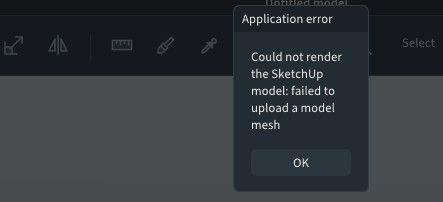


                                        image.jpeg

                                        Krass

                                        1 Reply Last reply
                                        Reply Quote 0

                                        Hello! It looks like you're interested in this conversation, but you don't have an account yet.

                                        Getting fed up of having to scroll through the same posts each visit? When you register for an account, you'll always come back to exactly where you were before, and choose to be notified of new replies (either via email, or push notification). You'll also be able to save bookmarks and upvote posts to show your appreciation to other community members.

                                        With your input, this post could be even better 💗

                                        Register Login
                                        • 1
                                        • 2
                                        • 1 / 2
                                        • First post
                                          Last post
                                        Buy SketchPlus
                                        Buy SUbD
                                        Buy WrapR
                                        Buy eBook
                                        Buy Modelur
                                        Buy Vertex Tools
                                        Buy SketchCuisine
                                        Buy FormFonts

                                        Advertisement



