Is SketchUp Now Open-Source? Trimble Won't Like This
-
Blocking dialog ...More Info > Run Anyway ? button ??
-
OK, I finally have it installed. Now it is time to do some learning. I was thinking (from the original post) that this was an extension of Blender. I see it is a completely separate app. Now I have to do some testing/learning. It will be interesting to see if there is any response from Trimble.
-
If it really does have similar inference functions, geometry generation, and display capabilities, then it will be very interesting to see how it performs. And to what extent they can integrate multithreading and GPU utilization...
-
hello,
It would be great to have a powerful free tool—I’ve tested it—but I feel that as long as the 2017 version of SketchUp exists, there’s no point to it.
It’s riddled with bugs. There’s also the Hew 3D version (https://github.com/hew3d/hew); the interface and navigation are excellent, but the rest is even worse. And what about extensions? -
And what about extensions?
"Extensions — a plugin system: drop a Python file in the plugins folder and its tools appear in the Extensions menu."
ingetrazo/docs/plugins.md at main · ingelibre/ingetrazo
Traza como a mano: modelador 3D libre para arquitectura, ingeniería y diseño 3D. Linux, Windows y macOS. BIM e IFC con IngePresupuestos. Abre archivos .skp. - ingetrazo/docs/plugins.md at main · ingelibre/ingetrazo

GitHub (github.com)
-
yes, but all extensions already done in ruby will be lost
-
@Krass
Its API is in a very early stage.
It is possible to convert RB to PY [AI etc] but, considering the likely API differences, I suspect that reusing whole scripts could be a timesome task !
BUT their core 'ideas' will still be valid - and reconsidering how these get realize on a newer platform might actually improve them in the long run ??
Let's wait and see - after all it is still only weeks old... -
Yes, we need to see to what extent plugins can be converted and what might need to be modified or rebuilt. Maybe it will be possible to build a converter. However, let's wait and see how things develop…
-
I am trying to learn the tool but having problems. There are times (like say with the bevel tool) where I would like to be able to enter values for the tool or understand how to control the axis for something like the rotation tool. So far, it has been iffy. I wish that the panel on the right side of the screen would give you more options to enter values. But I have just started so I will keep messing around and try to learn things. If someone has suggestions about where to find more instructions, please let me know.
It is off to a good start but as others have said, a long way to go. One of the first things, IMO, is to provide notes about how to use various tools. As an example, if you want to rotate an object you need an option of how to select which axis you want to use for the rotation. Yes, if you hover the object you are trying to rotate, you need to be able to kit a key that specifies which axis you want to rotate on. But again, the tool is very new so there will, I assume, be many updates to help with using the software.
-
I don't want to hijack this thread, but I also don't want to let the momentum go to waste. For the last couple of months, I've been chipping away at a simple, easy-to-use 3D modeling tool of my own (as a side project next to Rayscaper). It's still very rough around the edges, but I'd like to give people a sneak peek at what's coming and get early feedback on what I'm building. Like with Rayscaper, I love building it with the people who use it.
Check out the first preview here: https://modlumi.com/ - Don't hesitate to leave feedback in the application!
Thanks,
ThomasI'm the developer of Rayscaper: https://rayscaper.com/ - Fast and easy rendering for SketchUp.
-
@pixelcruncher You're welcome to start a new thread of your own, probably better so that all comments relating to the subject is contained in the same thread.

-
Things are getting interesting

-
hello,
pixelcruncher ! not bad ! I like the viewport. I like the selection color, the UI. Geometry is too dark. I could not import a light recent model but it is a good start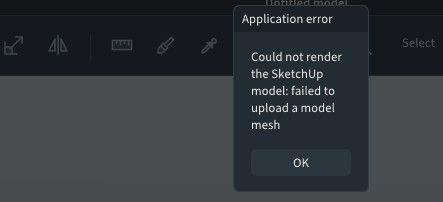
Krass
-
Too bad that developers are trying to "reinvent the wheel" in their own ghetto. If only it was implemented as "a-la sketchup" mode inside Blender, it would be another level.
-
@rv1974 We are waiting for a great mind, like yourself, to do that.
-
Good. Competition keeps products fresh and generally the consumer wins.
-
@pixelcruncher Looking good. I was able to draw out a structure very quickly.
-
@rv1974 We are waiting for a great mind, like yourself, to do that.
who knows, maybe in 3-5 years, with GPT Bougainvillea
-
@Krass Do you mind sending me the model so I can have a look?
-
Yes I Will do it tomorrow late morning







Hello! It looks like you're interested in this conversation, but you don't have an account yet.
Getting fed up of having to scroll through the same posts each visit? When you register for an account, you'll always come back to exactly where you were before, and choose to be notified of new replies (either via email, or push notification). You'll also be able to save bookmarks and upvote posts to show your appreciation to other community members.
With your input, this post could be even better 💗
Register Login


Advertisement