sketchucation logo sketchucation
    • Login
    Oops, your profile's looking a bit empty! To help us tailor your experience, please fill in key details like your SketchUp version, skill level, operating system, and more. Update and save your info on your profile page today!
    🚨 Skimp | 25% Off until March 30 Buy Now

    [Plugin] FredoBend - v1.2a - 25 Mar 26


    Scheduled Pinned Locked Moved Plugins
    27 Posts 6 Posters 261 Views 6 Watching
    Loading More Posts
    • Oldest to Newest
    • Newest to Oldest
    • Most Votes
    Reply
    • Reply as topic
    Log in to reply
    This topic has been deleted. Only users with topic management privileges can see it.
    • fredo6F Offline
      fredo6
      last edited by

      Thanks for reporting. The bug is fixed. Actually, there is an option to save a copy of the original container to file. This allows to edit the bent generated container even if the original container has been removed from the model. However, it assumes that you don't work on a new model, since the saved copy is in the same directory as the model.

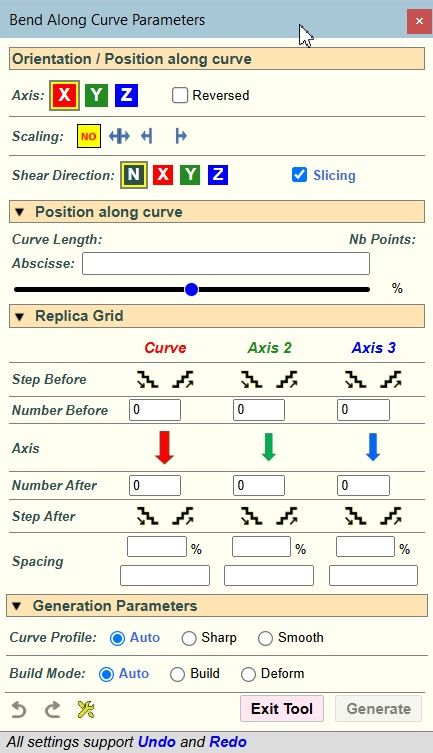
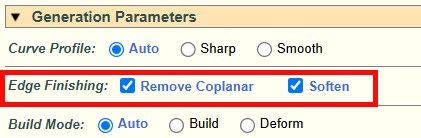
      I am also introducing an option for

      • softening edges or not
      • removing coplanar edges

      8a475c54-3840-4518-a4db-a0ded25c7fff-image.jpeg

      New version will be published later today.

      G 1 Reply Last reply πŸ‘ Reply Quote 0
      • G Offline
        GIGAL @fredo6
        last edited by

        @fredo6
        It is amazing (excuse for my bad english; i am italian)
        Best regards

        1 Reply Last reply Reply Quote 0
        • Dave RD Offline
          Dave R
          last edited by

          Ah ... So the file needs to be saved before using the extension. Makes sense.

          Etaoin Shrdlu

          %

          (THERE'S NO PLACE LIKE)

          G28 X0.0 Y0.0 Z0.0

          M30

          %

          fredo6F 1 Reply Last reply Reply Quote 0
          • panixiaP Offline
            panixia
            last edited by

            Amazing. Does it support quads and/or UV preservation?

            1 Reply Last reply Reply Quote 0
            • fredo6F Offline
              fredo6
              last edited by fredo6

              NEW RELEASE: FredoBend v1.2b - 25 Mar 26

              Requirements

              • LibFredo6: v15.9a or above
              • Sketchup version: SU2017 and above

              FredoBend 1.2b is a maintenance release including:

              • Bug fixing
              • Parameter for softening edges and removing coplanar edges

              Home Page of FredoBend for information and Download.

              Main post of this FredoBend thread.

              1 Reply Last reply πŸ‘ Reply Quote 0
              • A Offline
                AISmebel
                last edited by

                the triangulating line that appears after using the plugin should become soft+smooth. Then the squares of the SubD work. Now the following is happening:
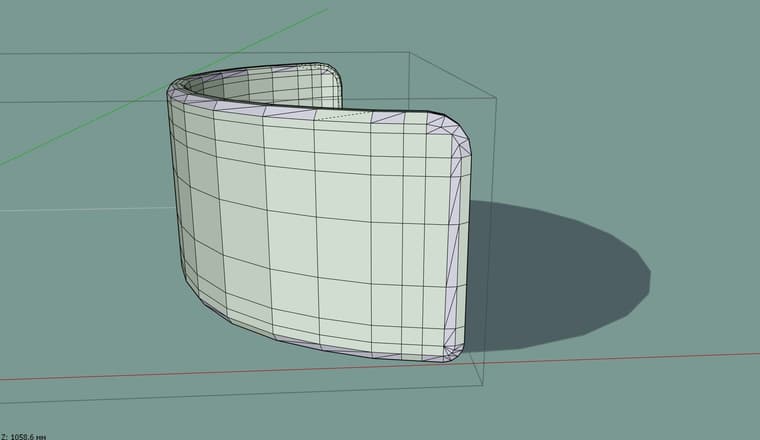
                1.jpg

                fredo6F 1 Reply Last reply Reply Quote 0
                • fredo6F Offline
                  fredo6 @Dave R
                  last edited by

                  @Dave-R said:

                  Ah ... So the file needs to be saved before using the extension. Makes sense.

                  No. you can use FredoBend on New models.

                  The SaveCopy feature is just for saving a copy of the original solid to file (in subfolder FredoBend Saved Containers). This is simply not done if the model is new.

                  1 Reply Last reply πŸ‘ Reply Quote 0
                  • fredo6F Offline
                    fredo6 @AISmebel
                    last edited by

                    @AISmebel said:

                    the triangulating line that appears after using the plugin should become soft+smooth. Then the squares of the SubD work. Now the following is happening:

                    1.jpg

                    I am not sure it is possible to identfy and carry over the quad mesh, because of the slicing.

                    Could you send me a model and a curve so that I see what can be done. Thanks.

                    panixiaP 1 Reply Last reply Reply Quote 0
                    • A Offline
                      AISmebel
                      last edited by

                      This post is deleted!
                      1 Reply Last reply Reply Quote 0
                      • A Offline
                        AISmebel
                        last edited by AISmebel

                        @fredo6 I also want to suggest that after using the plug-in, the components do not deform, bend in shape and retain their component properties. This will give more options to the users of your plugin. As an example, I additionally created objects made using the Flowify plugin. It transfers components without distortion, but the components lose their connection to each other, if you can implement this in your plugin, it will be great.
                        Test.skp - This is the model you asked for

                        panixiaP fredo6F 2 Replies Last reply Reply Quote 0
                        • panixiaP Offline
                          panixia @AISmebel
                          last edited by

                          @AISmebel said:

                          the triangulating line that appears after using the plugin should become soft+smooth

                          Nope.
                          It should be soft = true; smooth = true AND cast shadows = false otherwise it will not work.

                          @AISmebel said:

                          I also want to suggest that after using the plug-in, the components do not deform, bend in shape and retain their component properties

                          I agree +20 on this!
                          I already said that in the original discussion on Trimble forum and I 100% stand on that.
                          Slicing should be optional. The default behavior should be "deform only", that would make more sense.

                          A 1 Reply Last reply Reply Quote 0
                          • panixiaP Offline
                            panixia @fredo6
                            last edited by panixia

                            @fredo6 said:

                            I am not sure it is possible to identfy and carry over the quad mesh, because of the slicing.

                            I guess it's super-difficult when you need to slice (so you are creating new geometry with new vertex-order/face-IDs), but it's actually quite easy when you just need to deform.
                            The key is that you apply preemptive triangulation (with different properties for planar quads/planar n-gons) at the very beginning of the deforming operation in order to stabilize vertex order, edge properties and UV mapping, then you can safely preserve/restore everything once the deformation is done.

                            I'm not a programmer, but I managed to formalize the whole algorithm decently enough that Claude can execute that brilliantly (based on the steps that I use to do manually in order to stabilize a mesh for proper Subdivision/Uv-mapping workflow).

                            I achieved good deformations which are reliably preserving quads, and UV mapping with decent fallback methods for n-gons.
                            I was planning to share the code with you regardless (for review before publishing it on Sketchucation), I think it could be interesting if you could integrate (and probably improve) it in some of your plugins, this one could be a clear candidate.

                            A 1 Reply Last reply Reply Quote 0
                            • A Offline
                              AISmebel @panixia
                              last edited by

                              @panixia said:

                              НСт.
                              Π”ΠΎΠ»ΠΆΠ½ΠΎ Π±Ρ‹Ρ‚ΡŒ soft = true; smooth = true И cast shadows = false, ΠΈΠ½Π°Ρ‡Π΅ это Π½Π΅ сработаСт.

                              I was sure that I was not giving complete information, but I wrote that I knew)) I think Fredo knows exactly what it's about and how it should be. But still, thanks for the correction, maybe this way we will get the desired result faster)

                              1 Reply Last reply Reply Quote 0
                              • A Offline
                                AISmebel @panixia
                                last edited by

                                @panixia said:

                                Π― ΠΏΠ»Π°Π½ΠΈΡ€ΠΎΠ²Π°Π» ΠΏΠΎΠ΄Π΅Π»ΠΈΡ‚ΡŒΡΡ с Π²Π°ΠΌΠΈ ΠΊΠΎΠ΄ΠΎΠΌ Π² любом случаС (для ΠΏΡ€ΠΎΠ²Π΅Ρ€ΠΊΠΈ ΠΏΠ΅Ρ€Π΅Π΄ ΠΏΡƒΠ±Π»ΠΈΠΊΠ°Ρ†ΠΈΠ΅ΠΉ Π½Π° Sketchucation), Π΄ΡƒΠΌΠ°ΡŽ, Π±Ρ‹Π»ΠΎ Π±Ρ‹ интСрСсно, Ссли Π±Ρ‹ Π²Ρ‹ ΠΈΠ½Ρ‚Π΅Π³Ρ€ΠΈΡ€ΠΎΠ²Π°Π»ΠΈ (ΠΈ, Π²ΠΎΠ·ΠΌΠΎΠΆΠ½ΠΎ, ΡƒΠ»ΡƒΡ‡ΡˆΠΈΠ»ΠΈ) Π΅Π³ΠΎ Π² Π½Π΅ΠΊΠΎΡ‚ΠΎΡ€Ρ‹Π΅ ΠΈΠ· Π²Π°ΡˆΠΈΡ… ΠΏΠ»Π°Π³ΠΈΠ½ΠΎΠ², этот ΠΌΠΎΠΆΠ΅Ρ‚ ΡΡ‚Π°Ρ‚ΡŒ подходящим Π²Π°Ρ€ΠΈΠ°Π½Ρ‚ΠΎΠΌ.

                                I would like to ask you to share this interesting plugin. I created a lot of interesting things myself with the help of Claude. It's interesting to see what others are doing.

                                panixiaP 1 Reply Last reply Reply Quote 0
                                • fredo6F Offline
                                  fredo6
                                  last edited by

                                  With FredoBend v1.2b, you can normally keep the quad properties by turning off:

                                  • Slicing
                                  • remove coplanar edge
                                  • soften edges

                                  Here is a video showing the process.

                                  FredoBends - Quads.mp4

                                  Here is the test file. Tell me if this is OK.

                                  test quads 2.skp

                                  A 1 Reply Last reply Reply Quote 0
                                  • fredo6F Offline
                                    fredo6 @AISmebel
                                    last edited by

                                    @AISmebel said:

                                    I also want to suggest that after using the plug-in, the components do not deform, bend in shape and retain their component properties

                                    I don't understand what you mean.

                                    The component / group property is kept. If you bend a component. the output is a component. Same for subcomponents.

                                    However, all the content of the container is made unique, because bending is not a transformation but a creation of geometry. This has nothing to do with slicing.

                                    panixiaP A 2 Replies Last reply Reply Quote 0
                                    • panixiaP Offline
                                      panixia @fredo6
                                      last edited by

                                      @fredo6 said:

                                      I also want to suggest that after using the plug-in, the components do not deform, bend in shape and retain their component properties

                                      I don't understand what you mean.

                                      Wow, I realize that I didn't understand correctly the proposal, so I retreat my + 20 on this.
                                      Because you basically can't do that in Sketchup (you'd need some sort of modifier system similar to the 3dsMax one to accomplish this).
                                      I understood that he was talking about a non-slicing behavior instead (which would be preferable).

                                      1 Reply Last reply Reply Quote 0
                                      • panixiaP Offline
                                        panixia @AISmebel
                                        last edited by

                                        @AISmebel said:

                                        I would like to ask you to share this interesting plugin. I created a lot of interesting things myself with the help of Claude. It's interesting to see what others are doing.

                                        It's currently in the last (I hope so) alpha stage, I'll need to fix a couple of edge cases before it can go beta.

                                        1 Reply Last reply Reply Quote 0
                                        • A Offline
                                          AISmebel @fredo6
                                          last edited by

                                          @fredo6 said:

                                          Π’ΠΎΡ‚ тСстовый Ρ„Π°ΠΉΠ». Π‘ΠΊΠ°ΠΆΠΈΡ‚Π΅, поТалуйста, всё Π»ΠΈ Π² порядкС.

                                          тСстовыС ΠΊΠ²Π°Π΄Ρ€ΠΎΠΊΠΎΠΏΡ‚Π΅Ρ€Ρ‹ 2.skp

                                          2.mp4

                                          1 Reply Last reply Reply Quote 0
                                          • A Offline
                                            AISmebel @fredo6
                                            last edited by

                                            @fredo6 said:

                                            Π― Π½Π΅ понимаю, Ρ‡Ρ‚ΠΎ Π²Ρ‹ ΠΈΠΌΠ΅Π΅Ρ‚Π΅ Π² Π²ΠΈΠ΄Ρƒ.

                                            Бвойство ΠΊΠΎΠΌΠΏΠΎΠ½Π΅Π½Ρ‚Π°/Π³Ρ€ΡƒΠΏΠΏΡ‹ сохраняСтся. Если Π²Ρ‹ ΠΈΠ·Π³ΠΈΠ±Π°Π΅Ρ‚Π΅ ΠΊΠΎΠΌΠΏΠΎΠ½Π΅Π½Ρ‚, Π½Π° Π²Ρ‹Ρ…ΠΎΠ΄Π΅ получаСтся ΠΊΠΎΠΌΠΏΠΎΠ½Π΅Π½Ρ‚. Π’ΠΎ ΠΆΠ΅ самоС относится ΠΈ ΠΊ ΠΏΠΎΠ΄ΠΊΠΎΠΌΠΏΠΎΠ½Π΅Π½Ρ‚Π°ΠΌ.

                                            Однако всё содСрТимоС ΠΊΠΎΠ½Ρ‚Π΅ΠΉΠ½Π΅Ρ€Π° ΡƒΠ½ΠΈΠΊΠ°Π»ΡŒΠ½ΠΎ, ΠΏΠΎΡΠΊΠΎΠ»ΡŒΠΊΡƒ ΠΈΠ·Π³ΠΈΠ±Π°Π½ΠΈΠ΅ β€” это Π½Π΅ трансформация, Π° созданиС Π³Π΅ΠΎΠΌΠ΅Ρ‚Ρ€ΠΈΠΈ. Π­Ρ‚ΠΎ Π½Π΅ ΠΈΠΌΠ΅Π΅Ρ‚ Π½ΠΈΡ‡Π΅Π³ΠΎ ΠΎΠ±Ρ‰Π΅Π³ΠΎ с Ρ€Π°Π·Ρ€Π΅Π·Π°Π½ΠΈΠ΅ΠΌ.

                                            Perhaps I did not state my thought correctly, perhaps I got confused in the terms, or perhaps my translator did not translate it correctly) I want to say the following: when we use a plugin, is it possible not to deform the component so that the component does not lose its connection with its own kind? As an example in the video, I used the Copy Along Curve plugin. He arranged the components in an arc without deforming or making the components unique.

                                            3.mp4

                                            1 Reply Last reply Reply Quote 0

                                            Hello! It looks like you're interested in this conversation, but you don't have an account yet.

                                            Getting fed up of having to scroll through the same posts each visit? When you register for an account, you'll always come back to exactly where you were before, and choose to be notified of new replies (either via email, or push notification). You'll also be able to save bookmarks and upvote posts to show your appreciation to other community members.

                                            With your input, this post could be even better πŸ’—

                                            Register Login
                                            • 1
                                            • 2
                                            • 2 / 2
                                            • First post
                                              Last post
                                            Buy SketchPlus
                                            Buy SUbD
                                            Buy WrapR
                                            Buy eBook
                                            Buy Modelur
                                            Buy Vertex Tools
                                            Buy SketchCuisine
                                            Buy FormFonts

                                            Advertisement