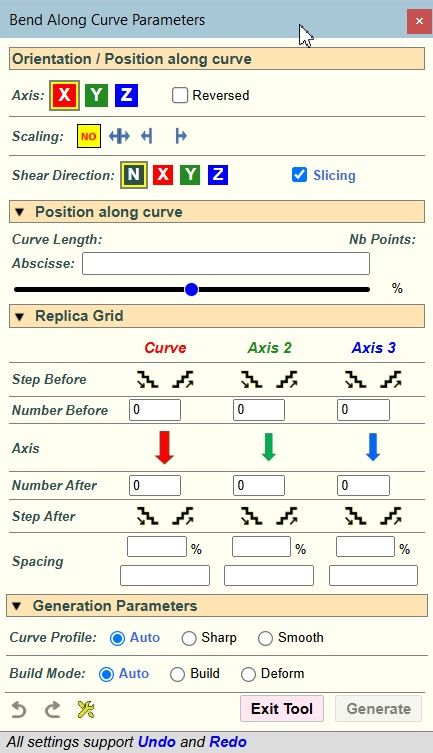
[Plugin][$] FredoBend - v1.5b - 23 Jul 26




-
This looks insane!
-
This is very cool Fredo!
I've installed it and tried using it with some 3D Text as you did. When I click to finalize I get an error. Here's the TXT file generated by the extension. I did update LibFredo6 before installing FredoBend and I did a restart of SketchUp.
Ruby Error - FredoBend Along Curve - 25-Mar-26 07_35_40 - SU2026.1 - LibFredo6 - v15.9a.txt
-
Hello, Freddo. Amazing job, thank you. I have a question for you, is it possible to save the grid in squares using FredoBend by disabling the Slicing tool? Currently, the plugin removes unnecessary geometry at the end of its work, and it is needed for further use of the SubD.
-
Some ruby console errors
ERROR in step: step_prepare no implicit conversion of nil into String c:/users/rclub/appdata/roaming/sketchup/sketchup 2026/sketchup/plugins/fredo6_fredobend/fredobendcurvetool.rbe:1194:in `save_copy' c:/users/rclub/appdata/roaming/sketchup/sketchup 2026/sketchup/plugins/fredo6_fredobend/fredobendcurvetool.rbe:1194:in `saver_solid_comp' c:/users/rclub/appdata/roaming/sketchup/sketchup 2026/sketchup/plugins/fredo6_fredobend/fredobendcurvetool.rbe:2419:in `generation_step_prepare' c:/users/rclub/appdata/roaming/sketchup/sketchup 2026/sketchup/plugins/fredo6_fredobend/fredobendcurvetool.rbe:3248:in `job_perform' c:/users/rclub/appdata/roaming/sketchup/sketchup 2026/sketchup/plugins/fredo6_fredobend/fredobendcurvetool.rbe:3190:in `job_notification' c:/users/rclub/appdata/roaming/sketchup/sketchup 2026/sketchup/plugins/fredo6_!libfredo6/body_lib6webprogress.rbe:104:in `call' c:/users/rclub/appdata/roaming/sketchup/sketchup 2026/sketchup/plugins/fredo6_!libfredo6/body_lib6webprogress.rbe:104:in `process_notify' c:/users/rclub/appdata/roaming/sketchup/sketchup 2026/sketchup/plugins/fredo6_!libfredo6/body_lib6webprogress.rbe:388:in `fast_process_next_step' c:/users/rclub/appdata/roaming/sketchup/sketchup 2026/sketchup/plugins/fredo6_!libfredo6/body_lib6webprogress.rbe:358:in `fast_process_start' c:/users/rclub/appdata/roaming/sketchup/sketchup 2026/sketchup/plugins/fredo6_!libfredo6/body_lib6webprogress.rbe:370:in `fast_process_next' c:/users/rclub/appdata/roaming/sketchup/sketchup 2026/sketchup/plugins/fredo6_!libfredo6/body_lib6webprogress.rbe:346:in `fast_process_top' c:/users/rclub/appdata/roaming/sketchup/sketchup 2026/sketchup/plugins/fredo6_!libfredo6/body_lib6webprogress.rbe:123:in `invoke' c:/users/rclub/appdata/roaming/sketchup/sketchup 2026/sketchup/plugins/fredo6_fredobend/fredobendcurvetool.rbe:3136:in `job_start' c:/users/rclub/appdata/roaming/sketchup/sketchup 2026/sketchup/plugins/fredo6_fredobend/fredobendcurvetool.rbe:2386:in `block in generation_launch' -
This was in console with Scaling set to By Center as you hover a curve
#<TypeError: nil can't be coerced into Float> c:/users/rclub/appdata/roaming/sketchup/sketchup 2026/sketchup/plugins/fredo6_fredobend/fredobendcurvetool.rbe:1953:in `-' c:/users/rclub/appdata/roaming/sketchup/sketchup 2026/sketchup/plugins/fredo6_fredobend/fredobendcurvetool.rbe:1953:in `tolid_replica_scaling' c:/users/rclub/appdata/roaming/sketchup/sketchup 2026/sketchup/plugins/fredo6_fredobend/fredobendcurvetool.rbe:2004:in `tolid_replica_transformation_single' c:/users/rclub/appdata/roaming/sketchup/sketchup 2026/sketchup/plugins/fredo6_fredobend/fredobendcurvetool.rbe:2061:in `tolid_replica_transformations' c:/users/rclub/appdata/roaming/sketchup/sketchup 2026/sketchup/plugins/fredo6_fredobend/fredobendcurvetool.rbe:2266:in `wireframe_compute' c:/users/rclub/appdata/roaming/sketchup/sketchup 2026/sketchup/plugins/fredo6_fredobend/fredobendcurvetool.rbe:781:in `drawing_wireframe' c:/users/rclub/appdata/roaming/sketchup/sketchup 2026/sketchup/plugins/fredo6_fredobend/fredobendcurvetool.rbe:745:in `draw_placement' c:/users/rclub/appdata/roaming/sketchup/sketchup 2026/sketchup/plugins/fredo6_fredobend/fredobendcurvetool.rbe:696:in `draw' -
Thanks for reporting. The bug is fixed. Actually, there is an option to save a copy of the original container to file. This allows to edit the bent generated container even if the original container has been removed from the model. However, it assumes that you don't work on a new model, since the saved copy is in the same directory as the model.
I am also introducing an option for
- softening edges or not
- removing coplanar edges
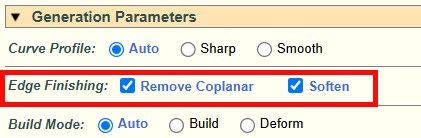
New version will be published later today.
-
@fredo6
It is amazing (excuse for my bad english; i am italian)
Best regards -
Ah ... So the file needs to be saved before using the extension. Makes sense.
Etaoin Shrdlu
%
(THERE'S NO PLACE LIKE)
G28 X0.0 Y0.0 Z0.0
M30
%
-
Amazing. Does it support quads and/or UV preservation?
-
NEW RELEASE: FredoBend v1.2b - 25 Mar 26
Requirements
- LibFredo6: v15.9a or above
- Sketchup version: SU2017 and above
FredoBend 1.2b is a maintenance release including:
- Bug fixing
- Parameter for softening edges and removing coplanar edges
Home Page of FredoBend for information and Download.
-
the triangulating line that appears after using the plugin should become soft+smooth. Then the squares of the SubD work. Now the following is happening:
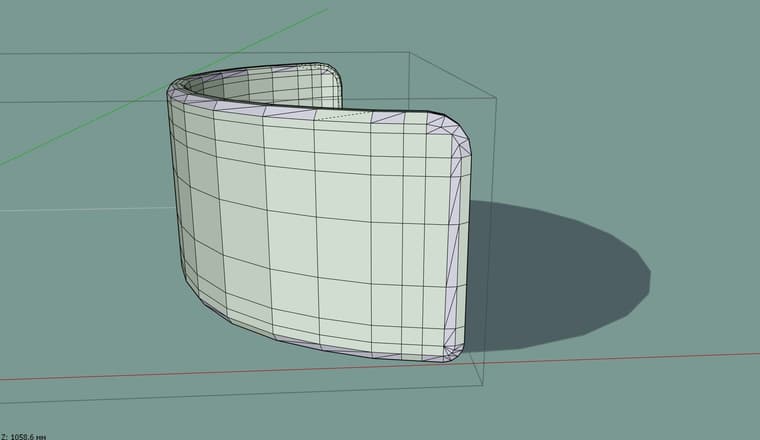
-
Ah ... So the file needs to be saved before using the extension. Makes sense.
No. you can use FredoBend on New models.
The SaveCopy feature is just for saving a copy of the original solid to file (in subfolder FredoBend Saved Containers). This is simply not done if the model is new.
-
the triangulating line that appears after using the plugin should become soft+smooth. Then the squares of the SubD work. Now the following is happening:
I am not sure it is possible to identfy and carry over the quad mesh, because of the slicing.
Could you send me a model and a curve so that I see what can be done. Thanks.
-
This post is deleted! -
@fredo6 I also want to suggest that after using the plug-in, the components do not deform, bend in shape and retain their component properties. This will give more options to the users of your plugin. As an example, I additionally created objects made using the Flowify plugin. It transfers components without distortion, but the components lose their connection to each other, if you can implement this in your plugin, it will be great.
Test.skp - This is the model you asked for -
the triangulating line that appears after using the plugin should become soft+smooth
Nope.
It should be soft = true; smooth = true AND cast shadows = false otherwise it will not work.I also want to suggest that after using the plug-in, the components do not deform, bend in shape and retain their component properties
I agree +20 on this!
I already said that in the original discussion on Trimble forum and I 100% stand on that.
Slicing should be optional. The default behavior should be "deform only", that would make more sense. -
I am not sure it is possible to identfy and carry over the quad mesh, because of the slicing.
I guess it's super-difficult when you need to slice (so you are creating new geometry with new vertex-order/face-IDs), but it's actually quite easy when you just need to deform.
The key is that you apply preemptive triangulation (with different properties for planar quads/planar n-gons) at the very beginning of the deforming operation in order to stabilize vertex order, edge properties and UV mapping, then you can safely preserve/restore everything once the deformation is done.I'm not a programmer, but I managed to formalize the whole algorithm decently enough that Claude can execute that brilliantly (based on the steps that I use to do manually in order to stabilize a mesh for proper Subdivision/Uv-mapping workflow).
I achieved good deformations which are reliably preserving quads, and UV mapping with decent fallback methods for n-gons.
I was planning to share the code with you regardless (for review before publishing it on Sketchucation), I think it could be interesting if you could integrate (and probably improve) it in some of your plugins, this one could be a clear candidate. -
Нет.
Должно быть soft = true; smooth = true И cast shadows = false, иначе это не сработает.I was sure that I was not giving complete information, but I wrote that I knew)) I think Fredo knows exactly what it's about and how it should be. But still, thanks for the correction, maybe this way we will get the desired result faster)
-
Я планировал поделиться с вами кодом в любом случае (для проверки перед публикацией на Sketchucation), думаю, было бы интересно, если бы вы интегрировали (и, возможно, улучшили) его в некоторые из ваших плагинов, этот может стать подходящим вариантом.
I would like to ask you to share this interesting plugin. I created a lot of interesting things myself with the help of Claude. It's interesting to see what others are doing.
-
With FredoBend v1.2b, you can normally keep the quad properties by turning off:
- Slicing
- remove coplanar edge
- soften edges
Here is a video showing the process.
Here is the test file. Tell me if this is OK.





Hello! It looks like you're interested in this conversation, but you don't have an account yet.
Getting fed up of having to scroll through the same posts each visit? When you register for an account, you'll always come back to exactly where you were before, and choose to be notified of new replies (either via email, or push notification). You'll also be able to save bookmarks and upvote posts to show your appreciation to other community members.
With your input, this post could be even better 💗
Register Login


Advertisement