sketchucation logo sketchucation
    • 登入
    Oops, your profile's looking a bit empty! To help us tailor your experience, please fill in key details like your SketchUp version, skill level, operating system, and more. Update and save your info on your profile page today!
    🔌 Smart Spline | Fluid way to handle splines for furniture design and complex structures. Download

    Rayscaper New Releases

    已排程 已置頂 已鎖定 已移動 Extensions & Applications Discussions
    rayscaperrender
    407 貼文 11 Posters 40.3k 瀏覽 12 Watching
    正在載入更多貼文
    • 從舊到新
    • 從新到舊
    • 最多點贊
    回覆
    • 在新貼文中回覆
    登入後回覆
    此主題已被刪除。只有擁有主題管理權限的使用者可以查看。
    • ntxdaveN 離線
      ntxdave @pixelcruncher
      最後由 編輯

      @pixelcruncher If I open SketchUp and then select the SketchUcation Extension Manager, it does not show that there is an update for Rayscaper.

      I will go ahead and download the update and install it but thought I would provide some feedback here. 😁

      Press F1...thank me later

      P 1 條回覆 最後回覆 回覆 引用 0
      • P 離線
        pixelcruncher Extension Creator @ntxdave
        最後由 編輯

        @ntxdave

        That’s a good point. I should add something to signal users that a new version is available. I don’t know how many people actually check the forums regularly, scanning for new updates.

        I'm the developer of Rayscaper: https://rayscaper.com/ - Fast and easy rendering for SketchUp.

        Mike AmosM 1 條回覆 最後回覆 回覆 引用 0
        • Mike AmosM 離線
          Mike Amos @pixelcruncher
          最後由 編輯

          @pixelcruncher

          I just check the Sketchucation store, any updates are readily apparent and it is faster when working within Sketchup.

          Absentia mortis praesentiam vitae probat, vita autem est argumentum constantiae.

          ntxdaveN 1 條回覆 最後回覆 回覆 引用 0
          • ntxdaveN 離線
            ntxdave @Mike Amos
            最後由 ntxdave 編輯

            @Mike-Amos said in Rayscaper New Releases:

            @pixelcruncher

            I just check the Sketchucation store, any updates are readily apparent and it is faster when working within Sketchup.

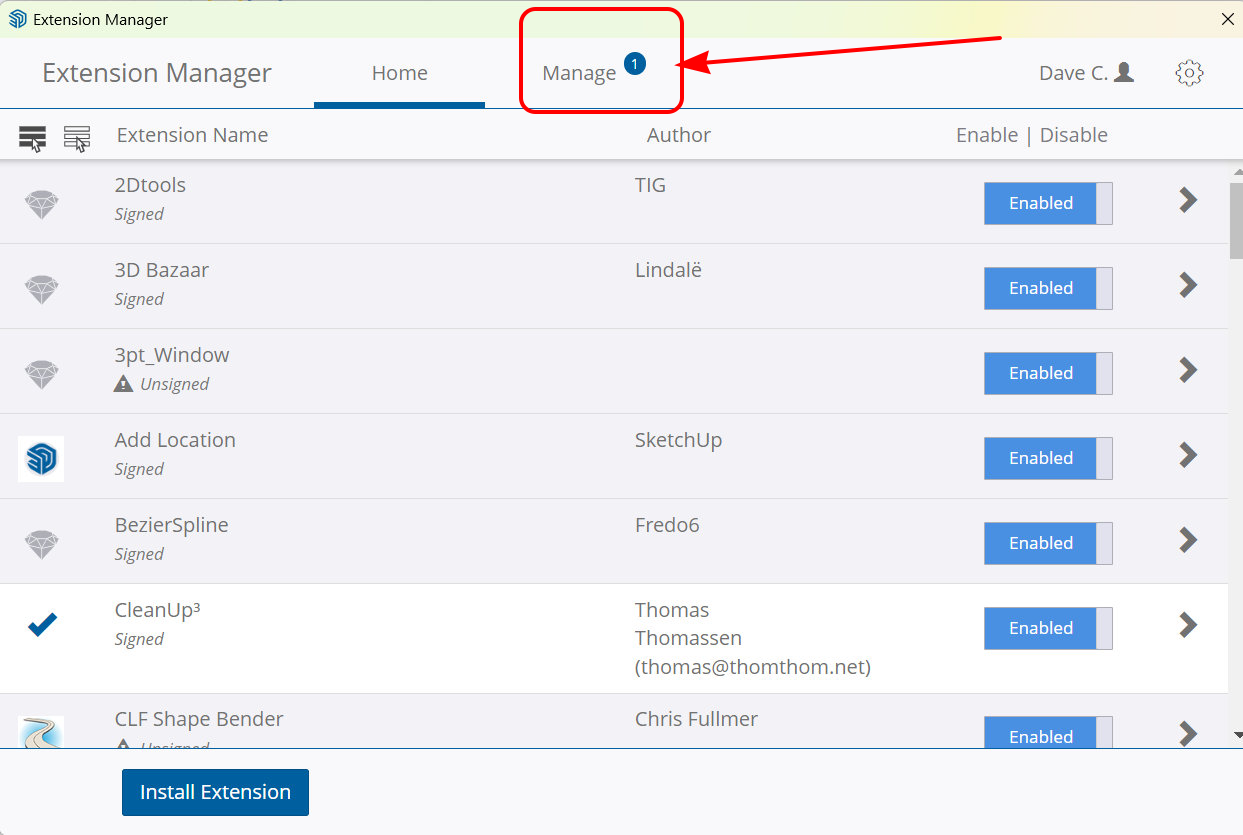
            Yes, however, my point was, why doesn’t it show up as an update in the SketchUcation Extension Manager? Normally when you have an extension installed that has an update available the Manage button/link will be highlighted indicating there is an update available but I did not see that for Rayscaper. I was just trying to point that out. 😀

            Press F1...thank me later

            Rich O BrienR 1 條回覆 最後回覆 回覆 引用 0
            • Rich O BrienR 離線
              Rich O Brien Moderator @ntxdave
              最後由 編輯

              @ntxdave I didnt know we had a Manage button or that our Extension Manager was showing updates. You must be running a version no else has.

              Download the free D'oh Book for SketchUp 📖

              ntxdaveN 1 條回覆 最後回覆 回覆 引用 0
              • ntxdaveN 離線
                ntxdave @Rich O Brien
                最後由 編輯

                @Rich-O-Brien said in Rayscaper New Releases:

                @ntxdave I didnt know we had a Manage button or that our Extension Manager was showing updates. You must be running a version no else has.

                Here is a screen shot of what I was talking about.
                SketchUcationExtensionManager-Manage.png

                Press F1...thank me later

                ntxdaveN 1 條回覆 最後回覆 回覆 引用 0
                • ntxdaveN 離線
                  ntxdave @ntxdave
                  最後由 ntxdave 編輯

                  @pixelcruncher said in [Rayscaper New Releases]> >

                  Help me build the community 👍

                  I'm on Twitter (X) now: https://twitter.com/Rayscaper3d/ - Please follow the @Rayscaper3d that will help me grow the community and spread the word about Rayscaper! 🙏

                  I have tried posting an image there a couple of times, but it does not show up when I go there. I must be doing something wrong. Your thread over there is the only thing I go to Twitter (X) for. 😁

                  Press F1...thank me later

                  Rich O BrienR 1 條回覆 最後回覆 回覆 引用 0
                  • Rich O BrienR 離線
                    Rich O Brien Moderator @ntxdave
                    最後由 編輯

                    @ntxdave that’s SketchUps native manager. Nothing to do with us

                    Download the free D'oh Book for SketchUp 📖

                    ntxdaveN 1 條回覆 最後回覆 回覆 引用 0
                    • ntxdaveN 離線
                      ntxdave @Rich O Brien
                      最後由 ntxdave 編輯

                      @Rich-O-Brien Ooops, my apology! 🤪

                      Isn't there something though that lets us know that there is an update for our installed plugins/extensions? If not, there should be, and my old memory was thinking there was (this is what happens as us elderly users get aged (more experienced)).

                      Press F1...thank me later

                      Mike AmosM 1 條回覆 最後回覆 回覆 引用 0
                      • Mike AmosM 離線
                        Mike Amos @ntxdave
                        最後由 編輯

                        @ntxdave

                        I think the only mode open to US older gits, apart from checking the store app, is writing on our own foreheads a short reminder to do so.

                        I have tried the other ways I know of and frankly I am a lost cause. I keep forgetting what they mean (String around the finger etc)..........

                        Absentia mortis praesentiam vitae probat, vita autem est argumentum constantiae.

                        1 條回覆 最後回覆 回覆 引用 0
                        • P 離線
                          pixelcruncher Extension Creator
                          最後由 編輯

                          Hey, Rayscaper users!

                          Another release, finding my groove!

                          Rayscaper 0.9.34 Beta is available in the SketchUcation store. More fixes and improvements. As always, I recommend upgrading to the latest version.

                          What Changed?

                          Improvements

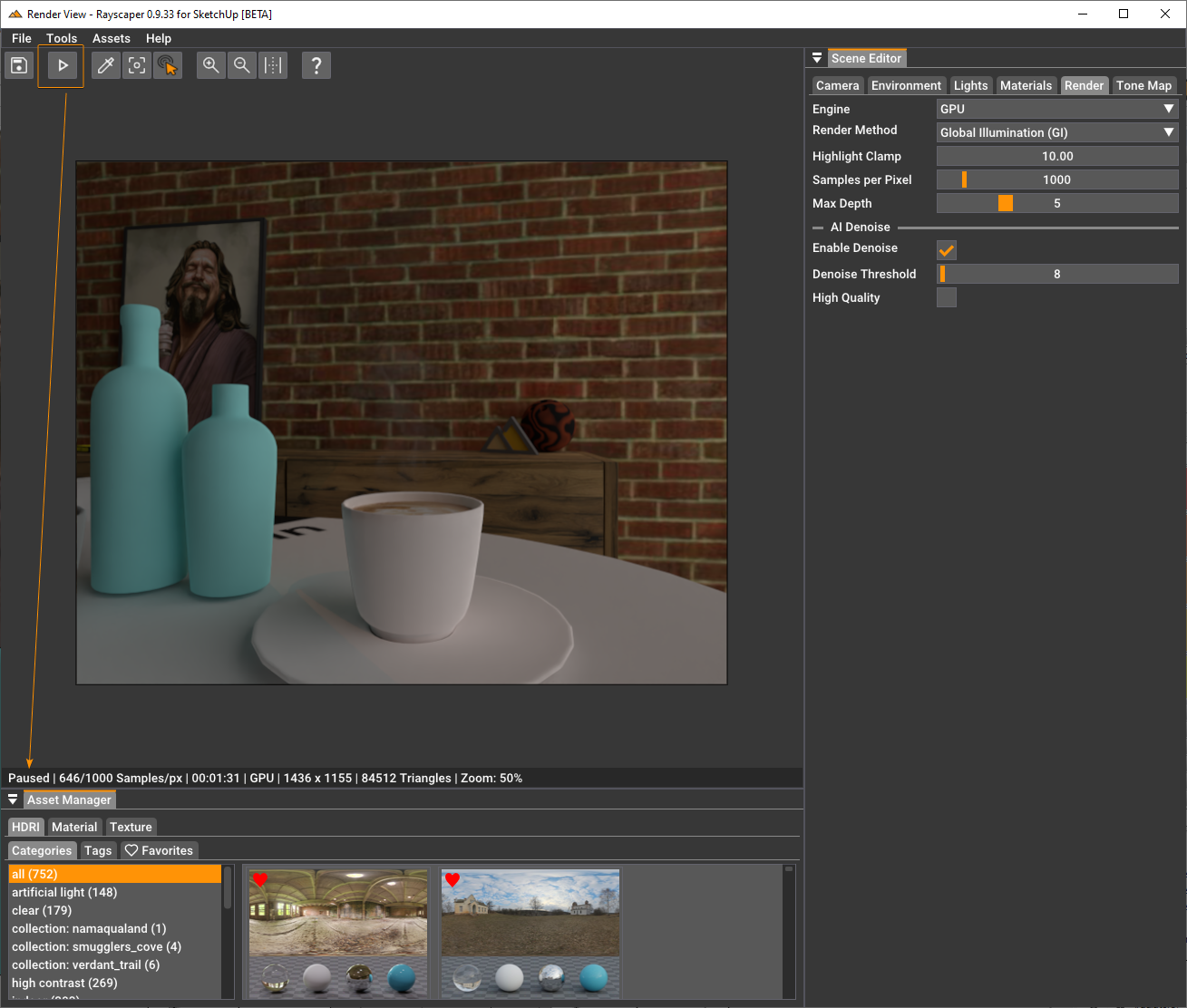
                          Pause/Resume

                          Works as advertised. Pauses the render and resume at a later time.
                          b4cb65f9-7d6c-486a-a522-697ef03602b1-image.png

                          • Internally, Rayscaper uses the meter as the scene unit. I made that more explicit in some inputs by having a unit. I will follow up with a feature to configure display units for folks who like something different than meters.
                          • Improve the speed of the picking operations.
                          • Display the material we are hovering over when dropping a material/texture on the viewport. This makes it clear where the dropped texture or material will apply.

                          Bug Fixes

                          • Fix the specular tint texture slot. Loading an image in this slot would load it in the normal map texture
                            slot.
                          • When applying a custom material (i.e., from the material library) and subsequently modifying the material. These
                            changes would not persist on saving. This is fixed in the current release.
                          • Fix a scrolling/clipping issue in the render viewport.
                          • Lights would get an empty name after modifying the light component (for example, moving the light). This is fixed.
                          • Fix an application freeze caused by light selection.

                          Help me build the community 👍

                          I'm on Twitter (X) now: https://twitter.com/Rayscaper3d/ - Please follow the @Rayscaper3d that will help me grow the community and spread the word about Rayscaper! 🙏

                          If you like Rayscaper, please share your renders (final or work-in-progress, it doesn't matter)! This is super motivating and will help me showcase its capabilities to new users.

                          Happy Rendering!

                          I'm the developer of Rayscaper: https://rayscaper.com/ - Fast and easy rendering for SketchUp.

                          1 條回覆 最後回覆 回覆 引用 2
                          • P 離線
                            pixelcruncher Extension Creator
                            最後由 編輯

                            Hey, Rayscaper users!

                            Another release!

                            Rayscaper 0.9.36 Beta is available in the SketchUcation store. More fixes and improvements. As always, I recommend upgrading to the latest version.

                            What Changed?

                            Improvements

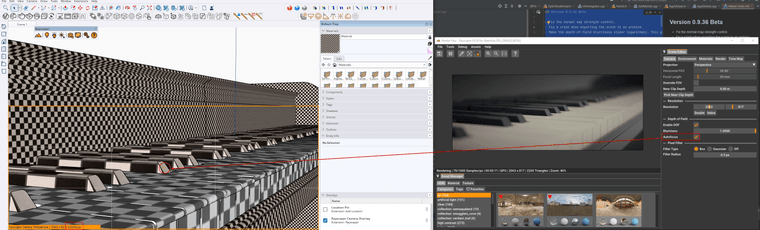
                            Auto Focus

                            • Add autofocus for DOF to the perspective camera. With autofocus, Rayscaper will automatically use the distance to the center 3D point in the rendered image as the focus distance (if possible).
                            3cd9f77d-b130-4f96-8680-144c9aebbba6-image.png

                            • Make the depth-of-field (DOF) blurriness easier to control. The range goes from 0 to 1, but if you need more blur for
                              your scene, you can punch in a higher value directly in the slider text box (CTRL + click).
                            • Make the depth-of-field blurriness slider logarithmic. This gives more control for low blur values.

                            Bug Fixes

                            • Fix the normal map strength control.
                            • Fix a crash when exporting the scene to an archive.
                              Spotlights with a falloff of zero would not render on the CPU. This release fixes that.

                            Help me build the community 👍

                            I'm on Twitter (X) now: https://twitter.com/Rayscaper3d/ - Please follow the @Rayscaper3d that will help me grow the community and spread the word about Rayscaper! 🙏

                            If you like Rayscaper, please share your renders (final or work-in-progress, it doesn't matter)! This is super motivating and will help me showcase its capabilities to new users.

                            Happy Rendering!

                            I'm the developer of Rayscaper: https://rayscaper.com/ - Fast and easy rendering for SketchUp.

                            1 條回覆 最後回覆 回覆 引用 2
                            • P 離線
                              pixelcruncher Extension Creator
                              最後由 pixelcruncher 編輯

                              Hey, Rayscaper users!

                              Another release!

                              Rayscaper 0.9.43 Beta is available in the SketchUcation store. More fixes and improvements. As always, I recommend upgrading to the latest version.

                              What Changed?

                              Improvements

                              • Rayscaper now takes Windows monitor scaling into account. On scaled monitors, Rayscaper should display correctly
                                without requiring manual user scaling. However, manual scaling is still an option if needed.
                              • Use the same light sampling algorithm for CPU and GPU. This would sometimes cause render differences between CPU and
                                GPU in complex lighting situations.
                              • Generate better tangent vectors for normal mapping. This should improve the quality of normal mapping.
                              • Rename the Disney material to PBR material.
                              • Drop the thin sheet approximation for the Disney (PBR) material, it's not working correctly currently.
                              • Drop the transmission color from the glass material.
                              • In the PBR material, rename clearcoat gloss to clearcoat roughness for consistency with other materials.
                              • Drop the environment light fake GI mode, it looks too weird to be useful.
                              • Drop some render methods that are not that useful except for debugging ("Shading dP/dU", "Shading dP/dV", "Shading
                                Incidence", "Shading Normals / No Bump").

                              Bug Fixes

                              • Fix a crash when double-clicking the save button in the GUI.
                              • Fixed the saving of the DPI scale application setting.

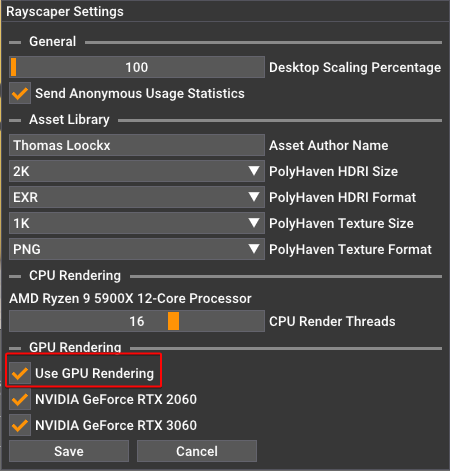
                              To avoid confusion, switching between CPU and GPU rendering doesn't happen anymore in the render tab but via the settings dialog (Menu > File > Settings).
                              a9612316-00c2-4731-bc77-493812113d58-image.png

                              Help me build the community 👍

                              If you like Rayscaper, please share your renders (final or work-in-progress, it doesn't matter)! This is motivating and will help me showcase its capabilities to new users.

                              Happy Rendering!

                              I'm the developer of Rayscaper: https://rayscaper.com/ - Fast and easy rendering for SketchUp.

                              1 條回覆 最後回覆 回覆 引用 0
                              • KrassK 離線
                                Krass
                                最後由 編輯

                                Great !
                                I'm testing your program, in the free version I discovered it when I was looking for free renderers for hobbyists and students and as twilight render disappeared, I came across Rayscaper.
                                I'm very impressed: I'm familiar with v-ray, D5 render and Twinmotion, but your tool is great for beginners, but of course for pros at a very, very decent price.
                                I'm in charge of a discord room on 3D rendering and plan to make tutorials for all those people who aren't into 3D rendering yet.

                                Krass

                                1 條回覆 最後回覆 回覆 引用 0
                                • P 離線
                                  pixelcruncher Extension Creator
                                  最後由 編輯

                                  @Krass I appreciate your interest in Rayscaper! Thanks.

                                  I'm very impressed: I'm familiar with v-ray, D5 render and Twinmotion, but your tool is great for beginners, but of course for pros at a very, very decent price.

                                  Glad to hear, I hope to build something that is very easy to use at a great price.

                                  I'm in charge of a discord room on 3D rendering and plan to make tutorials for all those people who aren't into 3D rendering yet.

                                  Nice! Let me know how I can support you.

                                  Cheers,
                                  Thomas

                                  I'm the developer of Rayscaper: https://rayscaper.com/ - Fast and easy rendering for SketchUp.

                                  1 條回覆 最後回覆 回覆 引用 0
                                  • KrassK 離線
                                    Krass
                                    最後由 Rich O Brien 編輯

                                    Hello,
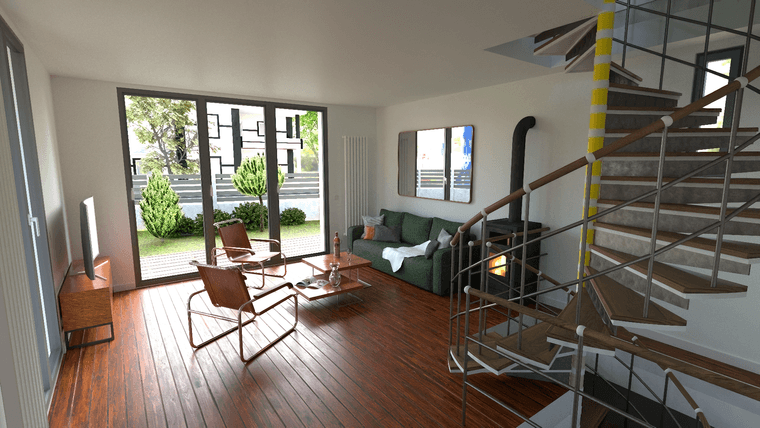
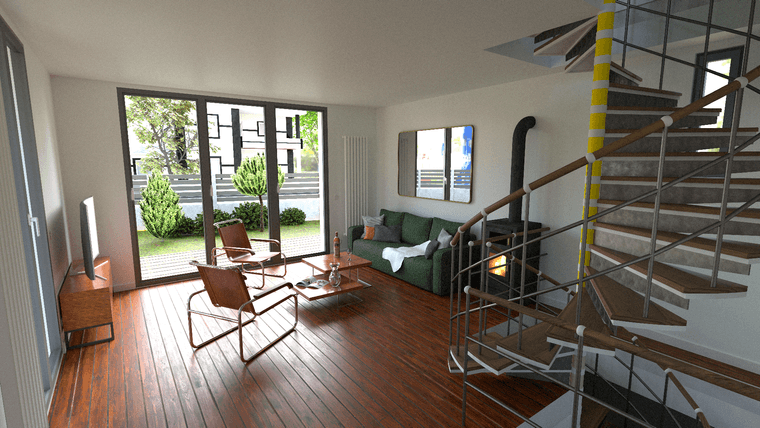
                                    first interior render with GPU, 10 000 samples, took 20:50 mn. Still very noisy
                                    0c0946f4-b02c-420a-a214-d5d3adab8f2d-image.png

                                    after external denoiser
                                    c47b667d-2203-45aa-ac44-4a1a4d730af3-image.png

                                    Krass

                                    1 條回覆 最後回覆 回覆 引用 2
                                    • P 離線
                                      pixelcruncher Extension Creator
                                      最後由 編輯

                                      @Krass, those are nice renders!

                                      By external denoiser, do you mean the one in Rayscaper or something else?
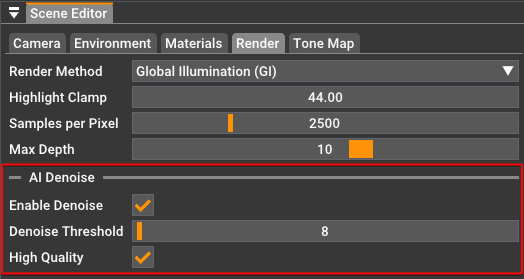
                                      image.png

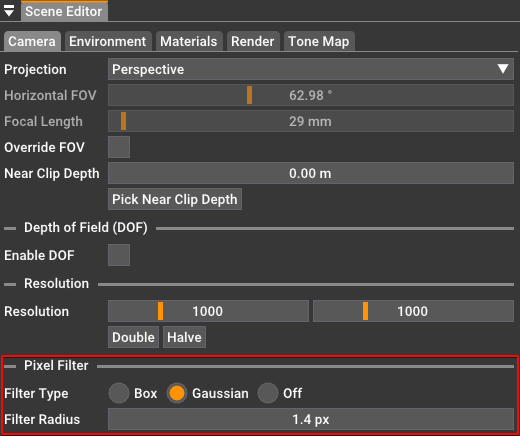
                                      Pixel filtering can also help to get rid of some of the jagged lines:
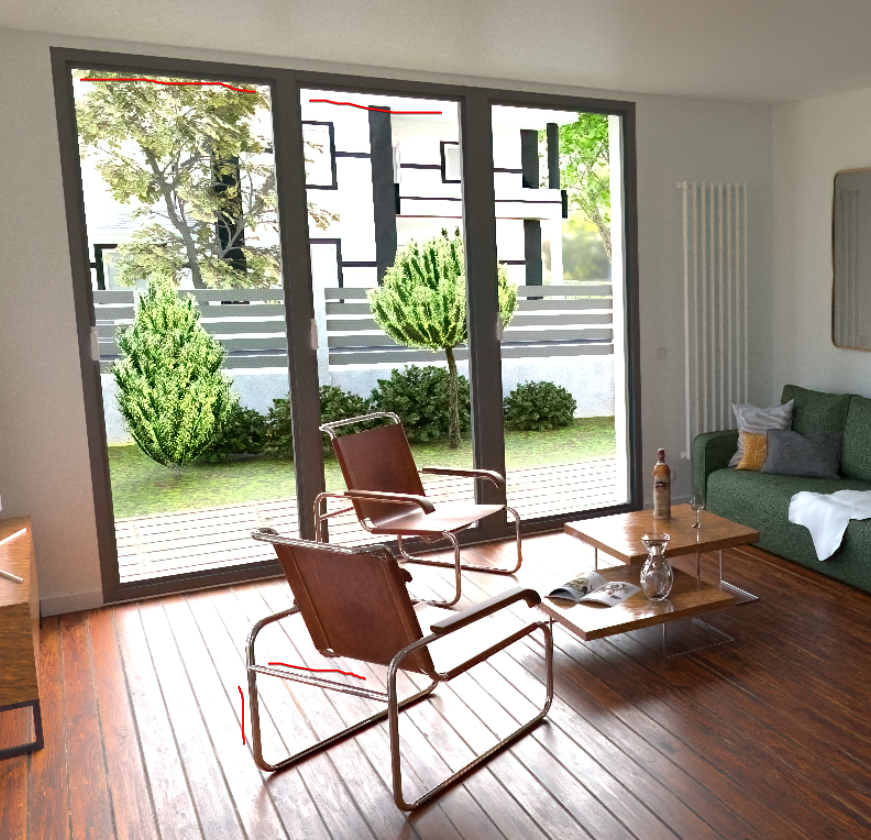
                                      image.png

                                      image.png

                                      Happy Rendering!
                                      Thomas

                                      I'm the developer of Rayscaper: https://rayscaper.com/ - Fast and easy rendering for SketchUp.

                                      1 條回覆 最後回覆 回覆 引用 1
                                      • KrassK 離線
                                        Krass
                                        最後由 編輯

                                        Hello,
                                        another test where I changed the lights and set the gaussian filtering mode (radius 1.2 px) to, like antialias, correct the material problems.
                                        I like the result, but I'd have to add some artificial lights to illuminate the scene.
                                        https://jskup.fr/wp-content/uploads/2025/02/gaussian-1.2-denoise-denoise.png

                                        Krass

                                        1 條回覆 最後回覆 回覆 引用 0
                                        • KrassK 離線
                                          Krass
                                          最後由 編輯

                                          I also applied a light coat of denoiser

                                          Krass

                                          1 條回覆 最後回覆 回覆 引用 0
                                          • KrassK 離線
                                            Krass
                                            最後由 編輯

                                            By external denoiser I mean I use a program dedicated to denoising

                                            Krass

                                            1 條回覆 最後回覆 回覆 引用 1
                                            • 1
                                            • 2
                                            • 3
                                            • 4
                                            • 5
                                            • 6
                                            • 20
                                            • 21
                                            • 4 / 21
                                            • 第一個貼文
                                              最後的貼文
                                            Buy SketchPlus
                                            Buy SUbD
                                            Buy WrapR
                                            Buy eBook
                                            Buy Modelur
                                            Buy Vertex Tools
                                            Buy SketchCuisine
                                            Buy FormFonts

                                            Advertisement