sketchucation logo sketchucation
    • 登入
    Oops, your profile's looking a bit empty! To help us tailor your experience, please fill in key details like your SketchUp version, skill level, operating system, and more. Update and save your info on your profile page today!
    🔌 Smart Spline | Fluid way to handle splines for furniture design and complex structures. Download

    Rayscaper New Releases

    已排程 已置頂 已鎖定 已移動 Extensions & Applications Discussions
    rayscaperrender
    407 貼文 11 Posters 40.4k 瀏覽 12 Watching
    正在載入更多貼文
    • 從舊到新
    • 從新到舊
    • 最多點贊
    回覆
    • 在新貼文中回覆
    登入後回覆
    此主題已被刪除。只有擁有主題管理權限的使用者可以查看。
    • P 離線
      pixelcruncher Extension Creator @Krass
      最後由 編輯

      @Krass Nice, thanks for sharing! Super cool to see this result.

      I'm the developer of Rayscaper: https://rayscaper.com/ - Fast and easy rendering for SketchUp.

      1 條回覆 最後回覆 回覆 引用 0
      • P 離線
        pixelcruncher Extension Creator
        最後由 pixelcruncher 編輯

        Hey, Rayscaper users!

        Rayscaper 0.9.83 Beta is available. You can get it via:

        • The SketchUcation store.
        • Direct download: Rayscaper_0.9.83_Beta.rbz.

        I recommend upgrading to the latest version.

        What Changed?

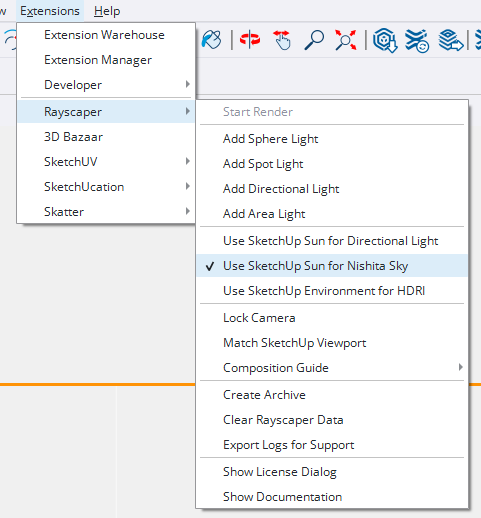
        • Add Nishita sky sun tracking from SketchUp shadows. The procedural sky will now automatically follow the sun position set in SketchUp's shadow settings, making it easier to match lighting conditions across your workflow. You can enable this via the menu Extensions > Rayscaper > Sync Nishita with Sun. See Syncing with SketchUp Sun for more details.
        • Improve environment power controls with logarithmic sliders. Environment intensity is now easier to adjust precisely across a wide range of values.
        • Fix crash when changing render resolution. Rayscaper will no longer crash when you adjust the resolution settings.
        • Fix alpha textures to use linear color space. Alpha channels in textures now render with correct transparency values.
        SketchUp_5nSoDFri5O.png

        Help Me Build the Community 👍

        If you like Rayscaper, please share your renders (final or work-in-progress, it doesn't matter)! This is motivating
        and helps me showcase its capabilities to new users.

        Follow me on X.

        Happy Rendering!
        Thomas

        I'm the developer of Rayscaper: https://rayscaper.com/ - Fast and easy rendering for SketchUp.

        KrassK 1 條回覆 最後回覆 回覆 引用 1
        • ntxdaveN 離線
          ntxdave
          最後由 編輯

          What tool can you use to create an animation that works with Rayscaper?

          Press F1...thank me later

          KrassK 1 條回覆 最後回覆 回覆 引用 0
          • ntxdaveN 離線
            ntxdave
            最後由 編輯

            Any plans to ,ake Rayscaper work withAnamator?

            Press F1...thank me later

            P 1 條回覆 最後回覆 回覆 引用 0
            • KrassK 離線
              Krass @ntxdave
              最後由 編輯

              @ntxdave i think it only works with scene transitions. Wait for pixel cruncher answer about Animator.

              Krass

              1 條回覆 最後回覆 回覆 引用 0
              • A 離線
                Alattab
                最後由 TIG 編輯

                How can I make a water material ?

                KrassK 1 條回覆 最後回覆 回覆 引用 0
                • P 離線
                  pixelcruncher Extension Creator @ntxdave
                  最後由 編輯

                  @ntxdave Like @krass mentioned, it only works for SketchUp scene animations. Fredo animator is not supported yet. Here is a guide on how to animate regular SketchUp scenes: https://rayscaper.com/guides/animation/

                  I'm the developer of Rayscaper: https://rayscaper.com/ - Fast and easy rendering for SketchUp.

                  1 條回覆 最後回覆 回覆 引用 0
                  • KrassK 離線
                    Krass @Alattab
                    最後由 Krass 編輯

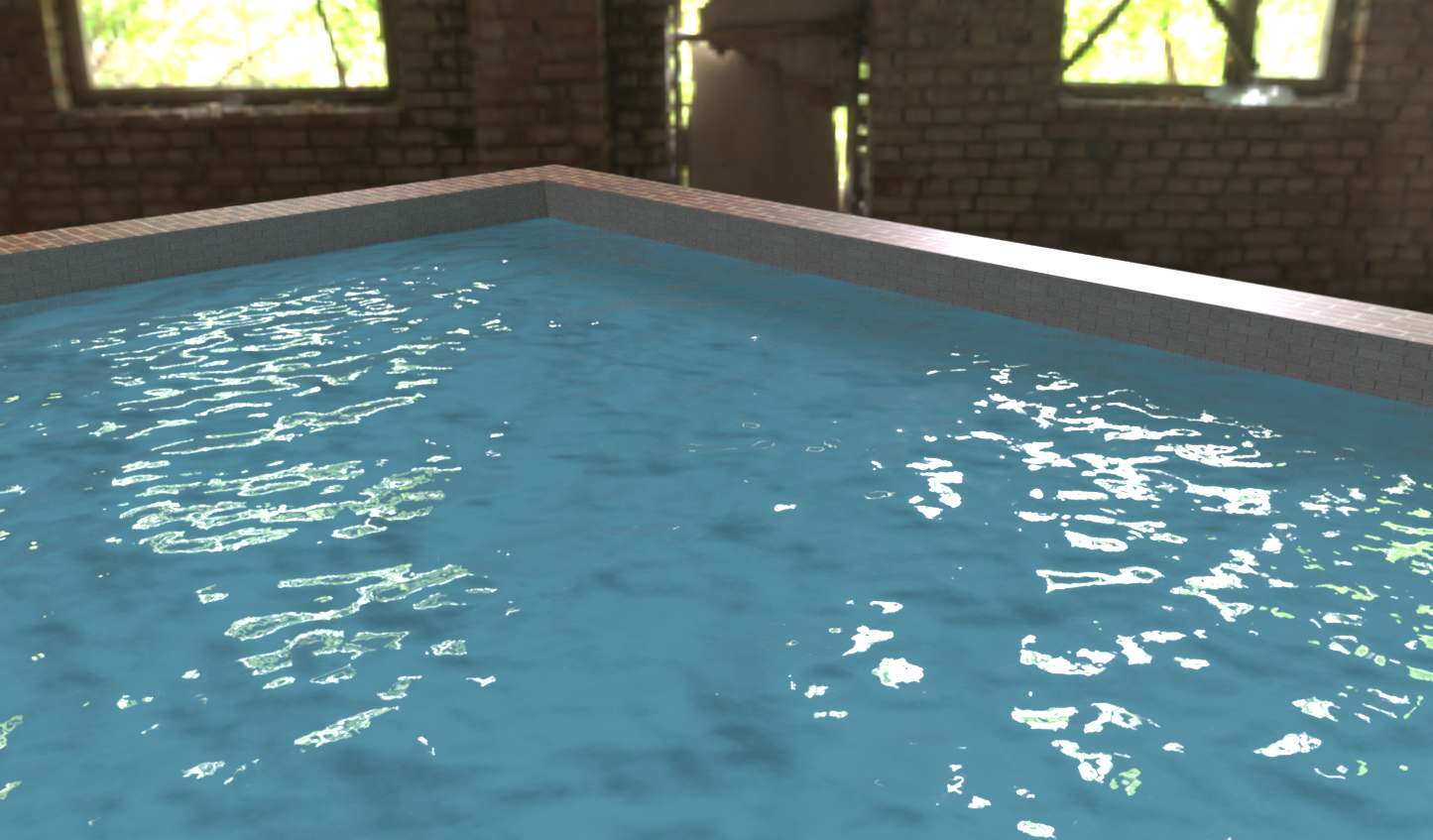
                    @Alattab forwater may be try a transparent or glass material and try several wave normal maps in the normal slot, play with material scale

                    Krass

                    1 條回覆 最後回覆 回覆 引用 0
                    • KrassK 離線
                      Krass
                      最後由 Krass 編輯

                      here a test with PBR mode/color/no roughness/ and this normal map
                      water.png

                      water.jpg

                      Krass

                      P A 2 條回覆 最後回覆 👍 回覆 引用 0
                      • KrassK 離線
                        Krass @pixelcruncher
                        最後由 Krass 編輯

                        @pixelcruncher Hello ! This is great,
                        You managed to fix the resolution change issue, and you did it very quickly, thank you! I'm now going to test my new animation in HD. I really like the subtle little changes you made to the interface; it's very well thought out: the fact that you only have to click once on the value field is perfect.

                        And I really like the interface in general. The scenes load very quickly...

                        However, it's true that being able to export the project as a workable zip file on another machine without having to remap missing textures would be ideal.

                        Let me give you a specific example: I don't like modeling and preparing the Rayscaper render on my laptop. But it will be much faster for rendering animations, so I need to export the project from the PC to the laptop.

                        Krass

                        P 1 條回覆 最後回覆 回覆 引用 0
                        • P 離線
                          pixelcruncher Extension Creator @Krass
                          最後由 編輯

                          @Krass That's some nice looking water! And a great workflow.

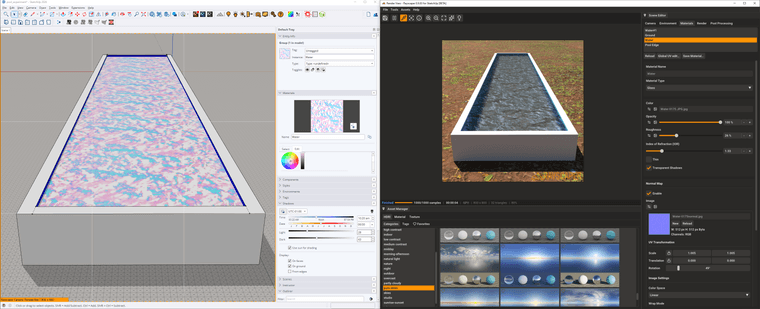
                          I did a similar experiment. I used a glass material with an index of refraction of 1.33 (the IOR of water). I used a water texture I found online.

                          Here's how I set it up in SketchUp and Rayscaper:
                          f0c646ab-616a-4486-bb0d-f41f9862d930-image.png

                          And there are the details of the glass material:
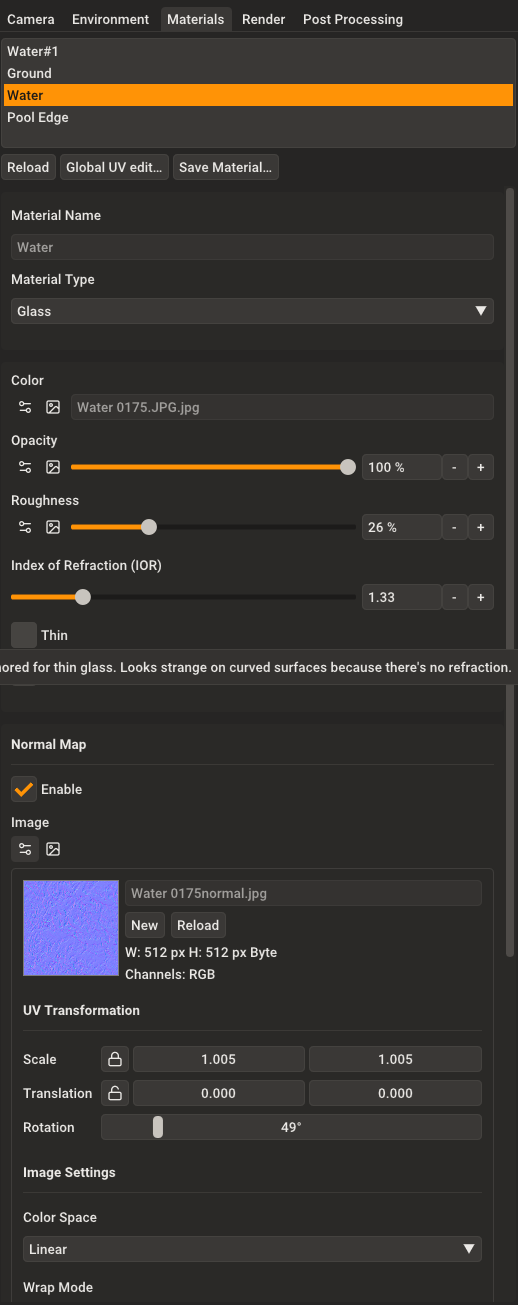
                          7c3267f3-55ca-405b-9220-f71adf1d90f2-image.png

                          I found the water texture here: https://www.cadhatch.com/seamless-water-textures

                          One of the upcoming releases, I will try to add a water material. It's such a common item in Archviz that I think Rayscaper should have one.

                          I hope this helps!

                          Cheers,
                          Thomas

                          I'm the developer of Rayscaper: https://rayscaper.com/ - Fast and easy rendering for SketchUp.

                          A 1 條回覆 最後回覆 👍 回覆 引用 0
                          • P 離線
                            pixelcruncher Extension Creator @Krass
                            最後由 編輯

                            @Krass said in Rayscaper New Releases:

                            @pixelcruncher Hello ! This is great,
                            You managed to fix the resolution change issue, and you did it very quickly, thank you! I'm now going to test my new animation in HD. I really like the subtle little changes you made to the interface; it's very well thought out: the fact that you only have to click once on the value field is perfect.

                            Cheers! Glad to hear the bug is fixed.

                            And I really like the interface in general. The scenes load very quickly...

                            Nice! I did put some work into improving the interface during the holidays.

                            However, it's true that being able to export the project as a workable zip file on another machine without having to remap missing textures would be ideal.

                            Let me give you a specific example: I don't like modeling and preparing the Rayscaper render on my laptop. But it will be much faster for rendering animations, so I need to export the project from the PC to the laptop.

                            Fair enough, I'm aware that this working 100% correct is super important. Expect this to be fixed in one of the upcoming releases.

                            Regards,
                            Thomas

                            I'm the developer of Rayscaper: https://rayscaper.com/ - Fast and easy rendering for SketchUp.

                            1 條回覆 最後回覆 回覆 引用 0
                            • KrassK 離線
                              Krass
                              最後由 編輯

                              I'm trying to find a plugin to extract all textures from a SU model, I had one before, I think it is from Eneroth...

                              Krass

                              1 條回覆 最後回覆 回覆 引用 0
                              • KrassK 離線
                                Krass
                                最後由 編輯

                                eneroth material Extractor

                                Krass

                                1 條回覆 最後回覆 回覆 引用 0
                                • KrassK 離線
                                  Krass
                                  最後由 Krass 編輯

                                  In the meantime, to transfer a project to another machine, simply go to the editor of the material and open the texture in the Windows viewer, then save it in the images folder generated by the Rayscaper material archive once SU is opened on the other machine (from the archive created by Rayscaper).

                                  Krass

                                  1 條回覆 最後回覆 回覆 引用 1
                                  • A 離線
                                    Alattab @Krass
                                    最後由 編輯

                                    @Krass thank you

                                    1 條回覆 最後回覆 回覆 引用 0
                                    • A 離線
                                      Alattab @pixelcruncher
                                      最後由 編輯

                                      @pixelcruncher Where can I add specular luminosity maps? Or where can i mange specular value

                                      1 條回覆 最後回覆 回覆 引用 0
                                      • A 離線
                                        Alattab
                                        最後由 編輯

                                        PBR Parameters.PNG

                                        Just a suggestion: all PBR parameters should be available, in addition to an AO parameter that allows the user to add all PBR maps. Also, the ability to add FORE GROUND AND BACK GROUND should be added instead of using the environment image, and the ability to resize the environment image should also be included.

                                        P 1 條回覆 最後回覆 👍 回覆 引用 0
                                        • KrassK 離線
                                          Krass
                                          最後由 編輯

                                          Yes, when you talk about resizing HDRI maps, it's an ideal function, but you know, even D5 Render doesn't have that feature yet. It's available in Twinmotion and V-Ray (Infinite Dome) for the programs I use. For the background, you can also place an arc-shaped plane with an image in Raycacaper, which often works.
                                          Have you tried that slot for your specular map?
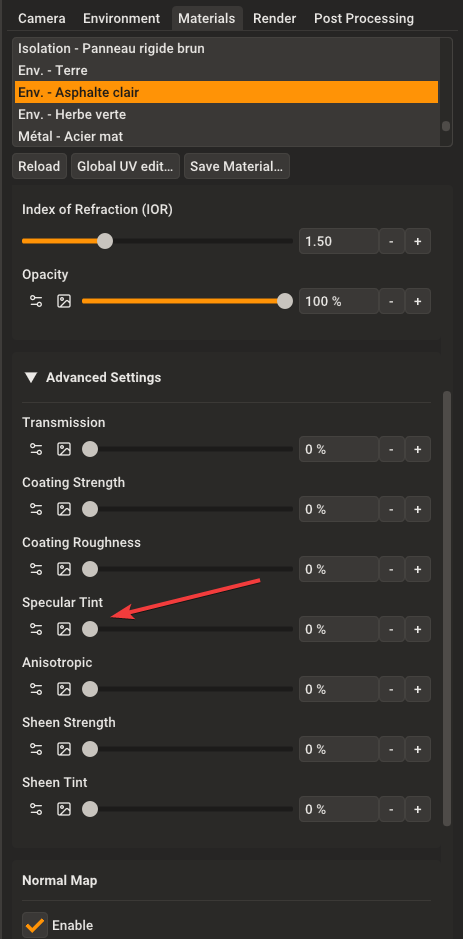
                                          image.png

                                          Krass

                                          A 1 條回覆 最後回覆 👎 回覆 引用 1
                                          • majidM 離線
                                            majid
                                            最後由 編輯

                                            Unbelieveably good!

                                            My inspiring A, B, Sketches book: https://sketchucation.com/shop/books/intermediate/2612-alphabet-inspired-sketches--inspiring-drills-for-architects--3d-artists-and-designers-

                                            1 條回覆 最後回覆 ♥ 回覆 引用 0
                                            • 1
                                            • 2
                                            • 15
                                            • 16
                                            • 17
                                            • 18
                                            • 19
                                            • 20
                                            • 21
                                            • 17 / 21
                                            • 第一個貼文
                                              最後的貼文
                                            Buy SketchPlus
                                            Buy SUbD
                                            Buy WrapR
                                            Buy eBook
                                            Buy Modelur
                                            Buy Vertex Tools
                                            Buy SketchCuisine
                                            Buy FormFonts

                                            Advertisement