[Plugin][$] ThruPaint - v2.8d - 13 May 25




-
@miszcz
I think there is a general problem with your environment. If you get the message 'Plese Wait' forever, then ThruPaint may not work correctly.Could you please:
- Invoke the menu Window > LibFredo6 Settings... > Fredo6 Plugins Information for Sketchucation Support. Just send me the outpout displayed in the Ruby Console
- Tell me if the problem happens with any model, and say, in a new model
- Send me the trace of the error Error: "#<NoMethodError: undefined method delete_if' for nil:NilClass>", so that I have the line number in .rb files.
-
I'm also seeing errors while using the plugin. I can pretty reliably recreate the issue by opening multiple models with ThruPain open, then switching between them. Once it has an error the plugin becomes unusable. I've also had it fail in other contexts, for example, working on a single model, but those are tougher to recreate reliably.
Video Showing Repro
ThruPaintErrors.mp4Plugin information for Support
Fredo6 Plugins Information on 2024-09-29 07:34:40 -0400
--------------------------
- Platform: arm64-darwin - Ruby: 3.2.2
- Sketchup: 24.0.595
- LibFredo6: v14.6a
- LibFredo6 Binary loaded
- Sketchucation ExtensionStore: 4.4.0
- SCFLicense: v6.4a - 72
- Fredo6 Plugins
- SCFLicense directory present
    > Signature File: 2024-04-19 21:52:41 -0400
    > ClothWorks: 2024-02-12 20:32:28 -0500
    > ThruPaint: 2024-09-26 07:53:53 -0400
Errors Observed
First Error when switching between modelsError: #<NoMethodError: undefined method `each' for nil:NilClass> /users/jusbell82/library/application support/sketchup 2024/sketchup/plugins/fredo6_thrupaint/bootstrap_thrupaint.rbe:397:in `exit' /users/jusbell82/library/application support/sketchup 2024/sketchup/plugins/fredo6_thrupaint/bootstrap_thrupaint.rbe:302:in `model_activating' /users/jusbell82/library/application support/sketchup 2024/sketchup/plugins/fredo6_thrupaint/bootstrap_thrupaint.rbe:283:in `onActivateModel'Subsequent errors when trying to activate tool via toobar.
Error: #<NoMethodError: undefined method `[]' for nil:NilClass> /users/jusbell82/library/application support/sketchup 2024/sketchup/plugins/fredo6_thrupaint/thrupainttool.rbe:547:in `paint_mode_change' /users/jusbell82/library/application support/sketchup 2024/sketchup/plugins/fredo6_thrupaint/bootstrap_thrupaint.rbe:422:in `execute_direct' /users/jusbell82/library/application support/sketchup 2024/sketchup/plugins/fredo6_thrupaint/bootstrap_thrupaint.rbe:79:in `action__mapping' /var/folders/85/65t6bh0j5gb1ntqbpx3_20dm0000gn/T/com.sketchup.SketchUp.2024.jusbell82/Fredo6_LibFredo6_TemporaryFiles/data6.rb:65:in `call' /var/folders/85/65t6bh0j5gb1ntqbpx3_20dm0000gn/T/com.sketchup.SketchUp.2024.jusbell82/Fredo6_LibFredo6_TemporaryFiles/data6.rb:65:in `launch_action' /users/jusbell82/library/application support/sketchup 2024/sketchup/plugins/fredo6_!libfredo6/lib6plugin.rbe:244:in `launch_action' /users/jusbell82/library/application support/sketchup 2024/sketchup/plugins/fredo6_thrupaint/bootstrap_thrupaint.rbe:69:in `launch_action' /users/jusbell82/library/application support/sketchup 2024/sketchup/plugins/fredo6_thrupaint/bootstrap_thrupaint.rbe:145:in `block in startup' /users/jusbell82/library/application support/sketchup 2024/sketchup/plugins/fredo6_!libfredo6/lib6plugin.rbe:1463:in `command_invoke' /users/jusbell82/library/application support/sketchup 2024/sketchup/plugins/fredo6_!libfredo6/lib6plugin.rbe:1443:in `block (2 levels) in build_config_commands' /users/jusbell82/library/application support/sketchup 2024/sketchup/plugins/fredo6_!libfredo6/lib6traductor.rbe:1446:in `block in add_command' -
@fredo6 Here is the Window > LibFredo6 Settings... > Fredo6 Plugins Information for Sketchucation Support Ruby Console
Fredo6 Plugins Information on 2024-10-02 19:37:58 +0200
--------------------------
- Platform: x64-mswin64_140 - Ruby: 3.2.2
- Sketchup: 24.0.594
- LibFredo6: v14.6a
- LibFredo6 Binary loaded
- Sketchucation ExtensionStore: 4.4.1
- SCFLicense: v6.4a - 74
- Fredo6 Plugins
    > LordOfTheToolbars v2.7c
    > Curviloft v2.0a - licensed FULL
    > Curvizard v2.5a - licensed FULL
    > FredoCorner v2.7a
    > FredoScale v3.6a - licensed FULL
    > FredoSpline v2.6a - licensed FULL
    > FredoTools v4.5c
    > JointPushPull v4.8a - licensed FULL
    > MrHide v1.8a
    > ThruPaint v2.5b - licensed FULL
    > ToolsOnSurface v2.6a - licensed FULL
    > Axyz v1.1a
- SCFLicense directory present
    > Signature File: 2024-01-12 19:58:04 +0100
    > Curviloft: 2024-01-12 20:05:07 +0100
    > Curvizard: 2024-01-12 20:06:02 +0100
    > FredoScale: 2024-01-12 19:59:00 +0100
    > FredoSpline: 2024-09-22 17:44:28 +0200
    > JointPushPull: 2024-01-12 20:02:53 +0100
    > ThruPaint: 2024-09-22 17:44:40 +0200
    > ToolsOnSurface: 2024-02-18 06:28:48 +0100
    > TopoShaper: 2024-01-12 20:10:57 +0100
Full errror "#<NoMethodError: undefined method delete_if' for nil:NilClass>", goes like this
Error: #<NoMethodError: undefined method `delete_if' for nil:NilClass>
c:/users/szcze/appdata/roaming/sketchup/sketchup 2024/sketchup/plugins/fredo6_!libfredo6/body_lib6materialbrowser.rbe:3647:in `matos_history_store'
c:/users/szcze/appdata/roaming/sketchup/sketchup 2024/sketchup/plugins/fredo6_!libfredo6/body_lib6materialbrowser.rbe:3575:in `matos_set_current_from_matbro'
c:/users/szcze/appdata/roaming/sketchup/sketchup 2024/sketchup/plugins/fredo6_!libfredo6/body_lib6materialbrowser.rbe:2454:in `matinfo_event'
c:/users/szcze/appdata/roaming/sketchup/sketchup 2024/sketchup/plugins/fredo6_!libfredo6/body_lib6materialbrowser.rbe:2319:in `dialog_process_events'
c:/users/szcze/appdata/roaming/sketchup/sketchup 2024/sketchup/plugins/fredo6_thrupaint/thrupaintmaindialog.rbe:1125:in `dialog_callback_exec'
c:/users/szcze/appdata/roaming/sketchup/sketchup 2024/sketchup/plugins/fredo6_thrupaint/thrupaintmaindialog.rbe:1117:in `dialog_callback'
c:/users/szcze/appdata/roaming/sketchup/sketchup 2024/sketchup/plugins/fredo6_!libfredo6/body_lib6chromiumwdlg.rbe:2460:in `call'
c:/users/szcze/appdata/roaming/sketchup/sketchup 2024/sketchup/plugins/fredo6_!libfredo6/body_lib6chromiumwdlg.rbe:2460:in `master_callback'
c:/users/szcze/appdata/roaming/sketchup/sketchup 2024/sketchup/plugins/fredo6_!libfredo6/body_lib6chromiumwdlg.rbe:2225:in `j_action'
c:/users/szcze/appdata/roaming/sketchup/sketchup 2024/sketchup/plugins/fredo6_!libfredo6/body_lib6chromiumwdlg.rbe:2184:in `j_callback'
c:/users/szcze/appdata/roaming/sketchup/sketchup 2024/sketchup/plugins/fredo6_!libfredo6/body_lib6chromiumwdlg.rbe:2170:in `block in j_dispatch'
c:/users/szcze/appdata/roaming/sketchup/sketchup 2024/sketchup/plugins/fredo6_!libfredo6/body_lib6chromiumwdlg.rbe:2162:in `each'
c:/users/szcze/appdata/roaming/sketchup/sketchup 2024/sketchup/plugins/fredo6_!libfredo6/body_lib6chromiumwdlg.rbe:2162:in `j_dispatch'
c:/users/szcze/appdata/roaming/sketchup/sketchup 2024/sketchup/plugins/fredo6_!libfredo6/body_lib6chromiumwdlg.rbe:1439:in `block in create_dialog'
I checked, and this problem is happening in any model.
-
NEW RELEASE: ThruPaint v2.6a - 15 Oct 24
Requirements:
- LibFredo6 14.6a
ThruPaint 2.6a is a release including:
- Fix of a future bug
Home Page of ThruPaint for information and Download.
-
Hi how are you?
I'm trying to map this mesh with quadmesh uv, but I get an error.
I know the mesh is Quads.
How can I fix this error?
I'm attaching the sketchup file in case you want to try it.
Thanks.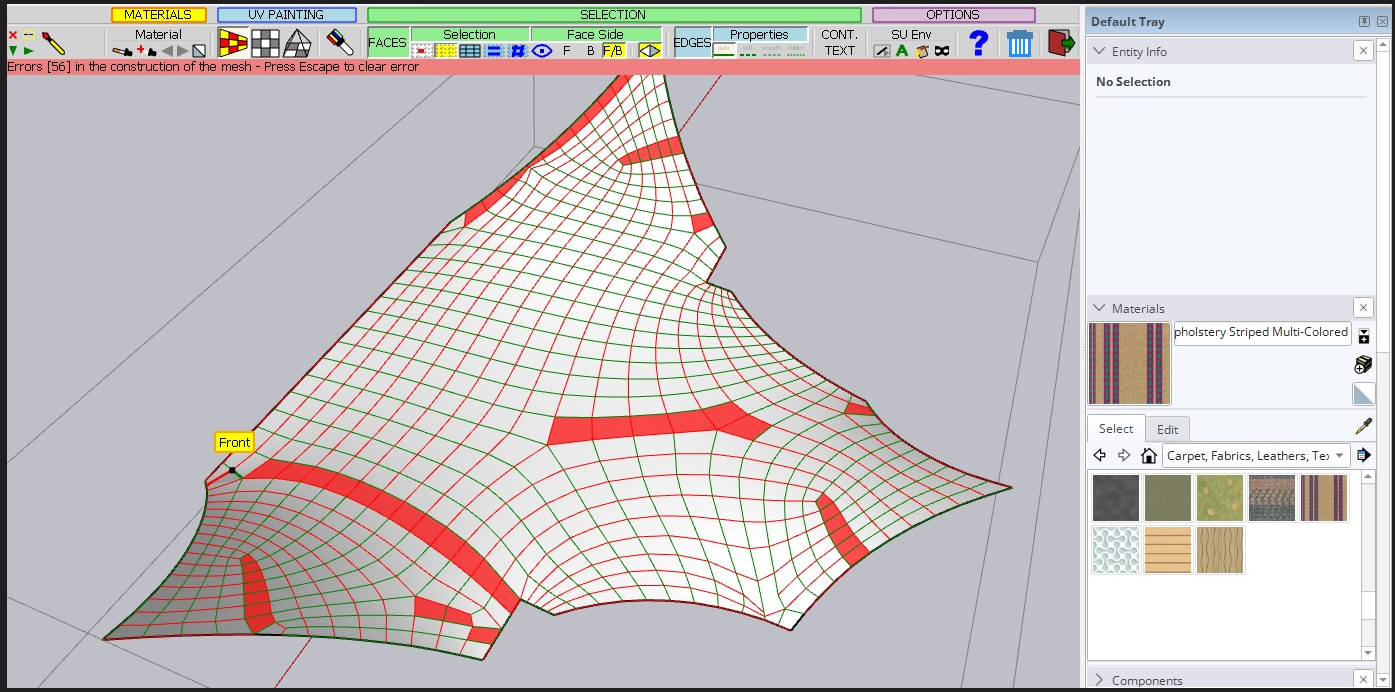
-
The requirement is Quad, but actually more like a grid. Your mesh may be quad, but not grid-like.
-
@fredo6 Hello, how are you? Thanks for your prompt response.
Do you know of any way or plugin that I can use to improve the mesh before applying the material?
Thanks.
-
Hello,
I'm experiencing a problem with the ThruPaint v2.6a plugin in SketchUp after the update. When I try to use certain functions nothing works, I see the following error message in the Ruby Console:
"1446:in `block in add_command" and
I'm currently using SketchUp version 2024 and ThruPaint version 2,6a.
I've tried troubleshooting by reinstalling the plugin and the LibFredo6, but the error persists. Any guidance you can offer to resolve this would be greatly appreciated.Thanks in advance!
-
Hello, just updated to ThruPaint 2.6a, and it does not work at all. Have 3 seats and same results on all of them.
Pictogram appears but when you hit it nothing happens. License is ok, extension store is v4.4.1 and libfredo6 is v14.6a. -
@Darius Same issue here!
One of our colleagues and me have the same issue.
We click a button, it stays "selected" but Thrupaint doesn't open or pop up.
Quite unfortunate to have an update forced on you that doesn't work and leaves your work stranded.
Does anyone have the .rbz for version 2.5b by any chance?
-
Bonjour,
Cela ne fonctionne pas non plus chez moi...
-
I am also having this issue, having been prompted to update.
The brush icon is highlighting but no tooltip is appearing to paint with, or the thrupaint toolbar.
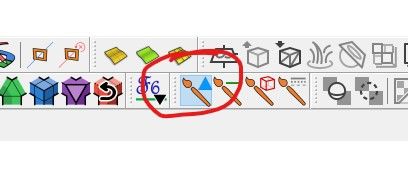
I've updated Thru Paint to V2.6 and LibFredo to 14.6a -
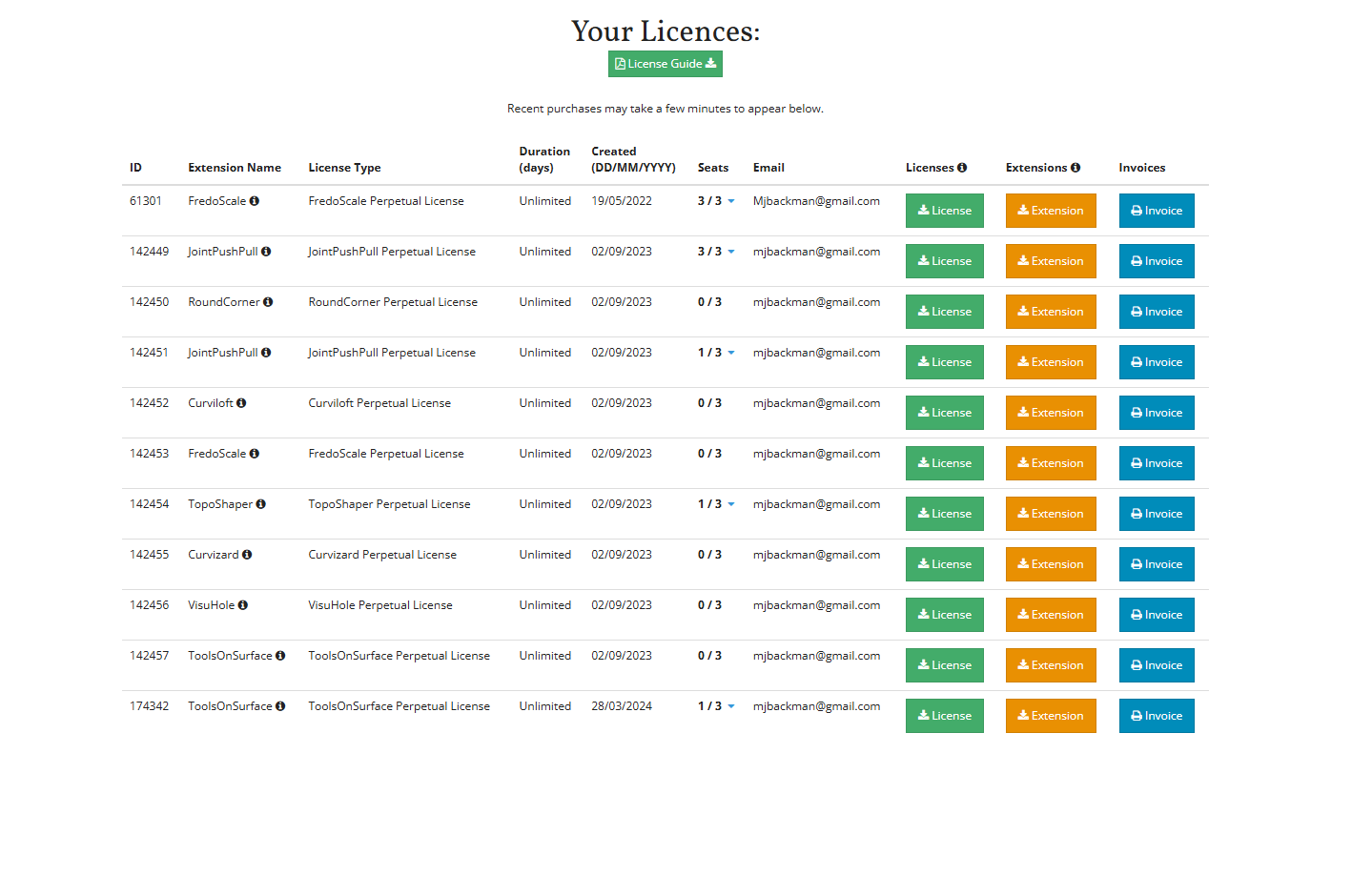
Why Does thrupaint keep asking me to validate my license? and I cant find my licensee file.
-
@Mike-Backman
Have you bought a license for it ? -
Purchased a license and updated from 2.4 to 2.6a but the latter does not work. Can only see the toolbar, but when using it nothing happens. How can we get some assistance?
-
@kaleen_pl Fredo is aware of this issue. We need to wait for him to push an update to address the cause.
-
Hi All,
Did anyone else notice that Thrupaint stopped working? It worked until recently, but not anymore. It no longer works for me on the Mac and for my colleague it no longer works in the Windows version either. I am working with the most recent SketchUp version and all SketchUcation extensions are up-to-date. Does anyone know what could be going on?
What happens is dat when I click on any of the Thrupaint icons in the toolbar nothing happens, without any message. The same happens in the Windows version of SketchUp so it seems that there is something wrong with te extension?
Thanks in advance!
Ronald -
@Rovasli67 said in [Plugin][$] ThruPaint - v2.6a - 15 Oct 24:
Did anyone else notice that Thrupaint stopped working?
Did you read the several posts above yours? As Rich wrote, Fredo is aware of it and we need to wait for him to issue an update.
-
NEW RELEASE: ThruPaint v2.7a - 01 Nov 24
Requirements:
- LibFredo6 14.6a
ThruPaint 2.5b is a release including:
- Fix of a major bug related to a remaining expiration date on 31 Oct.
Home Page of ThruPaint for information and Download.
-
Hi, I'm sorry that I missed the several posts about the same issue. I searched for "ThruPaint" before I posted my question but only found posts from 2022 and older...(?). Thank you for your response and for pointing out those messages to me! We will wait for the update.







Advertisement