[Plugin][$] ThruPaint - v2.8d - 13 May 25




-
@madrhyno
Youhave purchased a license for "thrupaint".
I have purchased a license for "thrupaint". -
Could you open and leave the Ryb console before you invoke ThruPaint, in case there are errors displayed.
Also, did it already work on SU2024 for you? That is:
- did you upgrade to SU2024 and it does not work any longer?
- or did you upgrade to ThruPaint v2.4a and it does not work any longer?
-
I am currently using the 2024 version.
Thrupaint is also using the 2.4a version.
I've been using it for about five weeks,
Recently, these symptoms started two weeks ago.As you said, I checked the ruby console
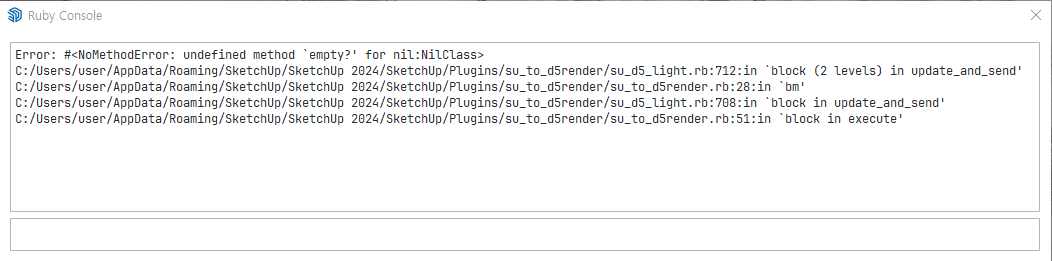
It looks like there's a collision with something related to the D5 render. -
@fredo6
I tried it for testing.Sketchup 2021 version with D5 + Thrupaint old version (old version with menu bar on top without new window)
I did the same in the above situation.When I pressed the Thrupaint button, nothing came out of the Ruby console at the time.
Even the loading speed is fast!!! Important!!!However, when I color certain sides, the same message as before appears on the Ruby console.
However, the results come out well, and the speed is still high.In conclusion, I think the content that appears on the Ruby Console has nothing to do with the loading speed.
-
The old version of ThruPaint is something different (it does not have a material browser integrated).
Do you remember in you did something in your environemnt 2 weeks ago?
Also, does the problem happen with any model?
Could you try to deactivate D5 Render and see if ThruPaint 2.4a behaves better.
-
I deleted D5 Live sync and tried again.
No message appears on the Ruby console now.
However, the slow loading speed is still the same.
It's still slow in the 2024 version + the latest version of thrupaint
It's fast in the old version of 2021+thrupaint.
-
@fredo6
As I told you at first, loading time is not long in a sketchup project with a small number of materials.And when I use the old version -thrupaint- in a project that had a problem with a long loading time, the problem disappears.
Wouldn't the "material browser integrated" you mentioned make loading time longer in projects with a lot of materials?
-
@fredo6 thanks for pointing this out
-
The material loading and updating is normally only done once (and then material information is cached) but it may take time if you have a lot of materials.
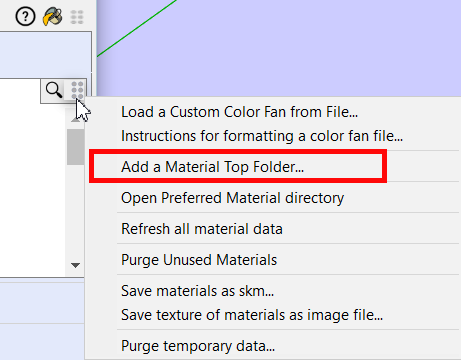
By the way, to avoid that ThruPaint discovers new custom materials for some models, the best is to declare your custom materials to Thrupaint, basically designating the root directory where your materials are located as a set of .skm files.
-
@fredo6
The license purchase page for Thrupaint says it's for Visuhole. Is this just a typo? I already own Visuhole.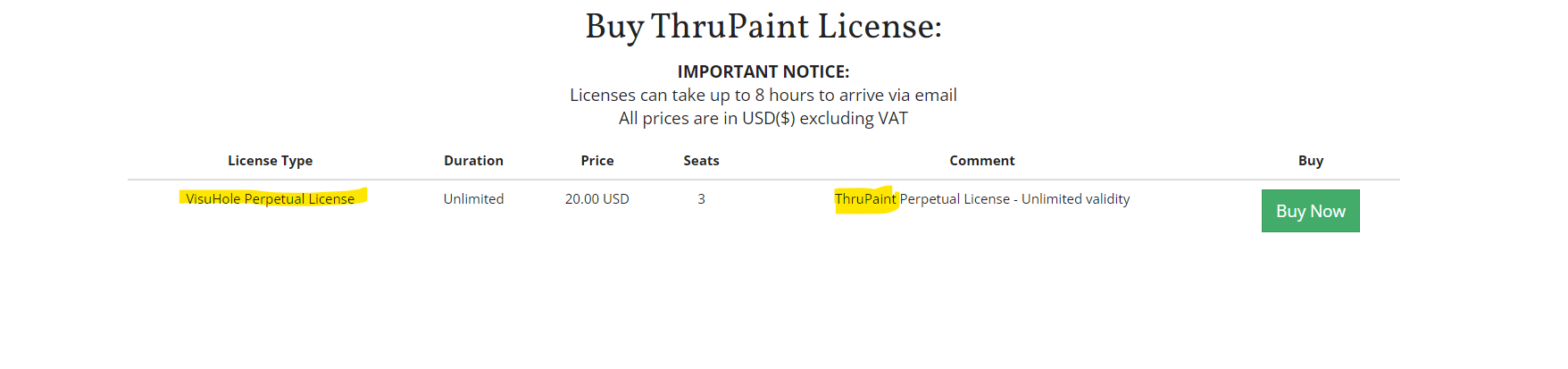
-
@jkoll66 I'd say its a typo in the php. I'll let @Gabor know about it
If you decide to purchase and you still end up with a Visuhole license send an email to support@sketchucation.com
-
It was just a typo. All's good. Thanks!
-
Re: [Plugin][$] ThruPaint - v2.4a - 02 Apr 24
Hi @fredo6 ,
I had an issue with thruPaint with the object painter not working. I updated LibFredo and now I cant get the window to open, only the top bar when i hit TAB. Prior to updating LibFredo I had the option to activate ThruPaint when invoking the paint bucket tool twice, and my bet is that if I could reset to factory settings my issue would be solved, but without being able to open the window, I cant access the extension settings. My guess is that setting preference is stored in some AppData file somewhere and I need to delete it.
I've tried uninstalling all Fredo extensions and LibFredo, then uninstalling LibFredo then the rest one by one, restarting Sketchup each time, but can't get it to work.
(Sketchup 2024, Windows 11)
-
@fredo6
I managed to solve the problem. I uninstalled Sketchup, then manually deleted all associated Sketchup folders from Program Files, AppData/Local and AppData/Roaming, rebooted, reinstalled everything and now it works properly.I was Incorrect. The problem is back. After restoring all my preferences and extensions it's no longer working again.
-
@artformoney said in [Plugin][$] ThruPaint - v2.4a - 02 Apr 24:
I finally actually solved the issue. For anyone else having this problem, the folder I needed to find was C:\Users...\AppData\Local\LIBFREDO6_DATA_Dir. I uninstalled my Fredo6 plugins including LibFredo then deleted that folder. Then reinstalled my extensions.
*Adding some language below so maybe this post is more visible to search engines on this issue:
ThruPaint window missing. ThruPaint window closes automatically. ThruPaint window disappears.Re: [Plugin][$] ThruPaint - v2.4a - 02 Apr 24
Hi @fredo6 ,
I had an issue with thruPaint with the object painter not working. I updated LibFredo and now I cant get the window to open, only the top bar when i hit TAB. Prior to updating LibFredo I had the option to activate ThruPaint when invoking the paint bucket tool twice, and my bet is that if I could reset to factory settings my issue would be solved, but without being able to open the window, I cant access the extension settings. My guess is that setting preference is stored in some AppData file somewhere and I need to delete it.
I've tried uninstalling all Fredo extensions and LibFredo, then uninstalling LibFredo then the rest one by one, restarting Sketchup each time, but can't get it to work.
(Sketchup 2024, Windows 11)
-
NEW RELEASE: ThruPaint v2.5a - 18 Sep 24
Requirements:
- LibFredo6 14.6a
ThruPaint 2.5a is a release including:
- Faster display of the Material Browser dialog. After the first display in the model (necessary to check materials), the dialog is fatser to display.
- Option to avoid display of the Material Browser when starting ThruPaint (except very first launch). You can always make the browser appear by clicking in the empty space or the deciated button in the palette.
Home Page of ThruPaint for information and Download.
-
Hi @fredo6 ,
Recently, I've been having issues with ThruPaint. I purchased a new version, but it’s not working as expected. I'm encountering two errors: one when I double-click,
Error: #<NoMethodError: undefined method
[]' for nil:NilClass> c:/users/szcze/appdata/roaming/sketchup/sketchup 2024/sketchup/plugins/fredo6_thrupaint/thrupaintmiro.rbe:1864:in_initial_calculate'
c:/users/szcze/appdata/roaming/sketchup/sketchup 2024/sketchup/plugins/fredo6_thrupaint/thrupaintmiro.rbe:498:incontinue_session' c:/users/szcze/appdata/roaming/sketchup/sketchup 2024/sketchup/plugins/fredo6_thrupaint/thrupainttool.rbe:3173:inmiro_prepare_session'
c:/users/szcze/appdata/roaming/sketchup/sketchup 2024/sketchup/plugins/fredo6_thrupaint/thrupainttool.rbe:3101:instart_painting' c:/users/szcze/appdata/roaming/sketchup/sketchup 2024/sketchup/plugins/fredo6_thrupaint/thrupainttool.rbe:2057:inhandle_click_down'
c:/users/szcze/appdata/roaming/sketchup/sketchup 2024/sketchup/plugins/fredo6_thrupaint/thrupainttool.rbe:4257:inonLButtonDown' Error: #<NoMethodError: undefined method[]' for nil:NilClass>
c:/users/szcze/appdata/roaming/sketchup/sketchup 2024/sketchup/plugins/fredo6_thrupaint/thrupaintmiro.rbe:1864:in_initial_calculate' c:/users/szcze/appdata/roaming/sketchup/sketchup 2024/sketchup/plugins/fredo6_thrupaint/thrupaintmiro.rbe:498:incontinue_session'
c:/users/szcze/appdata/roaming/sketchup/sketchup 2024/sketchup/plugins/fredo6_thrupaint/thrupainttool.rbe:3173:inmiro_prepare_session' c:/users/szcze/appdata/roaming/sketchup/sketchup 2024/sketchup/plugins/fredo6_thrupaint/thrupainttool.rbe:3101:instart_painting'
c:/users/szcze/appdata/roaming/sketchup/sketchup 2024/sketchup/plugins/fredo6_thrupaint/thrupainttool.rbe:2057:inhandle_click_down' c:/users/szcze/appdata/roaming/sketchup/sketchup 2024/sketchup/plugins/fredo6_thrupaint/thrupainttool.rbe:4257:inonLButtonDown'and the other when selecting any material from the materials manager.
Error: #<NoMethodError: undefined method
delete_if' for nil:NilClass> c:/users/szcze/appdata/roaming/sketchup/sketchup 2024/sketchup/plugins/fredo6_!libfredo6/body_lib6materialbrowser.rbe:3647:inmatos_history_store'
c:/users/szcze/appdata/roaming/sketchup/sketchup 2024/sketchup/plugins/fredo6_!libfredo6/body_lib6materialbrowser.rbe:3575:inmatos_set_current_from_matbro' c:/users/szcze/appdata/roaming/sketchup/sketchup 2024/sketchup/plugins/fredo6_!libfredo6/body_lib6materialbrowser.rbe:2454:inmatinfo_event'
c:/users/szcze/appdata/roaming/sketchup/sketchup 2024/sketchup/plugins/fredo6_!libfredo6/body_lib6materialbrowser.rbe:2319:indialog_process_events' c:/users/szcze/appdata/roaming/sketchup/sketchup 2024/sketchup/plugins/fredo6_thrupaint/thrupaintmaindialog.rbe:1125:indialog_callback_exec'
c:/users/szcze/appdata/roaming/sketchup/sketchup 2024/sketchup/plugins/fredo6_thrupaint/thrupaintmaindialog.rbe:1117:indialog_callback' c:/users/szcze/appdata/roaming/sketchup/sketchup 2024/sketchup/plugins/fredo6_!libfredo6/body_lib6chromiumwdlg.rbe:2460:incall'
c:/users/szcze/appdata/roaming/sketchup/sketchup 2024/sketchup/plugins/fredo6_!libfredo6/body_lib6chromiumwdlg.rbe:2460:inmaster_callback' c:/users/szcze/appdata/roaming/sketchup/sketchup 2024/sketchup/plugins/fredo6_!libfredo6/body_lib6chromiumwdlg.rbe:2225:inj_action'
c:/users/szcze/appdata/roaming/sketchup/sketchup 2024/sketchup/plugins/fredo6_!libfredo6/body_lib6chromiumwdlg.rbe:2184:inj_callback' c:/users/szcze/appdata/roaming/sketchup/sketchup 2024/sketchup/plugins/fredo6_!libfredo6/body_lib6chromiumwdlg.rbe:2170:inblock in j_dispatch'
c:/users/szcze/appdata/roaming/sketchup/sketchup 2024/sketchup/plugins/fredo6_!libfredo6/body_lib6chromiumwdlg.rbe:2162:ineach' c:/users/szcze/appdata/roaming/sketchup/sketchup 2024/sketchup/plugins/fredo6_!libfredo6/body_lib6chromiumwdlg.rbe:2162:inj_dispatch'
c:/users/szcze/appdata/roaming/sketchup/sketchup 2024/sketchup/plugins/fredo6_!libfredo6/body_lib6chromiumwdlg.rbe:1439:in `block in create_dialog'Besides that, the extension acts inconsistently during other operations. The whole process can be seen in the youtube video linked below.
-
NEW RELEASE: ThruPaint v2.5b - 24 Sep 24
Requirements:
- LibFredo6 14.6a
ThruPaint 2.5b is a release including:
- Fix of a major bug introduced in v2.5a, creating unexpected errors
Home Page of ThruPaint for information and Download.
-
Could you try with ThruPaint v2.5b just released.
-
@fredo6 Generally material manager is still stuck on “please wait” also Thrupaint is giving Error: #<NoMethodError: undefined method delete_if' for nil:NilClass> after applying any material. Also, you cannot enter “edit mode” in face mode by double click and there is no material preview above the cursor. The only thing i noticed that have changed is actually a big one - that you can change modes in the “ribbon” after you closed and opened the plugin again which makes the plugin usable again.





Advertisement