sketchucation logo sketchucation
    • Login
    Oops, your profile's looking a bit empty! To help us tailor your experience, please fill in key details like your SketchUp version, skill level, operating system, and more. Update and save your info on your profile page today!
    โš ๏ธ Update | Sketchucation Tools 5.0.8 released with licensing improvements and bugfixes Download

    [Plugin] Animator - v4.6a - 18 Dec 25


    Scheduled Pinned Locked Moved Animator Beta
    renderpluginsextensions
    597 Posts 120 Posters 2.2m Views 120 Watching
    Loading More Posts
    • Oldest to Newest
    • Newest to Oldest
    • Most Votes
    Reply
    • Reply as topic
    Log in to reply
    This topic has been deleted. Only users with topic management privileges can see it.
    • fredo6F
      fredo6
      last edited by

      Actually, the X2 is not good. Take the 7.0x3.

      Fredo

      1 Reply Last reply
      Reply Quote 0
      • chriC
        chri
        last edited by

        hi Fredo
        the new release don't works for me
        When i click on the icon ... nothing !

        (i use SKETCHUP PRO 2014 AND WINDOWS XP )

        Chri

        1 Reply Last reply
        Reply Quote 0
        • chriC
          chri
          last edited by

          @fredo6 said:

          chri,

          Can you open the Ruby console to see what is going on

          Fredo

          message in Ruby console

          Error: #<NoMethodError: undefined method `definition' for #Sketchup::Group:0x968a150>
          ...

          1 Reply Last reply
          Reply Quote 0
          • chriC
            chri
            last edited by

            @fredo6 said:

            Actually, the X2 is not good. Take the 7.0x3.

            Fredo

            It works for me
            Thanks Fredo

            Chri

            1 Reply Last reply
            Reply Quote 0
            • pilouP
              pilou
              last edited by

              @unknownuser said:

              AmbientOcclusionEx v1.9.5.
              TheaRender v1.5 (from Animator and in Batch from Thea)
              SketchFX Ex v1.0.6
              Twilight Render %(#FF0000)[Pro v3.5]
              

              It's Twilight Render Pro v2.5! ๐Ÿ˜‰ (and I suppose also Hobby Version ? )

              What is the process for use it with Twilight Render ?

              Frenchy Pilou
              Is beautiful that please without concept!
              My Little site :)

              1 Reply Last reply
              Reply Quote 0
              • chriC
                chri
                last edited by

                Hi Fredo

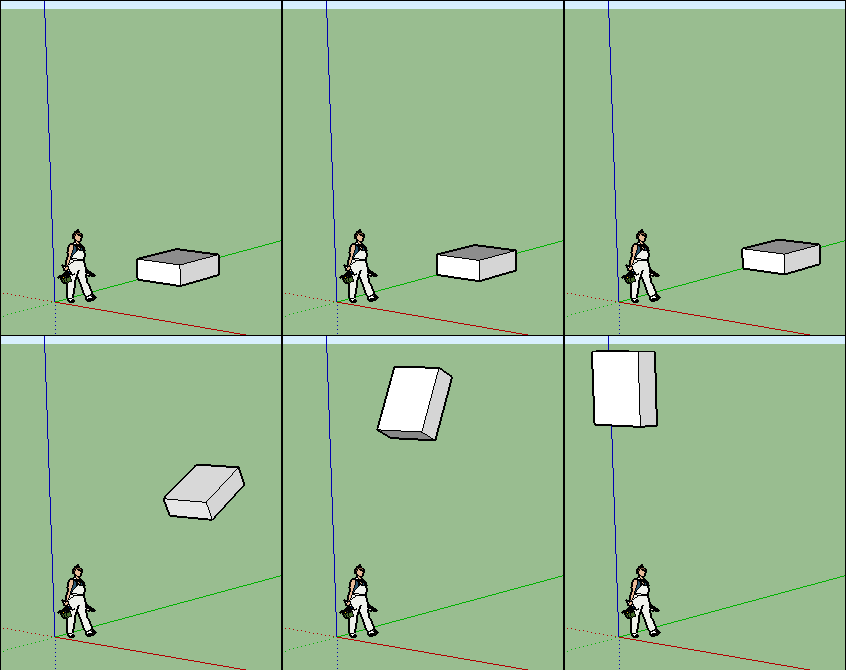
                I have a problem to ROTATE.
                Please , have a look on the next GIF ( clic to anim )

                Chri


                PB ROTATING.gif

                1 Reply Last reply
                Reply Quote 0
                • ntxdaveN
                  ntxdave
                  last edited by

                  @pilou said:

                  @unknownuser said:

                  AmbientOcclusionEx v1.9.5.
                  TheaRender v1.5 (from Animator and in Batch from Thea)
                  SketchFX Ex v1.0.6
                  Twilight Render %(#FF0000)[Pro v3.5]
                  

                  It's Twilight Render Pro v2.5! ๐Ÿ˜‰ (and I suppose also Hobby Version ? )

                  What is the process for use it with Twilight Render ?

                  It is my understanding that only the Pro version can be used with Animator. We will have to wait and see when they post the link today.

                  Press F1...thank me later

                  1 Reply Last reply
                  Reply Quote 0
                  • pilouP
                    pilou
                    last edited by

                    Idem! Seems there is blend of rotation / Object / General!
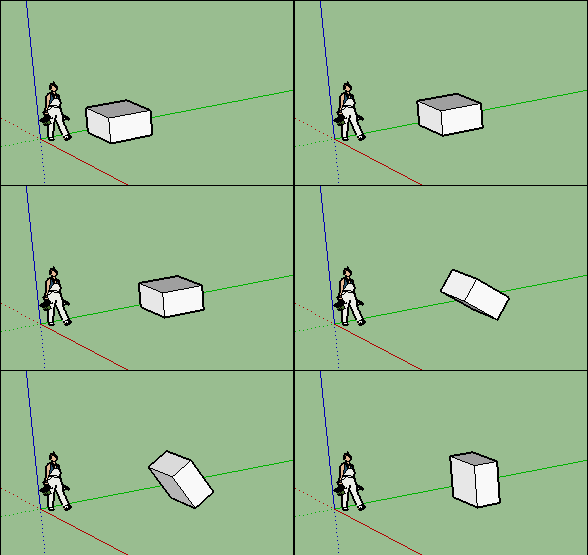
                    GIF_idem.gif

                    Frenchy Pilou
                    Is beautiful that please without concept!
                    My Little site :)

                    1 Reply Last reply
                    Reply Quote 0
                    • fredo6F
                      fredo6
                      last edited by

                      @chri said:

                      Hi Fredo

                      I have a problem to ROTATE.
                      Please , have a look on the next GIF ( clic to anim )

                      Chri

                      Thanks for signaling. Fixed.

                      Fredo

                      1 Reply Last reply
                      Reply Quote 0
                      • fredo6F
                        fredo6
                        last edited by

                        @pilou said:

                        @unknownuser said:

                        AmbientOcclusionEx v1.9.5.
                        TheaRender v1.5 (from Animator and in Batch from Thea)
                        SketchFX Ex v1.0.6
                        Twilight Render %(#FF0000)[Pro v3.5]
                        

                        It's Twilight Render Pro v2.5! ๐Ÿ˜‰ (and I suppose also Hobby Version ? )

                        What is the process for use it with Twilight Render ?

                        I think this is just for Pro version.

                        Fredo

                        1 Reply Last reply
                        Reply Quote 0
                        • fredo6F
                          fredo6
                          last edited by

                          @pilou said:

                          Idem! Seems there is blend of rotation / Object / General!
                          [attachment=0:yeoqnx06]<!-- ia0 -->GIF_idem.gif<!-- ia0 -->[/attachment:yeoqnx06]

                          Is there a bug there?

                          1 Reply Last reply
                          Reply Quote 0
                          • ntxdaveN
                            ntxdave
                            last edited by

                            I have been rebuilding my Pendulum animation (preparing for Twilight Render) and I have not seen a problem. I thought I did once but went back and redid my sequence and all worked well for me.

                            Press F1...thank me later

                            1 Reply Last reply
                            Reply Quote 0
                            • pilouP
                              pilou
                              last edited by

                              @unknownuser said:

                              Is there a bug there?

                              Yes same than Chris!
                              Rotation must be from a point outside the object, but result gives from a point inside the object! ๐Ÿ˜ฎ

                              Frenchy Pilou
                              Is beautiful that please without concept!
                              My Little site :)

                              1 Reply Last reply
                              Reply Quote 0
                              • ntxdaveN
                                ntxdave
                                last edited by

                                @pilou said:

                                @unknownuser said:

                                Is there a bug there?

                                Yes same than Chris!
                                Rotation must be from a point outside the object, but result gives from a point inside the object! ๐Ÿ˜ฎ

                                OK - I understand. My rotations were from inside the object.

                                Press F1...thank me later

                                1 Reply Last reply
                                Reply Quote 0
                                • fredo6F
                                  fredo6
                                  last edited by

                                  @pilou said:

                                  @unknownuser said:

                                  Is there a bug there?

                                  Yes same than Chris!
                                  Rotation must be from a point outside the object, but result gives from a point inside the object! ๐Ÿ˜ฎ

                                  When you pick the pivot, the reference component containing the pivot is highlighted in orange. If you wish a pivot at top of model, then right click and select the option.

                                  1 Reply Last reply
                                  Reply Quote 0
                                  • chriC
                                    chri
                                    last edited by

                                    @fredo6 said:

                                    When you pick the pivot, the reference component containing the pivot is highlighted in orange. If you wish a pivot at top of model, then right click and select the option.

                                    OK
                                    Thanks Fredo
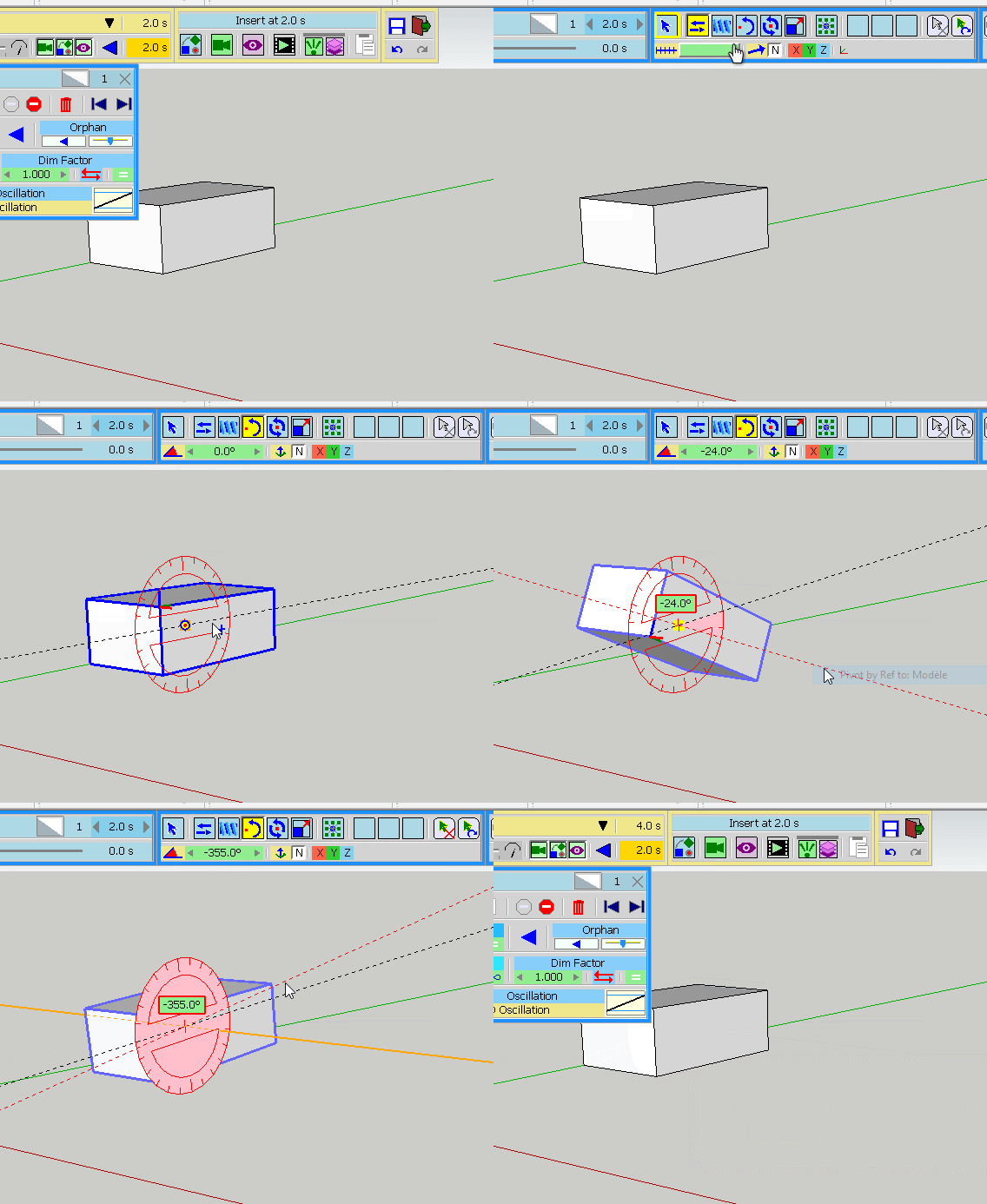

                                    right click.gif

                                    1 Reply Last reply
                                    Reply Quote 0
                                    • fredo6F
                                      fredo6
                                      last edited by

                                      In the current version, there is a bug when you capture the Rotation movement, but the transformation is actually created correctly.

                                      Fredo

                                      1 Reply Last reply
                                      Reply Quote 0
                                      • pilouP
                                        pilou
                                        last edited by

                                        @unknownuser said:

                                        When you pick the pivot, the reference component containing the pivot is highlighted in orange. If you wish a pivot at top of model, then right click and select the option.

                                        Better indeed! ๐Ÿ˜„

                                        GIF_better.gif

                                        Frenchy Pilou
                                        Is beautiful that please without concept!
                                        My Little site :)

                                        1 Reply Last reply
                                        Reply Quote 0
                                        • F
                                          Falstaff
                                          last edited by

                                          The camera tracking is not working for me - in particular object selection and playback. I am running on a MAC. Video attached.


                                          Camera_test_small.mov

                                          1 Reply Last reply
                                          Reply Quote 0
                                          • ntxdaveN
                                            ntxdave
                                            last edited by

                                            This is my first render with Animator using Twilight Render 2.5.

                                            I used the lowest quality settings because of the render time. This one took about 1.5 hours. When I looked at a higher quality setting, the render time was MUCH longer.

                                            At least it is a start.

                                            Press F1...thank me later

                                            1 Reply Last reply
                                            Reply Quote 0

                                            Hello! It looks like you're interested in this conversation, but you don't have an account yet.

                                            Getting fed up of having to scroll through the same posts each visit? When you register for an account, you'll always come back to exactly where you were before, and choose to be notified of new replies (either via email, or push notification). You'll also be able to save bookmarks and upvote posts to show your appreciation to other community members.

                                            With your input, this post could be even better ๐Ÿ’—

                                            Register Login
                                            • 1
                                            • 2
                                            • 17
                                            • 18
                                            • 19
                                            • 20
                                            • 21
                                            • 29
                                            • 30
                                            • 19 / 30
                                            • First post
                                              Last post
                                            Buy SketchPlus
                                            Buy SUbD
                                            Buy WrapR
                                            Buy eBook
                                            Buy Modelur
                                            Buy Vertex Tools
                                            Buy SketchCuisine
                                            Buy FormFonts

                                            Advertisement