SUbD and quad workflow advices?
-
can't wait

-
I've noticed that doing extrusions using Joint Push Pull and it's affiliated extrusion tools often creates weird geometry and artifacts when converting to SUBD, it doesn't seem to help by using Quadface tools and trying to convert the mesh. Any solution to this?
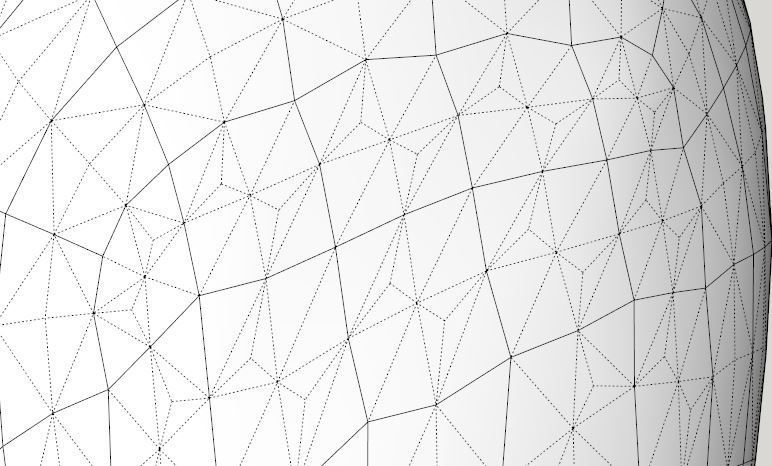
Here you can see that the top row is normal, but where it was extruded by Joint Push Pull it gets those weird triangulations on the bottom few rows.
-
I think I was wrong in thinking it was caused by Joint Push Pull, or at least it's not directly caused by Joint Push Pull. It seems that when I extrude and if I accidentally have the "Borders" settings so that there are "individual borders for each face" and then go in and erase these after the fact, this is what causes problems. Or if the "Finishing" setting is set to "Thicken" and leaves the original extruded face inside the model, you can't just go in and erase the interior edges and faces and still have the geometry turn out correctly when Subdividing.
I even tested erasing the faces and keeping the edges to try and use Quad Face Tools "Convert wireframe to quades" and that doesn't work.
Cleanup doesn't make any difference either.So it would seem the only answer is to be sure and do your extrusions with the proper setting the first time, or in my case I used the pencil tool to redraw the wireframe of just the bad portions of the geometry and then used quadface tools to covert the wireframe to mesh. And that worked fine.
-
Do you have a sample model so we can see what is going on?
-
I fixed the problems on the original model, but I was able to recreate the issue.
It's not necessarily anything of a serious problem, but it does create unnecessary geometry when subdivided, yet still smoothed.The odd geometry only appears on portions of the model.
-
Some of the diagonals have cast-shadows enabled:
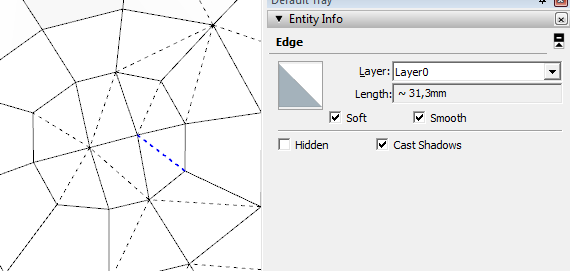
If you have only soft+smooth diagonals (like from Sandbox Tools) then use the Sandbox Tools Quads to QuadFace Tools Quads function in QFT. That will ensure they are treated as quads and not separate triangles.
I got plans for further tools to make it easier to detect this.
-
Hmmm, it seems to do it somewhat randomly. I have tried doing push pulls with different options selected, and sometimes it will have cast shadows checked on the edges and sometimes it doesn't. The only consistency I could see is that cast shadows become selected the more the model has been monkeyed around with which I'm sure means something specifically is causing it, but I can't pinpoint what it is. I thought it would always have something to do with the options selected on a push pull, but that only generates cast shadows on edges sometimes. Odd?
-
Wouldn't JPP produce more softened edges? And why would these be expected to follow quad rules? I may not be following the method correctly as others clearly know more about this... just thought I'd offer this.
-
Do you have any tips what would be your workflow when modeling this kind of Jacuzzi with the help of SUbD and other useful plugins?

-
not accurately dimensioned just something to for you to tweak...
[edg3d:1r4utfmh]hROHySkeFXAjkq4[/edg3d:1r4utfmh]
-
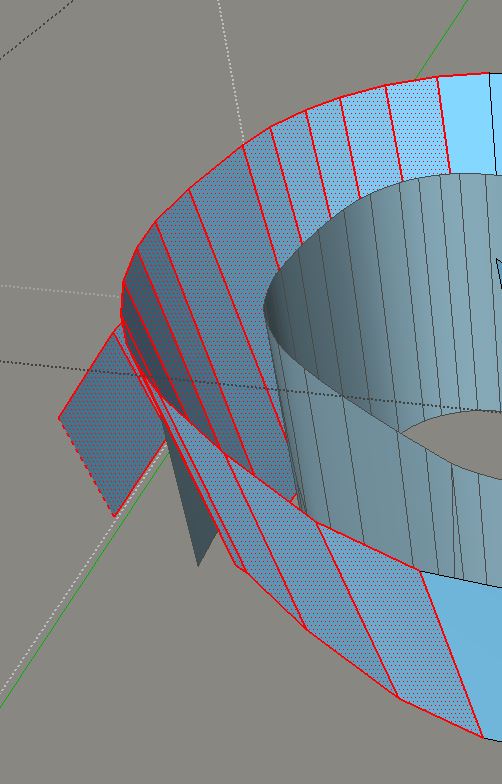
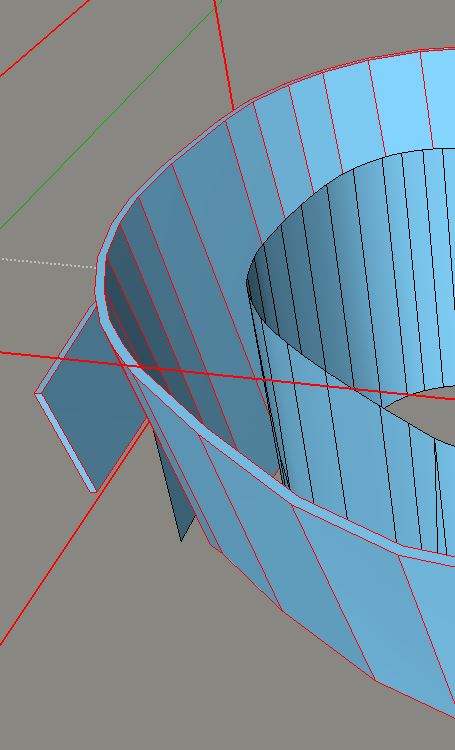
any advice to keep quads on borders after a JPP?
The default behaviour of JPP is to soften the borders. Yet for QFT and SubD we need to keep those extruded edges when shelling.
I can't use Splitdonut as the resulting border surface isn't flat.
SubD's quadpushpull doesn't work like JPP for big complex surfaces.EDIT: Found. A. Synytsia's "Smooth to Quadrants" does exactly that.
BTW does thomthom's Shell work on quads?
-
@rich o brien said:
not accurately dimensioned just something to for you to tweak...
[edg3d:1qmnhj2j]hROHySkeFXAjkq4[/edg3d:1qmnhj2j]
[attachment=0:1qmnhj2j]<!-- ia0 -->subd-jacuzzi.skp<!-- ia0 -->[/attachment:1qmnhj2j]
Thanks for the model/tips! All these basic shapes (included skp model) look so simple but I am still having hard hard time to find out what is the efficient way (workflow) to create this kind of models and what are the plugins that would be useful. I will try to recreate this model and hopefully I will learn something.
-
Thanks Rich. Will the browser eventually have subd mode (showing the subd basic divisions)? I thought you posted that before. BTW I notice the viewer does not give access to controls once it is full screen or is that just my setup?








Advertisement