sketchucation logo sketchucation
    • 登入
    Oops, your profile's looking a bit empty! To help us tailor your experience, please fill in key details like your SketchUp version, skill level, operating system, and more. Update and save your info on your profile page today!
    🔌 Smart Spline | Fluid way to handle splines for furniture design and complex structures. Download

    SubD examples and models

    已排程 已置頂 已鎖定 已移動 SUbD
    renderpluginsextensions
    1.7k 貼文 81 Posters 1.1m 瀏覽 79 Watching
    正在載入更多貼文
    • 從舊到新
    • 從新到舊
    • 最多點贊
    回覆
    • 在新貼文中回覆
    登入後回覆
    此主題已被刪除。只有擁有主題管理權限的使用者可以查看。
    • thomthomT 離線
      thomthom
      最後由 編輯

      @optimaforever said:

      btw sometimes when I open a skp with a subd-ed mesh in it, the mesh is invisible (but it's definitely there, as you can select a hollow box and it becomes visible if you toggle the subdivision off)...

      Is there a fix for this? what causes this?

      Do you have such a model you can share?
      And the mesh isn't missing when you save? It could either be some extension that do something to the model when it saves. Or could it be a graphic card issue?
      Do you ever get a SUbD error dialog?

      Thomas Thomassen — SketchUp Monkey & Coding addict
      List of my plugins and link to the CookieWare fund

      1 條回覆 最後回覆 回覆 引用 0
      • HornOxxH 離線
        HornOxx
        最後由 編輯

        @optimaforever said:

        ... again a ... question:
        to get these topologies (Cut Face A and B), is there a specific tool or can I draw them the usual way with QFT line tool?

        ... that´s a good question and thanks for your useful picture - in 2D, these "curved direction changes" can be drawn with basic SU tools.
        As they are so useful, I´ll add them here if someone wants to use them as "instant groups" 😄


        Basic_Geometry1.JPG


        Basic_Geometry1.skp

        never trust a skinny cook

        1 條回覆 最後回覆 回覆 引用 0
        • HornOxxH 離線
          HornOxx
          最後由 編輯

          👍 thats good! thanks for this workflow

          just right click on the gif within your web page and copy the gif´s URL and paste it her - like you would post any other internet linked picture
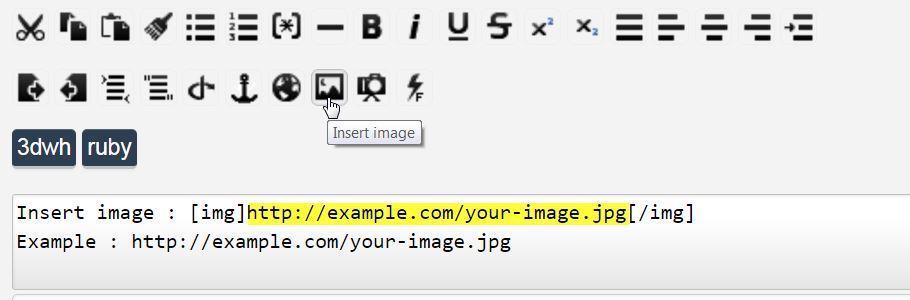

          url.jpg

          never trust a skinny cook

          1 條回覆 最後回覆 回覆 引用 0
          • HieruH 離線
            Hieru
            最後由 編輯

            Here's my workflow for building them from scratch.
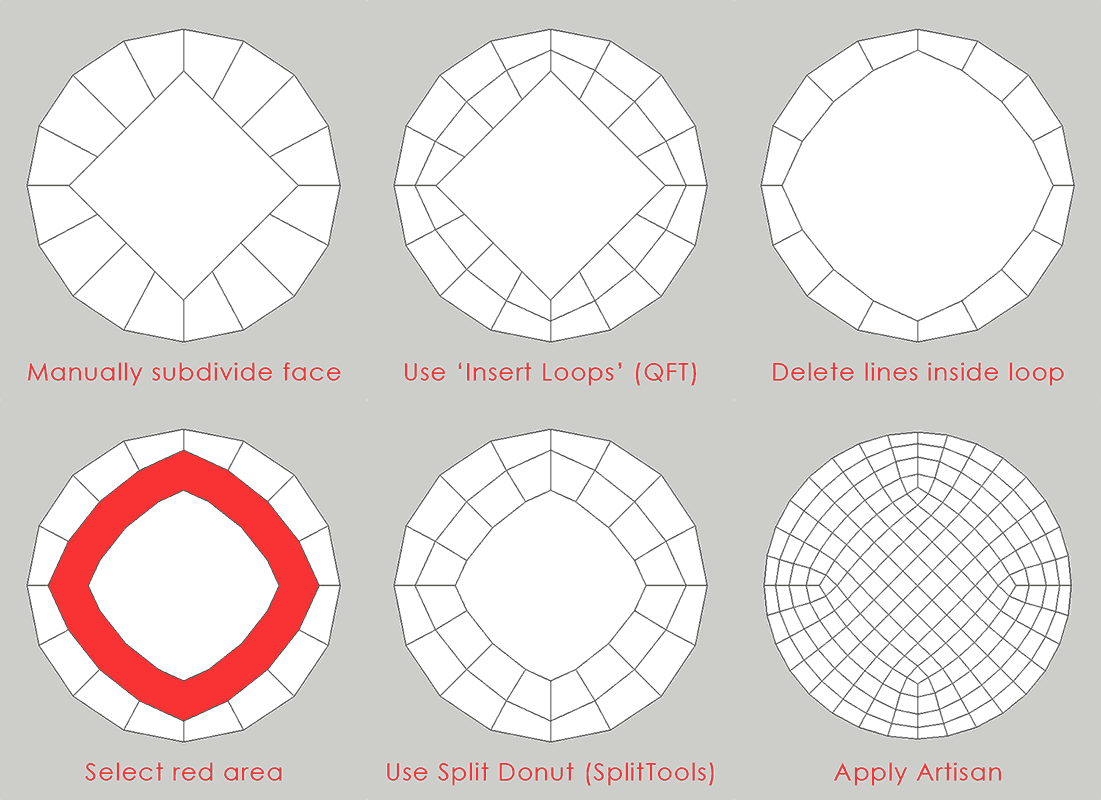
            https://media.giphy.com/media/TTgdzuMVNdQ1qNdmnYs/giphy.gif

            www.davidhier.co.uk

            1 條回覆 最後回覆 回覆 引用 0
            • HieruH 離線
              Hieru
              最後由 編輯

              Thanks 👍 . It's so obvious really....let's chalk it up to a senior moment.

              www.davidhier.co.uk

              1 條回覆 最後回覆 回覆 引用 0
              • BoxB 離線
                Box
                最後由 編輯

                I was just fiddling around with this and thought it worth dropping in.
                This is the funny horn from a few pages back. Rendered in Twilight.

                http://i155.photobucket.com/albums/s296/storeben/SU/Funny Horn Doodle.jpg

                1 條回覆 最後回覆 回覆 引用 0
                • olisheaO 離線
                  olishea
                  最後由 編輯

                  that speaker-bowl thingy is extremely well modelled well done box

                  oli

                  1 條回覆 最後回覆 回覆 引用 0
                  • BoxB 離線
                    Box
                    最後由 編輯

                    Cheers, Oli, I'm just getting my beginner bits in before you break the mold.

                    1 條回覆 最後回覆 回覆 引用 0
                    • pilouP 離線
                      pilou
                      最後由 編輯

                      😎

                      http://genevievejurgensen.blog50.com/media/01/00/271183208.jpg

                      Frenchy Pilou
                      Is beautiful that please without concept!
                      My Little site :)

                      1 條回覆 最後回覆 回覆 引用 0
                      • olisheaO 離線
                        olishea
                        最後由 編輯

                        @box said:

                        Cheers, Oli, I'm just getting my beginner bits in before you break the mold.

                        lol don't know about that mate! great stuff! By break the mold I think you mean post some weird surrealist crap that doesn't really help anyone. 😄

                        oli

                        1 條回覆 最後回覆 回覆 引用 0
                        • BoxB 離線
                          Box
                          最後由 編輯

                          Q: How many surrealists does it take to change a light bulb?

                          A: Fish.

                          1 條回覆 最後回覆 回覆 引用 0
                          • olisheaO 離線
                            olishea
                            最後由 編輯

                            PMSL!

                            what lightbulb it's just a molten blob of glass?!

                            On a serious note (if there is such a thing)....is there a multi-face offset for curved surfaces?

                            So like Tools On Surface offset that you can apply to several faces at once?

                            oli

                            1 條回覆 最後回覆 回覆 引用 0
                            • thomthomT 離線
                              thomthom
                              最後由 編輯

                              @olishea said:

                              On a serious note (if there is such a thing)....is there a multi-face offset for curved surfaces?

                              So like Tools On Surface offset that you can apply to several faces at once?

                              How would it differ from TOS?
                              You mean something that preserves quads?

                              Thomas Thomassen — SketchUp Monkey & Coding addict
                              List of my plugins and link to the CookieWare fund

                              1 條回覆 最後回覆 回覆 引用 0
                              • olisheaO 離線
                                olishea
                                最後由 編輯

                                I think you can only offset one face at a time with TOS? And multi face offset is coplanar faces only.

                                I want to offset the lines from SubD....then you can JPP rails to form a complex shell that follows the SUbD topology.

                                oli

                                1 條回覆 最後回覆 回覆 引用 0
                                • olisheaO 離線
                                  olishea
                                  最後由 編輯

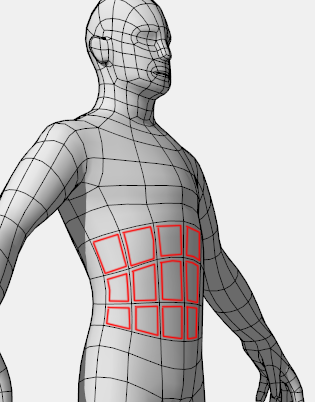
                                  OK let's use Rich's model as example. Picture says a thousands words n all that....

                                  This would allow you to create "cages" for 3D printing etc. Hollowed out skeletons. 😄

                                  I want to offset every single quad like this with one click:

                                  And then JPP or other....

                                  22222.png

                                  oli

                                  1 條回覆 最後回覆 回覆 引用 0
                                  • thomthomT 離線
                                    thomthom
                                    最後由 編輯

                                    Ah, yes - I see now. We like pictures. And I like your idea.
                                    Btw - the QFT issue tracker is public and a good way to file feature requests: https://bitbucket.org/thomthom/quadface-tools/issues?status=new%26amp;status=open

                                    Thomas Thomassen — SketchUp Monkey & Coding addict
                                    List of my plugins and link to the CookieWare fund

                                    1 條回覆 最後回覆 回覆 引用 0
                                    • olisheaO 離線
                                      olishea
                                      最後由 編輯

                                      Great!

                                      Also is an edge direction procedural out of the question? It can make the edge flow turn through 45 degrees. Then you could achieve a really funky cage!

                                      See this 3DSMax video at 4:40 to see what I mean.

                                      Thanks I'll be frequenting the QFT issue tracker 😄

                                      oli

                                      1 條回覆 最後回覆 回覆 引用 0
                                      • thomthomT 離線
                                        thomthom
                                        最後由 編輯

                                        Thanks. Once SUbD migrates to OpenSubdiv I'll turn my focus to Vertex Tools and QFT for improving the modelling tools. References like that are great to have (please include them in feature requests in the issue tracker.)

                                        Thomas Thomassen — SketchUp Monkey & Coding addict
                                        List of my plugins and link to the CookieWare fund

                                        1 條回覆 最後回覆 回覆 引用 0
                                        • olisheaO 離線
                                          olishea
                                          最後由 編輯

                                          No problem....only just got round to really testing this. Thanks again for all you do.

                                          oli

                                          1 條回覆 最後回覆 回覆 引用 0
                                          • garydornG 離線
                                            garydorn
                                            最後由 編輯

                                            @garydorn said:

                                            Howdy
                                            Please excuse my questions if its not suitable here.

                                            I've modelled up an AC aceca body - using SU 6 - native tools only , following CaljuCotcas how to model in a car in 3D using blueprints https://www.youtube.com/watch?v=Hgrix3m1l9k

                                            blueprint is from a 3Warehouse model called Aceca ( no model just blueprints.)

                                            Is SubD something that could be used to smooth out and simplify the surface better than what I've modelled so far. - some of my surfaces are still too dimply.

                                            Thanks - any advice appreciated.

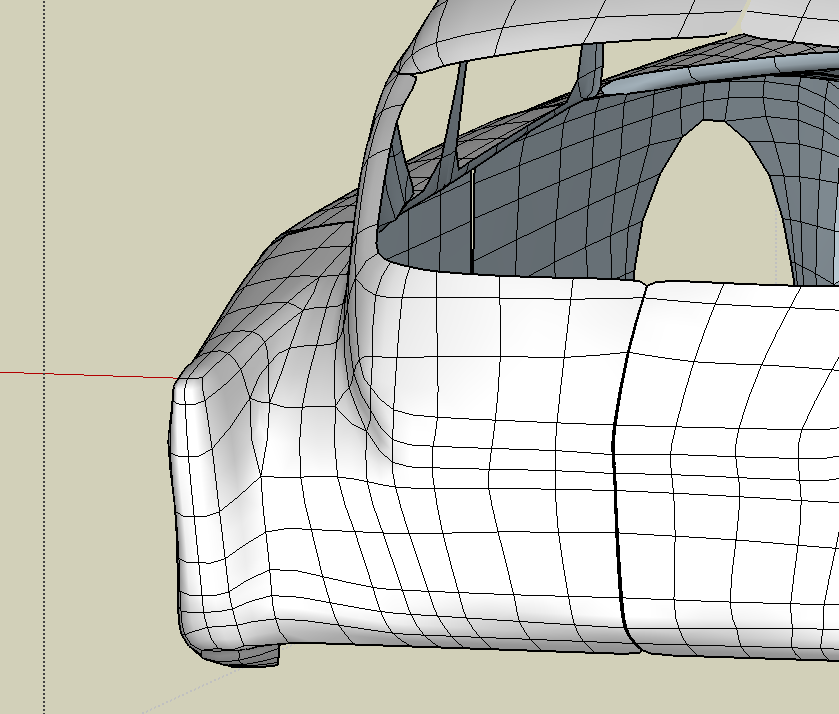
                                            Probably NOT the best example, but I have managed to SubD the Aceca. It still needs a bit of work to get the bonnet the right shape. Still its better than previous posting.

                                            I divided the body in sections and adjusted each section separate. i.e. bonnet, front valance , front fender, rear fender boot, roof.
                                            somethings I've noticed

                                            1. Quad lines/loops need to be equal number when joining adjacent Groups to look even.

                                            2. loops look best when they align in a reasonably straight line and evenly spaced.

                                            3. remember to UnSubD when want to adjust something!!! i.e. work on base geometry

                                            4. turn off hidden line prior to SubD otherwise it may go into circular mode.

                                            5. save during progress often - 3 times I got bugspats, when I didn't save in SubD view, then when I go back to base geometry - BAM - got me!

                                            6. I ended up using TomThoms solid inspector2 tool ( as per his suggestion) quite a bit to find out where I was having poor geometry that prevented SubD from working.

                                            I'm not very good at setting up the base model so that Quads face tools can used - most of this is simply line tool and moving vector points.

                                            This is a pretty groovy plugin.

                                            This is on SketchUP Make 2016 on 2009 iMac with 12 GB RAM Mac Os 10.11.3
                                            chow

                                            PS my process was;

                                            1. remove all surfaces so just wire frame was left - adjust wire frame to suit.
                                            2. select wireframe and run Quad Face tools > convert> wireframe to Quads.
                                            3. select QF mesh - run Tools>solid Inspector 2 - check surfaces - adjust as necessary - it has good guide notes.
                                            4. select mesh - run subD
                                            5. if SubD has error message ( more then 2 faces to an edge)- redo steps 2, 3 + 4 until it works.
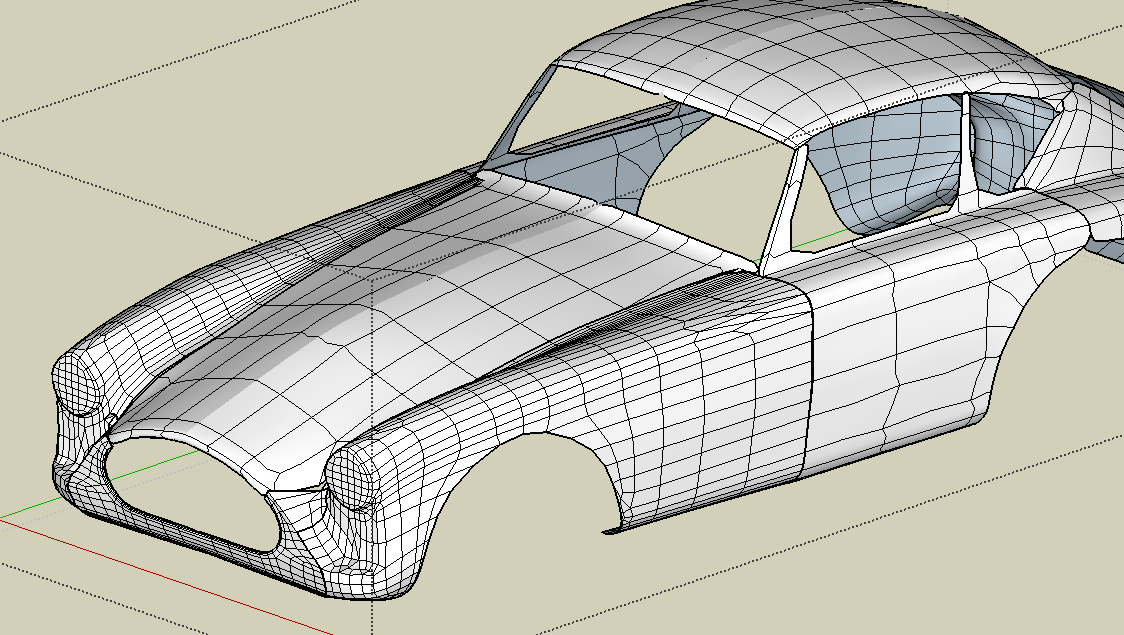
                                            AC Aceca body through SubD process.


                                            rear view of Aceca subD -1

                                            1 條回覆 最後回覆 回覆 引用 0
                                            • 1
                                            • 2
                                            • 70
                                            • 71
                                            • 72
                                            • 73
                                            • 74
                                            • 82
                                            • 83
                                            • 72 / 83
                                            • 第一個貼文
                                              最後的貼文
                                            Buy SketchPlus
                                            Buy SUbD
                                            Buy WrapR
                                            Buy eBook
                                            Buy Modelur
                                            Buy Vertex Tools
                                            Buy SketchCuisine
                                            Buy FormFonts

                                            Advertisement