sketchucation logo sketchucation
    • 登入
    Oops, your profile's looking a bit empty! To help us tailor your experience, please fill in key details like your SketchUp version, skill level, operating system, and more. Update and save your info on your profile page today!
    🔌 Smart Spline | Fluid way to handle splines for furniture design and complex structures. Download

    [Plugin][$] VisuHole - v1.5a - 01 Apr 24


    已排程 已置頂 已鎖定 已移動 Plugins
    103 貼文 39 Posters 127.4k 瀏覽 39 Watching
    正在載入更多貼文
    • 從舊到新
    • 從新到舊
    • 最多點贊
    回覆
    • 在新貼文中回覆
    登入後回覆
    此主題已被刪除。只有擁有主題管理權限的使用者可以查看。
    • B 離線
      Buckyman
      最後由 編輯

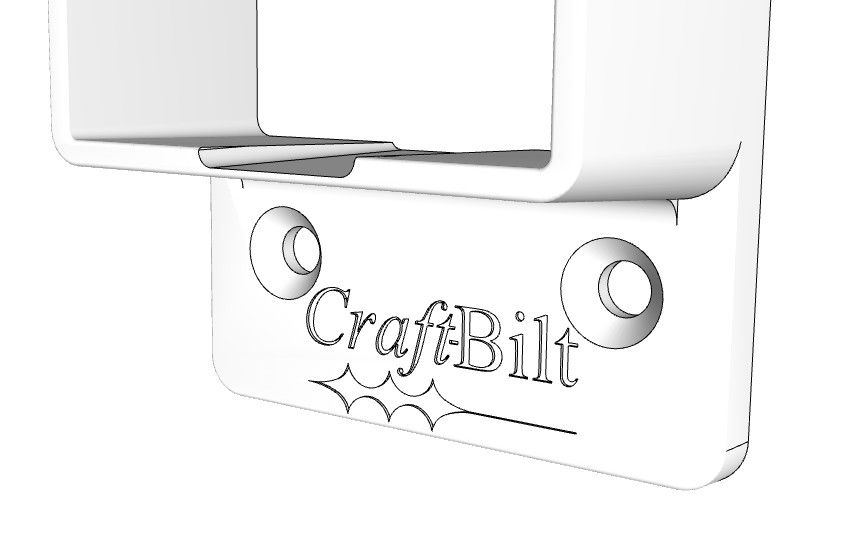
      I have used Visuhole successfully to stamp a logo into my model
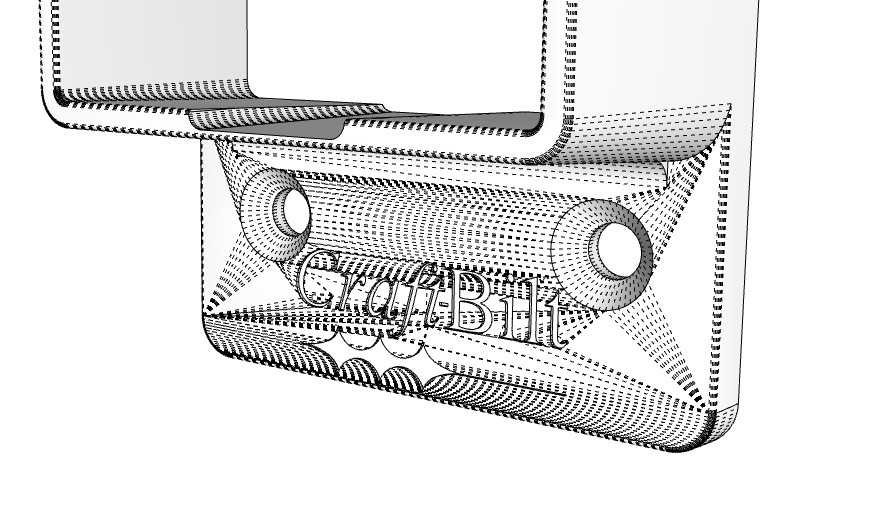
      I noticed after converting to STEP file with FreeCAD that there are many hidden lines after the stamping, see "after carve.jpg"

      After the carve operation my model is no longer solid. I used CleanUp3 to clean up the model, after that there were a few lines I deleted manually.
      SolidInspector2 says it is a solid
      Solid Solver says it is not

      I am just wondering if the extra lines are to be expected after a carve operation or is there some setting in Visuhole that would avoid this?

      thx

      before carve.jpg


      after carve.jpg

      1 條回覆 最後回覆 回覆 引用 0
      • fredo6F 離線
        fredo6
        最後由 編輯

        Because of the two holes, the front face will become quite busy with edges when you carve the logo. If your model is at small scale, this can generate issues with the shape being manifold.

        Possibly, you may try by putting rectangular edges around the holes over the main face to isolate them.

        1 條回覆 最後回覆 回覆 引用 0
        • B 離線
          Buckyman
          最後由 編輯

          Or do the carve first, Holes after??

          1 條回覆 最後回覆 回覆 引用 0
          • H 離線
            Hannahdesigns88
            最後由 編輯

            When I try to download this visuhole plug in, it says its not a sketchup model and wont let me download it...or even begin to download. I have sketch up pro 2022 windows.

            1 條回覆 最後回覆 回覆 引用 0
            • Rich O BrienR 離線
              Rich O Brien Moderator
              最後由 編輯

              @hannahdesigns88 said:

              When I try to download this visuhole plug in, it says its not a sketchup model and wont let me download it...or even begin to download. I have sketch up pro 2022 windows.

              Extensions cannot be opened by SketchUp. You need to use Extensions > Extension Manager to install the .RBZ file

              Download the free D'oh Book for SketchUp 📖

              1 條回覆 最後回覆 回覆 引用 0
              • BoxB 離線
                Box
                最後由 編輯

                To follow on from Rich's comment, it sounds like you have the download dialog set to 'Open with' rather than 'Save File' You need to set it to save file to get the RBZ to your computer to then get the extension manager to use it.

                1 條回覆 最後回覆 回覆 引用 0
                • P 離線
                  ploniman
                  最後由 編輯

                  it doesnt work as it should. tried several fonts but, always with little errors. see picure
                  what to do?
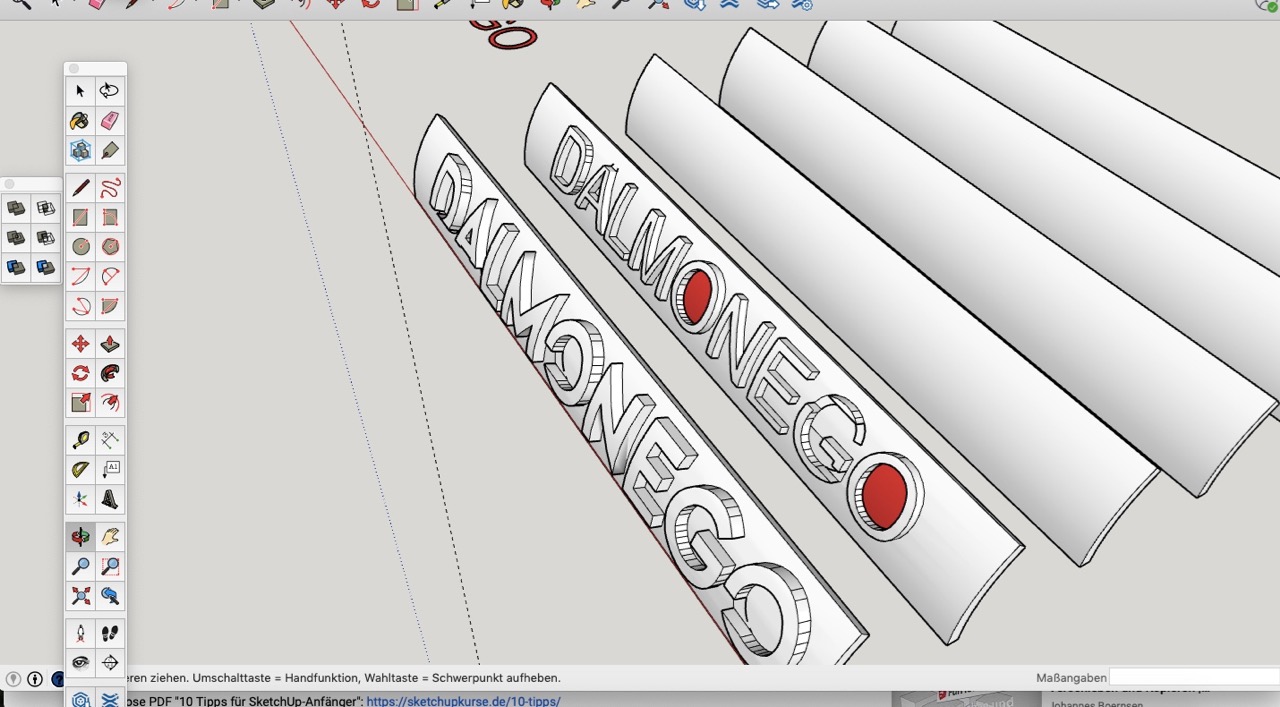
                  Bild 22.06.22 um 08.58.jpg

                  1 條回覆 最後回覆 回覆 引用 0
                  • BoxB 離線
                    Box
                    最後由 編輯

                    Scale is the first most likely issue, how small is your model.
                    Scale up by 100 and see if it works.

                    1 條回覆 最後回覆 回覆 引用 0
                    • Rich O BrienR 離線
                      Rich O Brien Moderator
                      最後由 編輯

                      @ploniman said:

                      it doesnt work as it should. tried several fonts but, always with little errors. see picure
                      what to do?

                      [attachment=0:1pr1bp40]<!-- ia0 -->Bild 22.06.22 um 08.58.jpg<!-- ia0 -->[/attachment:1pr1bp40]

                      Scale the geometry so its oversized, run the tool and then scale it back down. SketchUp can struggle with forming geometry < 1mm.

                      Download the free D'oh Book for SketchUp 📖

                      1 條回覆 最後回覆 回覆 引用 0
                      • ezyuzinE 離線
                        ezyuzin Extension Creator
                        最後由 編輯

                        Hello,
                        Is it possible to create holes with specific depth in multilayer objects
                        For sample, I was unable to find correct results
                        using drill and carve commands

                        1 條回覆 最後回覆 回覆 引用 0
                        • Rich O BrienR 離線
                          Rich O Brien Moderator
                          最後由 編輯

                          To mimic an emboss across identical objects as per your setup could be done if the identical objects were components. Then a change in one is propagated to others.

                          But to emboss multiple objects based on selection I cannot see possible with Vishole if I understand your description correctly.

                          Download the free D'oh Book for SketchUp 📖

                          1 條回覆 最後回覆 回覆 引用 0
                          • ezyuzinE 離線
                            ezyuzin Extension Creator
                            最後由 編輯

                            @rich o brien said:

                            To mimic an emboss across identical objects as per your setup could be done if the identical objects were components. Then a change in one is propagated to others.

                            But to emboss multiple objects based on selection I cannot see possible with Vishole if I understand your description correctly.

                            It’s a pity that it’s impossible, it seems like a typical operation (because the plugin can punch holes through components). But I need to cut a hole of a given depth through several components

                            I found another plugin (BoolTool) that does this, less convenient than this plugin. But it works

                            1 條回覆 最後回覆 回覆 引用 0
                            • M 離線
                              mac13517a
                              最後由 編輯

                              Great Plugin, I love it a LOT!!!

                              I have a question: How can I remove a stencil???

                              Sometime I just require upgrade the stencil or simply remove the old stencil.

                              Kind regards,

                              1 條回覆 最後回覆 回覆 引用 0
                              • F 離線
                                faustcan
                                最後由 編輯

                                Hello, where is the download link to Visuhole, please? I bought the licence for 8 plugins including this. Many thanks

                                1 條回覆 最後回覆 回覆 引用 0
                                • Rich O BrienR 離線
                                  Rich O Brien Moderator
                                  最後由 編輯

                                  Open ExtensionStore dialog in SketchUp

                                  Click the Paste URL icon

                                  https://i.imgur.com/glZOdES.png

                                  In the input put pln=visuhole and click Install

                                  https://i.imgur.com/URWwE2D.png

                                  Restart SketchUp

                                  Download the free D'oh Book for SketchUp 📖

                                  1 條回覆 最後回覆 回覆 引用 0
                                  • fredo6F 離線
                                    fredo6
                                    最後由 fredo6 編輯

                                    NEW RELEASE: VisuHole v1.5a - 01 Apr 24

                                    Requirements:

                                    • LibFredo6 v14.3b
                                    • Sketchucation Plugintore v4.4.0

                                    VisuHole 1.5a is a maintenance release for

                                    • Future compatibility

                                    Home Page of VisuHole for information and Download.

                                    Main post of this VisuHole thread.

                                    1 條回覆 最後回覆 回覆 引用 0
                                    • I 離線
                                      ivansmirnov333 Newcomers
                                      最後由 編輯

                                      Visuhole.

                                      Hello! I'm trying to make a hole in the selection component. What do I do wrong?

                                      Screen Video: link

                                      TIGT 1 條回覆 最後回覆 回覆 引用 1
                                      • TIGT 離線
                                        TIG Moderator @ivansmirnov333
                                        最後由 編輯

                                        @ivansmirnov333

                                        You give too much AND not enough information…
                                        Can you explain what the carious bits are, and what you are trying to do, and preferably attached a simple SKP showing the problem, with steps if necessary - currently your movie is unclear…

                                        TIG

                                        I 1 條回覆 最後回覆 回覆 引用 0
                                        • I 離線
                                          ivansmirnov333 Newcomers @TIG
                                          最後由 編輯

                                          @TIG Sorry. New video with my explanations is here: link

                                          SKP is attached.

                                          TIGT 1 條回覆 最後回覆 回覆 引用 1
                                          • TIGT 離線
                                            TIG Moderator @ivansmirnov333
                                            最後由 TIG 編輯

                                            @ivansmirnov333
                                            This really needs @fredo6 's expertise, but as far as I can see the vertical component with the holes is nested inside a component of several pieces.
                                            If you do not edit and select the appropriate context then the hole cutting doesn't occur in the component ?


                                            TIG

                                            I 1 條回覆 最後回覆 回覆 引用 0
                                            • 1
                                            • 2
                                            • 3
                                            • 4
                                            • 5
                                            • 6
                                            • 2 / 6
                                            • 第一個貼文
                                              最後的貼文
                                            Buy SketchPlus
                                            Buy SUbD
                                            Buy WrapR
                                            Buy eBook
                                            Buy Modelur
                                            Buy Vertex Tools
                                            Buy SketchCuisine
                                            Buy FormFonts

                                            Advertisement