sketchucation logo sketchucation
    • 登入
    Oops, your profile's looking a bit empty! To help us tailor your experience, please fill in key details like your SketchUp version, skill level, operating system, and more. Update and save your info on your profile page today!
    🔌 Smart Spline | Fluid way to handle splines for furniture design and complex structures. Download

    [Plugin] MoveAlong - v1.2b - 07 Jul 14

    已排程 已置頂 已鎖定 已移動 Plugins
    71 貼文 26 Posters 67.0k 瀏覽 26 Watching
    正在載入更多貼文
    • 從舊到新
    • 從新到舊
    • 最多點贊
    回覆
    • 在新貼文中回覆
    登入後回覆
    此主題已被刪除。只有擁有主題管理權限的使用者可以查看。
    • fredo6F 離線
      fredo6
      最後由 編輯

      @xianglin said:

      Hello Fredo
      Thank you for your plugin.
      I'm your biggest fan.
      For you to see a video, you might have some new ideas.
      Http://video.sina.com.cn/v/b/92151582-1801050914.html

      Looks like a super-powerful road editor; very well done!

      Fredo

      1 條回覆 最後回覆 回覆 引用 0
      • KrisidiousK 離線
        Krisidious
        最後由 編輯

        @xianglin said:

        Hello Fredo
        Thank you for your plugin.
        I'm your biggest fan.
        For you to see a video, you might have some new ideas.
        Http://video.sina.com.cn/v/b/92151582-1801050914.html

        Wow, that's very kool... I'd love to have that in Sketchup.

        By: Kristoff Rand
        Home DesignerUnique House Plans

        1 條回覆 最後回覆 回覆 引用 0
        • FrederikF 離線
          Frederik
          最後由 編輯

          @xianglin said:

          For you to see a video, you might have some new ideas.
          Http://video.sina.com.cn/v/b/92151582-1801050914.html

          That video takes forever to load for me, although I have a very fast Internet connection... 😕

          Cheers
          Kim Frederik

          1 條回覆 最後回覆 回覆 引用 0
          • KrisidiousK 離線
            Krisidious
            最後由 編輯

            Fred, It's served from China (I think) and then it has to load 14 minutes of video. I think that's why it takes so long.

            By: Kristoff Rand
            Home DesignerUnique House Plans

            1 條回覆 最後回覆 回覆 引用 0
            • R 離線
              rv1974
              最後由 編輯

              Fredo, many thanks for 1.8e update, it's great improvement!
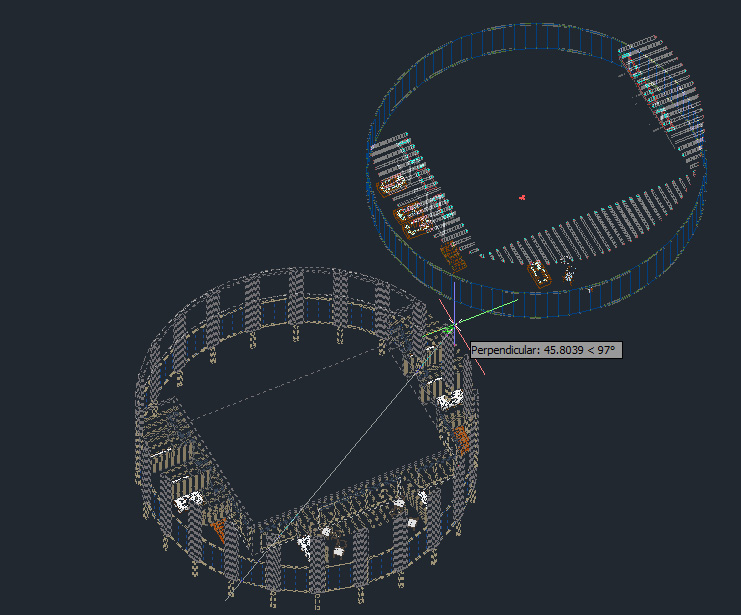
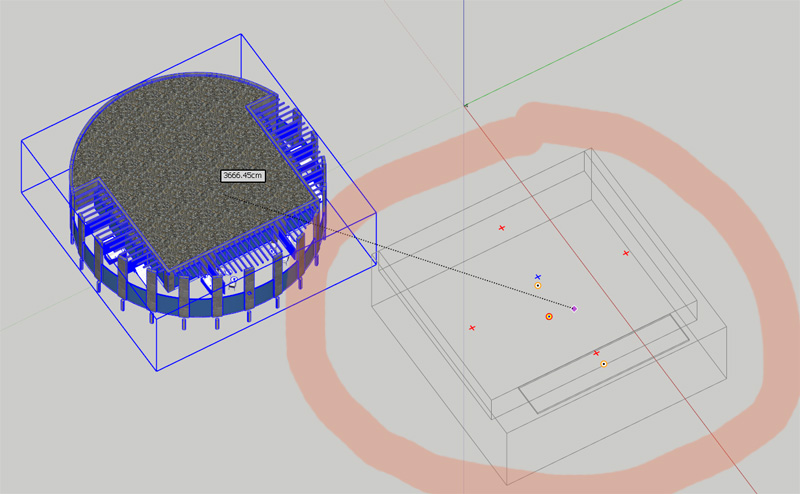
              Another nuance- those Acad-like grey phantom lines of the initial position, which give posibility to snap.
              I noticed that not grouped\componented geometry unfortunately doesn't give this feature;
              grey phantom lines represent the object's bounding boxes (pic.1). Couldn't they represent the true
              wireframe
              (pic.2)?
              Thank you.

              grey2.jpg


              gr44.jpg

              1 條回覆 最後回覆 回覆 引用 0
              • fredo6F 離線
                fredo6
                最後由 編輯

                This is possible, but it would defeat performance, which I think is essential for a Move operation (remember your other request on big building!)).

                What I can do is to display in wire the element picked inside the groups and components, say face, edge, ...)

                Fredo

                1 條回覆 最後回覆 回覆 引用 0
                • R 離線
                  rv1974
                  最後由 編輯

                  may be some sort of button or combo box in your ribbon toolbar that dis-\en-ables wireframe degradation?

                  1 條回覆 最後回覆 回覆 引用 0
                  • fredo6F 離線
                    fredo6
                    最後由 編輯

                    @cotty said:

                    Shortcut 'M' updated!

                    A little observation:
                    The shadow is not updated until leaving the tool... (not really a problem)
                    [screenr:3rgydhdx]cFxN[/screenr:3rgydhdx]

                    At least you can tell that you move faster than your shadow!

                    Fredo

                    PS: nothing I can do, I have no control over shadows and the Move api does not seem to take care of them interactively.

                    1 條回覆 最後回覆 回覆 引用 0
                    • Rich O BrienR 離線
                      Rich O Brien Moderator
                      最後由 編輯

                      @Fredo

                      Wonderful tool.

                      Will we see it obey quad face convention in the future?

                      Enabling Thomthom's AutoSmooth while using MoveAlong has no effect.

                      Download the free D'oh Book for SketchUp 📖

                      1 條回覆 最後回覆 回覆 引用 0
                      • fredo6F 離線
                        fredo6
                        最後由 編輯

                        @rich o brien said:

                        Will we see it obey quad face convention in the future?

                        Enabling Thomthom's AutoSmooth while using MoveAlong has no effect.

                        Rich,

                        Good suggestion. It should go in the next release.
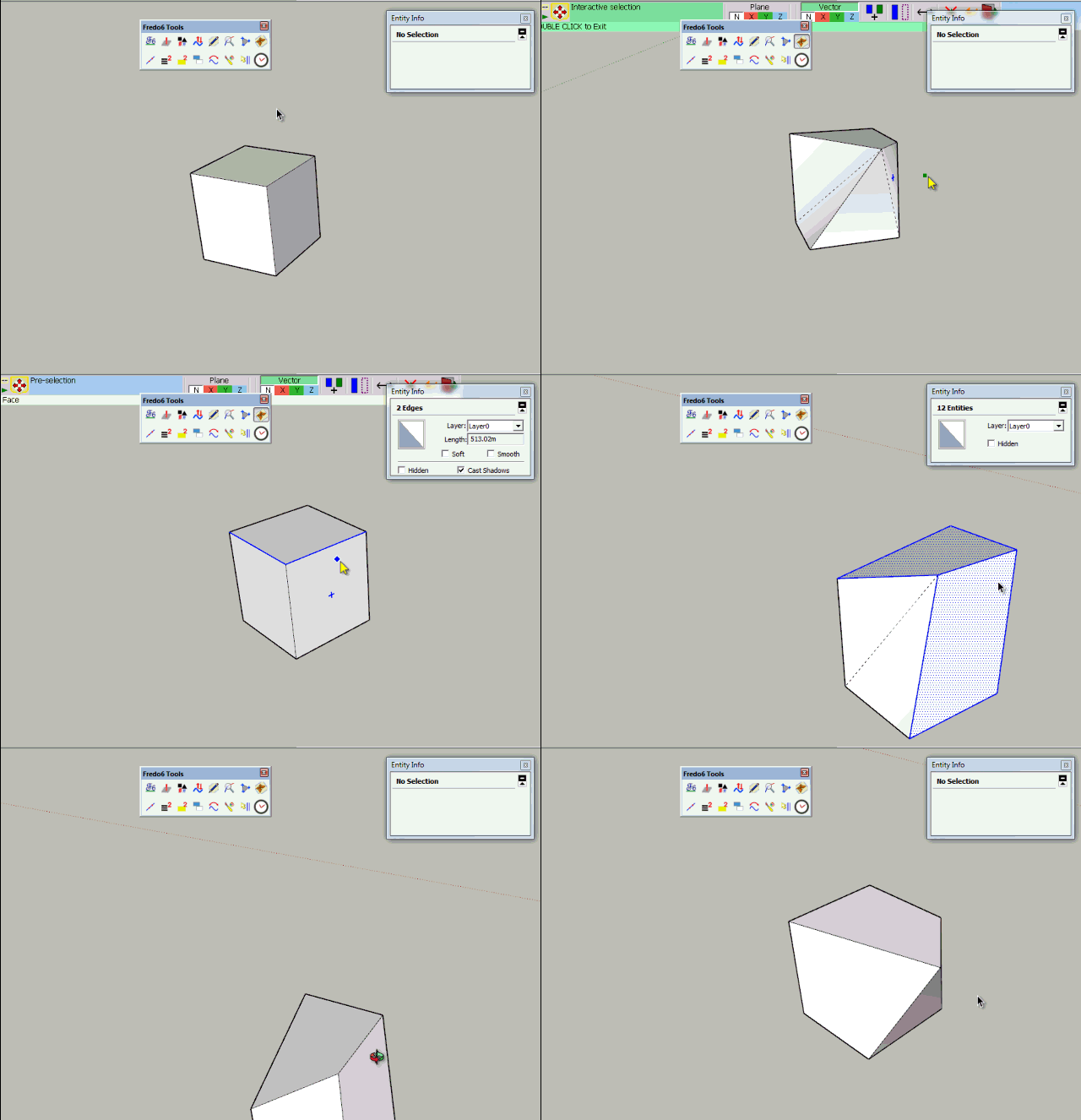
                        MoveAlong Autosmooth.gif

                        I use thomthom's conventions for quads

                        • smooth = soft = true
                          cast_shadows = false

                        Fredo

                        PS: Apparently the Move api ( #transform_entities) behaves differently from the move tool regarding the creation / modification of entities. So it is more tricky.

                        1 條回覆 最後回覆 回覆 引用 0
                        • R 離線
                          rv1974
                          最後由 編輯

                          Fredo,
                          is it possible to replicate the Acad's Tracking (with numeric distance input) as shown on vid.1? And I can't figure out how do standard Move with Shift pressed (vid.2.) Is it supported in MoveAlong?
                          Another little thing: this strip of beige with current snapping info.. could it stay permanently (no popping-up)?


                          acad.swf


                          acad2.swf

                          1 條回覆 最後回覆 回覆 引用 0
                          • fredo6F 離線
                            fredo6
                            最後由 編輯

                            @rv1974 said:

                            Fredo,
                            is it possible to replicate the Acad's Tracking (with numeric distance input) as shown on vid.1? And I can't figure out how do standard Move with Shift pressed (vid.2.) Is it supported in MoveAlong?
                            Another little thing: this strip of beige with current snapping info.. could it stay permanently (no popping-up)?

                            I cannot read the swf files. Could you display them or use another format.

                            Thanks

                            Fredo

                            1 條回覆 最後回覆 回覆 引用 0
                            • TIGT 離線
                              TIG Moderator
                              最後由 編輯

                              To read a swf file just drag+drop it on your browser - it's a flash-movie and should then play...

                              @rv1974
                              You can constrain the native move/copy to align with the edge - hover over it and hold shift, then the movement is inference constrained along an extension of that edge, BUT any typed in the distance is taken from the picked point on the original object [along that vector].
                              You can of course use a premade guide-line offset the desired distance and snap to that using the inferred vector...

                              TIG

                              1 條回覆 最後回覆 回覆 引用 0
                              • R 離線
                                rv1974
                                最後由 編輯

                                http://screencast.com/t/7ii1K2G10nsi
                                http://screencast.com/t/ZXLyKo6h
                                Can you see them online?

                                1 條回覆 最後回覆 回覆 引用 0
                                • R 離線
                                  rv1974
                                  最後由 編輯

                                  @TIG: Exactly, that's what I tried to illustrate with the 2nd vid. I just suggested to MoveAlong to support the Shift trick (with Acad's numeric input, if possible).

                                  1 條回覆 最後回覆 回覆 引用 0
                                  • fredo6F 離線
                                    fredo6
                                    最後由 編輯

                                    @TIG, @rv1974

                                    That's just remote inferencing (passive and active). It was planned and I am actually coding it. So should go in next release whenever I have time.

                                    Fredo

                                    1 條回覆 最後回覆 回覆 引用 0
                                    • X 離線
                                      xianglin
                                      最後由 編輯

                                      @fredo6 said:

                                      @TIG, @rv1974

                                      That's just remote inferencing (passive and active). It was planned and I am actually coding it. So should go in next release whenever I have time.

                                      Fredo

                                      Hello fredo.
                                      DO you see the powerful road editor?
                                      If there is a person who can do such the powerful road editor in SkethcUp.I think only you.

                                      1 條回覆 最後回覆 回覆 引用 0
                                      • fredo6F 離線
                                        fredo6
                                        最後由 編輯

                                        @xianglin said:

                                        Hello fredo.
                                        DO you see the powerful road editor?
                                        If there is a person who can do such the powerful road editor in SkethcUp.I think only you.

                                        Yes I did. This is quite a piece of work. And the main difficulty is to create the roads over a surface mesh.
                                        I think you should try to see if this tool can export the roads data format that can be re-imported into Sketchup. That would be the most efficient.

                                        Fredo

                                        1 條回覆 最後回覆 回覆 引用 0
                                        • fredo6F 離線
                                          fredo6
                                          最後由 編輯

                                          @rv1974 said:

                                          Fredo,
                                          is it possible to replicate the Acad's Tracking (with numeric distance input) as shown on vid.1? And I can't figure out how do standard Move with Shift pressed (vid.2.) Is it supported in MoveAlong?
                                          Another little thing: this strip of beige with current snapping info.. could it stay permanently (no popping-up)?

                                          Here is a preview of the remote inferencing feature. It allows to type the distance from the remote in the VCB.
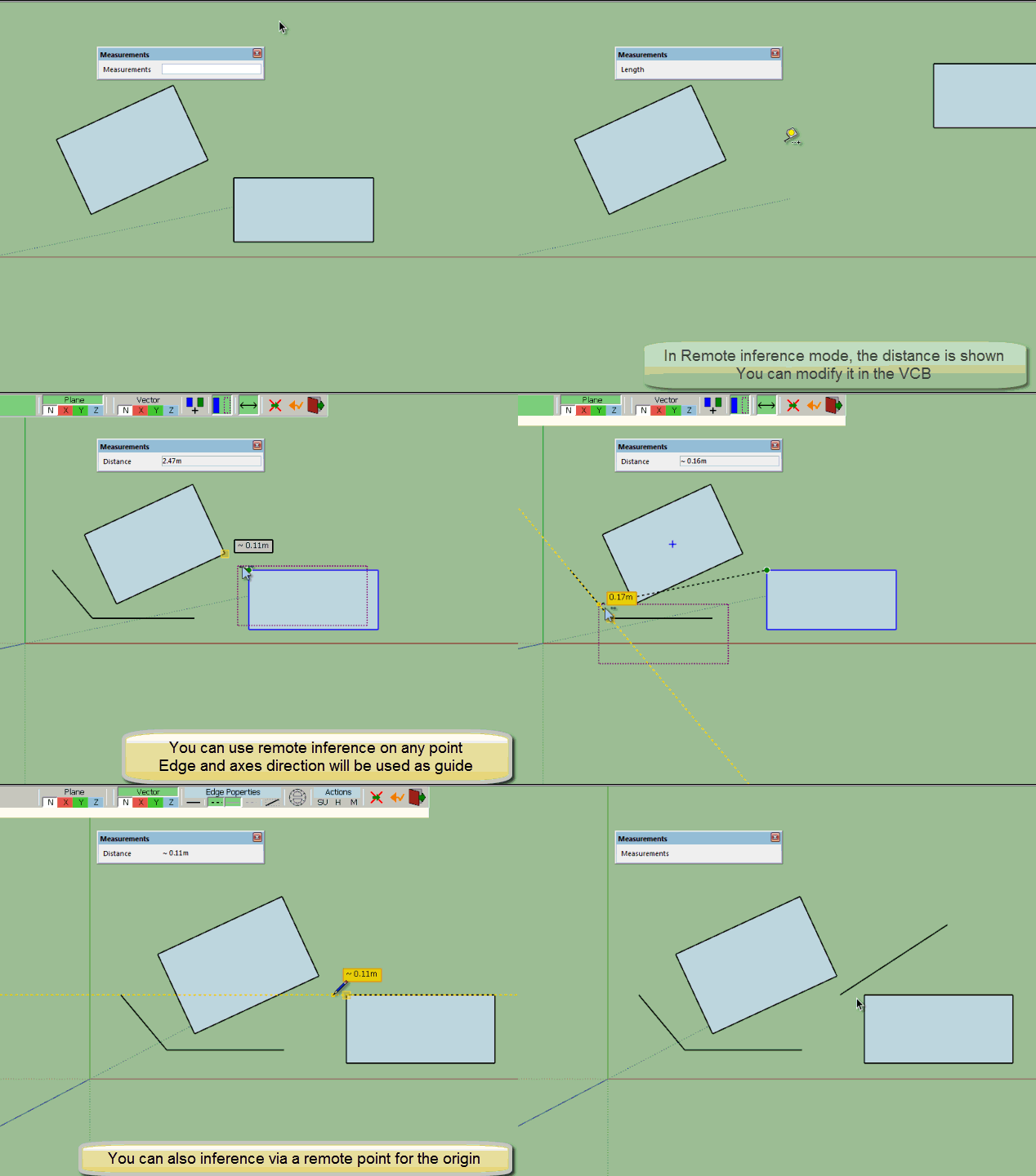
                                          MoveAlong Remote inference.gif

                                          Fredo

                                          1 條回覆 最後回覆 回覆 引用 0
                                          • rvizR 離線
                                            rviz
                                            最後由 編輯

                                            so far the best animated film in this season.
                                            .. but it's important to keep it simple.

                                            1 條回覆 最後回覆 回覆 引用 0
                                            • 1
                                            • 2
                                            • 3
                                            • 4
                                            • 1 / 4
                                            • 第一個貼文
                                              最後的貼文
                                            Buy SketchPlus
                                            Buy SUbD
                                            Buy WrapR
                                            Buy eBook
                                            Buy Modelur
                                            Buy Vertex Tools
                                            Buy SketchCuisine
                                            Buy FormFonts

                                            Advertisement