sketchucation logo sketchucation
    • Login
    Oops, your profile's looking a bit empty! To help us tailor your experience, please fill in key details like your SketchUp version, skill level, operating system, and more. Update and save your info on your profile page today!
    โš ๏ธ Update | Sketchucation Tools 5.0.8 released with licensing improvements and bugfixes Download

    [Plugin][$] JointPushPull Interactive - v4.9a - 02 Apr 25


    Scheduled Pinned Locked Moved Plugins
    619 Posts 156 Posters 938.1k Views 155 Watching
    Loading More Posts
    • Oldest to Newest
    • Newest to Oldest
    • Most Votes
    Reply
    • Reply as topic
    Log in to reply
    This topic has been deleted. Only users with topic management privileges can see it.
    • Dave RD
      Dave R
      last edited by

      Is this what you're trying to do?
      Click on the picture

      Etaoin Shrdlu

      %

      (THERE'S NO PLACE LIKE)

      G28 X0.0 Y0.0 Z0.0

      M30

      %

      1 Reply Last reply
      Reply Quote 0
      • fredo6F
        fredo6
        last edited by

        JPP Thickening is done along the normal of faces. If it happens that all faces are perpendicular to the the radial dierction, then it is OK.

        1 Reply Last reply
        Reply Quote 0
        • R
          Raimondo_Vincenti
          last edited by

          Installed libfredo6 11.4f -> JointPushPull is not awailable and cannot be installed anymore.
          Message(german): "JointPushPull_v4.4e.rbz konnte nicht installiert werden."

          1 Reply Last reply
          Reply Quote 0
          • Dave RD
            Dave R
            last edited by

            "JointPushPull_v4.4e.rbz konnte nicht installiert werden."

            Where are you looking for it?

            Screenshot - 12_14_2020 , 10_19_17 AM.png

            Link Preview Image
            SketchUp Plugins | PluginStore | SketchUcation

            SketchUp Plugin and Extension Store by SketchUcation provides free downloads of hundreds of SketchUp extensions and plugins

            favicon

            (sketchucation.com)

            Etaoin Shrdlu

            %

            (THERE'S NO PLACE LIKE)

            G28 X0.0 Y0.0 Z0.0

            M30

            %

            1 Reply Last reply
            Reply Quote 0
            • TIGT
              TIG Moderator
              last edited by

              If you have successfully downloaded Fredo's extension as an RBZ file, then you still need to 'Install' it... using the appropriate button on SketchUp's 'Extension Manager' dialog...
              But note that, as explained in the extension's notes, it also requires you to download and install a suitable version of the Libfredo... RBZ... [>=8.7]
              After that you will need to restart SketchUp to 'sync' the loading files...

              TIG

              1 Reply Last reply
              Reply Quote 0
              • R
                Raimondo_Vincenti
                last edited by

                Fredo6 Libfredo6 is installed (Version11.4f) is installed
                Still cannot install JointPushPull - a Sketchup 2021 problem?

                I could use JountPushPull in Sketchup 2020.
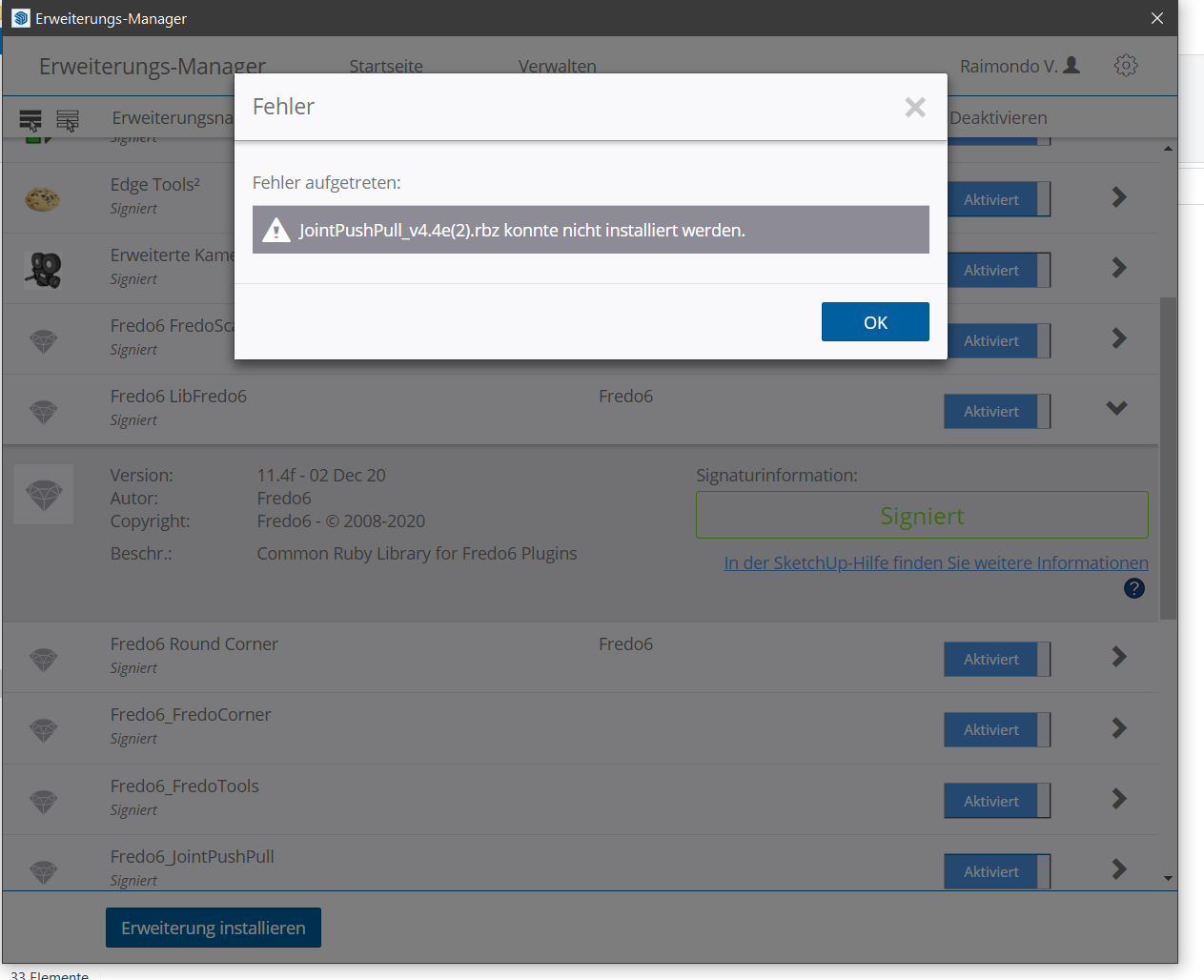

                ErrorMessage

                1 Reply Last reply
                Reply Quote 0
                • E
                  Einstein
                  last edited by

                  Hello,
                  I got an error with joint push pull extrusion in SketchUp 2020.

                  Date: 10-Jan-21 15:59:27
                  An error occurred in Joint Push Pull
                  Error in generation of the geometry

                  undefined method `target' for nil:NilClass

                  jointpushpullgeometry.rbe: 447 -- block in geometry_create_top_face
                  jointpushpullgeometry.rbe: 445 -- collect
                  jointpushpullgeometry.rbe: 445 -- geometry_create_top_face
                  jointpushpullgeometry.rbe: 258 -- block in geometry_robot_prepare_mesh
                  jointpushpullgeometry.rbe: 257 -- each
                  jointpushpullgeometry.rbe: 257 -- each_with_index
                  jointpushpullgeometry.rbe: 257 -- geometry_robot_prepare_mesh
                  jointpushpullgeometry.rbe: 212 -- robot_call_action
                  jointpushpullgeometry.rbe: 183 -- geometry_robot_exec
                  jointpushpullgeometry.rbe: 166 -- geometry_robot
                  jointpushpullgeometry.rbe: 81 -- block in geometry_execute
                  lib6operation.rbe: 369 -- step_geometry
                  lib6operation.rbe: 304 -- block in yield?
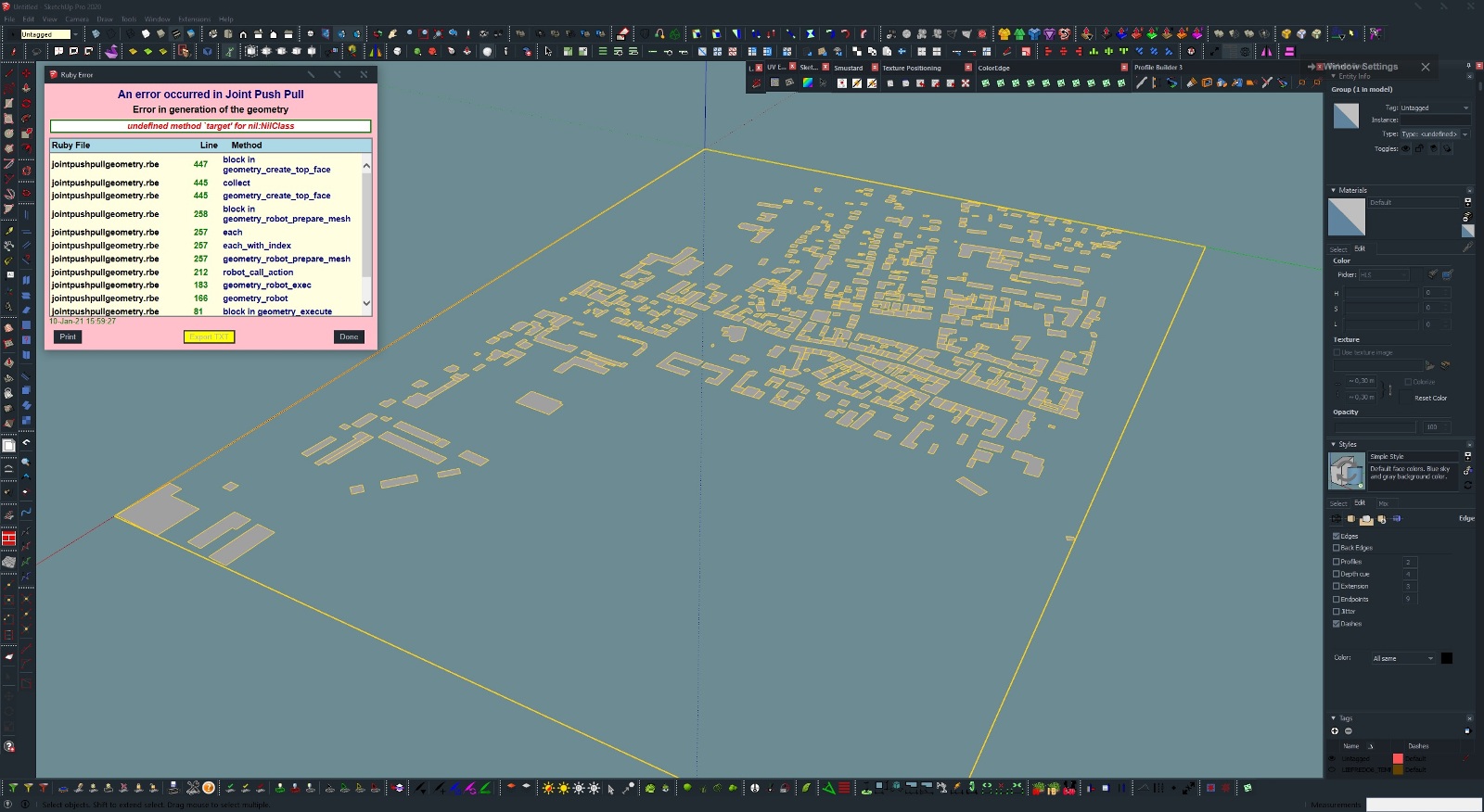

                  JPP error.skp


                  JPP error.jpg

                  1 Reply Last reply
                  Reply Quote 0
                  • fredo6F
                    fredo6
                    last edited by

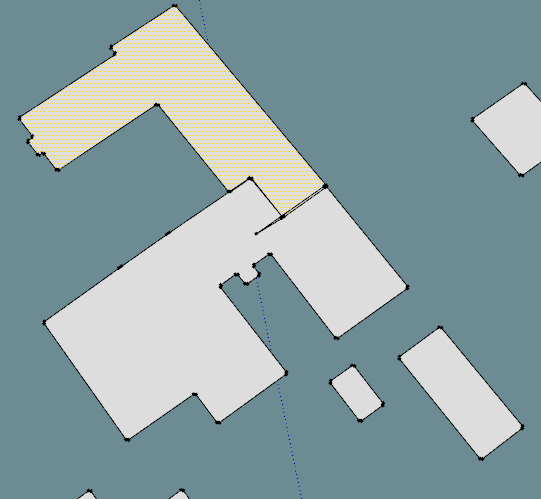
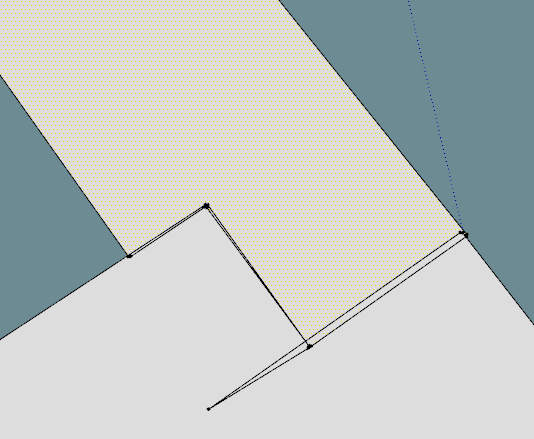
                    I guess you wish to push-pull all faces.

                    Then, you have a number of them which are ill-formed and there is nothing JPP can do about it. For instance, these group of buildings:
                    Einstein - JPP - faces 1.png

                    Einstein - JPP - faces 2.png

                    Einstein - JPP - faces 3.png

                    1 Reply Last reply
                    Reply Quote 0
                    • E
                      Einstein
                      last edited by

                      Then would it be possible for the plugin to skip the ill-formed faces, leave them unextruded and proceed?
                      Ok, some of the faces are broken but most of them are OK. Why break entire operation due to a few wicked faces?

                      1 Reply Last reply
                      Reply Quote 0
                      • Dave RD
                        Dave R
                        last edited by

                        Why not clean up the model before you add more geometry and potentially make more problems for yourself?

                        Etaoin Shrdlu

                        %

                        (THERE'S NO PLACE LIKE)

                        G28 X0.0 Y0.0 Z0.0

                        M30

                        %

                        1 Reply Last reply
                        Reply Quote 0
                        • fredo6F
                          fredo6
                          last edited by

                          @einstein said:

                          Then would it be possible for the plugin to skip the ill-formed faces, leave them unextruded and proceed?
                          Ok, some of the faces are broken but most of them are OK. Why break entire operation due to a few wicked faces?

                          I concur with Dave. Better clean up the model if you wish to do something with it.

                          Detecting and cleaning the problem is a whole big task in itself. It could deserve a plugin. This is not like Sketchup tells you the face is ill-formed or not. Actually, these faces are toplogically valid for Sketchup but they won't work with many transformations and operations.

                          So, using a detection and fixing before operating JPP would be counterproductive and a big hit to performance in 99.9% of cases where the geometry is OK.

                          1 Reply Last reply
                          Reply Quote 0
                          • Dave RD
                            Dave R
                            last edited by

                            Thom Thom's CleanUp3 could remove coplanar edges to merge faces although it may not remove the correct edges. In this particular model it would be difficult for an extension to identify which edges should be removed.

                            Etaoin Shrdlu

                            %

                            (THERE'S NO PLACE LIKE)

                            G28 X0.0 Y0.0 Z0.0

                            M30

                            %

                            1 Reply Last reply
                            Reply Quote 0
                            • E
                              Einstein
                              last edited by

                              That's weird. I actually did a cleanup using ThomThom's plugin and JPP first threw an error. Then did a cleanup again and JPP worked fine.
                              I don't know why it happened but sorry for bothering you.

                              1 Reply Last reply
                              Reply Quote 0
                              • J
                                jpaine
                                last edited by

                                Hi everyone,

                                Is project shape on a plane possible on a Mac? I can't seem to find this option.

                                Thanks

                                1 Reply Last reply
                                Reply Quote 0
                                • I
                                  iggi
                                  last edited by

                                  Hi,
                                  how do you report a bug?
                                  (well, I believe that what I see is a bug, not a feature ๐Ÿ˜ƒ

                                  version 4.4e, Sk Pro

                                  Regards,

                                  1 Reply Last reply
                                  Reply Quote 0
                                  • fredo6F
                                    fredo6
                                    last edited by

                                    @iggi,

                                    Can you send me the model.

                                    I think it has to do with the original circular profile sections, which are not generated parallel to the axes.

                                    1 Reply Last reply
                                    Reply Quote 0
                                    • R
                                      rv1974
                                      last edited by

                                      Fredo wouldn't it be fantastic to add context-free JPP mode for edges? It would demand some smart path selection tool similar to the one in profile builder.
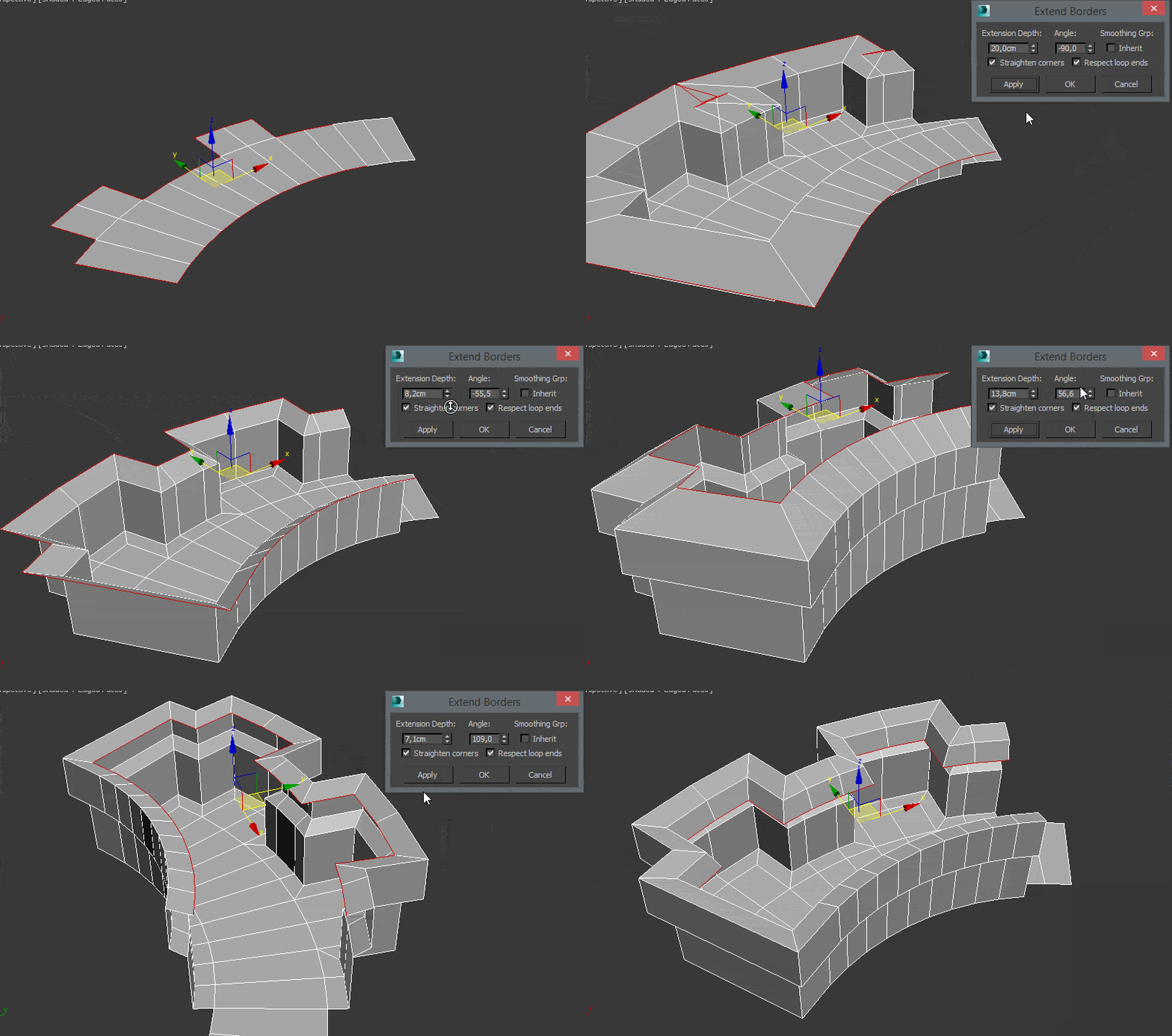
                                      http://www.scriptspot.com/files/straightencorners_cmprspd.gif

                                      1 Reply Last reply
                                      Reply Quote 0
                                      • fredo6F
                                        fredo6
                                        last edited by

                                        That's a different plugin, because the extrusion is based on contour lines, not faces.

                                        Interesting anyway.

                                        Which software is it?

                                        1 Reply Last reply
                                        Reply Quote 0
                                        • R
                                          rv1974
                                          last edited by

                                          some script for Max. If you could develop it for SU.. it'd have a huge advantage because
                                          SU allows to 'hack' the context hierarchy.

                                          1 Reply Last reply
                                          Reply Quote 0
                                          • panixiaP
                                            panixia
                                            last edited by

                                            @rv1974 said:

                                            some script for Max. If you could develop it for SU.. it'd have a huge advantage because
                                            SU allows to 'hack' the context hierarchy.

                                            Which script is that? Is free?
                                            In Max I'm able to do 99% of that stuff without any script at all just using regular editpoly edge mode (just select the loop, set "normal" constraint, extrude/scale and then pull up and down without constraints).
                                            But that corner options look intriguing btw.. โ“

                                            I did a similar request to Thomas, because I feel that normal constraint is one of the few mayor tool still missing in the QFT/VT/SubD workflow.
                                            Not sure this edge job is suitable for JPP itself which is more of a shell/push/face extrude tool.
                                            But never put limits to the Fredo power.. Maybe some normal face extrude logic is reusable on edges? ๐Ÿ˜„

                                            1 Reply Last reply
                                            Reply Quote 0

                                            Hello! It looks like you're interested in this conversation, but you don't have an account yet.

                                            Getting fed up of having to scroll through the same posts each visit? When you register for an account, you'll always come back to exactly where you were before, and choose to be notified of new replies (either via email, or push notification). You'll also be able to save bookmarks and upvote posts to show your appreciation to other community members.

                                            With your input, this post could be even better ๐Ÿ’—

                                            Register Login
                                            • 1
                                            • 2
                                            • 22
                                            • 23
                                            • 24
                                            • 25
                                            • 26
                                            • 30
                                            • 31
                                            • 24 / 31
                                            • First post
                                              Last post
                                            Buy SketchPlus
                                            Buy SUbD
                                            Buy WrapR
                                            Buy eBook
                                            Buy Modelur
                                            Buy Vertex Tools
                                            Buy SketchCuisine
                                            Buy FormFonts

                                            Advertisement