sketchucation logo sketchucation
    • 登入
    Oops, your profile's looking a bit empty! To help us tailor your experience, please fill in key details like your SketchUp version, skill level, operating system, and more. Update and save your info on your profile page today!
    🔌 Smart Spline | Fluid way to handle splines for furniture design and complex structures. Download

    [Plugin][$] JointPushPull Interactive - v4.9a - 02 Apr 25


    已排程 已置頂 已鎖定 已移動 Plugins
    619 貼文 156 Posters 631.5k 瀏覽 155 Watching
    正在載入更多貼文
    • 從舊到新
    • 從新到舊
    • 最多點贊
    回覆
    • 在新貼文中回覆
    登入後回覆
    此主題已被刪除。只有擁有主題管理權限的使用者可以查看。
    • T 離線
      theVonZipper
      最後由 編輯

      Thanks Fredo for the fantastic plugins. I use 'Divide faces' often and of course Joint Push Pull. Just wondering, is there a way for Push Pull Interactive to inherit layers from the faces they are affecting as the Classic version did?

      1 條回覆 最後回覆 回覆 引用 0
      • Dave RD 離線
        Dave R
        最後由 編輯

        Faces and edges should always be created on and remain on Layer 0. See Controlling Visibility with Layers.

        Etaoin Shrdlu

        %

        (THERE'S NO PLACE LIKE)

        G28 X0.0 Y0.0 Z0.0

        M30

        %

        1 條回覆 最後回覆 回覆 引用 0
        • E 離線
          Einstein
          最後由 編輯

          Hi!

          I have an idea for a small feature upgrade.
          Actually, two ideas ^^

          1. Possibility to apply positive + negative offset in one go, so you can thicken a surface on both sides immediately

          2. Extrude faces to point, like in Rhino. It would be almost analogic operation to scaling about a point which can be performed via ThomThom's Rotate and Scale. However, you'd then have to manually connect border edges of source and result meshes. Rhino has a tool which does everything in one step. I attach an illustration for it.

          What do you think about it?
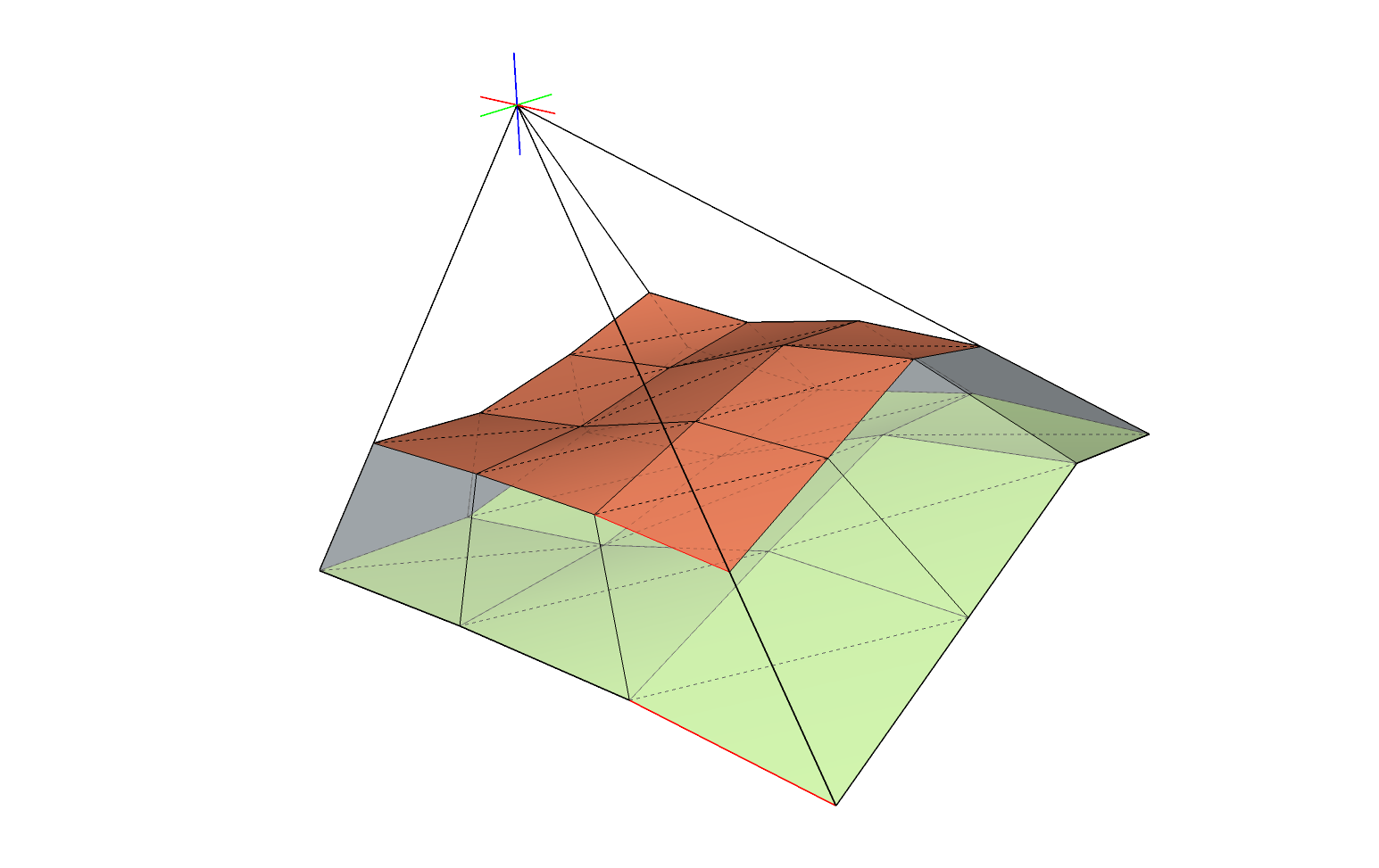

          extrude about point - request.png

          1 條回覆 最後回覆 回覆 引用 0
          • fredo6F 離線
            fredo6
            最後由 編輯

            @einstein said:

            1. Possibility to apply positive + negative offset in one go, so you can thicken a surface on both sides immediately

            This is doable, though not trivial, because I have two generate two faces for each original face. It would also require an additional option, maybe triggered by a modifier; the only left is ALT (on Windows)

            @einstein said:

            1. Extrude faces to point, like in Rhino. It would be almost analogic operation to scaling about a point which can be performed via ThomThom's Rotate and Scale. However, you'd then have to manually connect border edges of source and result meshes. Rhino has a tool which does everything in one step. I attach an illustration for it.

            This would be a new tool actually. I need to think about it, but a priori an interesting idea.

            1 條回覆 最後回覆 回覆 引用 0
            • E 離線
              Einstein
              最後由 編輯

              Could you please increase extreme angle values for Molding in the next release? Now it's +- 60, which is a serious limitation in some cases. I'd suggest 89 or even 90 - this would practically create a flat offset (nice!). Certainly, faces would overlap but that could be fixed manually.

              1 條回覆 最後回覆 回覆 引用 0
              • fredo6F 離線
                fredo6
                最後由 編輯

                @einstein said:

                Could you please increase extreme angle values for Molding in the next release? Now it's +- 60, which is a serious limitation in some cases. I'd suggest 89 or even 90 - this would practically create a flat offset (nice!). Certainly, faces would overlap but that could be fixed manually.

                If the angle is too large, then you are almost sure to get overlaps and mess up the extrusion.

                Here is what I get with the set of letters, each one of width roughly 0.5 m. I had to reduce the offset of extrusion to 0.001 m (that is, 1mm) to get a molding at 85 deg. without overlap.
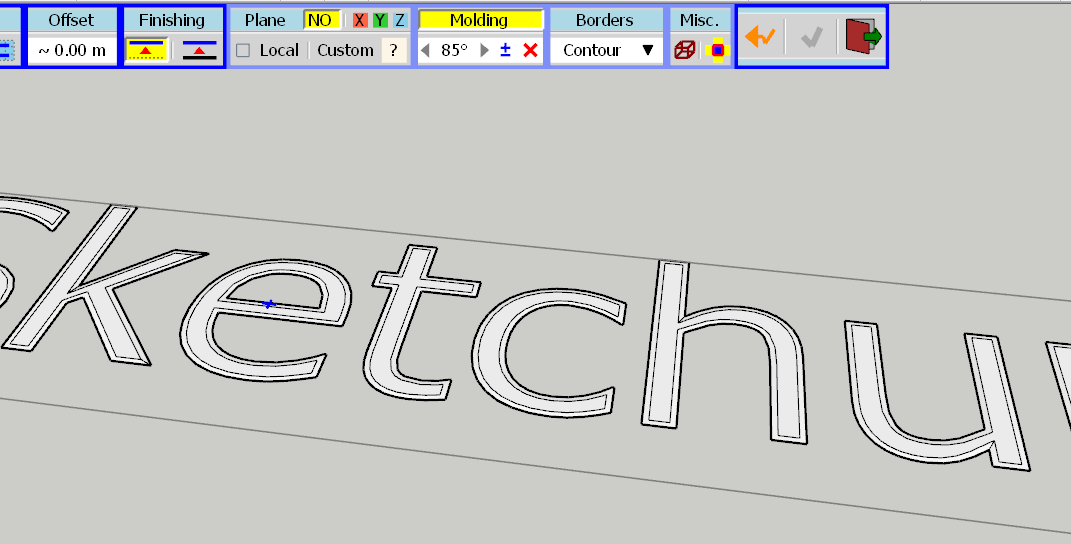
                JPP Molding at 85 deg.png

                With an offset of 1cm, the extrusion gets seriously messy
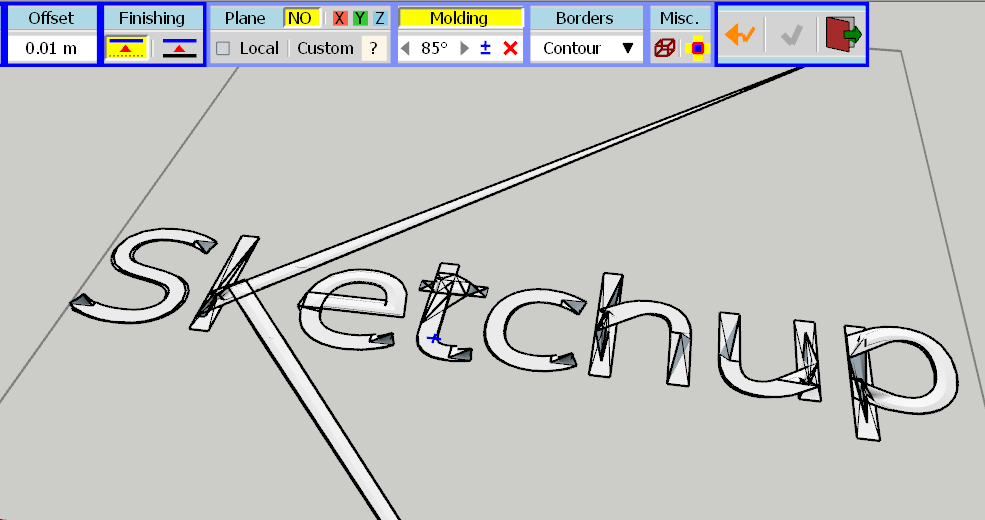
                JPP Molding at 85 deg - mess.png

                I can increase it to 89 degrees. At 90, you reach math limit, since there is NO extrusion, and JPP does not like it. So, I'll probably pick 85 degrees, to make it a multiple of the 5 deg increment in a next release.

                Fredo

                1 條回覆 最後回覆 回覆 引用 0
                • E 離線
                  Einstein
                  最後由 編輯

                  Thank you 😄

                  1 條回覆 最後回覆 回覆 引用 0
                  • fredo6F 離線
                    fredo6
                    最後由 編輯

                    NEW RELEASE: JointPushPull Interactive v4.4e - 02 Jun 19

                    JointPushPull Interactive 4.4e is a minor release including an increase of the maximum angle for Molding (now 85 degrees).

                    JointPushPull 4.4e requires LibFredo6 8.7m or above


                    See plugin home page of JointPushPull for Download of JointPushPull.

                    Main Post of the JointPushPull thread on this forum

                    Fredo

                    1 條回覆 最後回覆 回覆 引用 0
                    • E 離線
                      Einstein
                      最後由 編輯

                      Thank you, for me it's a major release 😄

                      1 條回覆 最後回覆 回覆 引用 0
                      • J 離線
                        jonnys777
                        最後由 編輯

                        Morning all,

                        I'm getting the follow error trying to thicken some terrain on the z-axis;

                        Date: 20-Jun-19 08:06:15
                        An error occurred in Vector Push Pull
                        Error in generation of the geometry

                        Could not compute valid matrix from points

                        body_lib6g6.rbe: 4568 -- position_material
                        body_lib6g6.rbe: 4568 -- reverse_face_with_uv
                        jointpushpullgeometry.rbe: 556 -- block in geometry_handle_finishing
                        jointpushpullgeometry.rbe: 556 -- each
                        jointpushpullgeometry.rbe: 556 -- geometry_handle_finishing
                        jointpushpullgeometry.rbe: 376 -- geometry_robot_handle_finishing
                        jointpushpullgeometry.rbe: 222 -- robot_call_action
                        jointpushpullgeometry.rbe: 183 -- geometry_robot_exec
                        jointpushpullgeometry.rbe: 166 -- geometry_robot
                        jointpushpullgeometry.rbe: 81 -- block in geometry_execute
                        lib6operation.rbe: 370 -- call
                        lib6operation.rbe: 370 -- step_geometry
                        lib6operation.rbe: 305 -- block in yield?
                        SketchUp: 1 -- call

                        1 條回覆 最後回覆 回覆 引用 0
                        • J 離線
                          jonnys777
                          最後由 編輯

                          @jonnys777 said:

                          Morning all,

                          I'm getting the follow error trying to thicken some terrain on the z-axis;

                          Date: 20-Jun-19 08:06:15
                          An error occurred in Vector Push Pull
                          Error in generation of the geometry

                          Could not compute valid matrix from points

                          body_lib6g6.rbe: 4568 -- position_material
                          body_lib6g6.rbe: 4568 -- reverse_face_with_uv
                          jointpushpullgeometry.rbe: 556 -- block in geometry_handle_finishing
                          jointpushpullgeometry.rbe: 556 -- each
                          jointpushpullgeometry.rbe: 556 -- geometry_handle_finishing
                          jointpushpullgeometry.rbe: 376 -- geometry_robot_handle_finishing
                          jointpushpullgeometry.rbe: 222 -- robot_call_action
                          jointpushpullgeometry.rbe: 183 -- geometry_robot_exec
                          jointpushpullgeometry.rbe: 166 -- geometry_robot
                          jointpushpullgeometry.rbe: 81 -- block in geometry_execute
                          lib6operation.rbe: 370 -- call
                          lib6operation.rbe: 370 -- step_geometry
                          lib6operation.rbe: 305 -- block in yield?
                          SketchUp: 1 -- call

                          I'm not having much luck resolving this. I've tried scaling up and inspecting the surface to see if there's anything obviously wrong. It allows Normal Push Pull, but Vector, Joint etc. all fail.

                          Any ideas as to what might be wrong?

                          It's a fairly complex surface - a piece of terrain that is a hill with sections cut out of it (I draped a road onto the surface so that counts as a separate surface, for example). The surface I want to extrude is vegetation and I need it locked to the z-axis otherwise the software I intend to import it into won't work properly.

                          Many thanks

                          1 條回覆 最後回覆 回覆 引用 0
                          • fredo6F 離線
                            fredo6
                            最後由 編輯

                            @jonnys777 said:

                            I'm not having much luck resolving this. I've tried scaling up and inspecting the surface to see if there's anything obviously wrong. It allows Normal Push Pull, but Vector, Joint etc. all fail. Any ideas as to what might be wrong?

                            I included a fix in LibFredo6 9.0a

                            @jonnys777 said:

                            It's a fairly complex surface - a piece of terrain that is a hill with sections cut out of it (I draped a road onto the surface so that counts as a separate surface, for example). The surface I want to extrude is vegetation and I need it locked to the z-axis otherwise the software I intend to import it into won't work properly.

                            If you post or PM me the model, I can have a look and advise.

                            1 條回覆 最後回覆 回覆 引用 0
                            • J 離線
                              jonnys777
                              最後由 編輯

                              @fredo6 said:

                              @jonnys777 said:

                              I'm not having much luck resolving this. I've tried scaling up and inspecting the surface to see if there's anything obviously wrong. It allows Normal Push Pull, but Vector, Joint etc. all fail. Any ideas as to what might be wrong?

                              I included a fix in LibFredo6 9.0a

                              Hi Fredo, I can confirm the updated version of LibFredo has solved my issues. Many thanks, and keep up the good work.

                              1 條回覆 最後回覆 回覆 引用 0
                              • D 離線
                                DigitalArena
                                最後由 編輯

                                Have a problem with one installation of this set of tools on Pro 2019. We have the latest Fredo6Lib. We have installed the latest JointPushPull plugin. The tools appear in the toolbar. But when you select the surface and then the tool, the tool doesn't become active. You remain with the mouse pointer and it doesn't change to the selected JointPushPull tool.

                                Any idea why this would be happening?

                                We installed the same setup on another computer and everything is fine. Thoughts?

                                1 條回覆 最後回覆 回覆 引用 0
                                • Dave RD 離線
                                  Dave R
                                  最後由 編輯

                                  When SketchUp 2019 was installed, did you right click on the installer and choose Run as administrator?

                                  Etaoin Shrdlu

                                  %

                                  (THERE'S NO PLACE LIKE)

                                  G28 X0.0 Y0.0 Z0.0

                                  M30

                                  %

                                  1 條回覆 最後回覆 回覆 引用 0
                                  • deaneauD 離線
                                    deaneau
                                    最後由 編輯

                                    Feature Request in this Plugin

                                    Hi Fredo is this possible to have an offset of faces with the same material?

                                    I need this for a game.

                                    The windows in the night will be the only face that has an offset. this face will save as a separate file (night mesh).

                                    big thank you


                                    https://i.ibb.co/Jvbyv1d/2019-08-22-01h34-49.png


                                    https://i.ibb.co/9rTf66k/2019-08-22-01h46-05day.png


                                    https://i.ibb.co/ThbggvQ/2019-08-22-01h46-25-night.png

                                    MADE, BORN AND LIVING IN BERLIN
                                    Big Thank You to all Programmers
                                    Some German words are so long that they have a perspective. M.Twain

                                    1 條回覆 最後回覆 回覆 引用 0
                                    • A 離線
                                      Ahmed0007
                                      最後由 編輯

                                      Getting a bugsplat when trying to change the random push pull values. in sketchup 2019 and 18
                                      any solution?

                                      1 條回覆 最後回覆 回覆 引用 0
                                      • Dave RD 離線
                                        Dave R
                                        最後由 編輯

                                        @ahmed0007 said:

                                        Getting a bugsplat... any solution?

                                        You'd need to provide some useful information to be able to diagnose the problem and find a solution. Share the SKP file and the values you are trying to use.

                                        Etaoin Shrdlu

                                        %

                                        (THERE'S NO PLACE LIKE)

                                        G28 X0.0 Y0.0 Z0.0

                                        M30

                                        %

                                        1 條回覆 最後回覆 回覆 引用 0
                                        • A 離線
                                          Ahmed0007
                                          最後由 編輯

                                          @dave r said:

                                          @ahmed0007 said:

                                          Getting a bugsplat... any solution?

                                          You'd need to provide some useful information to be able to diagnose the problem and find a solution. Share the SKP file and the values you are trying to use.

                                          here are:
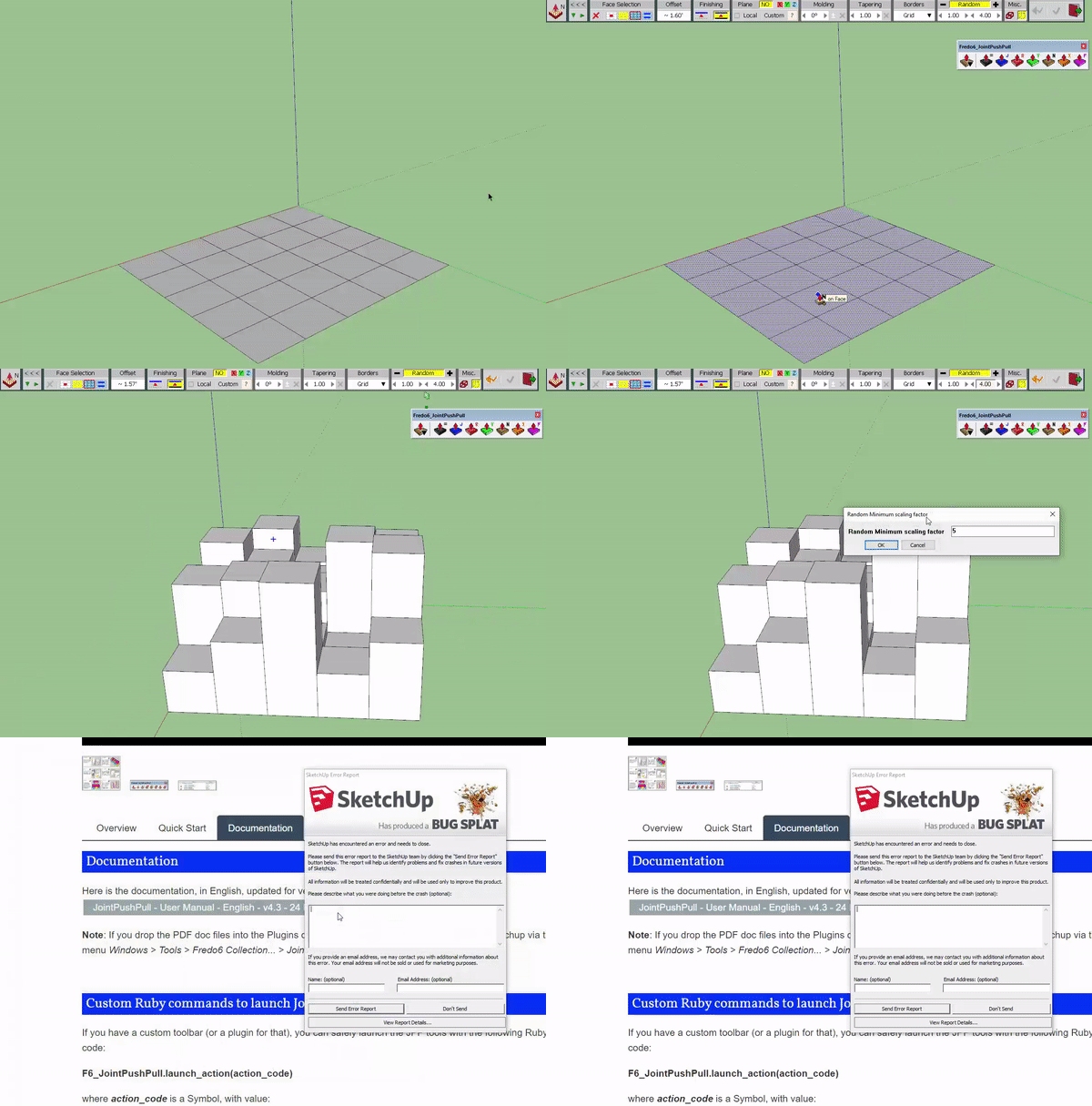

                                          ezgif-2-12c249956a58.gif


                                          J.skp

                                          1 條回覆 最後回覆 回覆 引用 0
                                          • Dave RD 離線
                                            Dave R
                                            最後由 編輯

                                            I don't have any problems with your file in SU2019.
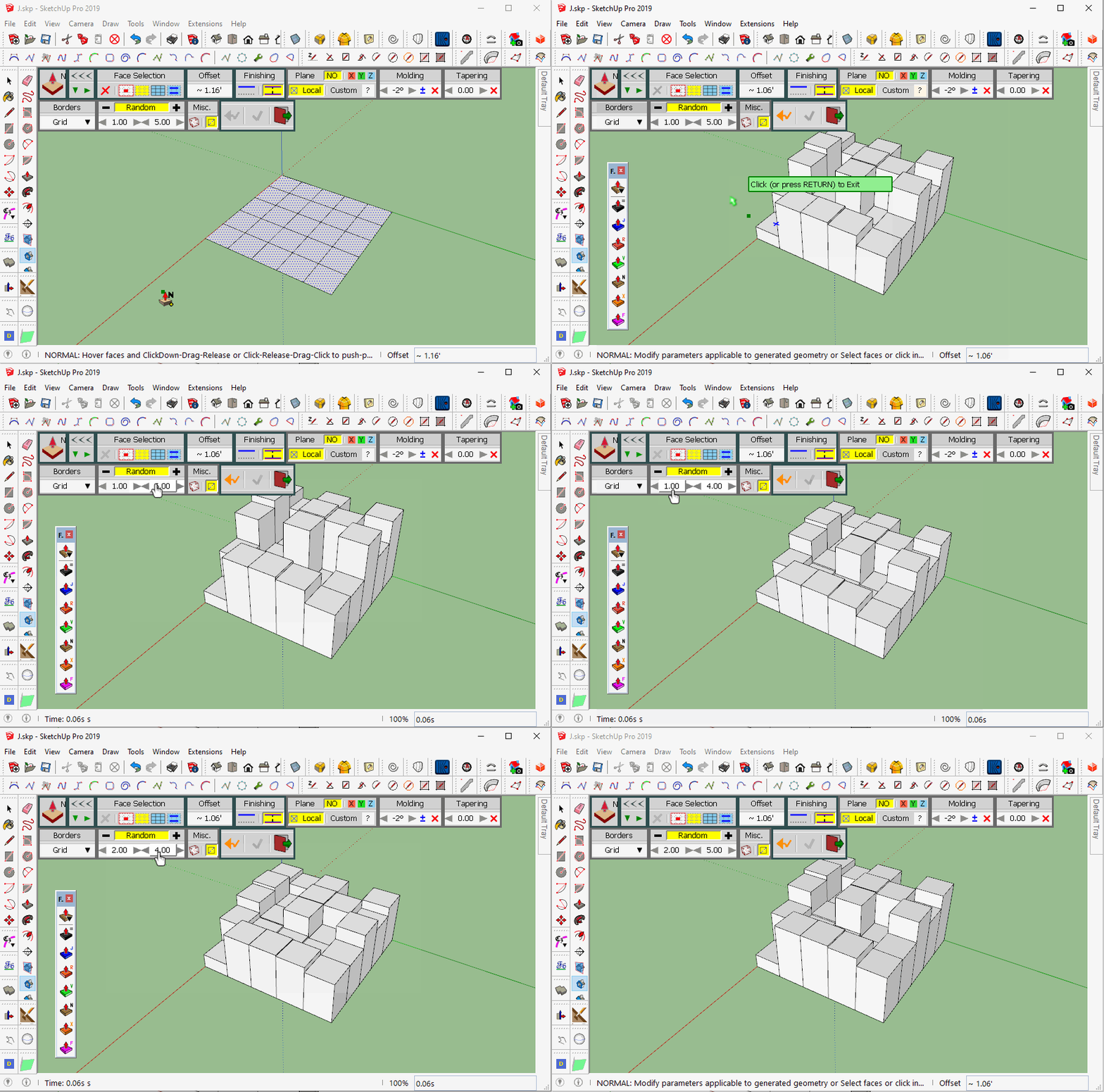
                                            Random PushPull.gif
                                            Click on the picture to see it move.

                                            Make sure have the current version installed along with the current version of LibFredo6 and make sure you installed SketchUp correctly. That is, you right clicked on the installer and selected Run as administrator from the context menu.


                                            Etaoin Shrdlu

                                            %

                                            (THERE'S NO PLACE LIKE)

                                            G28 X0.0 Y0.0 Z0.0

                                            M30

                                            %

                                            1 條回覆 最後回覆 回覆 引用 0
                                            • 1
                                            • 2
                                            • 3
                                            • 4
                                            • 5
                                            • 6
                                            • 30
                                            • 31
                                            • 4 / 31
                                            • 第一個貼文
                                              最後的貼文
                                            Buy SketchPlus
                                            Buy SUbD
                                            Buy WrapR
                                            Buy eBook
                                            Buy Modelur
                                            Buy Vertex Tools
                                            Buy SketchCuisine
                                            Buy FormFonts

                                            Advertisement