sketchucation logo sketchucation
    • 登入
    Oops, your profile's looking a bit empty! To help us tailor your experience, please fill in key details like your SketchUp version, skill level, operating system, and more. Update and save your info on your profile page today!
    🔌 Smart Spline | Fluid way to handle splines for furniture design and complex structures. Download

    [Plugin][$] JointPushPull Interactive - v4.9a - 02 Apr 25


    已排程 已置頂 已鎖定 已移動 Plugins
    619 貼文 156 Posters 631.8k 瀏覽 155 Watching
    正在載入更多貼文
    • 從舊到新
    • 從新到舊
    • 最多點贊
    回覆
    • 在新貼文中回覆
    登入後回覆
    此主題已被刪除。只有擁有主題管理權限的使用者可以查看。
    • pilouP 離線
      pilou
      最後由 編輯

      The new hit for sure ! 👍 😎
      Random functions are crazzy! 😲

      Frenchy Pilou
      Is beautiful that please without concept!
      My Little site :)

      1 條回覆 最後回覆 回覆 引用 0
      • fredo6F 離線
        fredo6
        最後由 編輯

        @unknownuser said:

        The new hit for sure ! 👍 😎
        Random functions are crazzy! 😲

        Pilou,

        This was a special gift for you. I am sure you'll complement it with the Tapering feature to produce some inspiring modern art masterpiece.

        And I am also sure that you'll ask right away for random colorization! 😆

        Fredo

        1 條回覆 最後回覆 回覆 引用 0
        • B 離線
          Ben Ritter
          最後由 編輯

          A big thank you. You are very talented, and generous.

          1 條回覆 最後回覆 回覆 引用 0
          • massimoM 離線
            massimo Moderator
            最後由 編輯

            Thanks Fredo I'll try it for sure. 👍

            @unknownuser said:

            Pilou,

            This was a special gift for you...

            😆

            1 條回覆 最後回覆 回覆 引用 0
            • pilouP 離線
              pilou
              最後由 編輯

              Many Thanks! 💚
              As soon as some free times I will explore these new infinite possibilities! (Smart) 😎

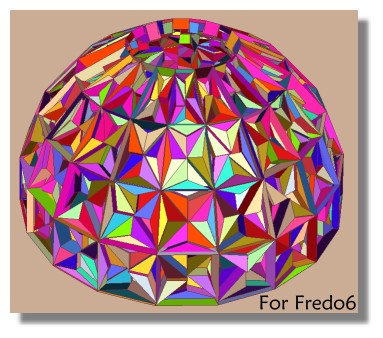
              Ce tableau inestimable est pour vous! 😄
              Renderiza à la subdivision, Chris Fullmer à la peinture et Fredo6 à la randomisation! 😉 ☀

              fredo.jpg

              Ps I have made some publicity of it over the 3D world forums! 😛

              Frenchy Pilou
              Is beautiful that please without concept!
              My Little site :)

              1 條回覆 最後回覆 回覆 引用 0
              • A 離線
                alpro
                最後由 編輯

                Amazing!, thank you!!

                1 條回覆 最後回覆 回覆 引用 0
                • cottyC 離線
                  cotty
                  最後由 編輯

                  If you think you know those tools, you should look in the 39 pages PDF documentation and I bet you will find something new to learn 😎

                  examples:

                  • random push pull
                  • tapering
                  • ...

                  my SketchUp gallery

                  1 條回覆 最後回覆 回覆 引用 0
                  • D 離線
                    dtrarch
                    最後由 編輯

                    Hi Fredo
                    Thank you for the JPP update. 👍 👍 👍
                    Just super and a well deserved cookie on its way. 😄
                    Sure wish your contribute was in English but thanks for fixing the entry.
                    You are not only generous but honest too. 👍 👍 👍 👍

                    dtr

                    1 條回覆 最後回覆 回覆 引用 0
                    • kenK 離線
                      ken
                      最後由 編輯

                      Fredo6

                      Well sir, I installed your plugin for V 2013. Noticed that the icons, looked a little large. I discovered that all the png files listed as 16 x 16 were actually 24 x24. Not sure if you intended this or the sizes were not changed.

                      I changed all my 16 x16 listed, to actual 16 x16 from the 24 x 24, and now they look like the rest of the icon on the toolbar.

                      Ken

                      Fight like your the third monkey on Noah's Ark gangway.

                      1 條回覆 最後回覆 回覆 引用 0
                      • fredo6F 離線
                        fredo6
                        最後由 編輯

                        @unknownuser said:

                        Fredo6

                        Well sir, I installed your plugin for V 2013. Noticed that the icons, looked a little large. I discovered that all the png files listed as 16 x 16 were actually 24 x24. Not sure if you intended this or the sizes were not changed.

                        I changed all my 16 x16 listed, to actual 16 x16 from the 24 x 24, and now they look like the rest of the icon on the toolbar.

                        Ken

                        Ken,

                        You are right: icons are 24x24 and 32x32 for the big ones.
                        However, due to ancient code in LibFredo6, I had kept the old naming conventions _16 and _24 for compatibility with earlier versions of SU. I may change it to _small and _large at a later stage, but this is some work to keep compatibility.

                        In SU8 and earlier, the icons are: small = 16x16, large = 24x24. However, SU will anyway rescale the image whatever size it is.

                        In SU13, the icons are: small = 24x24, large = 32x32. SU13 does not resize the icons images.

                        Personally I find that bigger icons offer a better readibility while still fitting in the square allocated in the toolbar.

                        Currently, there's nothing I can do immediately for two reasons:

                        • I need to ask Daniel S. a version of the icons in 16x16
                        • I need to offer the option for the user to choose between small (16x16) and less small (24x24), as we'll probably find users liking one or the other option.

                        Fredo

                        1 條回覆 最後回覆 回覆 引用 0
                        • kenK 離線
                          ken
                          最後由 編輯

                          Fredo6

                          It wasn't a problem, I just notice the icons were larger. I have a 1920x1080 display and the icons just didn't look good. Me, I just went in and changed the size. I wasn't sure if you intended this, or you make a mistake in coping the files.

                          I just giving you a heads up.

                          Thanks for you reply and your work. Not sure where you live, but Boulder is beautiful and a great place to live, hint, hint.

                          Ken

                          Fight like your the third monkey on Noah's Ark gangway.

                          1 條回覆 最後回覆 回覆 引用 0
                          • H 離線
                            hebeijianke
                            最後由 編輯

                            There are two strings cannt be translated
                            Processing time = %1s
                            Time calculation =

                            1 條回覆 最後回覆 回覆 引用 0
                            • fredo6F 離線
                              fredo6
                              最後由 編輯

                              @hebeijianke said:

                              There are two strings cannt be translated
                              Processing time = %1s
                              Time calculation =

                              There may be a problem with the = sign.
                              So just use : instead for the time being

                              Fredo

                              1 條回覆 最後回覆 回覆 引用 0
                              • pilouP 離線
                                pilou
                                最後由 編輯

                                Effectively Tapering negative gives some funny results! 😄
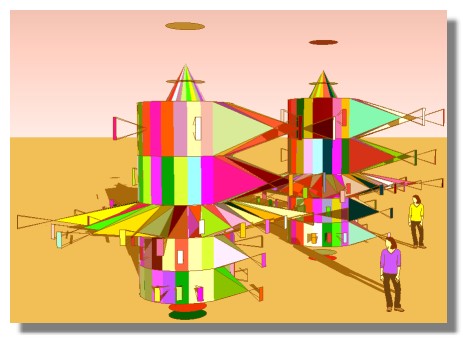
                                effectively.jpg

                                Frenchy Pilou
                                Is beautiful that please without concept!
                                My Little site :)

                                1 條回覆 最後回覆 回覆 引用 0
                                • bagateloB 離線
                                  bagatelo
                                  最後由 編輯

                                  Very good job! Thanks!
                                  And about to make the object like before the operation by this plug in? Will be great...

                                  While the cat's away, the mice will play

                                  1 條回覆 最後回覆 回覆 引用 0
                                  • fredo6F 離線
                                    fredo6
                                    最後由 編輯

                                    NEW RELEASE: JointPush Pull Interactive v3.0h - 29 Oct 13

                                    JointPushPull Interactive 3.0h is a minor release fixing a few problems and adjustments

                                    See main post of this thread for Download.

                                    Fredo

                                    1 條回覆 最後回覆 回覆 引用 0
                                    • OxerO 離線
                                      Oxer
                                      最後由 編輯

                                      Thanks you very much!! 😍
                                      I needed some of new features. I have created the new spanish (Spain) language file

                                      Spanish (Spain) Language File

                                      "The result is the end what is important is the process" by Oxer
                                      [http://www.oxervision.blogspot.com/(http://www.oxervision.blogspot.com/)]

                                      1 條回覆 最後回覆 回覆 引用 0
                                      • mitcorbM 離線
                                        mitcorb
                                        最後由 編輯

                                        Salutations Fredo:
                                        I like your new version. However, I will not download until I can make a donation.

                                        I take the slow, deliberate approach in my aimless wandering.

                                        1 條回覆 最後回覆 回覆 引用 0
                                        • LAGRARI2012L 離線
                                          LAGRARI2012
                                          最後由 編輯

                                          Thanks you very much 👍

                                          1 條回覆 最後回覆 回覆 引用 0
                                          • B 離線
                                            BruceG
                                            最後由 編輯

                                            Doesn't seem to work in my Windows 8.1 machine. Previous push/pull still works fine. It will highlight sections but not select more than one or if one is selected it will not extrude. Anyone else with this problem?


                                            1 條回覆 最後回覆 回覆 引用 0
                                            • 1
                                            • 2
                                            • 15
                                            • 16
                                            • 17
                                            • 18
                                            • 19
                                            • 30
                                            • 31
                                            • 17 / 31
                                            • 第一個貼文
                                              最後的貼文
                                            Buy SketchPlus
                                            Buy SUbD
                                            Buy WrapR
                                            Buy eBook
                                            Buy Modelur
                                            Buy Vertex Tools
                                            Buy SketchCuisine
                                            Buy FormFonts

                                            Advertisement