sketchucation logo sketchucation
    • 登入
    Oops, your profile's looking a bit empty! To help us tailor your experience, please fill in key details like your SketchUp version, skill level, operating system, and more. Update and save your info on your profile page today!
    🔌 Smart Spline | Fluid way to handle splines for furniture design and complex structures. Download

    [Plugin] Layers Panel 1.2.1

    已排程 已置頂 已鎖定 已移動 Plugins
    672 貼文 109 Posters 204.2k 瀏覽 109 Watching
    正在載入更多貼文
    • 從舊到新
    • 從新到舊
    • 最多點贊
    回覆
    • 在新貼文中回覆
    登入後回覆
    此主題已被刪除。只有擁有主題管理權限的使用者可以查看。
    • Bob JamesB 離線
      Bob James
      最後由 編輯

      @jiminy-billy-bob said:

      @bob james said:

      What's more, sometimes undo does work. 😒

      Hmm, so not every time? Do you know in which case it doesn't happen? Or in which case it happens?
      Does it happen in every file?

      For large files (e.g., >100MB): Yes, but not on every attempt to undo!!

      i7-4930K 3.4Ghz, 2x GTX780 6GB, 32GB DDR3-1600 ECC, OCZ Vertex 4 500GB, WD Black 3TB, 32TB NAS, 4x 27" Monitors, SpaceMouse Pro, X-keys XK-60

      1 條回覆 最後回覆 回覆 引用 0
      • jiminy-billy-bobJ 離線
        jiminy-billy-bob
        最後由 編輯

        Could you send me one of those files? (Maybe delete the geometry, if this doesn't affect the behaviour)

        25% off Skatter for SketchUcation Premium Members

        1 條回覆 最後回覆 回覆 引用 0
        • gullfoG 離線
          gullfo
          最後由 編輯

          also noted: when i first loaded the latest version, i got an error about id being incorrect and used the "fix" link provided. that seemed ok, but then i noticed that the name-order of the layers is wrong - about 1/2 are ok, and 1/2 are not - i was assuming the order of the layers follows the regular layer when first initialized? an ability to sort the layers by name or groups would be handy ☀
          otherwise it seems like i would manually need to re-order them...

          Glenn

          http://www.runnel.com

          1 條回覆 最後回覆 回覆 引用 0
          • JQLJ 離線
            JQL
            最後由 編輯

            Hi Jiminy,

            I have a minor issue for you here. Win 7 SU 2014.
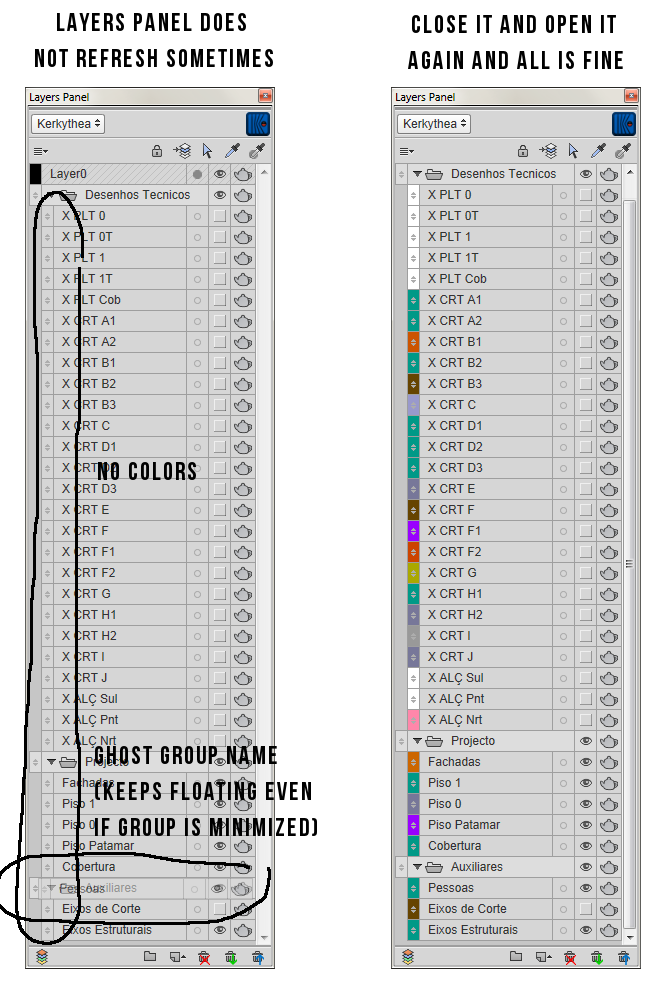

            layers panel.png

            www.casca.pt
            Visit us on facebook!

            1 條回覆 最後回覆 回覆 引用 0
            • M 離線
              mrdcon
              最後由 編輯

              Love the plugin but I keep getting this error message!
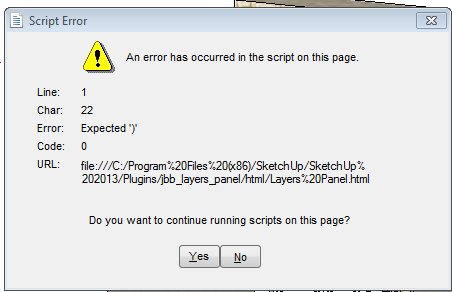

              error message.jpg

              1 條回覆 最後回覆 回覆 引用 0
              • jiminy-billy-bobJ 離線
                jiminy-billy-bob
                最後由 編輯

                @gullfo said:

                also noted: when i first loaded the latest version, i got an error about id being incorrect and used the "fix" link provided. that seemed ok, but then i noticed that the name-order of the layers is wrong - about 1/2 are ok, and 1/2 are not

                Yes, this is normal. Previous versions were causing an issue, so this new version is fixing it. But this should happen only once.

                @jql said:

                I have a minor issue for you here. Win 7 SU 2014.

                Whow, this is weird. Does this happen in the same file that was previously causing you issues? Do you know how to reproduce this?

                @mrdcon said:

                Love the plugin but I keep getting this error message!

                Does this happen in every file? Are you running the last version of Layers Panel? (v1.0.5)

                25% off Skatter for SketchUcation Premium Members

                1 條回覆 最後回覆 回覆 引用 0
                • SolarwiseLLCS 離線
                  SolarwiseLLC
                  最後由 編輯

                  Jiminy, Thank you for the 1.0.5 release. The Layer Panel is working much better now. I appreciate your willingness to keep at in order to provide a great plugin.

                  1 條回覆 最後回覆 回覆 引用 0
                  • icedkaszI 離線
                    icedkasz
                    最後由 編輯

                    I'm hoping to add this extension to my toolset, but I'm having some issues (see attached image). It's very strange.

                    If I open up Sketchup2014 first, then click File > Open and find my model, it works just fine.
                    If I open the file directly from my windows explorer (locating sketchup\models\model.skp and double clicking it), I get the error shown.
                    For some reason, opening the file directly causes problems.

                    I found a way around it, though: if I open up Sketchup2014, then IMPORT my model.skp, it works fine. I can save it as model-2.skp, close sketchhup, then open model-2.skp directly, and it continues to work just fine. Very strange. This is SORT of a workaround, but if I try to open any of my other dozens of sketchup files directly, I get the error message. I've tried deleting the files from my Roaming folder, then reinstalling. No luck. Any advise?

                    Also as a secondary question, I'll have multiple people using this extension (if I can get it working). We'll be accessing the file from a shared server. If person A adds a Layers Panel group to the model, then saves and quits, can person B open up the model and find that group? Is Layers Panel adding metadata to the model or something?
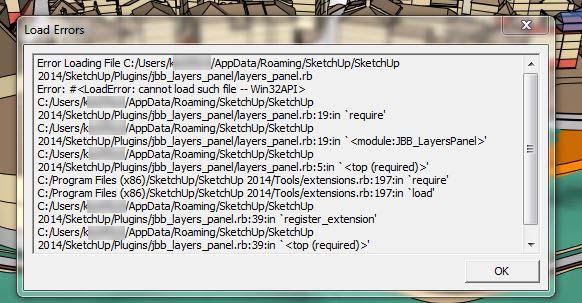

                    sketchup errors.JPG

                    1 條回覆 最後回覆 回覆 引用 0
                    • jiminy-billy-bobJ 離線
                      jiminy-billy-bob
                      最後由 編輯

                      icedkasz > Your first issue has been discussed many times on this thread. It's a Sketchup issue, I can't do anything about it. We need to wait for Trimble to fix it.

                      As for your second question: Yes, all the data is stored within the file, so you can give it to whoever you want, and they'll see all you groups etc.

                      25% off Skatter for SketchUcation Premium Members

                      1 條回覆 最後回覆 回覆 引用 0
                      • B 離線
                        bimbachi
                        最後由 編輯

                        I have a problem :

                        • when adding keyshortcut to LayerPanel tool palet it adds shortcut to SketchucationPluginStore tool palet this same shortcut
                        • and as result to use of shortcut, command opens SketchucationPluginStore tool palet!
                        1 條回覆 最後回覆 回覆 引用 0
                        • B 離線
                          bimbachi
                          最後由 編輯

                          question:
                          is it possibul that LayerPanel window position would be kept as last open location on the screen? ❓

                          1 條回覆 最後回覆 回覆 引用 0
                          • jiminy-billy-bobJ 離線
                            jiminy-billy-bob
                            最後由 編輯

                            @bimbachi said:

                            I have a problem :

                            • when adding keyshortcut to LayerPanel tool palet it adds shortcut to SketchucationPluginStore tool palet this same shortcut
                            • and as result to use of shortcut, command opens SketchucationPluginStore tool palet!

                            Weird, it works fine for me on windows. Can another mac user confirm this?
                            What happens if you disable SCtools?

                            @bimbachi said:

                            question:
                            is it possibul that LayerPanel window position would be kept as last open location on the screen? ❓

                            I haven't figured how to do that on Mac, it works fine on windows...

                            25% off Skatter for SketchUcation Premium Members

                            1 條回覆 最後回覆 回覆 引用 0
                            • jiminy-billy-bobJ 離線
                              jiminy-billy-bob
                              最後由 編輯


                              New version 1.0.6 !

                              Changelog :

                              • Improved "add layer" menu (Hold-down the add layer button), based on Jim's great "Add layer" plugin
                              • Fixed "Win32api" error when opening a file from a different drive than sketchup's. (Thanks to Dan Rathbun and TIG)
                              • Fixed layer colors vanishing when switching scenes

                              Download in the plugin store !


                              Credit goes to Jim for the original "Add layer" UI idea : http://sketchucation.com/plugin/832-jf_add_layer
                              Thanks to him for allowing me to embed it in Layers Panel

                              25% off Skatter for SketchUcation Premium Members

                              1 條回覆 最後回覆 回覆 引用 0
                              • J 離線
                                Jim
                                最後由 編輯

                                Seems like you un-published it because it does not show up in the Plugin Store.

                                Hi

                                1 條回覆 最後回覆 回覆 引用 0
                                • TIGT 離線
                                  TIG Moderator
                                  最後由 編輯

                                  With the new authors' area once you start editing your entry it becomes 'unpublished'.
                                  After updating anything you must click the big button near the top to [re]publish it...
                                  Go back in and do that, and it should reappear in the listings again...

                                  TIG

                                  1 條回覆 最後回覆 回覆 引用 0
                                  • jiminy-billy-bobJ 離線
                                    jiminy-billy-bob
                                    最後由 編輯

                                    @tig said:

                                    With the new authors' area once you start editing your entry it becomes 'unpublished'.
                                    After updating anything you must click the big button near the top to [re]publish it...
                                    Go back in and do that, and it should reappear in the listings again...

                                    Uh, I did, but I guess I modified something else afterward.
                                    It should be fine now.

                                    25% off Skatter for SketchUcation Premium Members

                                    1 條回覆 最後回覆 回覆 引用 0
                                    • wind-borneW 離線
                                      wind-borne
                                      最後由 編輯

                                      @jiminy-billy-bob said:

                                      @bimbachi said:

                                      I have a problem :

                                      • when adding keyshortcut to LayerPanel tool palet it adds shortcut to SketchucationPluginStore tool palet this same shortcut
                                      • and as result to use of shortcut, command opens SketchucationPluginStore tool palet!

                                      Weird, it works fine for me on windows. Can another mac user confirm this?
                                      What happens if you disable SCtools?

                                      @bimbachi said:

                                      question:
                                      is it possibul that LayerPanel window position would be kept as last open location on the screen? ❓

                                      I haven't figured how to do that on Mac, it works fine on windows...

                                      I am assuming what you really want is a shortcut to the layers panel itself and not the toolbar(Palette) icon.

                                      Within SU shortcuts you can open layer panel window in Window menu but it won't toggle.

                                      The most functional setup is in System Preferences as you can toggle window with shortcut. You do need to restart after setting or else merely toggles icon.
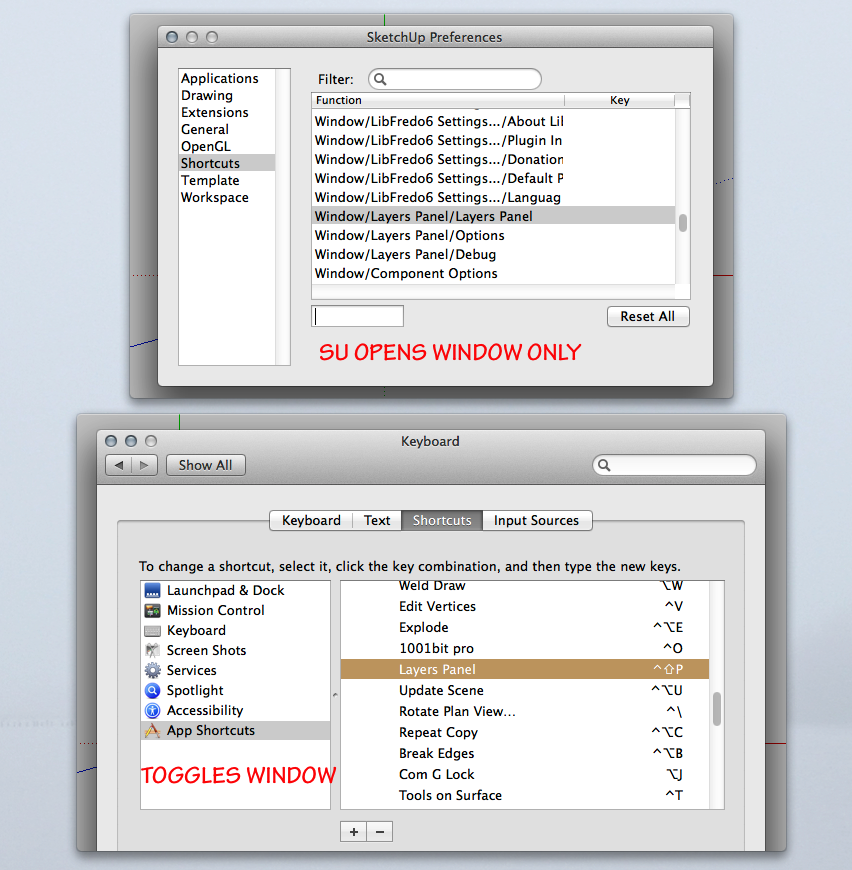

                                      LPW.png

                                      "To read between the lines was easier than to follow the text."OSX 10.11.6

                                      %(#BF80BF)[SU 8 pro

                                      1 條回覆 最後回覆 回覆 引用 0
                                      • JQLJ 離線
                                        JQL
                                        最後由 編輯

                                        @jiminy-billy-bob said:

                                        @jql said:

                                        I have a minor issue for you here. Win 7 SU 2014.

                                        Whow, this is weird. Does this happen in the same file that was previously causing you issues? Do you know how to reproduce this?

                                        It happened in the same file, I don't know how to reproduce it but it happened more than once. I will work on that same file this week so I'll let you know if anything strange happens.

                                        Thanks again and best regards,

                                        JQL

                                        www.casca.pt
                                        Visit us on facebook!

                                        1 條回覆 最後回覆 回覆 引用 0
                                        • F 離線
                                          fountainhead
                                          最後由 編輯

                                          Not sure if this is an intended function or not, but I accidently discovered today that holding down 'control' and scrolling causes the whole menu system to resize...that was unexpected, and very helpful. I can double the number of layers visible on the screen. Has this functionality always been there?

                                          1 條回覆 最後回覆 回覆 引用 0
                                          • F 離線
                                            fountainhead
                                            最後由 編輯

                                            Okay, nevermind. Did some looking, and apparently I've been living in the dark ages regarding control + mouse scroll functionality for about a zillion things. 😳

                                            1 條回覆 最後回覆 回覆 引用 0
                                            • 1
                                            • 2
                                            • 14
                                            • 15
                                            • 16
                                            • 17
                                            • 18
                                            • 33
                                            • 34
                                            • 16 / 34
                                            • 第一個貼文
                                              最後的貼文
                                            Buy SketchPlus
                                            Buy SUbD
                                            Buy WrapR
                                            Buy eBook
                                            Buy Modelur
                                            Buy Vertex Tools
                                            Buy SketchCuisine
                                            Buy FormFonts

                                            Advertisement