sketchucation logo sketchucation
    • Login
    Oops, your profile's looking a bit empty! To help us tailor your experience, please fill in key details like your SketchUp version, skill level, operating system, and more. Update and save your info on your profile page today!
    Mac User? | Join the Rayscaper Beta for Mac Learn More

    How to create a Mask in Layout

    Scheduled Pinned Locked Moved LayOut Discussions
    layout
    42 Posts 9 Posters 7.9k Views 9 Watching
    Loading More Posts
    • Oldest to Newest
    • Newest to Oldest
    • Most Votes
    Reply
    • Reply as topic
    Log in to reply
    This topic has been deleted. Only users with topic management privileges can see it.
    • Dave RD
      Dave R
      last edited by

      Mike, those are beautiful. πŸ‘

      Etaoin Shrdlu

      %

      (THERE'S NO PLACE LIKE)

      G28 X0.0 Y0.0 Z0.0

      M30

      %

      1 Reply Last reply
      Reply Quote 0
      • porch_unpluggedP
        porch_unplugged
        last edited by

        @bmike said:

        so how are you getting accurate dimensions in autocad by dimensioning jpgs?

        like dave said, to each his own, but i get accurate dimensions...

        maybe it's just me then.

        At the minute(and i've only really started the thought process really) I'm importing the jpegs with a scale bar and just scaling up to 1:1 in cad. like i said, i can't snap to the end points for dimensions, so for the minute i'm scaling off the sketchup model, and offsetting construction lines in cad to snap to. not ideal i know, and i think i'll probably have to revert to using dimensions in sketchup so they export with the jpegs. this is my first project doing it this way (sketchup to cad), so i'm making it up as i go along. still only in sketch design, so ultra accurate dimensions aren't required yet.

        1 Reply Last reply
        Reply Quote 0
        • Dave RD
          Dave R
          last edited by

          That just sounds like a lot of work to me. If it works for you, great. If I had to work that way I think I'd quit and do something else. πŸ˜‰

          Etaoin Shrdlu

          %

          (THERE'S NO PLACE LIKE)

          G28 X0.0 Y0.0 Z0.0

          M30

          %

          1 Reply Last reply
          Reply Quote 0
          • porch_unpluggedP
            porch_unplugged
            last edited by

            @dave r said:

            That just sounds like a lot of work to me. If it works for you, great. If I had to work that way I think I'd quit and do something else. πŸ˜‰

            It's not too bad, drawing out a clipping mask in layout sounds like a lot more work to me. Doesn't look like I'll be getting Pro and layout any time soon, so it'll have to do. πŸ˜„

            1 Reply Last reply
            Reply Quote 0
            • bmikeB
              bmike
              last edited by

              @porch_unplugged said:

              @dave r said:

              That just sounds like a lot of work to me. If it works for you, great. If I had to work that way I think I'd quit and do something else. πŸ˜‰

              It's not too bad, drawing out a clipping mask in layout sounds like a lot more work to me. Doesn't look like I'll be getting Pro and layout any time soon, so it'll have to do. πŸ˜„

              have a look at my layout overview.
              even if you don't go pro - there are lots of ways to setup your sketchup to streamline your workflow.

              mike beganyi design + consulting llc

              1 Reply Last reply
              Reply Quote 0
              • porch_unpluggedP
                porch_unplugged
                last edited by

                @pbacot said:

                Brian: Have you tried a dwg export or vector pdf to CAD? I think there a plugins for the dwg or dxf if you don't have pro.

                thought never crossed my mind, i'll look into it, thanks Peter.

                @bmike said:

                have a look at my layout overview.
                even if you don't go pro - there are lots of ways to setup your sketchup to streamline your workflow.

                I'm sure I've watched it already, but just waiting for it load again now (rubbish internet connection) Thanks Mike πŸ‘

                1 Reply Last reply
                Reply Quote 0
                • pbacotP
                  pbacot
                  last edited by

                  Brian: Have you tried a dwg export or vector pdf to CAD? I think there's a plugins for the dwg or dxf if you don't have pro.

                  MacOSX MojaveSketchUp Pro v19 Twilight v2 Thea v3 PowerCADD

                  1 Reply Last reply
                  Reply Quote 0
                  • P
                    penumbra
                    last edited by

                    How about this? What do you do when you have elements on an elevation that are not orthogonal with the view plane as in walls that are at an angle and receding away from the viewer?

                    1 Reply Last reply
                    Reply Quote 0
                    • Dave RD
                      Dave R
                      last edited by

                      What do you mean, "what do you do?" What would you do? Could you post an example?

                      Etaoin Shrdlu

                      %

                      (THERE'S NO PLACE LIKE)

                      G28 X0.0 Y0.0 Z0.0

                      M30

                      %

                      1 Reply Last reply
                      Reply Quote 0
                      • TIGT
                        TIG Moderator
                        last edited by

                        You could us Fog in SKP scene-tab or a Style with depth-cues - to show them feinter.
                        You could use a SectionPlane in the SKP scene-tab to hide everything towards the back of the model.
                        You could make a large white grouped vertical face on a special layer that's only on in that scene-tab, locate it to obscure the back of the model.
                        Or a shaped mask face overlaid in LayOut to hide them, or even made edgeless and translucent to show what's behind feinter.

                        There are many ways to achieve different effects - you choose or invent one that does what you want... πŸ˜•

                        TIG

                        1 Reply Last reply
                        Reply Quote 0
                        • P
                          penumbra
                          last edited by

                          Thanks tig. Very helpful.

                          1 Reply Last reply
                          Reply Quote 0
                          • pbacotP
                            pbacot
                            last edited by

                            Penumbra,

                            In common elevations, one should be able to see background elements of the building. Here is a masterful use of fog by Sonder, in SU and LO:
                            http://sketchucation.com/forums/download/file.php?id=80022&t=1
                            .

                            404 Not Found

                            favicon

                            (sketchucation.com)

                            Peter

                            MacOSX MojaveSketchUp Pro v19 Twilight v2 Thea v3 PowerCADD

                            1 Reply Last reply
                            Reply Quote 0
                            • P
                              penumbra
                              last edited by

                              Thanks Peter, i find fog difficult to control but once is setup right, looks great.

                              1 Reply Last reply
                              Reply Quote 0
                              • bmikeB
                                bmike
                                last edited by

                                @penumbra said:

                                Thanks Peter, i find fog difficult to control but once is setup right, looks great.

                                I find it difficult to use as well, likely operator error on my part.

                                mike beganyi design + consulting llc

                                1 Reply Last reply
                                Reply Quote 0
                                • TIGT
                                  TIG Moderator
                                  last edited by

                                  Use [and update] scene-tabs, styles etc to 'remember' your settings for fog, layers etc

                                  TIG

                                  1 Reply Last reply
                                  Reply Quote 0
                                  • S
                                    sonder
                                    last edited by

                                    Fog is really easy to use. I set it up always in SU saved to the scene. Once you understand how the two arrows work, it is really intuitive. I like to think of the two as - right arrow = overall fog thickness - thicker as you slide to the left. Left arrow = fog depth from view point to your model - gets thinner as you slide it towards the right arrow.

                                    I wish the fog in my brain were so easily controlled.

                                    1 Reply Last reply
                                    Reply Quote 0
                                    • bmikeB
                                      bmike
                                      last edited by

                                      @unknownuser said:

                                      Fog is really easy to use. I set it up always in SU saved to the scene. Once you understand how the two arrows work, it is really intuitive. I like to think of the two as - right arrow = overall fog thickness - thicker as you slide to the left. Left arrow = fog depth from view point to your model - gets thinner as you slide it towards the right arrow.

                                      I wish the fog in my brain were so easily controlled.

                                      Do you need a separate style anytime you change the arrows? Or is it remembered per scene like the shadows?

                                      mike beganyi design + consulting llc

                                      1 Reply Last reply
                                      Reply Quote 0
                                      • pbacotP
                                        pbacot
                                        last edited by

                                        @bmike said:

                                        Do you need a separate style anytime you change the arrows? Or is it remembered per scene like the shadows?

                                        Per Scene.
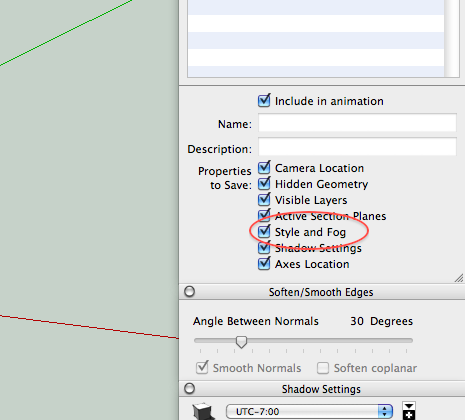

                                        Screen shot 2012-11-16 at 10.34.27 PM.png

                                        MacOSX MojaveSketchUp Pro v19 Twilight v2 Thea v3 PowerCADD

                                        1 Reply Last reply
                                        Reply Quote 0
                                        • S
                                          sonder
                                          last edited by

                                          Yes, it saves with the scene when updated after adjustment.

                                          1 Reply Last reply
                                          Reply Quote 0

                                          Hello! It looks like you're interested in this conversation, but you don't have an account yet.

                                          Getting fed up of having to scroll through the same posts each visit? When you register for an account, you'll always come back to exactly where you were before, and choose to be notified of new replies (either via email, or push notification). You'll also be able to save bookmarks and upvote posts to show your appreciation to other community members.

                                          With your input, this post could be even better πŸ’—

                                          Register Login
                                          • 1
                                          • 2
                                          • 3
                                          • 1 / 3
                                          • First post
                                            Last post
                                          Buy SketchPlus
                                          Buy SUbD
                                          Buy WrapR
                                          Buy eBook
                                          Buy Modelur
                                          Buy Vertex Tools
                                          Buy SketchCuisine
                                          Buy FormFonts

                                          Advertisement