sketchucation logo sketchucation
    • Login
    Oops, your profile's looking a bit empty! To help us tailor your experience, please fill in key details like your SketchUp version, skill level, operating system, and more. Update and save your info on your profile page today!
    ⚠️ Update | Sketchucation Tools 5.0.8 released with licensing improvements and bugfixes Download

    [Plugin] FredoTools::ThruPaint - v1.3a - 20 Oct 16

    Scheduled Pinned Locked Moved Plugins
    331 Posts 102 Posters 610.7k Views 102 Watching
    Loading More Posts
    • Oldest to Newest
    • Newest to Oldest
    • Most Votes
    Reply
    • Reply as topic
    Log in to reply
    This topic has been deleted. Only users with topic management privileges can see it.
    • fredo6F
      fredo6
      last edited by

      @jorge2011 said:

      fredo, thank you very much for this new update.

      A query. Is possible to copy the material properties (rotation, scale, etc ...) and paste those properties to other faces?

      You have the transfer UV mode, which allows to substitute a texture by another without changing the UVs.

      Otherwise, if the faces are adjacent to the painted faces, just click and drag to extend the painting.

      Fredo

      1 Reply Last reply
      Reply Quote 0
      • thomthomT
        thomthom
        last edited by

        @jorge2011 said:

        A query. Is possible to copy the material properties (rotation, scale, etc ...) and paste those properties to other faces?

        If the mesh is made out of Quads you can use QuadFace Tools to copy and paste UV mapping.

        Thomas Thomassen β€” SketchUp Monkey & Coding addict
        List of my plugins and link to the CookieWare fund

        1 Reply Last reply
        Reply Quote 0
        • J
          jorge2011
          last edited by

          thank you very much

          1 Reply Last reply
          Reply Quote 0
          • J
            jorge2011
            last edited by

            can be applied a methodology similar to native sketchup materials, using the "Alt" to copy the properties of a material?

            1 Reply Last reply
            Reply Quote 0
            • fredo6F
              fredo6
              last edited by

              @jorge2011 said:

              can be applied a methodology similar to native sketchup materials, using the "Alt" to copy the properties of a material?

              We cannot use ALT in scripts because when the key is UP it gives focus to the main Sketchup menu.
              But I can do it on Shift

              Note that you can also press the Enter key to sample the material under the mouse

              Fredo

              1 Reply Last reply
              Reply Quote 0
              • kenK
                ken
                last edited by

                Fredo

                I have updated as required Fredo Tools to 1.1n and Thru:Paint to 1.0n, however the Check Plugin for Updates still list the two programs as Fredo Tools as 1.1m and Thru:Paint as 1.0m.

                Am I making a mistake, or is the new programs not registering correctly?

                Thanks

                Ken

                Fight like your the third monkey on Noah's Ark gangway.

                1 Reply Last reply
                Reply Quote 0
                • OxerO
                  Oxer
                  last edited by

                  Hi Fredo, i'm testing the last revision of ThruPaint 1.0n on Mac (OSX 10.6.8 & SU8) all works fine except that you say in the main post about Material Selector but i have found other problem the arrows don't work on Mac, it is not a big problem because i can introduce the values through the Measures or Visual Edition Mode.
                  Thanks for this great plugin!! πŸ‘

                  "The result is the end what is important is the process" by Oxer
                  http://www.oxervision.blogspot.com/

                  1 Reply Last reply
                  Reply Quote 0
                  • fredo6F
                    fredo6
                    last edited by

                    @oxer said:

                    Hi Fredo, i'm testing the last revision of ThruPaint 1.0n on Mac (OSX 10.6.8 & SU8) all works fine except that you say in the main post about Material Selector but i have found other problem the arrows don't work on Mac, it is not a big problem because i can introduce the values through the Measures or Visual Edition Mode.
                    Thanks for this great plugin!! πŸ‘

                    Oxer,

                    Did it work in previous versions?
                    Or other Mac OS versions?

                    Thanks

                    Fredo

                    1 Reply Last reply
                    Reply Quote 0
                    • OxerO
                      Oxer
                      last edited by

                      @unknownuser said:

                      Oxer,

                      Did it work in previous versions?
                      Or other Mac OS versions?

                      Thanks

                      Fredo

                      No, it doesn't work in previous version.
                      I haven't probed other Mac OS versions.

                      "The result is the end what is important is the process" by Oxer
                      http://www.oxervision.blogspot.com/

                      1 Reply Last reply
                      Reply Quote 0
                      • P
                        Pherim
                        last edited by

                        This is really great, thank you for fulfilling my request!

                        It works great, just how I wanted it to. [[Just one small thing: It would be perfect to me if the "sample material" tool could also adopt the scale of the sampled material.
                        I hope I don't bother you with my daydreams... πŸ˜’]] edit: never mind, it works perfectly! πŸ‘

                        1 Reply Last reply
                        Reply Quote 0
                        • fredo6F
                          fredo6
                          last edited by

                          @oxer said:

                          No, it doesn't work in previous version.
                          I haven't probed other Mac OS versions.

                          Oxer,

                          Strange because it works for some other Mac users

                          Could you type in the Ruby Console

                          • VK_DOWN
                          • VK_UP
                          • VK_LEFT
                          • VK_RIGHT

                          Thanks

                          Fredo

                          1 Reply Last reply
                          Reply Quote 0
                          • OxerO
                            Oxer
                            last edited by

                            This is the result in the Ruby Console:
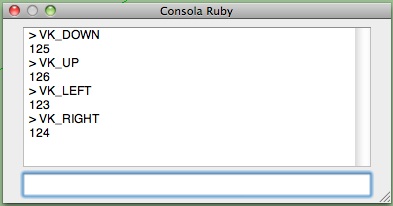
                            Ruby Console.jpg

                            "The result is the end what is important is the process" by Oxer
                            http://www.oxervision.blogspot.com/

                            1 Reply Last reply
                            Reply Quote 0
                            • M
                              moghamdi
                              last edited by

                              Thank you Fredo for this nice Plugin.

                              I have a problem

                              I have a Mac 10.6.8 and I cannot transform the texture. I tried all 3 ways you mentioned but they did not work.

                              1 Reply Last reply
                              Reply Quote 0
                              • fredo6F
                                fredo6
                                last edited by

                                @moghamdi said:

                                Thank you Fredo for this nice Plugin.

                                I have a problem

                                I have a Mac 10.6.8 and I cannot transform the texture. I tried all 3 ways you mentioned but they did not work.

                                Could you open the Ruby console and see if something is displayed.
                                It seems that the Arrows don't work on all Mac, but the VCB and Visual Editor should normally function correctly.

                                Thanks

                                Fredo

                                1 Reply Last reply
                                Reply Quote 0
                                • fredo6F
                                  fredo6
                                  last edited by

                                  @oxer said:

                                  This is the result in the Ruby Console:
                                  [attachment=0:23qhhc8q]<!-- ia0 -->Ruby Console.jpg<!-- ia0 -->[/attachment:23qhhc8q]

                                  Oxer,

                                  Thanks. Interesting to see that the value may be different depending on the Mac versions (on the Mac I have access to, VK_DOWN = 63233

                                  Anyway, ThruPaint only use the symbolic constant value VK_DOWN and therefore should not be impacted by the internal value of the Arrows constants.

                                  It seems also that several Mac users don't have any problem with the Arrows on Mac.

                                  Just in case, could you type in the Ruby Console Traductor.new_check_key(VK_DOWN, 0, 0).

                                  Also, when you try to exercise transformation by arrows on texture, could you leave the Ruby console open to see if an error message is displayed. Also, make sure that the focus is on the Sketchup window when typing the arrows.

                                  Thanks

                                  Fredo

                                  1 Reply Last reply
                                  Reply Quote 0
                                  • TIGT
                                    TIG Moderator
                                    last edited by

                                    In my scripts that use arrows keys I use this

                                    if RUBY_PLATFORM=~/mswin32/ ### PC
                                      KALXMINUS = 37          # Arrow Left Key 
                                      KARXPLUS  = 39          # Arrow Right Key 
                                      KAUYPLUS  = 38          # Arrow Up Key 
                                      KADYMINUS = 40          # Arrow Down Key 
                                      KSHIFT    = 16          # Shift Key 
                                    else### MAC
                                      KALXMINUS = 63234       # Arrow Left Key 
                                      KARXPLUS  = 63235       # Arrow Right Key 
                                      KAUYPLUS  = 63232       # Arrow Up Key 
                                      KADYMINUS = 63233       # Arrow Down Key 
                                      KSHIFT    = 131072      # Shift Key 
                                    end#if
                                    

                                    and then test key-down events etc against these 'constants'

                                    TIG

                                    1 Reply Last reply
                                    Reply Quote 0
                                    • thomthomT
                                      thomthom
                                      last edited by

                                      @tig said:

                                      In my scripts that use arrows keys I use this

                                      if RUBY_PLATFORM=~/mswin32/ ### PC
                                      >   KALXMINUS = 37          # Arrow Left Key 
                                      >   KARXPLUS  = 39          # Arrow Right Key 
                                      >   KAUYPLUS  = 38          # Arrow Up Key 
                                      >   KADYMINUS = 40          # Arrow Down Key 
                                      >   KSHIFT    = 16          # Shift Key 
                                      > else### MAC
                                      >   KALXMINUS = 63234       # Arrow Left Key 
                                      >   KARXPLUS  = 63235       # Arrow Right Key 
                                      >   KAUYPLUS  = 63232       # Arrow Up Key 
                                      >   KADYMINUS = 63233       # Arrow Down Key 
                                      >   KSHIFT    = 131072      # Shift Key 
                                      > end#if
                                      

                                      and then test key-down events etc against these 'constants'

                                      Why don't you use the built in constants? They should be reflecting the correct value based on the current OS. When you do it manually you have to keep updating it....
                                      ❓

                                      Thomas Thomassen β€” SketchUp Monkey & Coding addict
                                      List of my plugins and link to the CookieWare fund

                                      1 Reply Last reply
                                      Reply Quote 0
                                      • fredo6F
                                        fredo6
                                        last edited by

                                        @Thomthom: I agree with you and my scripts do use the built-in constants for Arrow (and Shift, Ctrl). This is why I don't understand why it does not work. I was just wondering why the VK_constants for Oxer where in the range 123-126 whereas on the Mac I can have access to there are in the range of 63232... One possibility is that another script redefines the constants VK_.... because as far as I know, there is only a single Mac release of Sketchup, and therefore of the Ruby API (unless the Ruby API check itself the version of Mac OS).

                                        @TIG: the values you show are correct for the Mac, as far as I knew them.

                                        Fredo

                                        1 Reply Last reply
                                        Reply Quote 0
                                        • thomthomT
                                          thomthom
                                          last edited by

                                          @unknownuser said:

                                          because as far as I know, there is only a single Mac release of Sketchup, and therefore of the Ruby API

                                          I assumed that SketchUp got the key code values from the system when it initialized the Ruby interpreter and abstracted them into these system-safe constants...

                                          Thomas Thomassen β€” SketchUp Monkey & Coding addict
                                          List of my plugins and link to the CookieWare fund

                                          1 Reply Last reply
                                          Reply Quote 0
                                          • R
                                            redog
                                            last edited by

                                            for me u are a genius in sketchup you can now manage the textures in an intelligent way. thanks fridoooooo. grazie 😍 πŸ‘ πŸ‘ 😍

                                            1 Reply Last reply
                                            Reply Quote 0

                                            Hello! It looks like you're interested in this conversation, but you don't have an account yet.

                                            Getting fed up of having to scroll through the same posts each visit? When you register for an account, you'll always come back to exactly where you were before, and choose to be notified of new replies (either via email, or push notification). You'll also be able to save bookmarks and upvote posts to show your appreciation to other community members.

                                            With your input, this post could be even better πŸ’—

                                            Register Login
                                            • 1
                                            • 2
                                            • 3
                                            • 4
                                            • 5
                                            • 6
                                            • 7
                                            • 16
                                            • 17
                                            • 5 / 17
                                            • First post
                                              Last post
                                            Buy SketchPlus
                                            Buy SUbD
                                            Buy WrapR
                                            Buy eBook
                                            Buy Modelur
                                            Buy Vertex Tools
                                            Buy SketchCuisine
                                            Buy FormFonts

                                            Advertisement