sketchucation logo sketchucation
    • 登入
    Oops, your profile's looking a bit empty! To help us tailor your experience, please fill in key details like your SketchUp version, skill level, operating system, and more. Update and save your info on your profile page today!
    🔌 Smart Spline | Fluid way to handle splines for furniture design and complex structures. Download

    [Plugin] FredoTools::ThruPaint - v1.3a - 20 Oct 16

    已排程 已置頂 已鎖定 已移動 Plugins
    331 貼文 102 Posters 537.7k 瀏覽 102 Watching
    正在載入更多貼文
    • 從舊到新
    • 從新到舊
    • 最多點贊
    回覆
    • 在新貼文中回覆
    登入後回覆
    此主題已被刪除。只有擁有主題管理權限的使用者可以查看。
    • pilouP 離線
      pilou
      最後由 編輯

      About the first option
      Yet existing for a multiple selection with normal use of SU?

      Frenchy Pilou
      Is beautiful that please without concept!
      My Little site :)

      1 條回覆 最後回覆 回覆 引用 0
      • J 離線
        jorge2011
        最後由 編輯

        fredo, thank you very much for this new update.

        A query. Is possible to copy the material properties (rotation, scale, etc ...) and paste those properties to other faces?

        1 條回覆 最後回覆 回覆 引用 0
        • EarthMoverE 離線
          EarthMover
          最後由 編輯

          Great update Fredo! This was my only issue with the tool. Now it is perfection!

          3D Artist at Clearstory 3D Imaging
          Guide Tool at Winning With Sketchup
          Content Creator at Skapeup

          1 條回覆 最後回覆 回覆 引用 0
          • fredo6F 離線
            fredo6
            最後由 編輯

            @jorge2011 said:

            fredo, thank you very much for this new update.

            A query. Is possible to copy the material properties (rotation, scale, etc ...) and paste those properties to other faces?

            You have the transfer UV mode, which allows to substitute a texture by another without changing the UVs.

            Otherwise, if the faces are adjacent to the painted faces, just click and drag to extend the painting.

            Fredo

            1 條回覆 最後回覆 回覆 引用 0
            • thomthomT 離線
              thomthom
              最後由 編輯

              @jorge2011 said:

              A query. Is possible to copy the material properties (rotation, scale, etc ...) and paste those properties to other faces?

              If the mesh is made out of Quads you can use QuadFace Tools to copy and paste UV mapping.

              Thomas Thomassen — SketchUp Monkey & Coding addict
              List of my plugins and link to the CookieWare fund

              1 條回覆 最後回覆 回覆 引用 0
              • J 離線
                jorge2011
                最後由 編輯

                thank you very much

                1 條回覆 最後回覆 回覆 引用 0
                • J 離線
                  jorge2011
                  最後由 編輯

                  can be applied a methodology similar to native sketchup materials, using the "Alt" to copy the properties of a material?

                  1 條回覆 最後回覆 回覆 引用 0
                  • fredo6F 離線
                    fredo6
                    最後由 編輯

                    @jorge2011 said:

                    can be applied a methodology similar to native sketchup materials, using the "Alt" to copy the properties of a material?

                    We cannot use ALT in scripts because when the key is UP it gives focus to the main Sketchup menu.
                    But I can do it on Shift

                    Note that you can also press the Enter key to sample the material under the mouse

                    Fredo

                    1 條回覆 最後回覆 回覆 引用 0
                    • kenK 離線
                      ken
                      最後由 編輯

                      Fredo

                      I have updated as required Fredo Tools to 1.1n and Thru:Paint to 1.0n, however the Check Plugin for Updates still list the two programs as Fredo Tools as 1.1m and Thru:Paint as 1.0m.

                      Am I making a mistake, or is the new programs not registering correctly?

                      Thanks

                      Ken

                      Fight like your the third monkey on Noah's Ark gangway.

                      1 條回覆 最後回覆 回覆 引用 0
                      • OxerO 離線
                        Oxer
                        最後由 編輯

                        Hi Fredo, i'm testing the last revision of ThruPaint 1.0n on Mac (OSX 10.6.8 & SU8) all works fine except that you say in the main post about Material Selector but i have found other problem the arrows don't work on Mac, it is not a big problem because i can introduce the values through the Measures or Visual Edition Mode.
                        Thanks for this great plugin!! 👍

                        "The result is the end what is important is the process" by Oxer
                        http://www.oxervision.blogspot.com/

                        1 條回覆 最後回覆 回覆 引用 0
                        • fredo6F 離線
                          fredo6
                          最後由 編輯

                          @oxer said:

                          Hi Fredo, i'm testing the last revision of ThruPaint 1.0n on Mac (OSX 10.6.8 & SU8) all works fine except that you say in the main post about Material Selector but i have found other problem the arrows don't work on Mac, it is not a big problem because i can introduce the values through the Measures or Visual Edition Mode.
                          Thanks for this great plugin!! 👍

                          Oxer,

                          Did it work in previous versions?
                          Or other Mac OS versions?

                          Thanks

                          Fredo

                          1 條回覆 最後回覆 回覆 引用 0
                          • OxerO 離線
                            Oxer
                            最後由 編輯

                            @unknownuser said:

                            Oxer,

                            Did it work in previous versions?
                            Or other Mac OS versions?

                            Thanks

                            Fredo

                            No, it doesn't work in previous version.
                            I haven't probed other Mac OS versions.

                            "The result is the end what is important is the process" by Oxer
                            http://www.oxervision.blogspot.com/

                            1 條回覆 最後回覆 回覆 引用 0
                            • P 離線
                              Pherim
                              最後由 編輯

                              This is really great, thank you for fulfilling my request!

                              It works great, just how I wanted it to. [[Just one small thing: It would be perfect to me if the "sample material" tool could also adopt the scale of the sampled material.
                              I hope I don't bother you with my daydreams... 😒]] edit: never mind, it works perfectly! 👍

                              1 條回覆 最後回覆 回覆 引用 0
                              • fredo6F 離線
                                fredo6
                                最後由 編輯

                                @oxer said:

                                No, it doesn't work in previous version.
                                I haven't probed other Mac OS versions.

                                Oxer,

                                Strange because it works for some other Mac users

                                Could you type in the Ruby Console

                                • VK_DOWN
                                • VK_UP
                                • VK_LEFT
                                • VK_RIGHT

                                Thanks

                                Fredo

                                1 條回覆 最後回覆 回覆 引用 0
                                • OxerO 離線
                                  Oxer
                                  最後由 編輯

                                  This is the result in the Ruby Console:
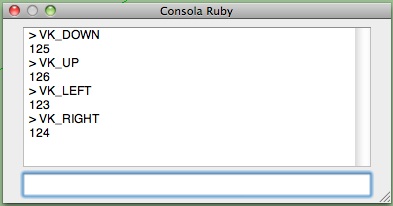
                                  Ruby Console.jpg

                                  "The result is the end what is important is the process" by Oxer
                                  http://www.oxervision.blogspot.com/

                                  1 條回覆 最後回覆 回覆 引用 0
                                  • M 離線
                                    moghamdi
                                    最後由 編輯

                                    Thank you Fredo for this nice Plugin.

                                    I have a problem

                                    I have a Mac 10.6.8 and I cannot transform the texture. I tried all 3 ways you mentioned but they did not work.

                                    1 條回覆 最後回覆 回覆 引用 0
                                    • fredo6F 離線
                                      fredo6
                                      最後由 編輯

                                      @moghamdi said:

                                      Thank you Fredo for this nice Plugin.

                                      I have a problem

                                      I have a Mac 10.6.8 and I cannot transform the texture. I tried all 3 ways you mentioned but they did not work.

                                      Could you open the Ruby console and see if something is displayed.
                                      It seems that the Arrows don't work on all Mac, but the VCB and Visual Editor should normally function correctly.

                                      Thanks

                                      Fredo

                                      1 條回覆 最後回覆 回覆 引用 0
                                      • fredo6F 離線
                                        fredo6
                                        最後由 編輯

                                        @oxer said:

                                        This is the result in the Ruby Console:
                                        [attachment=0:23qhhc8q]<!-- ia0 -->Ruby Console.jpg<!-- ia0 -->[/attachment:23qhhc8q]

                                        Oxer,

                                        Thanks. Interesting to see that the value may be different depending on the Mac versions (on the Mac I have access to, VK_DOWN = 63233

                                        Anyway, ThruPaint only use the symbolic constant value VK_DOWN and therefore should not be impacted by the internal value of the Arrows constants.

                                        It seems also that several Mac users don't have any problem with the Arrows on Mac.

                                        Just in case, could you type in the Ruby Console Traductor.new_check_key(VK_DOWN, 0, 0).

                                        Also, when you try to exercise transformation by arrows on texture, could you leave the Ruby console open to see if an error message is displayed. Also, make sure that the focus is on the Sketchup window when typing the arrows.

                                        Thanks

                                        Fredo

                                        1 條回覆 最後回覆 回覆 引用 0
                                        • TIGT 離線
                                          TIG Moderator
                                          最後由 編輯

                                          In my scripts that use arrows keys I use this

                                          if RUBY_PLATFORM=~/mswin32/ ### PC
                                            KALXMINUS = 37          # Arrow Left Key 
                                            KARXPLUS  = 39          # Arrow Right Key 
                                            KAUYPLUS  = 38          # Arrow Up Key 
                                            KADYMINUS = 40          # Arrow Down Key 
                                            KSHIFT    = 16          # Shift Key 
                                          else### MAC
                                            KALXMINUS = 63234       # Arrow Left Key 
                                            KARXPLUS  = 63235       # Arrow Right Key 
                                            KAUYPLUS  = 63232       # Arrow Up Key 
                                            KADYMINUS = 63233       # Arrow Down Key 
                                            KSHIFT    = 131072      # Shift Key 
                                          end#if
                                          

                                          and then test key-down events etc against these 'constants'

                                          TIG

                                          1 條回覆 最後回覆 回覆 引用 0
                                          • thomthomT 離線
                                            thomthom
                                            最後由 編輯

                                            @tig said:

                                            In my scripts that use arrows keys I use this

                                            if RUBY_PLATFORM=~/mswin32/ ### PC
                                            >   KALXMINUS = 37          # Arrow Left Key 
                                            >   KARXPLUS  = 39          # Arrow Right Key 
                                            >   KAUYPLUS  = 38          # Arrow Up Key 
                                            >   KADYMINUS = 40          # Arrow Down Key 
                                            >   KSHIFT    = 16          # Shift Key 
                                            > else### MAC
                                            >   KALXMINUS = 63234       # Arrow Left Key 
                                            >   KARXPLUS  = 63235       # Arrow Right Key 
                                            >   KAUYPLUS  = 63232       # Arrow Up Key 
                                            >   KADYMINUS = 63233       # Arrow Down Key 
                                            >   KSHIFT    = 131072      # Shift Key 
                                            > end#if
                                            

                                            and then test key-down events etc against these 'constants'

                                            Why don't you use the built in constants? They should be reflecting the correct value based on the current OS. When you do it manually you have to keep updating it....
                                            ❓

                                            Thomas Thomassen — SketchUp Monkey & Coding addict
                                            List of my plugins and link to the CookieWare fund

                                            1 條回覆 最後回覆 回覆 引用 0
                                            • 1
                                            • 2
                                            • 3
                                            • 4
                                            • 5
                                            • 16
                                            • 17
                                            • 3 / 17
                                            • 第一個貼文
                                              最後的貼文
                                            Buy SketchPlus
                                            Buy SUbD
                                            Buy WrapR
                                            Buy eBook
                                            Buy Modelur
                                            Buy Vertex Tools
                                            Buy SketchCuisine
                                            Buy FormFonts

                                            Advertisement





