sketchucation logo sketchucation
    • 登入
    Oops, your profile's looking a bit empty! To help us tailor your experience, please fill in key details like your SketchUp version, skill level, operating system, and more. Update and save your info on your profile page today!
    🔌 Smart Spline | Fluid way to handle splines for furniture design and complex structures. Download

    [Plugin] Honeycomber

    已排程 已置頂 已鎖定 已移動 Plugins
    91 貼文 21 Posters 54.5k 瀏覽 21 Watching
    正在載入更多貼文
    • 從舊到新
    • 從新到舊
    • 最多點贊
    回覆
    • 在新貼文中回覆
    登入後回覆
    此主題已被刪除。只有擁有主題管理權限的使用者可以查看。
    • TIGT 離線
      TIG Moderator
      最後由 編輯

      Guanjin

      The more geometry there is the slower the processing.
      It's inevitable. 😕
      Set it running and make some tea...

      TIG

      1 條回覆 最後回覆 回覆 引用 0
      • guanjinG 離線
        guanjin
        最後由 編輯

        @tig said:

        Guanjin

        The more geometry there is the slower the processing.
        It's inevitable. 😕
        Set it running an make some tea...

        Thank you of TIG: you have worked hard, so many good tools for free use, you are great! 👍 👍

        I come from China, is to learn

        1 條回覆 最後回覆 回覆 引用 0
        • EscapeArtistE 離線
          EscapeArtist
          最後由 編輯

          Awesome plugin. I have enjoyed using it so far, just experimenting.

          I have noticed it will hang if I breathe wrong when applying a large number of perforations. I can't tab to another program, it will simply lock SU up.

          An idea - would it be possible to add a "random" or mathematical feature to the spacing and size? I.e., between 1" to 1'? Add a rotation feature, i.e. each new unit rotates 10 degrees "X", 5 "Y" and 12 "Z" (all 3 axis?), and finally to use one's own model as the subtracted shape?

          I realize this may be completely prohibitive by SU's single core use and the added complexity of any intersections, but just a thought. One could come up with almost fractal-like iterations in a medium with these options.

          1 條回覆 最後回覆 回覆 引用 0
          • TIGT 離線
            TIG Moderator
            最後由 編輯

            It's almost certainly not 'hanging'.
            It just takes ages to process and left to its own devices it will complete [eventually!]
            Use the Task Manager to see that Sketchup is still processing away, although the screen has a 'white-out' - it's one of the quirks of SUp, when it's doing intensive calculations it looses the screen...
            It does take a while to make all of the changes to the geometry - have patience...

            I do have some recoding ideas to speed it up [a little], but testing takes time too...

            TIG

            1 條回覆 最後回覆 回覆 引用 0
            • I 離線
              ideas_arte
              最後由 編輯

              @tig said:

              It is for v8-Pro only.

              😳 "Free" users will have any chance of using this excellent tool?

              Best regards!

              1 條回覆 最後回覆 回覆 引用 0
              • TIGT 離線
                TIG Moderator
                最後由 編輯

                v8-Pro only because it uses several API techniques only accessible to Pro - sorry...

                TIG

                1 條回覆 最後回覆 回覆 引用 0
                • TIGT 離線
                  TIG Moderator
                  最後由 編輯

                  Here's v1.3 http://forums.sketchucation.com/viewtopic.php?p=395061#p395061
                  The speed has been improved by ~4x.
                  The 'shell' version still takes ~4x longer than an un-shelled version because of the many extra steps required - but while ~15 minutes is worse that ~4minutes, it is better than ~60 minutes !!
                  Some minor glitches have also been fixed with 3-sided setting out centrally.

                  TIG

                  1 條回覆 最後回覆 回覆 引用 0
                  • I 離線
                    ideas_arte
                    最後由 編輯

                    @tig said:

                    sorry...

                    I understand. 😒 Thank you for all the good work. My best wishes for you

                    1 條回覆 最後回覆 回覆 引用 0
                    • guanjinG 離線
                      guanjin
                      最後由 編輯

                      @tig said:

                      Here's v1.3 http://forums.sketchucation.com/viewtopic.php?p=395061#p395061
                      The speed has been improved by ~4x.
                      The 'shell' version still takes ~4x longer than an un-shelled version because of the many extra steps required - but while ~15 minutes is worse that ~4minutes, it is better than ~60 minutes !!
                      Some minor glitches have also been fixed with 3-sided setting out centrally.

                      Thank of TIG: Speed ​​is the key, to test the new file。

                      I come from China, is to learn

                      1 條回覆 最後回覆 回覆 引用 0
                      • D 離線
                        dtolios
                        最後由 編輯

                        Amazing work, great potential for this tool...
                        Unfortunately is too slow for some of the complex shapes I had in mind, but I have trust that it will get better overtime (and yeah, my mobile i7 is not the fastest processor anyways...)

                        1 條回覆 最後回覆 回覆 引用 0
                        • charly2008C 離線
                          charly2008
                          最後由 編輯

                          TIG, you have once again created a surprising and promising tool. Thank you.
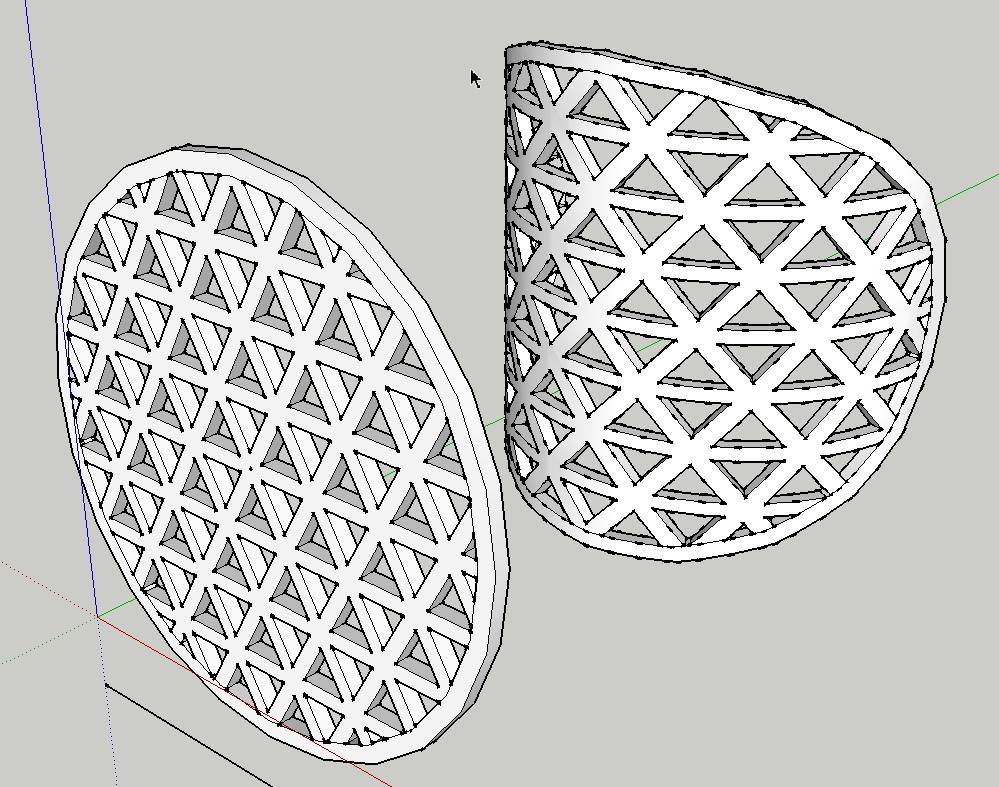

                          2012-04-28_145245.jpg

                          He who makes no mistakes, makes nothing

                          1 條回覆 最後回覆 回覆 引用 0
                          • S 離線
                            SUFractal
                            最後由 編輯

                            @charly2008 said:

                            TIG, you have once again created a surprising and promising tool. Thank you.

                            I'm curious as to how long it took you to create this?

                            1 條回覆 最後回覆 回覆 引用 0
                            • TIGT 離線
                              TIG Moderator
                              最後由 編輯

                              @sufractal said:

                              @charly2008 said:

                              TIG, you have once again created a surprising and promising tool. Thank you.

                              I'm curious as to how long it took you to create this?
                              I reproduced it [badly!]
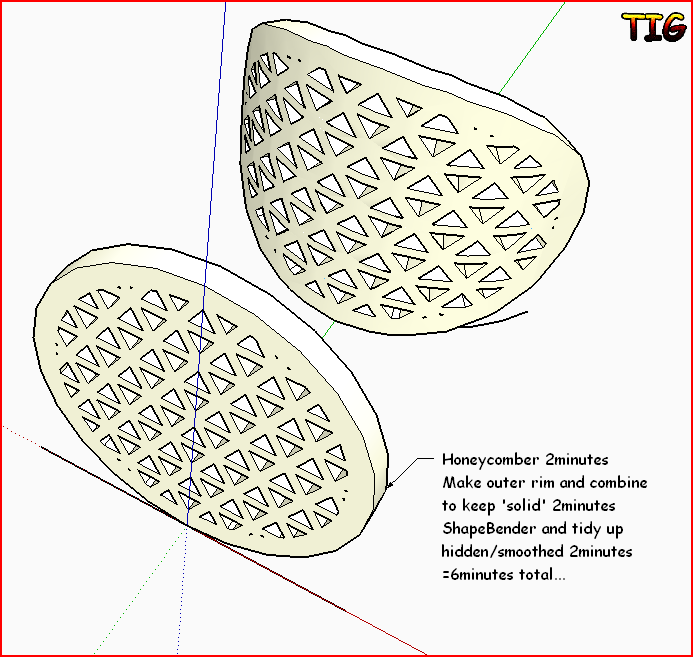

                              Capture.PNG

                              TIG

                              1 條回覆 最後回覆 回覆 引用 0
                              • EscapeArtistE 離線
                                EscapeArtist
                                最後由 編輯

                                Just tried the updated version. Very nice, considerably faster!

                                1 條回覆 最後回覆 回覆 引用 0
                                • T 離線
                                  thraxx2
                                  最後由 編輯

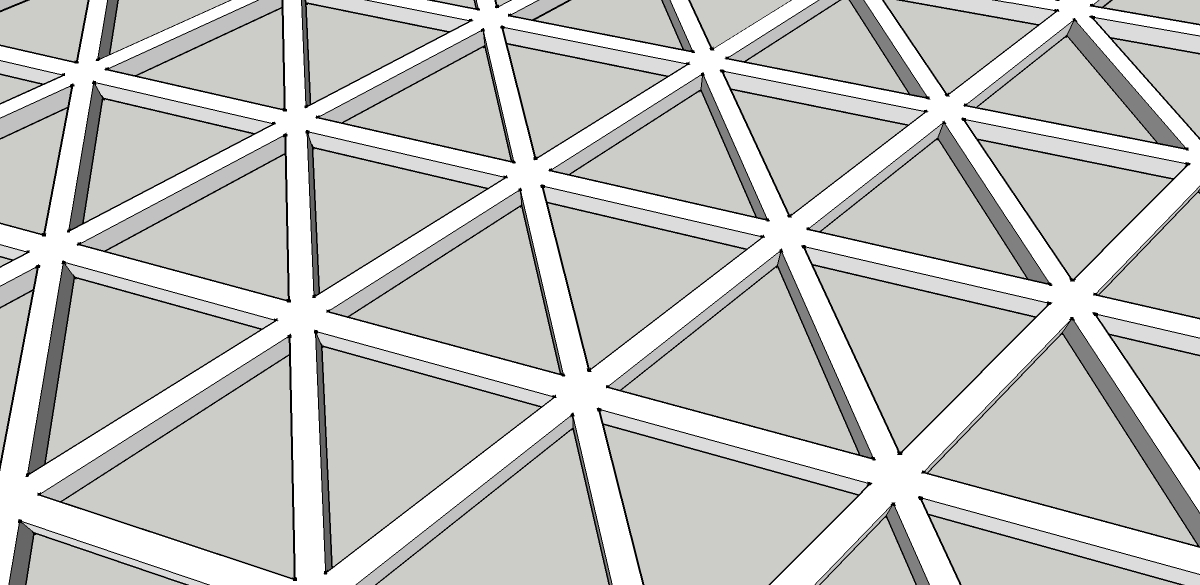
                                  Hi everyone, i just need a little help here, trying to model up something which I can't. So here it goes:

                                  1. I used honeyecomber to get the normal triangle tessellation. (first image)
                                  2. I want to bend it and shape it like this! (second image)

                                  I have been trying lots of ways i can think of but to no avail. thanks guys!

                                  Gerald.

                                  1.jpg


                                  2.jpg

                                  1 條回覆 最後回覆 回覆 引用 0
                                  • JBJDesignsJ 離線
                                    JBJDesigns
                                    最後由 編輯

                                    Hi TIG!

                                    What an awesome tool! Unfortunately, I'm stuck with SketchUp8 (free). Is there anyway to make this tool work in the free version. If not, I understand.

                                    Thanks for replying!

                                    Jo 😄

                                    ...you send them to school, you give them books, and they eat the pages...

                                    1 條回覆 最後回覆 回覆 引用 0
                                    • cottyC 離線
                                      cotty
                                      最後由 編輯

                                      The plugin uses solid functions, which are only available in the PRO version. So I think there will be no (simple and practicable) way for him to change this...

                                      my SketchUp gallery

                                      1 條回覆 最後回覆 回覆 引用 0
                                      • OxerO 離線
                                        Oxer
                                        最後由 編輯

                                        Hi TIG,
                                        After much time with the problem on Mac, I can say you the plugin works fine!!
                                        Thanks for the update. 👍

                                        "The result is the end what is important is the process" by Oxer
                                        http://www.oxervision.blogspot.com/

                                        1 條回覆 最後回覆 回覆 引用 0
                                        • S 離線
                                          Skutvik
                                          最後由 編輯

                                          Hi TIG,

                                          is there any way not pro users can get this pluggin?

                                          1 條回覆 最後回覆 回覆 引用 0
                                          • S 離線
                                            slave
                                            最後由 編輯

                                            Hi,

                                            any updates to get this plugin to work with SU2017?

                                            Regards
                                            Slave

                                            1 條回覆 最後回覆 回覆 引用 0
                                            • 1
                                            • 2
                                            • 3
                                            • 4
                                            • 5
                                            • 2 / 5
                                            • 第一個貼文
                                              最後的貼文
                                            Buy SketchPlus
                                            Buy SUbD
                                            Buy WrapR
                                            Buy eBook
                                            Buy Modelur
                                            Buy Vertex Tools
                                            Buy SketchCuisine
                                            Buy FormFonts

                                            Advertisement