sketchucation logo sketchucation
    • 登入
    Oops, your profile's looking a bit empty! To help us tailor your experience, please fill in key details like your SketchUp version, skill level, operating system, and more. Update and save your info on your profile page today!
    🔌 Smart Spline | Fluid way to handle splines for furniture design and complex structures. Download

    A quest for better understanding of textures

    已排程 已置頂 已鎖定 已移動 V-Ray
    renderpluginsextensions
    39 貼文 15 Posters 123.6k 瀏覽 15 Watching
    正在載入更多貼文
    • 從舊到新
    • 從新到舊
    • 最多點贊
    回覆
    • 在新貼文中回覆
    登入後回覆
    此主題已被刪除。只有擁有主題管理權限的使用者可以查看。
    • broomstickB 離線
      broomstick
      最後由 編輯

      @thomthom said:

      Only at render time. SketchUp has no knowledge of how V-Ray materials are designed.

      So how does this make them usable?? Maybe I'm just too used to using vray materials in 3d studio max!

      1 條回覆 最後回覆 回覆 引用 0
      • thomthomT 離線
        thomthom
        最後由 編輯

        @broomstick said:

        @thomthom said:

        Only at render time. SketchUp has no knowledge of how V-Ray materials are designed.

        So how does this make them usable?? Maybe I'm just too used to using vray materials in 3d studio max!

        Make use of the preview feature in VfSU's material editor (it's not great I know) or make small test scenes. I've done similar tests before to visualize these V-Ray textures and used several of them in my project.

        Thomas Thomassen — SketchUp Monkey & Coding addict
        List of my plugins and link to the CookieWare fund

        1 條回覆 最後回覆 回覆 引用 0
        • pyrolunaP 離線
          pyroluna
          最後由 編輯

          I did some test with the procedural texture for wood. The variable 'center_v' seems to have the most influence on the texture size.
          It is a 3d texture, I think that means that the object cuts through the texture somehow. It reminds me of the old days with POV-ray - which has extensive documentation on all of its functions, including its procedural wood texture. (although I'm not sure wether or not they are mathematically the same)
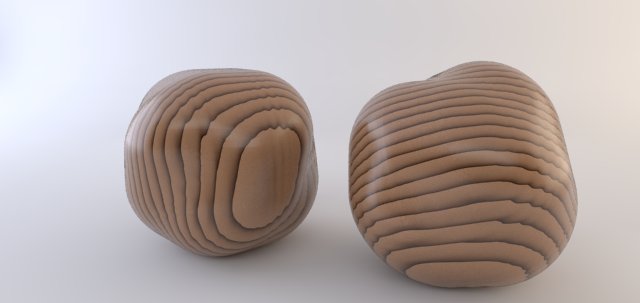
          wood_thingies.jpg


          wood_procedural.vismat

          1 條回覆 最後回覆 回覆 引用 0
          • thomthomT 離線
            thomthom
            最後由 編輯

            That's a nice sample. Thanks! 👍

            Thomas Thomassen — SketchUp Monkey & Coding addict
            List of my plugins and link to the CookieWare fund

            1 條回覆 最後回覆 回覆 引用 0
            • eidam655E 離線
              eidam655
              最後由 編輯

              wow, thanks for this 😄

              another thing i discovered is that with 'use_3d_mapping' checked (ie. it's ON), the result is just like you showed us; however, if you uncheck it, you'll get a texture of the wood end. demonstrating on your material:

              http://i.imgur.com/VZzrB.jpg

              however, i couldn't get center_v get to change the scale on my textures. i would say that center_u and _v define the center position of the texture, so i don't think this would affect the size... more testing is needed though.

              http://i.imgur.com/Gwu0Q.jpg

              strange thing is that even when in the TexWood preview window something is happening, in the material preview and in the render not so many things change...

              I'm using SketchUp 2017, V-Ray 3.4

              1 條回覆 最後回覆 回覆 引用 0
              • pyrolunaP 離線
                pyroluna
                最後由 編輯

                Oh yeah also this; the placement is dependent on the origin of the model or component. I'm not exactly sure how the difference between applying a material to a face or to a component is in play, but the component axes thing is clearly demonstrated in the example below:
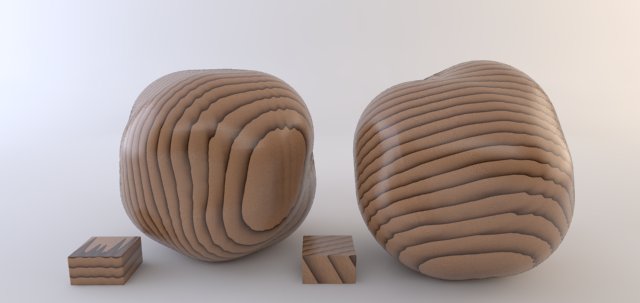
                wood_thingies2.jpg

                In this image, the two little blocks on the floor are the same component - one of them made unique and the axes of that one have been put at an angle of 45 degrees in two directions.
                As for the balls, they are the same component, one of them is rotated.
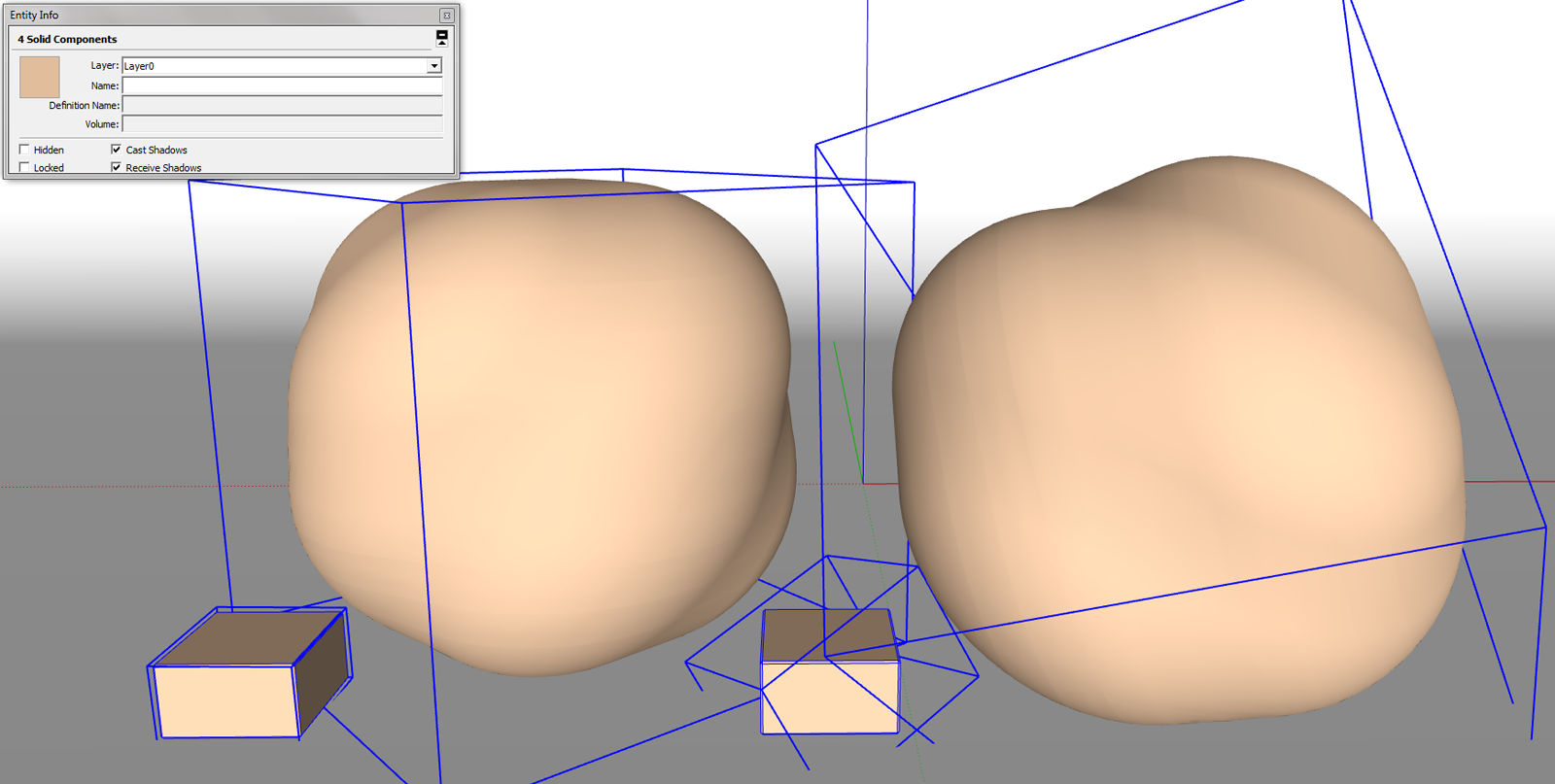
                wooden balls.png

                1 條回覆 最後回覆 回覆 引用 0
                • eidam655E 離線
                  eidam655
                  最後由 編輯

                  just for reference, how big are your... items? ('balls' would seem inappropriate ^^)

                  my sphere is 2,646m in diameter.

                  I'm using SketchUp 2017, V-Ray 3.4

                  1 條回覆 最後回覆 回覆 引用 0
                  • pyrolunaP 離線
                    pyroluna
                    最後由 編輯

                    the big ones are 470mm in diameter, the little blocks are 100mm

                    1 條回覆 最後回覆 回覆 引用 0
                    • broomstickB 離線
                      broomstick
                      最後由 編輯

                      may I publish here a little tutorial on how to use the Vray Blend Material?

                      It's useful to have bump maps without a diffuse texture (sort of)

                      1 條回覆 最後回覆 回覆 引用 0
                      • eidam655E 離線
                        eidam655
                        最後由 編輯

                        sure, please, go ahead 😄

                        I'm using SketchUp 2017, V-Ray 3.4

                        1 條回覆 最後回覆 回覆 引用 0
                        • thomthomT 離線
                          thomthom
                          最後由 編輯

                          @broomstick said:

                          may I publish here a little tutorial on how to use the Vray Blend Material?

                          It's useful to have bump maps without a diffuse texture (sort of)

                          Yes. But please post in a new thread, and tag it [Tutorial] so it's easier to find.

                          Thomas Thomassen — SketchUp Monkey & Coding addict
                          List of my plugins and link to the CookieWare fund

                          1 條回覆 最後回覆 回覆 引用 0
                          • broomstickB 離線
                            broomstick
                            最後由 編輯

                            @thomthom said:

                            @broomstick said:

                            may I publish here a little tutorial on how to use the Vray Blend Material?

                            It's useful to have bump maps without a diffuse texture (sort of)

                            Yes. But please post in a new thread, and tag it [Tutorial] so it's easier to find.

                            Gotcha 😉

                            1 條回覆 最後回覆 回覆 引用 0
                            • panixiaP 線上
                              panixia
                              最後由 編輯

                              @broomstick said:

                              may I publish here a little tutorial on how to use the Vray Blend Material?

                              It's useful to have bump maps without a diffuse texture (sort of)

                              yes you can!
                              😍

                              1 條回覆 最後回覆 回覆 引用 0
                              • john2J 離線
                                john2
                                最後由 編輯

                                @eidam655 said:

                                hello winGman,

                                create a material, open it in material editor:
                                [attachment=1:bo417hjm]<!-- ia1 -->texgrid_tut_1.png<!-- ia1 -->[/attachment:bo417hjm]
                                assign the TexGrid texture to the Diffuse channel (or some other channel, depending on your desired usage) and try to play around with the UV repeat values to adjust its size:
                                [attachment=2:bo417hjm]<!-- ia2 -->texgrid_tut_2.png<!-- ia2 -->[/attachment:bo417hjm]

                                after this, my render looks like this:
                                [attachment=0:bo417hjm]<!-- ia0 -->texgrid_tut.png<!-- ia0 -->[/attachment:bo417hjm]

                                and that should be it 😄

                                is there anyway we can change multiplier by measuring tilesize. ? this would be useful while making bump maps for tiles divided in a grid. say if i want tilesize 300mm by 300mm how can i do it?

                                Sketchup Make 2017 (64-bit), Vray 4.0 , Windows 10 – 64 bit, corei7-8750H, 16GB RAM, Nvidia GeForce GTX 1050Ti 4GB

                                1 條回覆 最後回覆 回覆 引用 0
                                • panixiaP 線上
                                  panixia
                                  最後由 編輯

                                  @eidam655 said:

                                  • rock/noise pattern. is not affected by UV repeat values.

                                  • smoke/noise pattern. is not affected by UV repeat values.

                                  • snow/noise pattern with alternating alpha. is not affected by UV repeat values.

                                  • speckle/noise pattern. is not affected by UV repeat values.

                                  • splat/noise pattern. is not affected by UV repeat values.

                                  • presumably stucco/noise pattern. is not affected by UV repeat values. sadly,

                                  • is not affected by UV repeat values. in fact, it's the same case as with Stucco. a

                                  • is not affected by UV repeat values. i

                                  my 50 cents to help your quest. 💭
                                  recently i discovered that for the textures rock - stucco - smoke - snow - speckle - splat - water you should untick "use 3d mapping" to enable UV tiling control. 👍

                                  1 條回覆 最後回覆 回覆 引用 0
                                  • J 離線
                                    jackwatson
                                    最後由 編輯

                                    Has anyone ever come across any clear documentation for all of these effects? The fact that there are so many cool procedural maps available, but the tutorials for how to utilise them are not seems a waste.

                                    I've spent a good few hours playing around with them before but managed to get no practical use out of them because, as you know, with all the variables you can change it would take weeks or months to learn anything through trial an error.

                                    This is probably less of an issue for Max users who tend to have had some kind of professional training, but those who use Sketchup for visualisation are at the shallow end of the visualisation pool are largely self trained I imagine. (Along with using amazing resources such as Sketchucation, of course 😉)

                                    1 條回覆 最後回覆 回覆 引用 0
                                    • eidam655E 離線
                                      eidam655
                                      最後由 編輯

                                      well, at least i haven't, that's why i opened this thread 😄

                                      I'm using SketchUp 2017, V-Ray 3.4

                                      1 條回覆 最後回覆 回覆 引用 0
                                      • B 離線
                                        bbergem
                                        最後由 編輯

                                        Do the original images to this thread still exist? I've been looking for this information on vray materials for a while, and this is the most promising result.. but it seems the image links are no longer valid? Or, can the information be found elsewhere?

                                        1 條回覆 最後回覆 回覆 引用 0
                                        • eidam655E 離線
                                          eidam655
                                          最後由 編輯

                                          hm, it seems my access to the old server got taken down (or my files have).

                                          i'll try to find the images somewhere in my backups... however, all of these were for vray 1.49 and the question is how relevant they still are.

                                          but as i said, i'll try to find them, just in case the were.

                                          I'm using SketchUp 2017, V-Ray 3.4

                                          1 條回覆 最後回覆 回覆 引用 0
                                          • NemesisN 離線
                                            Nemesis
                                            最後由 編輯

                                            @eidam655 said:

                                            hm, it seems my access to the old server got taken down (or my files have).

                                            i'll try to find the images somewhere in my backups... however, all of these were for vray 1.49 and the question is how relevant they still are.

                                            but as i said, i'll try to find them, just in case the were.

                                            Hi eidam655, are there any chances that you have found images from the first message?

                                            1 條回覆 最後回覆 回覆 引用 0
                                            • 1
                                            • 2
                                            • 2 / 2
                                            • 第一個貼文
                                              最後的貼文
                                            Buy SketchPlus
                                            Buy SUbD
                                            Buy WrapR
                                            Buy eBook
                                            Buy Modelur
                                            Buy Vertex Tools
                                            Buy SketchCuisine
                                            Buy FormFonts

                                            Advertisement