sketchucation logo sketchucation
    • 登入
    Oops, your profile's looking a bit empty! To help us tailor your experience, please fill in key details like your SketchUp version, skill level, operating system, and more. Update and save your info on your profile page today!
    🔌 Easy Offset | Offset selected faces in SketchUp in positive and negative offsets. Download

    [Plugin] TextureTools

    已排程 已置頂 已鎖定 已移動 Plugins
    106 貼文 34 Posters 103.4k 瀏覽 34 Watching
    正在載入更多貼文
    • 從舊到新
    • 從新到舊
    • 最多點贊
    回覆
    • 在新貼文中回覆
    登入後回覆
    此主題已被刪除。只有擁有主題管理權限的使用者可以查看。
    • D 離線
      driven
      最後由 編輯

      @tig said:

      feedback please - especially MAC users as I'm not sure about the key-codes...

      KeyCodes UP, Down, Left, Right work on 10.5.8, and I changed KSHIFT = VK_SHIFT to get shift to work

      I'll read the instructions now that I've worked out that you have to apply material to the front face for it to work at all.

      Is an alert possible for back face materials, I was trying to adjust texture on a LiveIvy skp and some are front face and some back face and I couldn't figure why TR was working intermittently.

      I'll try and get the correct KeyCode for Shift, but Jims script is throwing an error at the moment and I need sleep.

      great stuff, again

      john

      learn from the mistakes of others, you may not live long enough to make them all yourself...

      1 條回覆 最後回覆 回覆 引用 0
      • massimoM 離線
        massimo Moderator
        最後由 編輯

        @tig said:

        @massimo said:

        A detail: the first time you start the "nudge" and the "shunt" tools you are obliged to input an increment because if you confirm the default number by just pressing "Ok" they don't work.

        I'll look at it... 😕
        EDIT:
        I recheck and it works fine... 😕

        I have cm and yes it's the latest version, so i think it's not a matter of small lengths. I think that the culprit is the "." (just noticed the dot). So the default "1.0" should be "1,0" for me. Here you have the ruby console anyway.

        Error; #<ArgumentError; Cannot convert "1.0" to Length>
        C;/Program Files (x86)/Google/Google SketchUp 7/Plugins/TextureRotate.rb;282;in `to_l'
        C;/Program Files (x86)/Google/Google SketchUp 7/Plugins/TextureRotate.rb;282;in `reset'
        C;/Program Files (x86)/Google/Google SketchUp 7/Plugins/TextureRotate.rb;276;in `activate'
        C;/Program Files (x86)/Google/Google SketchUp 7/Plugins/TextureRotate.rb;410;in `select_tool'
        C;/Program Files (x86)/Google/Google SketchUp 7/Plugins/TextureRotate.rb;410
        C;/Program Files (x86)/Google/Google SketchUp 7/Plugins/TextureRotate.rb;410;in `call'


        EDIT

        @unknownuser said:

        IF you want to have a default find @@u, @@v and @@d values near the start of the two tools class initialize and change the numbers there

        Changed "1.0" to "1,0" and now seems to work fine. 👍

        EDIT 2
        Tried to change also the "angle" default parameter to "90,0" but it doesn't work. So now I have the "rotate" which works with "dot" and the "shunt+nudge" with "comma". 😕

        1 條回覆 最後回覆 回覆 引用 0
        • J 離線
          Jean-Luc Clauss
          最後由 編輯

          Nice tool for geomodeling.
          Thank you so much Tig !

          Auteur de guides et de mémos sur SketchUp aux éditions ENI
          http://archi-com21.blogspot.fr/

          1 條回覆 最後回覆 回覆 引用 0
          • TIGT 離線
            TIG Moderator
            最後由 編輯

            Massimo

            I hadn't anticipated you weird Eurpoeans using a ',' as a decimal point rather than a sensible '.' 😒
            I can easily trap that in the code... I'll release an update later today - it should also have new tools added - TextureScale and TextureTweak... 😄

            TIG

            1 條回覆 最後回覆 回覆 引用 0
            • V 離線
              vidy
              最後由 編輯

              Wooow.. like this TIG, thank you..
              my wish, hopefully it could do also on the complex shape surface like sphere or cylinder.. 🎉

              regards,

              still so much to learn..

              1 條回覆 最後回覆 回覆 引用 0
              • TIGT 離線
                TIG Moderator
                最後由 編輯

                Here's v1.4 http://forums.sketchucation.com/viewtopic.php?p=329765#p329765
                New tools have been added - TextureScale & TextureTweak [Scale by Arrows], and TextureAdjust [Rotate by Arrows]. Some button png files have been adjusted.
                'Locale' use of a ',' instead of a '.' as a decimal-point now works in all dialogs.

                Please read the usage note for each tool...

                Feedback please...

                TIG

                1 條回覆 最後回覆 回覆 引用 0
                • massimoM 離線
                  massimo Moderator
                  最後由 編輯

                  Wonderful. 😮 👍
                  A little issue is that now i have to do something like this when input values:
                  rotate-->dot
                  adjust-->dot
                  shunt-->comma
                  nudge-->comma
                  scale-->dot
                  tweak-->dot
                  While in SU i use always comma.

                  1 條回覆 最後回覆 回覆 引用 0
                  • OxerO 離線
                    Oxer
                    最後由 編輯

                    Thanks TIG, it works fine on Mac, only one thing the dot and comma don't works on all tools.

                    "The result is the end what is important is the process" by Oxer
                    [http://www.oxervision.blogspot.com/(http://www.oxervision.blogspot.com/)]

                    1 條回覆 最後回覆 回覆 引用 0
                    • TIGT 離線
                      TIG Moderator
                      最後由 編輯

                      @massimo said:

                      Wonderful. 😮 👍
                      A little issue is that now i have to do something like this when input values:
                      rotate-->dot
                      adjust-->dot
                      shunt-->comma
                      nudge-->comma
                      scale-->dot
                      tweak-->dot

                      Massimo [& Oxer]

                      What's your 'locale' ?
                      How do you normally input 'decimal-points' ?
                      In the UK/US it's 1.234 and I know in EU etc its [perversely] 1,234
                      The rotate/scale tools take 'float' numbers because angles and scaling are always in that format - the 'decimal-point' is determined by the system setup/locale not by me... 'I think 'floats' always use a '.' ??
                      The shunt/nudge tool takes a 'string' as its input since the user might type '10mm' or '1"' irrespective of their current units, and if they type '1' and their current units are 'cm' it is taken as '1cm', using the API's .to_l method. When the user enters a decimal-point it should be in the format that is determined by the system setup/locale not by me... So '1.234' or '1,234' - however I'm amazed that the two types of input are handled different.
                      Can you do a test in the Ruby Console for me... type these [exactly as they appear here] and report the result:
                      1.23.class 1,23.class 1.23.to_l 1,23.to_l '1.23'.to_l '1,23'.to_l
                      Depending on your feedback I COULD try trap it to change the input for the 'string' type so if you entered '1.23' and it couldn't be made into a length in length='1.23'.to_l then it'd try length='1.23'.tr('.',',').to_l - that way all of these tools would expect you always to use a '.' BUT it would substitute a ',' if your system needed it...
                      The code to swap is

                      
                        u=u.to_l
                        v=v.to_l
                      

                      which becomes

                      
                        begin
                          u=u.to_l
                        rescue
                          u=u.tr('.', ',').to_l
                        end
                        begin
                          v=v.to_l
                        rescue
                          v=v.tr('.', ',').to_l
                        end


                      AND then

                        @d=@@nudge.to_l
                      

                      which becomes

                      
                        begin
                          @d=@@nudge.to_l
                        rescue
                          @d=@@nudge.tr('.', ',').to_l
                        end


                      💭

                      TIG

                      1 條回覆 最後回覆 回覆 引用 0
                      • massimoM 離線
                        massimo Moderator
                        最後由 編輯

                        Well TIG in SU it's always comma or semicolon (for example when drawing a rectangle) for me, even the plugins, while in CAD, for example, it's always dot...
                        Anyway here is what i get in the ruby console:

                        1.23.class
                        Float
                        
                        
                        1 條回覆 最後回覆 回覆 引用 0
                        • TIGT 離線
                          TIG Moderator
                          最後由 編輯

                          @massimo said:

                          Well TIG in SU it's always comma or semicolon (for example when drawing a rectangle) for me, even the plugins, while in CAD, for example, it's always dot...
                          Anyway here is what i get in the ruby console:

                          1.23.class
                          > Float
                          > 
                          

                          I'd like the whole list please ?
                          I know in EU etc in the SKP's UI the '.' swaps with the ',' and then the ',' with the ';' BUT in the Ruby API I must always use a '.' as the decimal-separator, ',' as the list-separator and ';' as a line-break...
                          However I'd have expected that the SUp UI would seamlessly swap float '.' for ',' when displayed inputed in a UI.inputbox() to suit the locale, as it seems to take ',' in strings to convert to 'lengths' ??

                          TIG

                          1 條回覆 最後回覆 回覆 引用 0
                          • massimoM 離線
                            massimo Moderator
                            最後由 編輯

                            @unknownuser said:

                            I'd like the whole list please ?

                            I've copied and pasted ALL the text you posted, sorry... 😳 😒
                            Here you have the results of every single line

                            1.23.class
                            Float
                            1,23.class
                            Error; #<SyntaxError; (eval);894; compile error
                            (eval);894; syntax error
                            1,23.class
                              ^>
                            (eval);894
                            1.23.to_l
                            1.23
                            1,23.to_l
                            Error; #<SyntaxError; (eval);894; compile error
                            (eval);894; syntax error
                            1,23.to_l
                              ^>
                            (eval);894
                            '1.23'.to_l
                            Error; #<ArgumentError; (eval);894;in `to_l'; Cannot convert "1.23" to Length>
                            (eval);894
                            '1,23'.to_l
                            0.484251968503937
                            
                            
                            1 條回覆 最後回覆 回覆 引用 0
                            • OxerO 離線
                              Oxer
                              最後由 編輯

                              Hi TIG,
                              I had probe to type the text in Ruby Console and this the result:
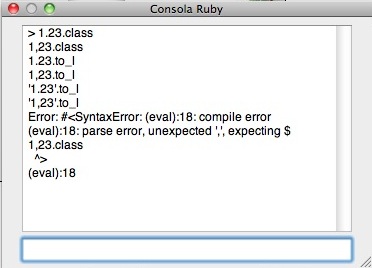
                              Captura de pantalla 2011-05-20 a las 14.34.13.JPG

                              I'm in Spain (EU) and i use metric units.

                              "The result is the end what is important is the process" by Oxer
                              [http://www.oxervision.blogspot.com/(http://www.oxervision.blogspot.com/)]

                              1 條回覆 最後回覆 回覆 引用 0
                              • TIGT 離線
                                TIG Moderator
                                最後由 編輯

                                So, as I suspected...
                                I'll reissue a trapped version that will take '.' or ',' as the decimal-separator in the inputbox for every tool, BUT it will if it's a string value it'll convert it to ',' to suit your locale and make a length from it if it has to... entering a number with a ',' it WILL work without failing [IF the locale supports] BUT it'll convert it back into a '.' when you OK the dialog...
                                Watch for an update...

                                TIG

                                1 條回覆 最後回覆 回覆 引用 0
                                • jgbJ 離線
                                  jgb
                                  最後由 編輯

                                  Ah yes, A period is as important to a programmer as it is to his girlfriend. 🤣


                                  jgb

                                  1 條回覆 最後回覆 回覆 引用 0
                                  • N 離線
                                    notareal
                                    最後由 編輯

                                    @tig said:

                                    Massimo

                                    I hadn't anticipated you weird Eurpoeans using a ',' as a decimal point rather than a sensible '.' 😒
                                    I can easily trap that in the code... I'll release an update later today - it should also have new tools added - TextureScale and TextureTweak... 😄

                                    😲 ...waiting for the fix.

                                    Welcome to try [Thea Render](http://www.thearender.com/), Thea support | [kerkythea.net](http://www.kerkythea.net/) -team member

                                    1 條回覆 最後回覆 回覆 引用 0
                                    • TIGT 離線
                                      TIG Moderator
                                      最後由 編輯

                                      Here's v1.5 http://forums.sketchucation.com/viewtopic.php?p=329765#p329765
                                      Irrespective of their locale, users may now type a '.' OR a ',' as a decimal-separator, depending on their preference, for any of the tools' dialogs - issues with conversion of strings to lengths from potential locale-wrong input is addressed in the code, 'behind the scenes'.

                                      Feedback please...

                                      TIG

                                      1 條回覆 最後回覆 回覆 引用 0
                                      • broomstickB 離線
                                        broomstick
                                        最後由 編輯

                                        @tig said:

                                        Here's v1.5 http://forums.sketchucation.com/viewtopic.php?p=329765#p329765
                                        Irrespective of their locale, users may now type a '.' OR a ',' as a decimal-separator, depending on their preference, for any of the tools' dialogs - issues with conversion of strings to lengths from potential locale-wrong input is addressed in the code behind the scenes.

                                        Feedback please...

                                        Just tried it, win7 64 bit skp 8... works fine and I must say this is one of the best plugins ever made!!!

                                        1 條回覆 最後回覆 回覆 引用 0
                                        • D 離線
                                          driven
                                          最後由 編輯

                                          Hi TIG,

                                          all functionality working very well on the Mac, except toolbar tooltips.

                                          They work if I put the icons in the custom toolbar but not on the standard, floating toolbar.

                                          not a big issue here, just thought I'd mention it.

                                          john

                                          learn from the mistakes of others, you may not live long enough to make them all yourself...

                                          1 條回覆 最後回覆 回覆 引用 0
                                          • massimoM 離線
                                            massimo Moderator
                                            最後由 編輯

                                            @unknownuser said:

                                            Here's v1.5 viewtopic.php?p=329765#p329765...

                                            Perfect! 😄

                                            1 條回覆 最後回覆 回覆 引用 0
                                            • 1
                                            • 2
                                            • 3
                                            • 4
                                            • 5
                                            • 6
                                            • 2 / 6
                                            • 第一個貼文
                                              最後的貼文
                                            Buy SketchPlus
                                            Buy SUbD
                                            Buy WrapR
                                            Buy eBook
                                            Buy Modelur
                                            Buy Vertex Tools
                                            Buy SketchCuisine
                                            Buy FormFonts

                                            Advertisement




